Best AI Image Generator for Fashion Lookbooks: Tested Workflows for Outfit Sets, Editorial Layouts, and Catalog-Style Results 한국어 요약
이 페이지는 ZView Space의 영어 원문을 한국어 검색 사용자도 이해할 수 있도록 정리한 SEO 요약입니다. 핵심은 단순한 얼굴 중심 이미지가 아니라 패션 에디토리얼, 룩북, 아웃핏, 프롬프트 테스트, 이미지 생성 워크플로우를 실제로 어떻게 구성할지입니다.
핵심 요약
- 원문 주제: Best AI Image Generator for Fashion Lookbooks: Tested Workflows for Outfit Sets, Editorial Layouts, and Catalog-Style Results
- 목적: AI 이미지 생성에서 outfit, silhouette, fabric, pose, location, camera framing을 더 명확하게 설계합니다.
- 활용 범위: Z-Image Turbo, Krea2 Turbo, Qwen Image, Anima, SeedVR2 같은 이미지 생성 및 업스케일 워크플로우에 적용할 수 있습니다.
- SEO 관점: 제목, 설명, 이미지 alt, 프롬프트 예시가 실제 검색 의도와 맞아야 색인 가능성이 높아집니다.
한국어 사용자를 위한 체크포인트
1. 프롬프트가 얼굴 묘사에만 머물지 않고 전체 스타일과 의상 구성을 설명하는지 확인합니다. 2. 패션 이미지라면 상의, 하의, 아우터, 신발, 액세서리, 소재감, 촬영 장소를 분리해서 씁니다. 3. 생성 결과는 바로 게시하지 말고 디테일, 손, 의상 형태, 배경 일관성, 이미지 품질을 비교합니다. 4. 글 본문에는 실제 테스트 기준과 실패를 줄이는 방법이 들어가야 검색엔진에서 얇은 콘텐츠로 보일 가능성이 줄어듭니다.
원문 미리보기
If you're searching for the best AI image generator for fashion lookbooks, the real question is not which model makes the prettiest single image. It is which tool or workflow can hold outfit logic across a set: full body silhouettes, fabric consistency, access
---
If you're searching for the best AI image generator for fashion lookbooks, the real question is not which model makes the prettiest single image. It is which tool or workflow can hold outfit logic across a set: full-body silhouettes, fabric consistency, accessories, page-ready framing, and enough control to build editorial layouts or catalog-style results without obvious AI drift. In this test, I focused on exactly that use case.
I generated lookbook-style images across common fashion shot types, then compared where the outputs held together and where they broke: hems changing between frames, bags mutating, hands tangling around garments, and layout images collapsing into unreadable fake typography. The strongest result was not one magic prompt. It was a workflow: use a controllable image model for hero outfit shots, keep prompts tightly structured around styling visibility, and only ask for layout-like compositions when the page design can tolerate some synthetic behavior.
Quick answer
- The best AI image generator for fashion lookbooks is usually the one with the best composition control and style consistency, not the one with the most dramatic lighting.
- For outfit sets, full-body and three-quarter editorial shots performed better than direct "magazine spread with text" requests.
- Catalog grids can work for concepting, but product accuracy and readable type still need manual cleanup.
- Prompting the shot type first, then the outfit system, then the retail/editorial context gave more stable results than describing the model first.
- If you need publishable pages, pair generation with light post work in your layout tool after creating images in [Create](/create) and refining wording in [Prompt Lab](/promptlab).
Test setup
I ran this as a practical commercial-investigation test rather than a showcase.
What was tested:
- Head-to-toe lookbook images
- Three-quarter editorial outfit shots
- Catalog-style grid pages
- Runway/backstage fashion context
- Flat lays, garment details, and accessories
- Storefront and visual merchandising scenes
What I checked in each result:
- Outfit consistency across layers and accessories
- Fabric texture on denim, wool, leather, satin, and knits
- Full-body anatomy and shoe rendering
- Background cleanliness for catalog use
- Page-composition usefulness for real lookbooks
- Whether the image would survive light upscaling in [Upscaler](/upscaler)
Why fashion lookbooks are a hard test for any AI fashion image generator
Fashion lookbooks look simple until you ask a model to produce a usable set. A single strong hero frame is easy. A sequence that shows styling logic is much harder.
The weak point in most tools is continuity. The blazer length shifts from hip to thigh. A tote becomes a shoulder bag. Trousers go from tailored wool to loose denim between otherwise similar prompts. This is why the AI image generator for lookbooks question is really about control.
Editorial layouts add another layer of difficulty. Models are decent at suggesting the feel of a magazine page, but they still struggle with real page logic: even gutters, product spacing, readable labels, and image-to-image garment consistency. If your goal is fashion concepting, that is fine. If your goal is sellable catalog images, you need stricter shot planning.
The first attempt: broad prompts gave attractive but unreliable outfit sets
My first pass used generic fashion wording like "minimalist lookbook," "editorial model," and "luxury campaign." The outputs looked polished at thumbnail size, but inspection showed familiar issues:
- shoes cropped or fused into flooring
- sleeve and cuff lengths changing unnaturally
- layered garments losing separation
- handbags appearing with impossible strap geometry
- fake page text that made a catalog grid unusable
The lesson was immediate: for text to image AI for outfits, vague aesthetic language produces mood, not merchandise clarity.
Test 1: street-style full body for outfit logic
This first prompt was meant to see whether the model could keep a complete trend-led outfit readable from head to toe in a real street context.
Topic: Trend-led layered street outfit for a fashion lookbook
Genre: Street Style
Camera: Sony A7R V
Lens: 40mm f/2.5
Lighting: Overcast diffusion
Location: Seongsu side street with clean concrete storefronts and soft reflections after light rain
Style: Clean commercial street fashion
Final Prompt: street-style full body fashion shot, complete head-to-toe lookbook image focused on styling system, model secondary to outfit, wearing oversized charcoal wool blazer over ribbed ivory knit top, wide-leg slate trousers with sharp crease, black leather loafers, structured burgundy shoulder bag, thin belt, silver earrings, layered silhouette clearly visible, relaxed walking pose, full body in frame with shoes visible, Seongsu fashion district background, neutral grey and burgundy palette, documentary 40mm framing, commercial clarity, crisp textile detail, realistic garment drape, clean negative space for lookbook use
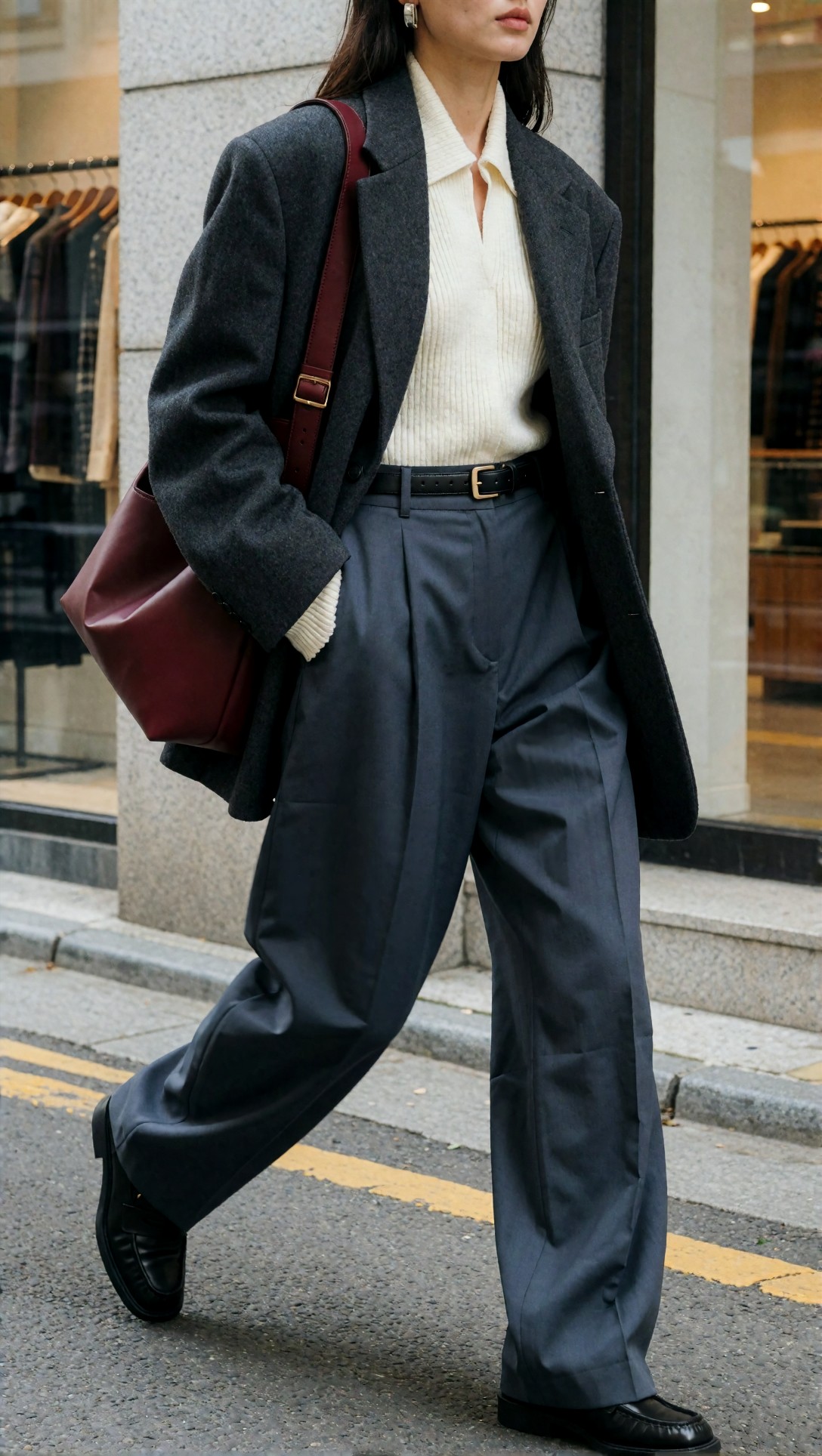
Inspect whether the blazer hem, trouser break, shoes, and bag all read clearly in one frame. If the outfit feels stylish but any one layer becomes ambiguous, the image is less useful for a lookbook than it first appears.
Test 2: three-quarter outfit editorial for stronger garment control
I then narrowed the framing to test whether the generator handled proportions better when it did not have to solve feet, floor contact, and long-leg anatomy at the same time.
Topic: Quiet luxury transitional outfit for editorial use
Genre: Fashion Editorial
Camera: Canon EOS R5
Lens: 50mm f/2
Lighting: Softbox key light mixed with window fill
Location: Paris editorial studio corner with limewashed walls and oak stool
Style: Luxury fashion magazine editorial
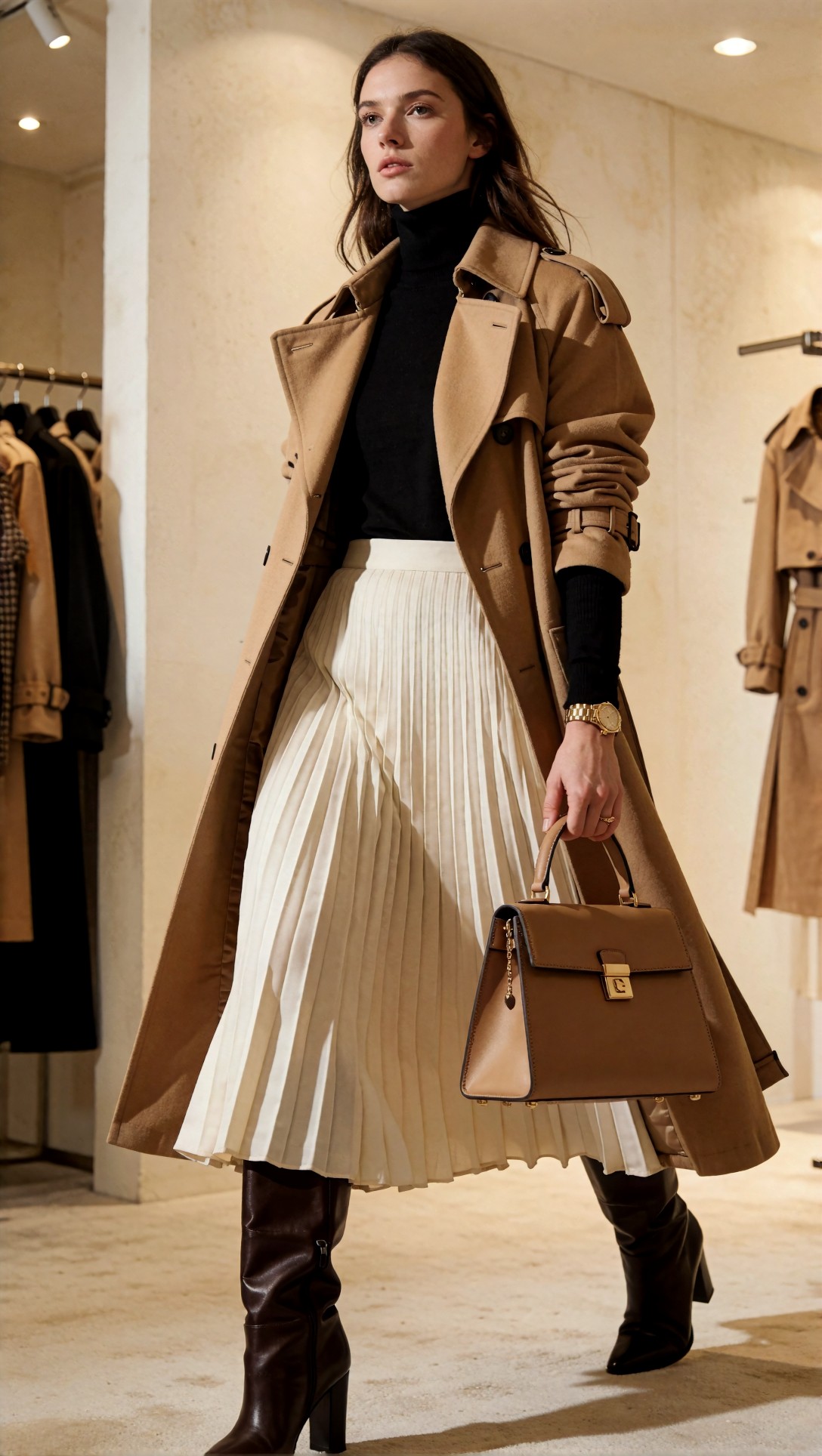
Final Prompt: three-quarter outfit editorial shot, trend-led quiet luxury styling, structured camel trench layered over fine gauge black turtleneck, pleated cream midi skirt, knee-high dark chocolate leather boots partly visible, top-handle tan bag, slim gold watch, clean tucked silhouette, body turned slightly to show layering and side seam, calm direct expression, studio-meets-editorial interior, soft directional light, warm beige and black palette, 50mm magazine framing, premium fabric texture, visible trench structure, elegant but commercially readable composition

This usually improves jacket structure and bag shape. Check whether the skirt pleats remain even and whether the trench belt, collar, and sleeve construction stay physically believable.
The adjustment that improved output: shot planning before aesthetics
The best improvement came from changing prompt order. Instead of starting with mood words, I started with the shot type and outfit architecture.
The more reliable structure was: 1. named fashion shot type 2. visible outfit layers 3. accessories and shoes 4. body framing and pose 5. scene context 6. palette and texture cues 7. quality direction
This sounds basic, but it made the model act more like a layout assistant than a mood engine.
Which workflow worked best for each fashion use case
| Use case | What worked best in this test | Main risk | Recommendation | |---|---|---|---| | Head-to-toe lookbook | Full-body prompts with simple backgrounds | shoes, hands, floor contact | Keep pose minimal and specify full body in frame | | Editorial outfit set | Three-quarter framing with strong layer description | garment proportions can drift | Use when styling story matters more than exact SKU accuracy | | Catalog grid page | Multi-item layout prompts for concept boards | unreadable text, uneven products | Use for mockups, then rebuild manually | | Runway/backstage | Documentary prompts with movement | face and limbs can warp in crowds | Best for atmosphere and trend signal | | Flat lay/product | Top-down prompts with controlled lighting | folded garments can merge | Good for planning assortments and color stories | | Accessories detail | Controlled close-up prompts | hardware symmetry | Best for material and merchandising concepts |
Prompt examples tied to the strongest workflows
Head-to-toe lookbook shots were the safest starting point
This prompt checks whether the model can create a clean AI fashion image generator result that actually shows the full silhouette, not just a stylish crop.
Topic: Head-to-toe minimalist autumn outfit set for lookbook pages
Genre: Fashion Lookbook
Camera: Nikon Z8
Lens: 35mm f/4
Lighting: Large north-window daylight
Location: Scandinavian minimalist studio with pale grey seamless backdrop and concrete floor
Style: Clean commercial lookbook
Final Prompt: head-to-toe lookbook fashion image, complete outfit clearly visible for catalog-style presentation, trend-led minimalist autumn styling with boxy navy wool coat, white poplin shirt, soft grey crewneck knit layered over collar, straight black trousers, polished black ankle boots, slim leather crossbody bag, narrow silver cuff, standing pose with slight weight shift, full body centered with shoes unobstructed, neutral studio background, restrained navy grey black palette, commercial fashion clarity, even daylight, realistic wool and cotton texture, sharp garment edges, clean spacing for possible page layout

Inspect the boot shape and the shirt-knit layering at the neckline. These are common failure points when the model tries to simplify the outfit.
Editorial framing helped with premium texture and styling direction
This test was meant to push a more trend-led magazine feel while keeping the outfit commercially legible.
Topic: Modern editorial tailoring with visible layering
Genre: Luxury Campaign
Camera: Fujifilm GFX100 II
Lens: 55mm f/1.7
Lighting: Window light with negative fill
Location: Milan apartment interior with stone floor and muted art wall
Style: High-end fashion campaign
Final Prompt: three-quarter outfit editorial, tailored fashion campaign image prioritizing styling system, cropped graphite blazer over silk cream blouse, high-waisted tobacco wide-leg trousers, pointed dark brown heels, sculptural gold earrings, compact clutch under arm, deliberate layered silhouette, seated edge-of-chair pose that still shows trouser volume and jacket cut, Milan editorial apartment setting, warm tobacco cream graphite palette, medium-format look, soft window light and gentle shadow contrast, refined fabric sheen, luxury campaign composition with commercial readability
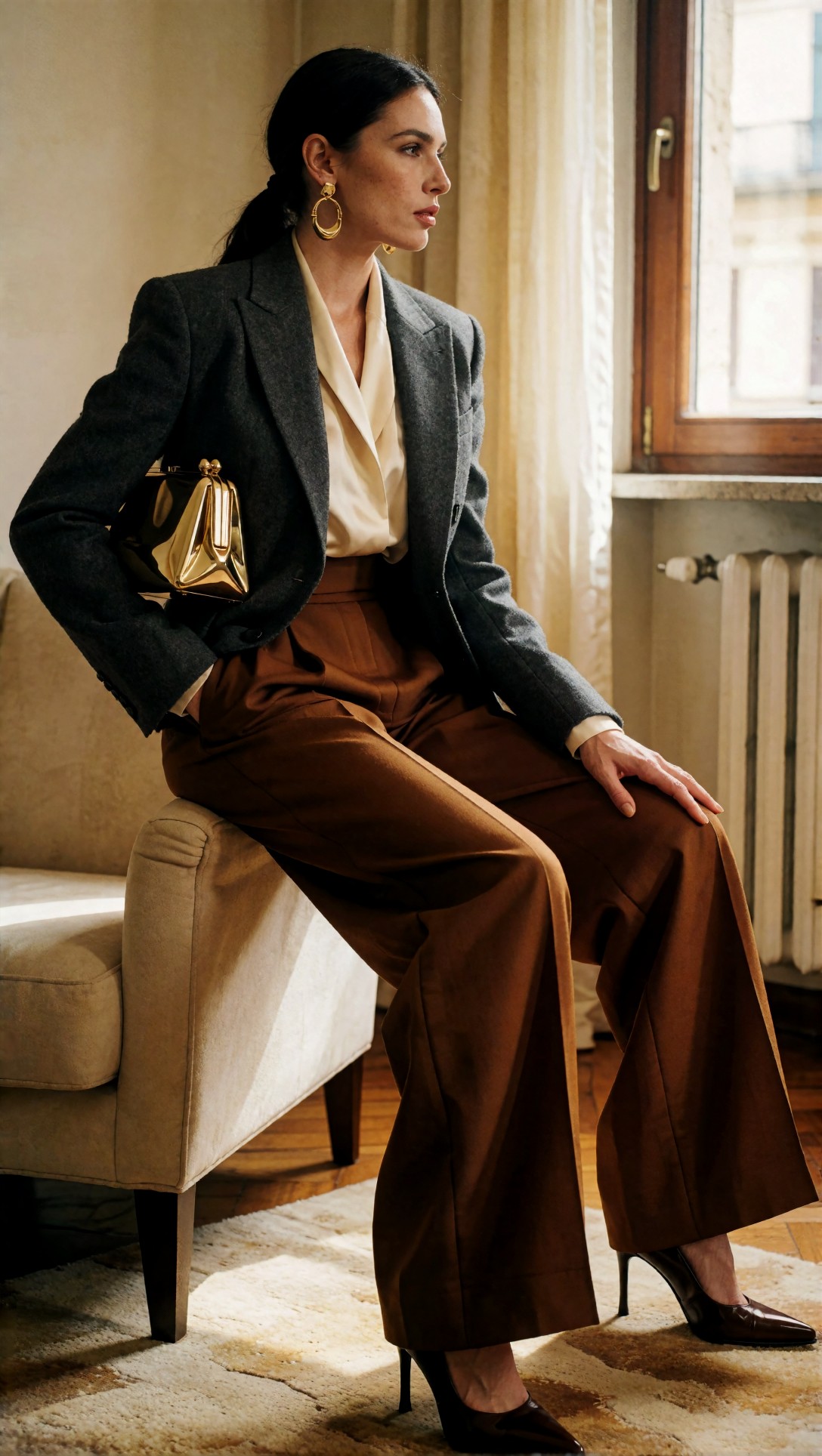
Check whether the blouse collar, blazer lapel, and trouser waistband all remain distinct. If they collapse into one shape, the result loses value for lookbook use.
Catalog grid pages worked for concepting, not final publishing
The next prompt tested whether a model could deliver a page-like arrangement for assortment planning.
Topic: Coordinated catalog grid page for a capsule wardrobe drop
Genre: Product Editorial
Camera: Phase One XF IQ4
Lens: 80mm f/5.6
Lighting: Overhead soft studio diffusion
Location: Clean white layout table translated into a catalog page composition
Style: Contemporary retail catalog
Final Prompt: catalog grid page fashion concept, multiple outfit and product frames arranged like a clean retail lookbook spread, trend-led capsule wardrobe in sand, black, cream, and olive, visible items include trench coat, knit top, pleated skirt, tailored trousers, loafers, shoulder bag, belt, and scarf, balanced grid composition with product-focused spacing, minimal page furniture, premium e-commerce aesthetic, soft overhead studio lighting, sharp edges, realistic fabric texture, clear merchandising logic, modern retail catalog feel without heavy text
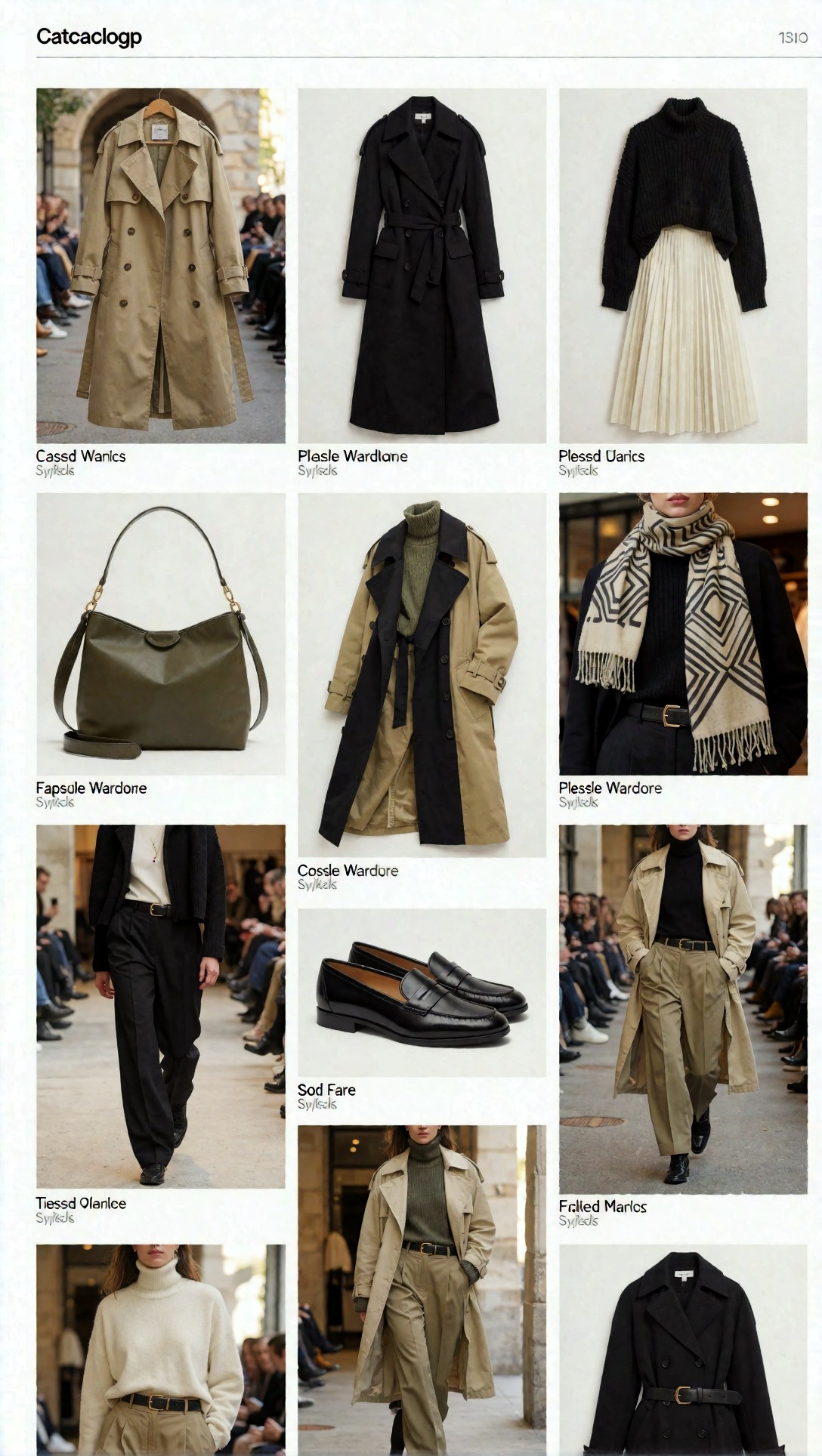
Do not expect usable text. What to inspect instead is whether the product family feels coherent and whether each item keeps enough shape to rebuild the layout manually.
A useful surprise: runway and backstage prompts helped define trend direction
I did not expect runway-style prompts to help with lookbooks, but they were useful for finding the collection mood before tightening into catalog shots. These images often carried the strongest silhouette signal.
Test 5: runway/backstage for silhouette discovery
This prompt checks whether the model can show movement, layering, and trend context without losing garment identity.
Topic: Runway backstage moment for oversized tailoring trend research
Genre: Fashion Documentary
Camera: Leica SL2-S
Lens: 24-70mm at 35mm f/3.5
Lighting: Mixed backstage fluorescents and soft tungsten spill
Location: Milan runway backstage with racks, garment bags, and taped floor marks
Style: Documentary fashion realism
Final Prompt: runway backstage moment, trend-led oversized tailoring look being adjusted before showtime, full outfit visible with long black double-breasted coat, pale blue shirt, loosened tie, wide charcoal trousers, square-toe shoes, leather belt, compact crossbody pouch, stylist hands lightly fixing lapel, garment racks and production clutter behind, candid motion, complete silhouette readable, cool mixed backstage lighting, gritty documentary realism, fabric texture and construction visible, fashion week atmosphere without glamour posing

Inspect the interaction points: lapels, hands, tie, and coat closure. This is where AI often introduces confusing geometry, but when it works, the image gives strong styling reference.
Flat lays and detail shots were better than expected for outfit system planning
For assortment planning, top-down product views were more dependable than layout pages. They were especially useful for checking color stories and material relationships.
Test 6: product flat lay for capsule coordination
This test was designed to remove anatomy problems and focus entirely on garment coordination.
Topic: Flat lay capsule wardrobe arrangement for a trend-led lookbook
Genre: Product Editorial
Camera: Canon EOS R3
Lens: 50mm f/5.6
Lighting: Overhead softbox with side fill cards
Location: Neutral stone tabletop studio set
Style: Clean premium merchandising
Final Prompt: product flat lay fashion composition, coordinated capsule wardrobe arranged neatly from overhead, oversized oatmeal knit, black tailored trousers, cream tank, cropped olive utility jacket, brown loafers, leather belt, canvas tote, square sunglasses, silk scarf, visible spacing between items, sleeves and hems carefully arranged, trend-led earthy palette, premium retail merchandising feel, top-down commercial clarity, realistic knit and leather texture, clean stone background, suitable for lookbook planning and e-commerce concepting
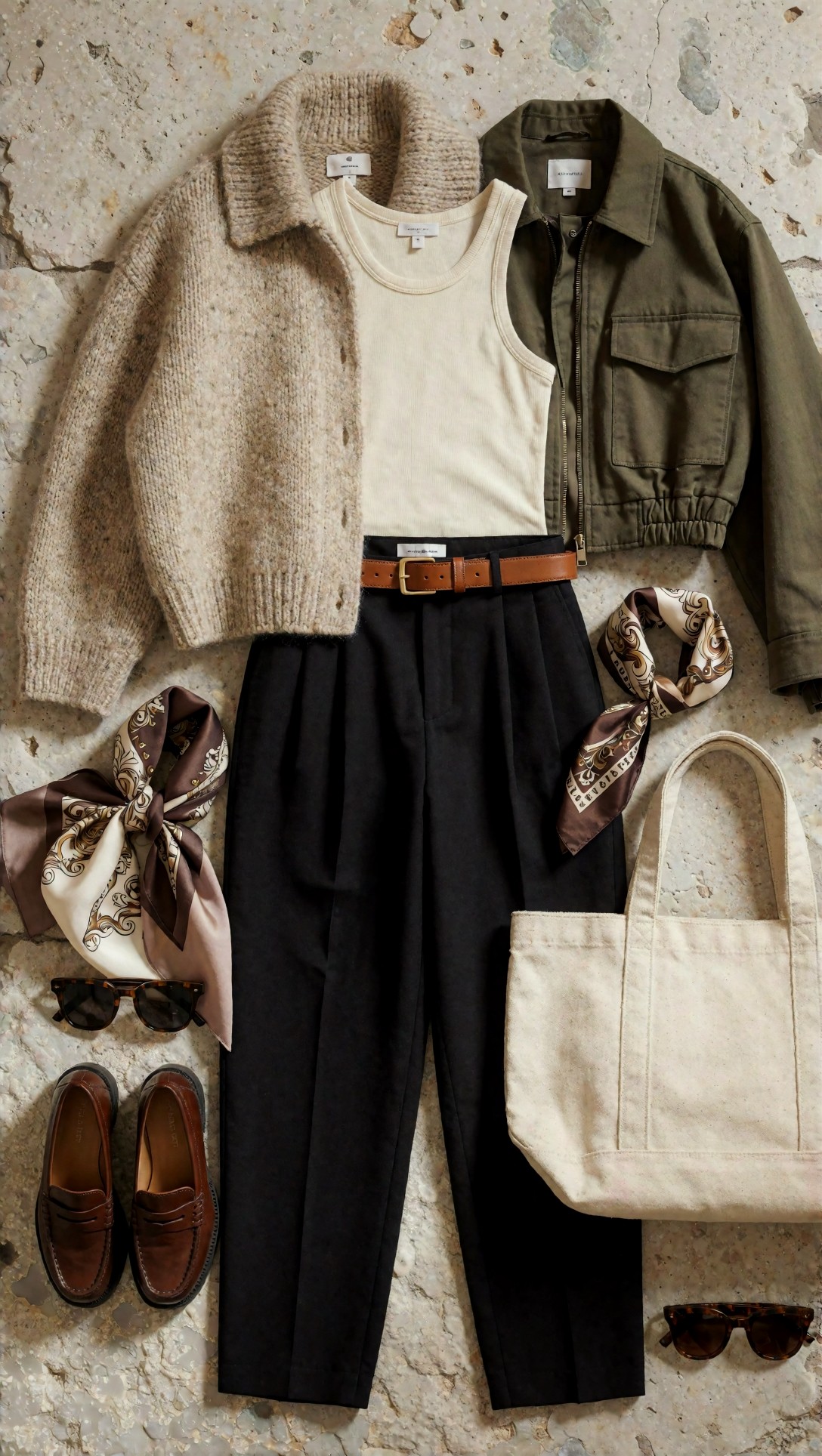
Check edge separation between overlapping items. If sleeves merge into trousers or accessories float unnaturally, the arrangement is not reliable enough for planning.
Test 7: garment detail macro for textile confidence
A lookbook set often fails because the hero shot suggests quality but the details do not hold. This prompt tests fabric credibility directly.
Topic: Garment detail macro of premium outerwear construction
Genre: Fashion Detail Study
Camera: Sony A1
Lens: 85mm f/2.8 macro
Lighting: Directional side light with soft reflector fill
Location: Studio garment rack close-up setting
Style: Editorial material study
Final Prompt: garment detail macro image, close study of a charcoal wool coat sleeve, horn buttons, precise topstitching, brushed texture, cream knit cuff peeking underneath, leather glove tucked into pocket edge, fashion editorial material focus, shallow but controlled depth of field, side light revealing weave and seam construction, muted charcoal cream black palette, luxury garment craftsmanship mood, highly realistic textile detail, premium close-up suitable for supporting lookbook pages
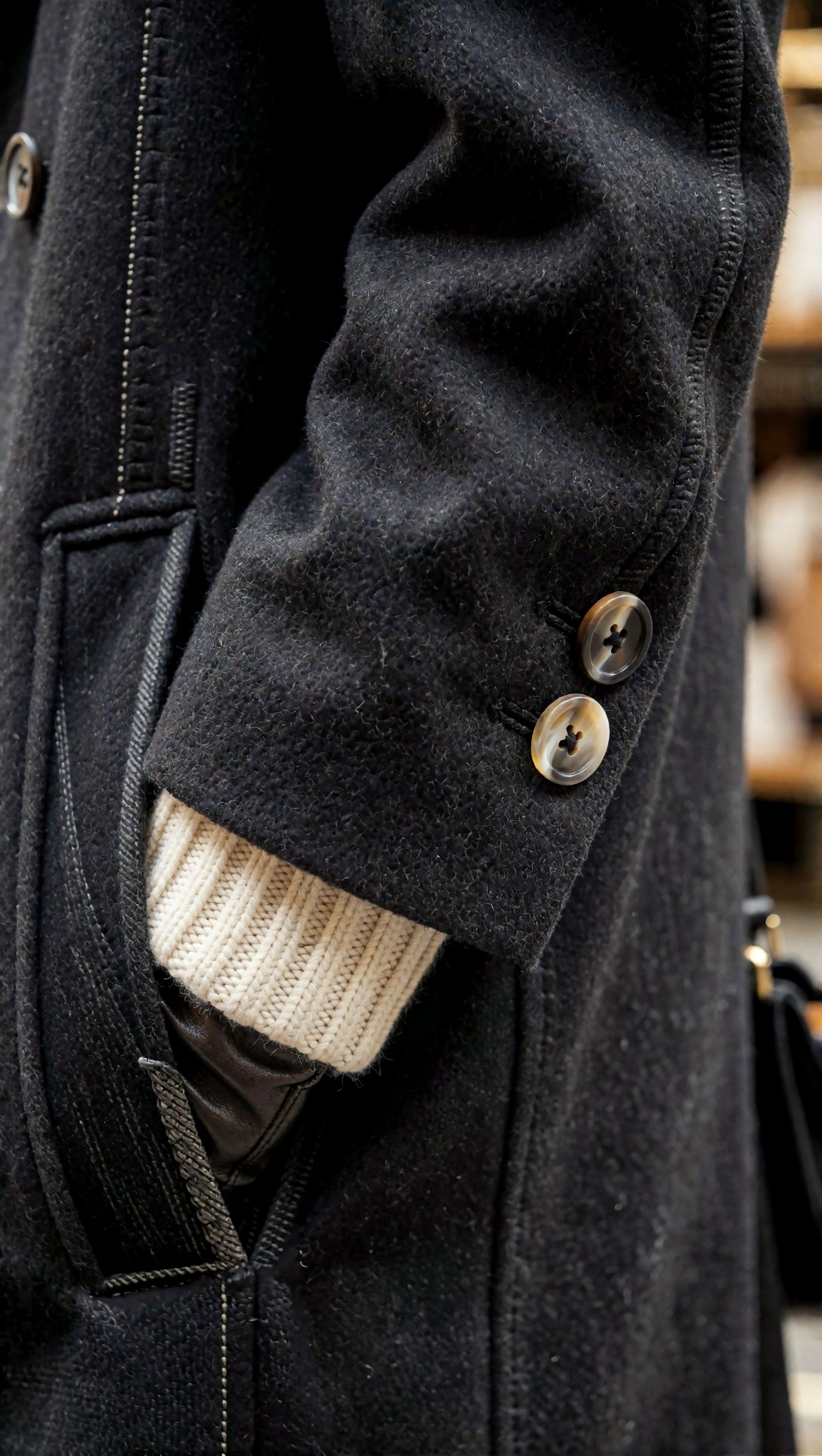
Inspect seam logic and button placement. If the texture is rich but the tailoring details are impossible, the image works as mood reference only.
Storefront and accessories scenes were strong for supporting pages
Support imagery matters in fashion presentations. A good lookbook is not only outfit shots. It also needs merchandising context, accessory pages, and visual transitions.
Test 8: storefront display for retail context
This final test checks whether the model can extend the styling world into a believable visual-merchandising scene.
Topic: Trend-led storefront display for a capsule fashion launch
Genre: Retail Visual Merchandising
Camera: Panasonic Lumix S1R
Lens: 24-70mm at 50mm f/4
Lighting: Early evening window glow with interior spotlights
Location: Seoul boutique storefront in Hongdae with glass reflections and minimalist fixtures
Style: Contemporary fashion retail campaign
Final Prompt: storefront display fashion image, boutique window presentation for a capsule wardrobe launch, mannequins and hanging garments showing complete outfit logic with beige trench, black knit, cream skirt, olive jacket, loafers, shoulder bags, scarves, folded knits on pedestal tables, clean signage areas with no readable text required, Hongdae boutique exterior, warm interior spotlights against cool dusk street reflections, trend-led retail atmosphere, polished merchandising, balanced composition, realistic glass reflections, premium fabric and accessory visibility
Look for believable spacing, hanger logic, and window reflections. If the mannequins, bags, or folded stacks warp, keep the image as inspiration rather than final retail creative.
What to inspect before publishing any AI photo generator for catalog images result
Before calling any output publishable, I would run this checklist:
- Silhouette integrity: can you read the outfit in one glance?
- Layer separation: are shirt, knit, jacket, coat, and accessories clearly distinct?
- Fabric truthfulness: do wool, satin, denim, leather, and knit behave differently?
- Footwear realism: are soles, heels, and toe shapes intact?
- Accessory continuity: does the bag hardware, strap, and closure make sense?
- Hand risk: are hands obscuring key garment details or creating impossible folds?
- Background usefulness: can the image sit on a lookbook page without distracting cleanup?
- Upscaling tolerance: does the image hold texture after enhancement in [Upscaler](/upscaler)?
If more than two of these fail, regenerate rather than retouch. In this test, regeneration was usually faster than trying to rescue a nearly-good fashion image.
Strengths: where the best AI image generator workflow really helps fashion teams
The strongest use cases were:
- concepting capsule wardrobe directions
- planning editorial mood before a real shoot
- creating supporting visuals for pitch decks
- generating lookbook placeholders for layout tests
- exploring color, texture, and silhouette combinations quickly
For these tasks, the workflow was efficient. It also worked well when browsing references in [Gallery](/gallery) and refining shot language in [Prompt Lab](/promptlab).
Limitations and failure risks
The weak point remained exact repeatability. If you need the same model, same garment, and same SKU accuracy across ten pages, pure text prompting is still fragile.
I would also avoid relying on direct page-text generation. The model can imply magazine design, but not replace a real layout system. For AI photo generator for catalog images use, generation is best treated as an image source, not a finished page builder.
Other recurring risks:
- fake fasteners and impossible seams
- mirrored accessories changing sides unpredictably
- hem lengths shifting between frames
- over-stylized lighting that hides merchandise clarity
- beauty bias, where the face becomes more detailed than the clothing
Practical recommendation: which option is best for which buyer
If you are comparing options commercially, here is the practical split:
- Best for fashion concepting: use an image generator with strong composition control and prompt responsiveness.
- Best for lookbook outfit sets: prioritize full-body and three-quarter prompts with simple backgrounds.
- Best for catalog planning: use flat lays and product group compositions, then rebuild the final page manually.
- Best for campaign moodboards: use runway, street style, and storefront prompts to define trend direction fast.
My general recommendation is to generate hero images in [Create](/create), keep prompt structures consistent, and only ask the model for page-like layouts when you are comfortable treating them as mockups.
Transferable lesson for similar topics
The main lesson transfers beyond fashion. Whether you are testing interiors, beauty campaigns, or retail product scenes, the best AI image generator is usually the one that survives inspection at the level your workflow actually needs.
For fashion specifically, the highest-leverage prompt detail was not camera brand or cinematic adjectives. It was explicit outfit logic: outerwear, top, bottom, shoes, bag, accessories, silhouette, and framing. When this setup works, the model behaves more like an art assistant. When that structure is missing, it fills the gaps with attractive but unreliable fashion noise.
FAQ
What is the best AI image generator for fashion lookbooks?
For fashion lookbooks, the best option is the tool that keeps outfit structure and composition stable across multiple shots. In this test, controlled full-body and three-quarter prompts outperformed loose editorial prompts.
Can an AI image generator make real catalog pages?
It can make convincing mockups and concept pages, but final catalog layouts still need manual design work. Text, spacing, and product repeatability remain weak points.
What prompt style works best for AI fashion image generator results?
Start with the shot type, then describe the outfit layers, accessories, framing, location, and palette. This produced more stable images than mood-only prompting.
Are flat lays easier than model shots?
Usually yes. Flat lays avoid anatomy errors and are useful for planning capsules, color stories, and merchandising pages.
Should I upscale fashion AI images before review?
Only after checking structural issues first. Upscaling can improve texture, but it will not fix broken footwear, bad hands, or impossible garment construction.
Editorial conclusion
For anyone evaluating the best AI image generator for fashion, my recommendation is clear: use this workflow if you need fast lookbook concepts, editorial placeholders, trend boards, or retail mood visuals. Avoid it if you need exact multi-page garment continuity without manual correction.
The setting that mattered most in this test was not a secret model parameter. It was prompt discipline: choose the fashion shot type first, make the full outfit logic visible, and keep the scene context supportive rather than dominant. That is what turned attractive AI fashion images into usable lookbook material.