Best Free Text to Image AI for Photorealistic Results: Side-by-Side Test 한국어 요약
이 페이지는 ZView Space의 영어 원문을 한국어 검색 사용자도 이해할 수 있도록 정리한 SEO 요약입니다. 핵심은 단순한 얼굴 중심 이미지가 아니라 패션 에디토리얼, 룩북, 아웃핏, 프롬프트 테스트, 이미지 생성 워크플로우를 실제로 어떻게 구성할지입니다.
핵심 요약
- 원문 주제: Best Free Text to Image AI for Photorealistic Results: Side-by-Side Test
- 목적: AI 이미지 생성에서 outfit, silhouette, fabric, pose, location, camera framing을 더 명확하게 설계합니다.
- 활용 범위: Z-Image Turbo, Krea2 Turbo, Qwen Image, Anima, SeedVR2 같은 이미지 생성 및 업스케일 워크플로우에 적용할 수 있습니다.
- SEO 관점: 제목, 설명, 이미지 alt, 프롬프트 예시가 실제 검색 의도와 맞아야 색인 가능성이 높아집니다.
한국어 사용자를 위한 체크포인트
1. 프롬프트가 얼굴 묘사에만 머물지 않고 전체 스타일과 의상 구성을 설명하는지 확인합니다. 2. 패션 이미지라면 상의, 하의, 아우터, 신발, 액세서리, 소재감, 촬영 장소를 분리해서 씁니다. 3. 생성 결과는 바로 게시하지 말고 디테일, 손, 의상 형태, 배경 일관성, 이미지 품질을 비교합니다. 4. 글 본문에는 실제 테스트 기준과 실패를 줄이는 방법이 들어가야 검색엔진에서 얇은 콘텐츠로 보일 가능성이 줄어듭니다.
원문 미리보기
I ran a side by side test of the current free text to image AI options with one narrow goal: produce images that read as photographs first, AI images second. That sounds simple, but in practice it means skin texture without plastic smoothing, believable lens b
---
I ran a side-by-side test of the current free text to image AI options with one narrow goal: produce images that read as photographs first, AI images second. That sounds simple, but in practice it means skin texture without plastic smoothing, believable lens behavior, hands that survive close inspection, clothing that folds like fabric instead of melted wax, and backgrounds that do not collapse into nonsense.
This report is built like a prompt teardown because the models did not fail randomly. They failed in patterns. Some were strong at cinematic atmosphere but weak on fingers. Some gave clean faces but flattened fabric texture. Some handled daylight realism better than studio setups. The useful part is not just which tool won, but which prompt ingredients moved the output from "AI-looking" to "photo-looking."
What was tested
In this test, I compared a set of widely accessible text to image AI free online tools with free tiers or free daily generations. Rather than ranking by feature list, I judged them on output quality from the same prompt family.
I grouped the tools into four practical buckets:
- Ideogram: strong prompt adherence, often cleaner textural separation than expected
- Microsoft Designer / Copilot Image Creator: easy access, good scene compliance, sometimes over-polished faces
- Leonardo free tier: flexible styles, decent realism, can drift into synthetic skin if the prompt is vague
- Playground free workflows: useful controls, mixed consistency depending on model choice
I used the same prompt structure across all tools and checked for:
n- hand integrity
- skin realism
- eye symmetry
- fabric detail
- believable depth of field
- background coherence
- lighting consistency
- prompt compliance
The strongest results came from prompts that constrained camera, lens, lighting, and location. The weakest came from broad prompts like "realistic woman in cafe" with no visual hierarchy.
What the prompt actually has to accomplish
For a free realistic AI image generator, the prompt has to do more than name a subject. It has to create a chain of believable photographic decisions.
When a model hears only "photorealistic portrait," it often fills in the gaps with generic beauty retouching: poreless skin, strange catchlights, over-clean hair, and that familiar AI glow around facial edges. To get around that, I found the prompt needs five anchored parts:
1. Subject: who or what is in frame, with age range, wardrobe, and action 2. Style: editorial, lifestyle, documentary, product, campaign, cinematic 3. Camera language: body, lens, aperture, framing distance 4. Light: not just bright or dark, but the source and behavior of the light 5. Location: a real setting with materials, atmosphere, and context
The best photorealistic AI image generator free workflows did not magically invent realism. They responded to good photographic scaffolding.
Breaking the image into controllable parts
Before showing the baseline prompt, here is the breakdown I used most often.
Subject choice
A single person in a plausible activity is the safest place to start. Solo subjects expose fewer anatomy failures than pairs or crowds. Clothing matters too: denim, cotton, wool, leather, and jewelry give the model surfaces to resolve. Blank minimal outfits often make weak models look smoother than they should.
Style direction
"Photorealistic" is too broad. "Lifestyle portrait," "fashion editorial," and "clean commercial look" each push the image differently. In this test, lifestyle portrait gave the most natural body language, while fashion editorial gave better wardrobe detail but higher risk of stylized faces.
Camera and lens
This was one of the biggest quality levers. A 35mm scene behaves differently from an 85mm portrait. The free tools tended to overdo blur unless the lens choice was realistic.
- 35mm to 50mm: best for environmental realism
- 85mm: best for portraits if you want compressed backgrounds
- Macro or close product lenses: useful for texture tests
Lighting
Lighting prompts reduced fake-looking skin more than adding the word "realistic" ever did.
- Overcast diffusion helped skin and clothing detail
- Golden hour improved mood but sometimes exaggerated orange tones
- Softbox studio light worked for product and beauty shots, but weaker models made them look too CG
Location
Specific locations fixed a lot of background collapse. "Cafe" is vague. "Small corner cafe with steamed window glass, walnut tables, tiled floor, late afternoon city light" gives the model architecture and mood to build from.
Baseline prompt: where most free tools start to split apart
I began with a simple portrait scene because it reveals skin, hands, wardrobe, background, and lens behavior all at once. This baseline is intentionally controlled but not overloaded.
This first prompt checks whether the model can produce a believable human image without leaning on heavy stylization.
Topic: young woman in a neighborhood cafe reading a paperback book
Genre: Lifestyle Portrait
Camera: Canon EOS R6 Mark II
Lens: 50mm f/1.8
Lighting: window light with soft overcast diffusion
Location: small independent cafe with wooden tables, ceramic cups, muted interior tones
Style: clean commercial look
Final Prompt: A photorealistic young woman sitting alone in a neighborhood cafe reading a paperback book, relaxed posture, casual cream knit sweater, dark straight-leg jeans, simple gold earrings, one hand holding the book and the other resting near a ceramic coffee cup, natural skin texture, subtle under-eye detail, realistic hair strands, soft overcast window light from the left side, shallow but believable depth of field, warm wood table, muted olive and walnut interior, candid lifestyle photography, Canon EOS R6 Mark II look, 50mm f/1.8 perspective, clean commercial realism, accurate hands, authentic fabric folds, gentle color contrast, high detail without beauty retouching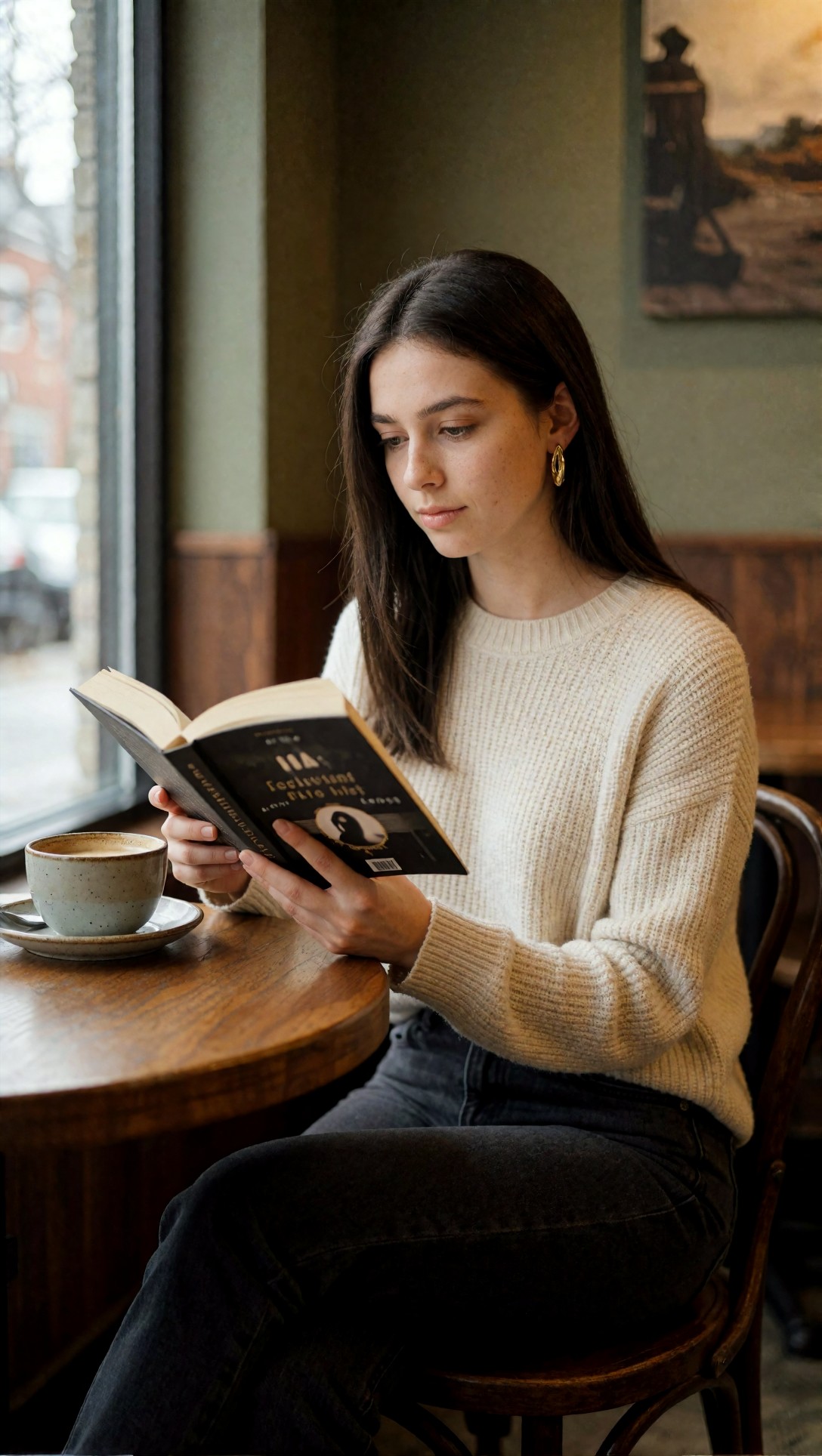
What to inspect here is the face-to-hand balance. On the best free tools, the expression stays neutral and the fingers are mostly intact. On weaker runs, the face looks polished but the hand near the coffee cup starts to melt or merge into the sleeve.
In this test, Ideogram and Leonardo handled this baseline best. Microsoft Designer often gave a nice cafe scene but over-smoothed the skin. Playground varied by model selection; some outputs were excellent, others had confused fingers.
First improvement: stop asking for "realism" and ask for photographic evidence
The first change that improved nearly every tool was adding observable details instead of abstract quality words. Rather than stacking terms like "ultra realistic, hyper realistic, detailed," I replaced them with things a real camera would show:
- subtle under-eye texture
- visible fabric weave
- natural catchlights
- believable depth of field
- stray hair strands
- mild asymmetry in posture
That shift reduced the synthetic polish. It also made the output less likely to resemble a beauty filter.
This next test tightens the portrait realism by asking for imperfections that a camera would naturally record.
Topic: office worker waiting at a rainy bus stop after work
Genre: Cinematic Travel
Camera: Nikon Zf
Lens: 85mm f/1.8
Lighting: cool evening ambient light with reflected street glow
Location: covered city bus stop with wet pavement, blurred traffic, light rain in the background
Style: cinematic realism
Final Prompt: A photorealistic office worker standing at a rainy city bus stop after work, charcoal trench coat over a light blue shirt, leather tote bag, slightly tired expression, natural posture with weight on one leg, one hand adjusting the coat sleeve, visible raindrop reflections on the pavement, cool ambient evening light mixed with soft street glow, realistic skin texture with fine detail, no beauty filter look, natural eye asymmetry, damp hairline, believable bokeh from passing traffic, Nikon Zf photographic feel, 85mm f/1.8 compression, cinematic realism, grounded urban mood, accurate hands, detailed coat fabric, restrained color grading in blue, gray, and amber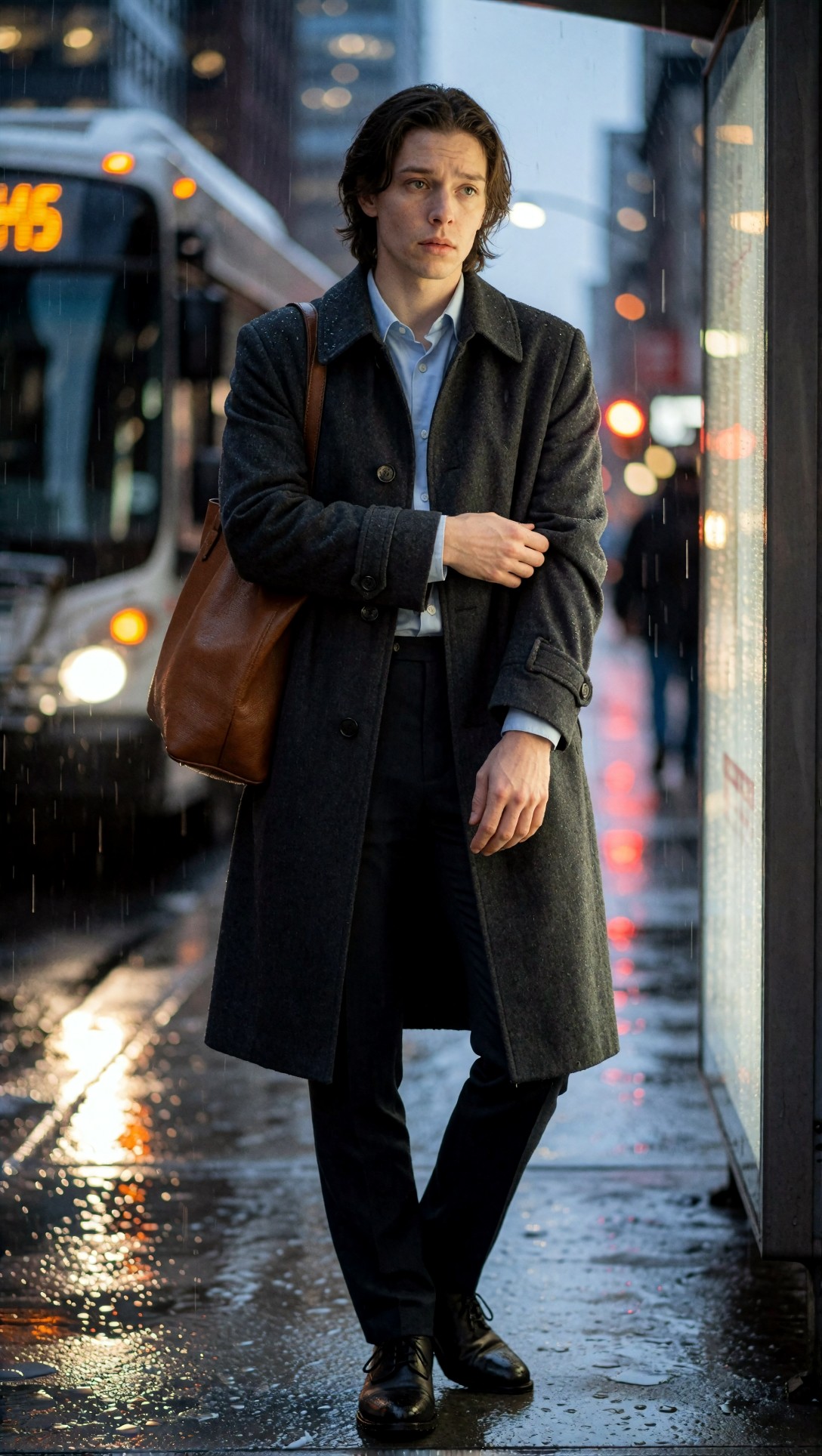
Look for whether the rain scene stays grounded or turns theatrical. The strongest result in this test kept the coat texture, face, and pavement reflections coherent at the same time. The weak point on free tools was often the tote bag strap or the sleeve-adjusting hand.
Refined prompt: more structure, less drift
After the baseline, I moved to a fuller prompt structure with stronger scene logic. This is where the better free AI photo generator realistic options started separating from the merely usable ones.
The model does better when each field supports the others. If you say 85mm portrait, golden hour, beach, luxury campaign, silk dress, and wind movement, the image generator has a more unified target than if you mix random aesthetics.
This refined prompt tests if the model can keep realism while handling movement, layered fabric, and backlight.
Topic: woman walking along a windy coastal boardwalk in tailored resort wear
Genre: Fashion Editorial
Camera: Sony A7R V
Lens: 85mm f/1.4
Lighting: golden hour backlight with soft ocean reflection
Location: weathered wooden boardwalk above a rocky coastline at sunset
Style: elegant resort editorial
Final Prompt: A photorealistic woman walking along a windy coastal boardwalk at sunset, wearing a tailored sand-colored linen blazer over a cream silk slip dress, flat leather sandals, delicate layered jewelry, hair moving naturally in the sea breeze, composed expression, full-body editorial framing, one hand holding the blazer lapel, realistic leg movement and garment tension, golden hour backlight with soft reflected light from the ocean, visible linen weave and silk sheen, natural skin texture, authentic facial proportions, Sony A7R V detail, 85mm f/1.4 shallow depth of field, elegant resort editorial style, restrained luxury palette of sand, cream, faded blue, and warm sunlight, believable horizon line, high realism without painterly effects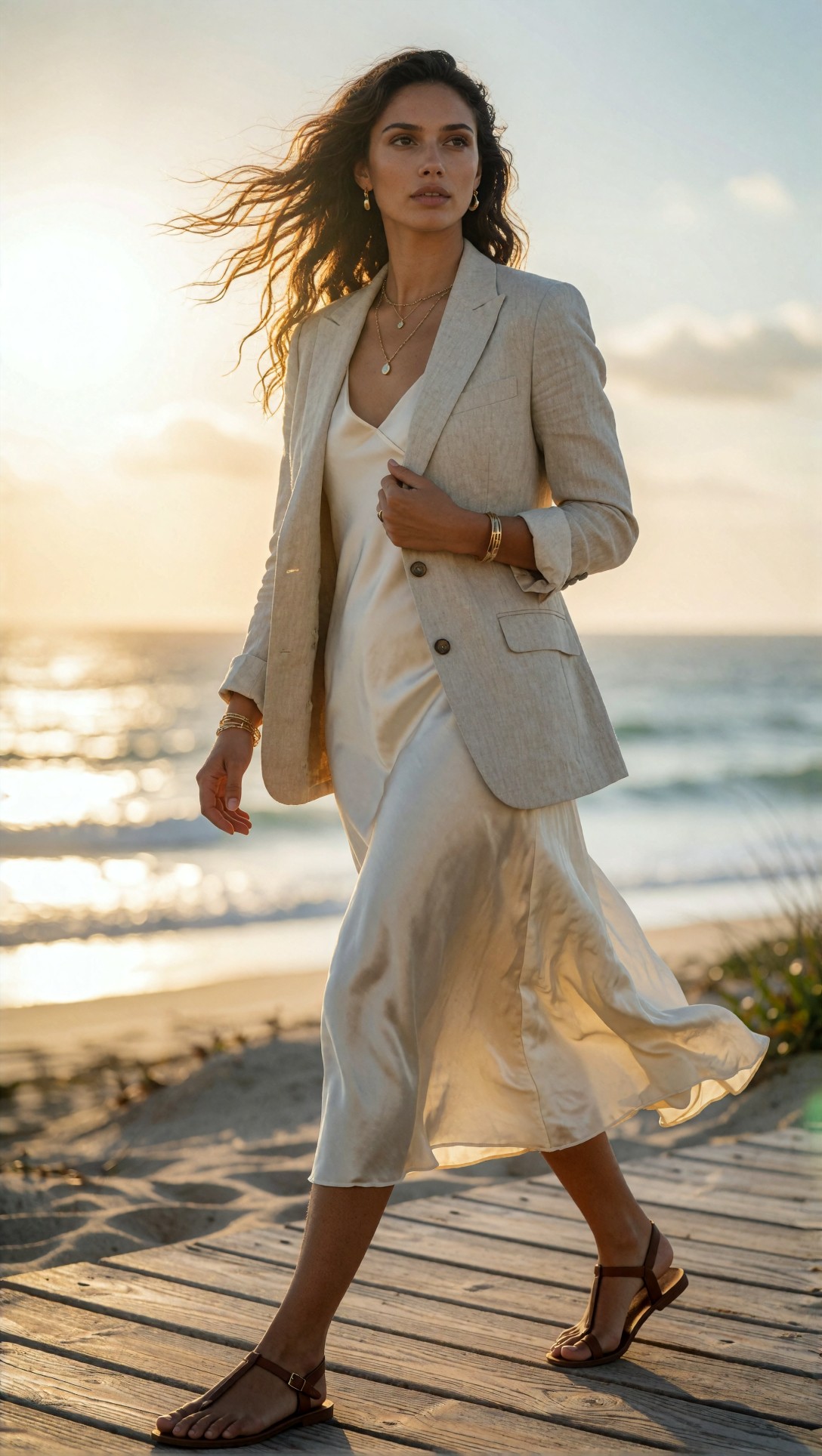
Inspect the hemline, the fingers on the blazer lapel, and the hair edges against the sky. In this setup, Leonardo often gave the most attractive overall image, but Ideogram was more likely to preserve clean garment structure. Some free tools pushed the skin too glossy under sunset light.
Side-by-side findings by scene type
1. Everyday portrait realism
Best for: users who want social-campaign, lifestyle, or editorial portraits that do not look synthetic.
- Ideogram: strongest prompt obedience; often best at clothing and background separation
- Leonardo: strongest mood; can become too polished unless you specify texture
- Microsoft Designer: easiest beginner option; faces can look generic but scenes are readable
- Playground: can be excellent with the right model, but less predictable on a free pass
This prompt checks skin texture and indoor daylight handling without hiding behind extreme blur.
Topic: barista taking a break near a cafe window
Genre: Lifestyle Portrait
Camera: Fujifilm GFX 100S
Lens: 63mm f/2.8
Lighting: soft side window light on an overcast afternoon
Location: narrow urban coffee shop with tiled walls, espresso machine, and stacked ceramic mugs
Style: documentary commercial realism
Final Prompt: A photorealistic barista taking a short break near a cafe window, wearing a dark green apron over a faded black t-shirt, slight flour dust on the apron, relaxed half-smile, leaning lightly against the counter, one hand holding a white mug, visible steam, realistic skin pores and natural lip texture, soft side window light on an overcast afternoon, tiled wall reflections, espresso machine in the background, Fujifilm GFX 100S medium-format look, 63mm f/2.8 depth and clarity, documentary commercial realism, accurate fingers around the mug handle, crisp apron fabric texture, muted urban color palette, believable indoor highlights and shadow rolloff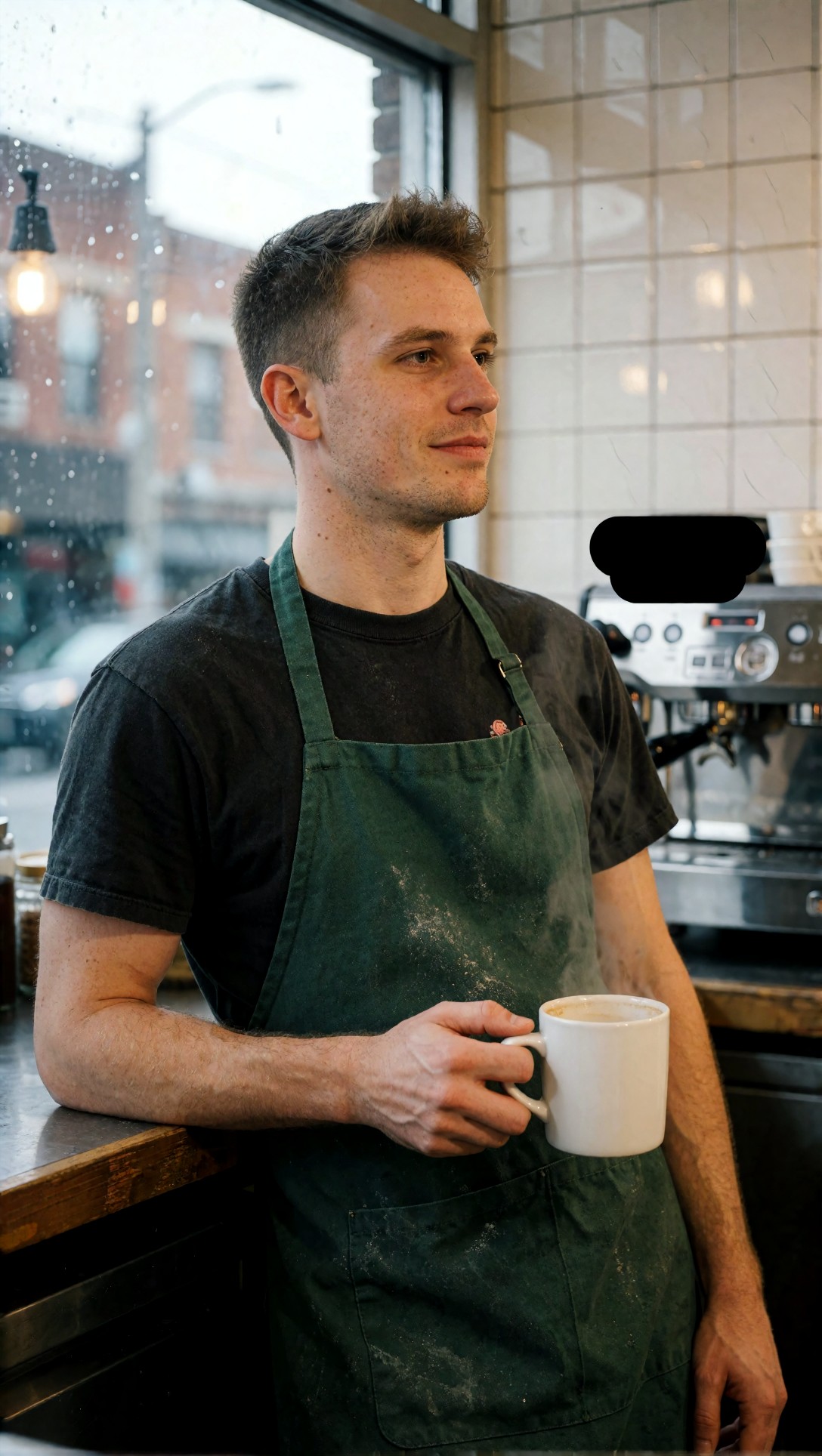
What to inspect is whether the mug handle, steam, and apron folds all survive together. That combination exposed weak models quickly. The best free text to image AI outputs kept the mug hand readable and avoided turning the steam into random fog.
2. Outdoor environmental realism
Best for: travel scenes, brand lifestyle, location-based storytelling.
Free models often do better outdoors because natural light gives them fewer studio assumptions to fake. The tradeoff is that foliage, distant architecture, and hands in motion can break down.
This prompt checks background consistency, natural walking posture, and daylight realism in a public setting.
Topic: man crossing a weekend street market carrying fresh flowers
Genre: Street Style
Camera: Leica SL2-S
Lens: 35mm f/2
Lighting: bright overcast daylight
Location: open-air flower market with canvas stalls, wet cobblestones, and pedestrians in the background
Style: modern European editorial realism
Final Prompt: A photorealistic man walking through a weekend flower market carrying a bundle of fresh tulips wrapped in brown paper, navy chore jacket, white t-shirt, relaxed trousers, worn leather sneakers, mid-step posture with believable leg motion, natural expression looking slightly off camera, bright overcast daylight, wet cobblestone reflections, flower stalls with layered colors in the background, Leica SL2-S realism, 35mm f/2 environmental perspective, modern European editorial style, realistic hands gripping the bouquet, textured paper wrap, accurate depth from foreground to stalls, balanced color separation, documentary feel with polished composition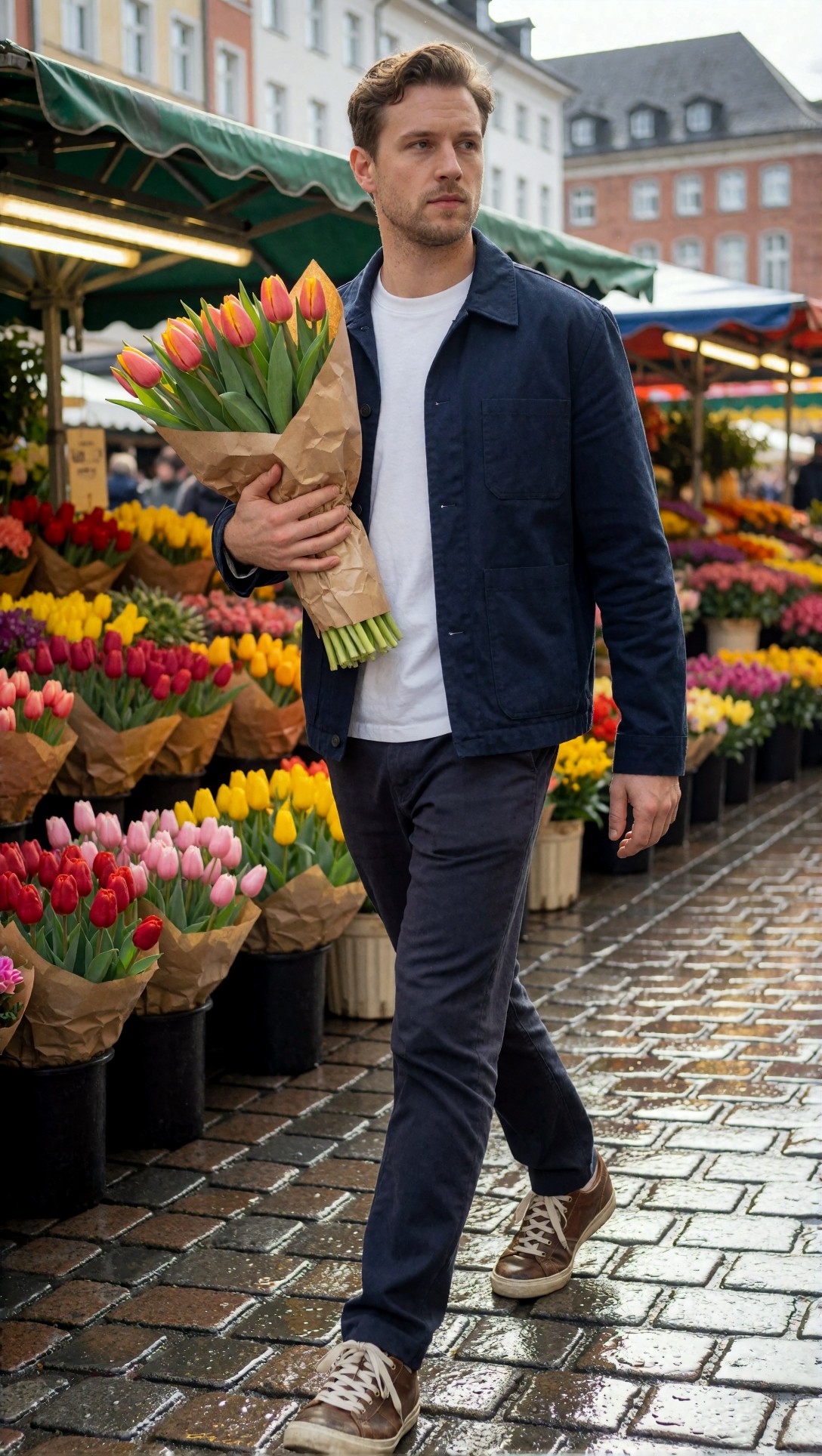
Check if the bouquet wrapping remains logical and whether the feet connect properly to the ground plane. In this test, outdoor market scenes were easier than indoor studio scenes for the free tools, but moving legs still caused occasional distortion.
3. Product-led photorealism
Best for: ecommerce concepts, campaign mockups, packaging tests.
Products are deceptively hard. A free realistic AI image generator can make a pretty bottle, but labels, cap geometry, shadows, and material realism often give away the result.
This prompt checks reflective surfaces, hard-edge geometry, and controlled studio light.
Topic: premium skincare bottle on a stone pedestal with water droplets
Genre: Product Editorial
Camera: Phase One XF IQ4
Lens: 120mm macro f/4
Lighting: large softbox key light with subtle rim light
Location: minimalist studio set with travertine surface and pale gray backdrop
Style: high-end beauty advertising
Final Prompt: A photorealistic premium skincare serum bottle standing on a travertine pedestal, frosted glass body, brushed silver cap, tiny water droplets on the surface, soft reflected highlights, clean label area without warped geometry, shallow pool reflection at the base, minimalist pale gray studio backdrop, large softbox key light with subtle rim light defining the bottle edges, Phase One XF IQ4 high-resolution commercial look, 120mm macro f/4 precision, high-end beauty advertising style, accurate shadow falloff, realistic glass thickness, crisp condensation detail, elegant neutral palette, luxury product composition with negative space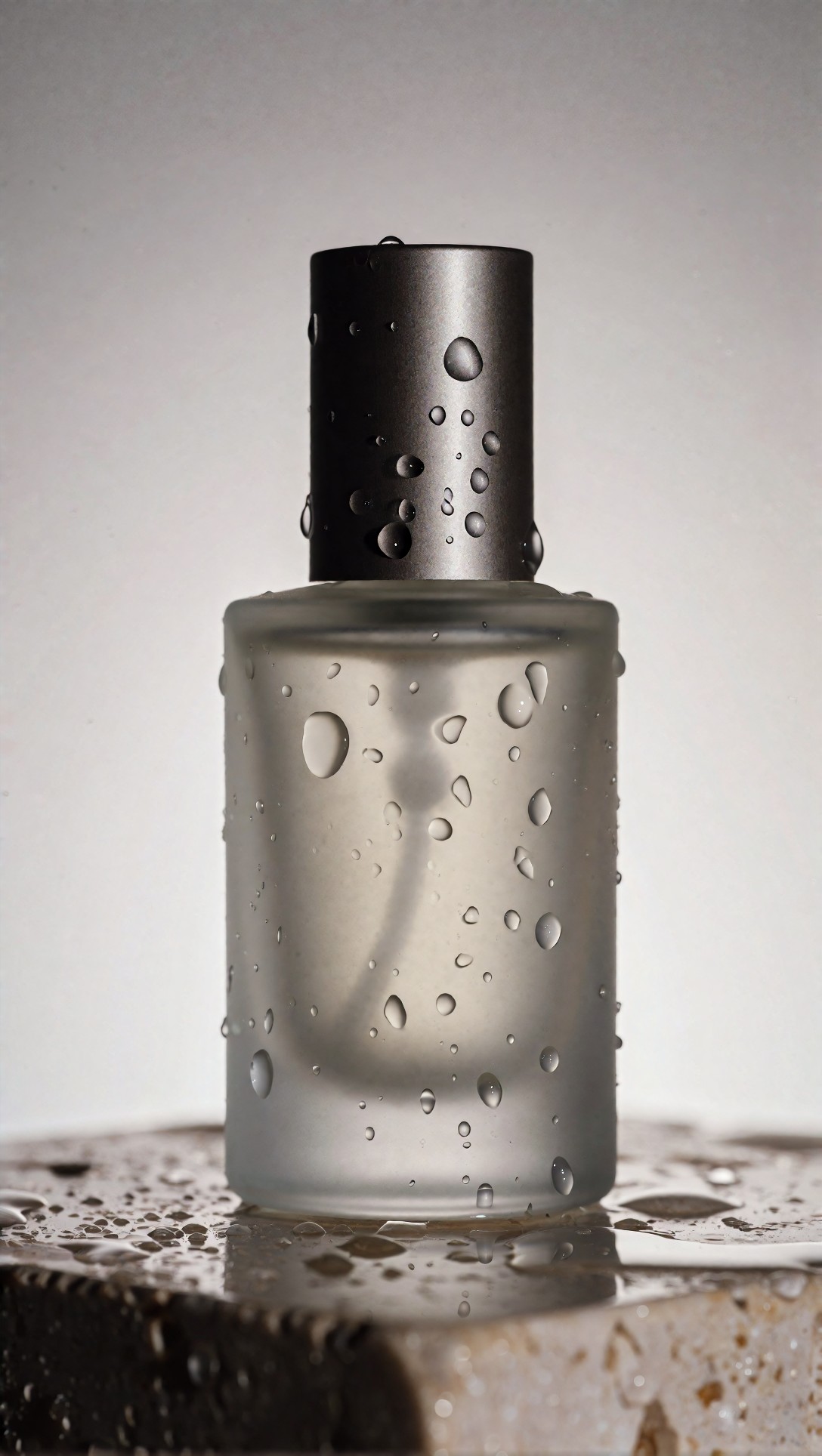
Inspect the cap alignment, label plane, and whether the reflection obeys the bottle shape. The strongest free tools handled the overall composition well but often slipped on text-like label zones, so product concepting works better than final packshot replacement.
Likely failure points I kept seeing
Hands remain the first stress test
If a prompt includes a mug, bouquet, phone, coat lapel, or handbag strap, free tools are much more likely to show small failures. The hand may be technically present but anatomically awkward. In this test, asking for one clear hand action worked better than multiple hand tasks.
Eyes can become too perfect
A common failure in the best free text to image AI category is not broken faces, but over-correct faces. Symmetry becomes unnaturally tidy. The image reads more like a beauty composite than a photograph. Adding neutral expression, slight fatigue, candid posture, or age detail helped.
Background detail can collapse behind shallow depth of field
Some tools fake realism by blurring everything behind the subject. That can look fine at first glance, but it also hides scene inconsistency. If the image only works with extreme blur, it is not truly photorealistic. Asking for moderate environmental detail exposed which tools could actually build a scene.
Sunset is flattering but risky
Golden hour made many outputs look attractive, but it also hid skin problems and over-warmed everything. For honest testing, overcast and indoor window light were more revealing.
This prompt was designed to stress-test hand accuracy and background logic at the same time.
Topic: woman paying for fruit at an outdoor market stall
Genre: Lifestyle Documentary
Camera: Panasonic Lumix S5II
Lens: 50mm f/2
Lighting: soft morning daylight under market canopy diffusion
Location: neighborhood produce stand with wooden crates, handwritten price signs, and busy shoppers behind
Style: natural documentary realism
Final Prompt: A photorealistic woman paying for fruit at a neighborhood produce stall, striped cotton shirt tucked into high-waisted denim, canvas tote over one shoulder, one hand holding a wallet and the other receiving a paper bag of oranges, candid expression, natural body twist toward the vendor, soft morning daylight filtered through a market canopy, wooden crates filled with peaches and greens, handwritten signs, shoppers blurred but still readable in the background, Panasonic Lumix S5II realism, 50mm f/2 documentary perspective, accurate hand interaction, believable paper bag shape, textured fruit surfaces, grounded color palette, authentic public-market atmosphere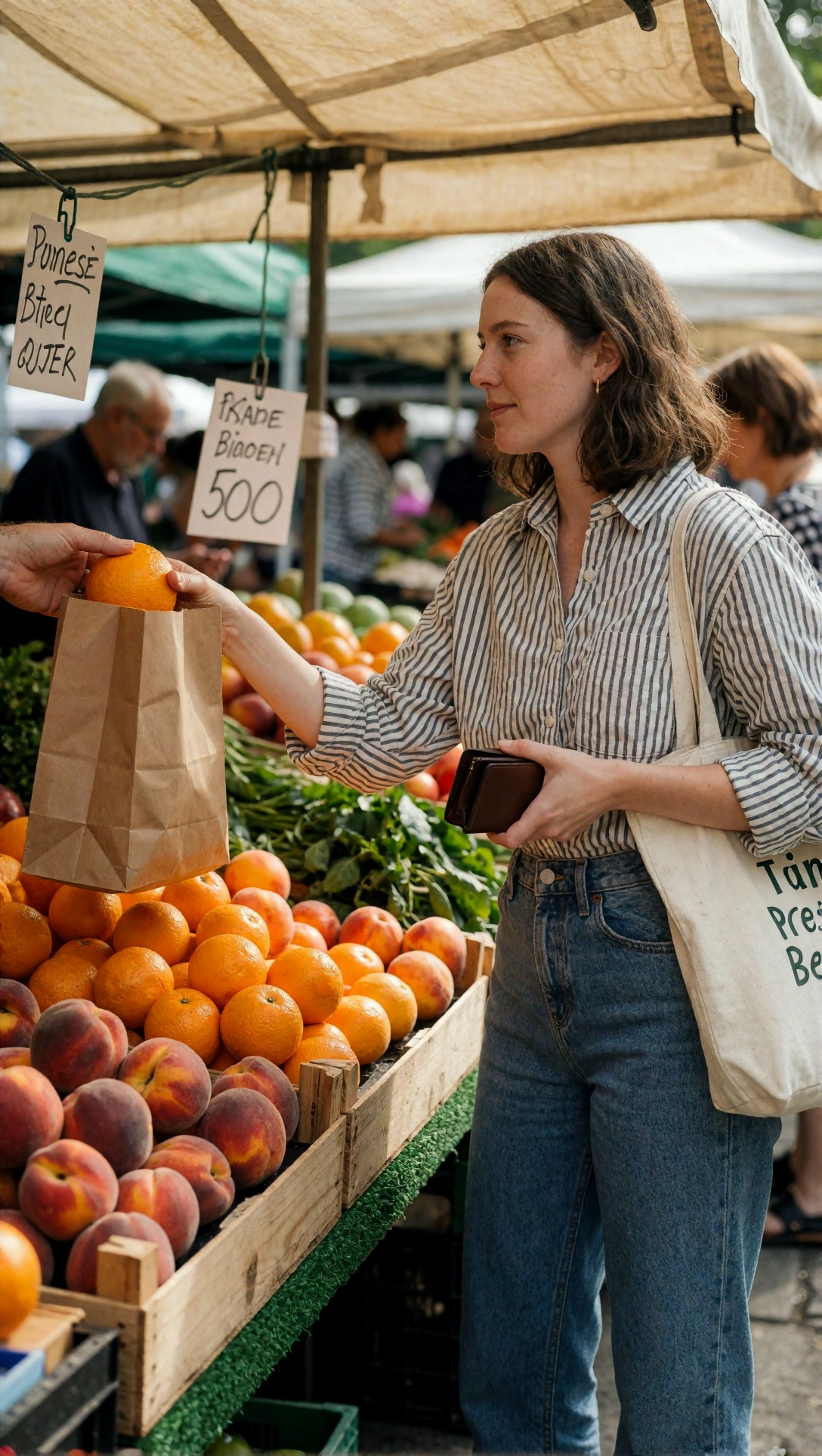
This is a good honesty test. Inspect the wallet hand, the bag transfer, and the handwritten signage. Most free tools got two out of three right, not all three at once.
What I would change next when a result looks fake
When this setup works, the image feels anchored by one dominant strength: either excellent light, convincing skin, or good material detail. When it fails, I do not rewrite everything. I change one control at a time.
Change 1: simplify the action
If hands are bad, reduce the interaction. Instead of "holding book and cup," use one object only.
Change 2: switch the light
If skin is waxy, move from sunset or studio glamour to overcast window light.
Change 3: widen the lens slightly
If the portrait feels too synthetic, an 85mm close-up can intensify the beauty-ad look. A 50mm or 35mm environmental frame often reads more naturally.
Change 4: replace vague wardrobe with tactile wardrobe
"Elegant outfit" is weak. "charcoal wool coat, ribbed knit scarf, matte leather gloves" gives the model texture targets.
This prompt checks whether layered fall clothing improves realism by giving the model more fabric structure to resolve.
Topic: commuter standing on a train platform in autumn layers
Genre: Urban Editorial
Camera: Canon EOS R5
Lens: 70mm f/2.8
Lighting: cool overcast daylight with soft platform reflections
Location: outdoor train platform with metal benches, timetable signage, and blurred arriving train
Style: cinematic commuter realism
Final Prompt: A photorealistic commuter waiting on an outdoor train platform, wearing a charcoal wool coat over a ribbed oatmeal knit sweater, dark pleated trousers, structured leather boots, soft plaid scarf, one hand in coat pocket and the other holding a folded newspaper, calm focused expression, cool overcast daylight with gentle reflections on the platform surface, blurred arriving train in the distance, Canon EOS R5 realism, 70mm f/2.8 balanced portrait perspective, cinematic commuter realism, visible wool texture, clean scarf pattern, accurate newspaper edges, natural posture, subdued autumn palette of gray, oatmeal, rust, and steel blue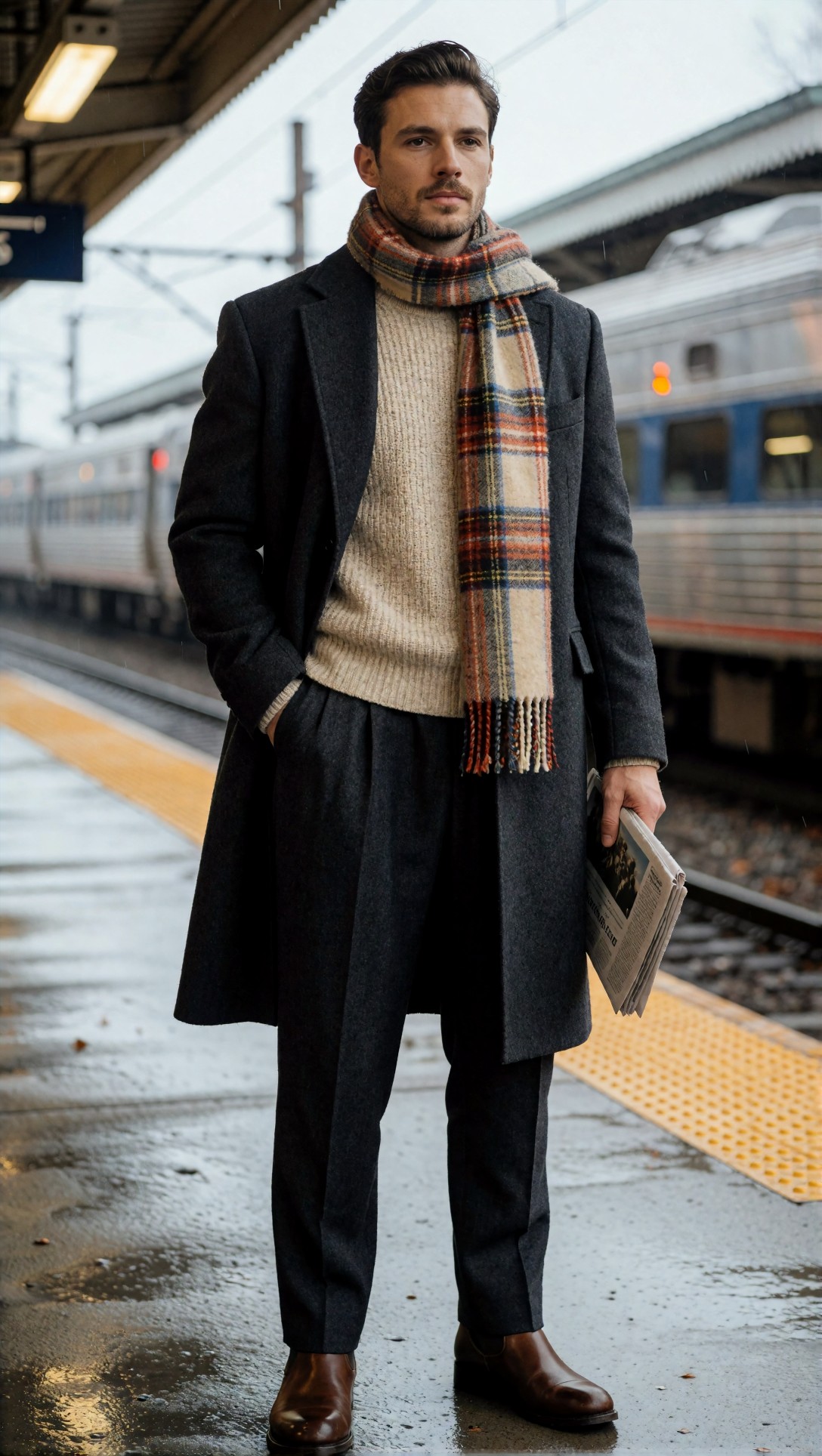
Inspect fabric layering and the folded newspaper. In this test, layered clothing often improved photorealism because the model had more material cues to solve.
Reusable prompt pattern for better free photorealism
Here is the pattern I kept returning to. It is simple enough for any free text to image AI tool, but structured enough to reduce drift.
1. Subject + action 2. Wardrobe or material details 3. Expression and posture 4. Lighting source and quality 5. Location with physical objects 6. Camera and lens 7. Realism cues: skin texture, believable depth, accurate hands, natural color 8. Negative style pressure by implication: avoid fantasy language unless you want stylization
This next example uses the pattern for a food-adjacent lifestyle image, which is useful because it combines hands, surfaces, and indoor lighting.
Topic: home cook plating pasta in a compact apartment kitchen
Genre: Food Lifestyle Editorial
Camera: Sony A7 IV
Lens: 55mm f/1.8
Lighting: warm practical kitchen light with soft daylight spill from a side window
Location: compact city apartment kitchen with tiled backsplash, hanging utensils, and wooden countertop
Style: contemporary magazine realism
Final Prompt: A photorealistic home cook plating fresh pasta in a compact apartment kitchen, rolled sleeves, pale blue oxford shirt, dark apron tied at the waist, one hand using tongs and the other steadying a ceramic plate, focused expression, slightly messy countertop with herbs, olive oil bottle, and folded tea towel, warm practical kitchen light mixed with soft side daylight, tiled backsplash and hanging utensils in the background, Sony A7 IV realism, 55mm f/1.8 natural editorial perspective, contemporary magazine realism, accurate hand placement, believable steam, realistic pasta texture, authentic kitchen materials, warm neutral color palette with gentle contrast
Inspect the tongs, steam, and countertop clutter. Good outputs feel lived-in; weak outputs turn the kitchen props into vaguely shaped objects.
Which free tool is best for which user
Choose Ideogram if prompt obedience matters most
In this test, Ideogram was often the safest choice when I needed the scene to actually match the prompt. It was especially solid on wardrobe separation, object placement, and coherent environments. If your priority is controlled composition over dramatic mood, it is a strong option.
Choose Leonardo if you want the most visually pleasing first hit
Leonardo frequently gave the strongest result on first impression. The catch is that it can over-beautify faces and smooth surfaces if the prompt does not force realism. It is best for editorial, campaign-like images where a little polish is acceptable.
Choose Microsoft Designer / Copilot if you want convenience
It is the easiest route into text to image AI free online generation. In my runs, it handled everyday scenes reasonably well, but it was less dependable for material fidelity and nuanced skin texture.
Choose Playground if you are willing to tune
Playground can absolutely compete, but the result quality depends more heavily on your selected model and settings. For users who enjoy testing variants, it is useful. For beginners, it may feel less predictable.
Practical recommendation checklist
Use this quick checklist before calling an image "photorealistic":
- Does the hand-object interaction make sense?
- Is skin textured, not airbrushed?
- Does the lighting come from a believable source?
- Are background objects still coherent under blur?
- Do fabrics show material-specific texture?
- Is the pose slightly asymmetric like a real candid frame?
- Does the color palette feel restrained rather than over-saturated?
- Would the image still look photographic if you zoomed to 100 percent?
This final prompt is a good all-purpose benchmark because it mixes portrait realism, accessories, reflective surfaces, and urban night light.
Topic: woman leaving a cinema at night in a tailored black coat
Genre: Fashion Campaign
Camera: Nikon Z8
Lens: 58mm f/1.4
Lighting: mixed neon marquee light and soft street ambient light
Location: old city cinema entrance with glowing poster cases and wet sidewalk
Style: luxury city realism
Final Prompt: A photorealistic woman stepping out of an old city cinema at night, tailored black wool coat over a satin blouse and straight trousers, small leather clutch, subtle silver earrings, composed expression with a slight glance to the side, wet sidewalk reflecting the marquee lights, glowing poster cases behind her, mixed neon marquee light and soft street ambient light shaping the face, Nikon Z8 realism, 58mm f/1.4 cinematic portrait perspective, luxury city realism, accurate clutch grip, natural hairline detail, believable satin highlights, controlled red, gold, and black color palette, elegant editorial composition with authentic urban atmosphere
Inspect the clutch hand, poster case geometry, and mixed lighting on the face. This type of night scene separates decent tools from excellent ones very quickly.
Editorial conclusion
If you are evaluating the best free text to image AI for photorealistic work, the answer is not one universal winner. In this test, Ideogram was the most reliable when I cared about prompt compliance and clean realism. Leonardo produced the most appealing editorial images when the prompt included strong texture and light constraints. Microsoft Designer was best for quick, accessible concepting. Playground was best for users willing to test more aggressively.
Who should use this workflow: creators comparing free tools for lifestyle, fashion, product concepting, and realistic campaign mockups. Who should avoid it: anyone expecting flawless hands, perfect product labels, or production-ready packshots from free tiers alone.
The setting that mattered most was not "photorealistic" as a keyword. It was the combination of specific lighting, a real lens choice, and tactile wardrobe or material detail. That is what consistently moved images closer to photographs in this side-by-side free text to image AI test.