Best Prompt Generator for AI Ads: Turn Simple Campaign Briefs Into Usable Image Prompts 한국어 요약
이 페이지는 ZView Space의 영어 원문을 한국어 검색 사용자도 이해할 수 있도록 정리한 SEO 요약입니다. 핵심은 단순한 얼굴 중심 이미지가 아니라 패션 에디토리얼, 룩북, 아웃핏, 프롬프트 테스트, 이미지 생성 워크플로우를 실제로 어떻게 구성할지입니다.
핵심 요약
- 원문 주제: Best Prompt Generator for AI Ads: Turn Simple Campaign Briefs Into Usable Image Prompts
- 목적: AI 이미지 생성에서 outfit, silhouette, fabric, pose, location, camera framing을 더 명확하게 설계합니다.
- 활용 범위: Z-Image Turbo, Krea2 Turbo, Qwen Image, Anima, SeedVR2 같은 이미지 생성 및 업스케일 워크플로우에 적용할 수 있습니다.
- SEO 관점: 제목, 설명, 이미지 alt, 프롬프트 예시가 실제 검색 의도와 맞아야 색인 가능성이 높아집니다.
한국어 사용자를 위한 체크포인트
1. 프롬프트가 얼굴 묘사에만 머물지 않고 전체 스타일과 의상 구성을 설명하는지 확인합니다. 2. 패션 이미지라면 상의, 하의, 아우터, 신발, 액세서리, 소재감, 촬영 장소를 분리해서 씁니다. 3. 생성 결과는 바로 게시하지 말고 디테일, 손, 의상 형태, 배경 일관성, 이미지 품질을 비교합니다. 4. 글 본문에는 실제 테스트 기준과 실패를 줄이는 방법이 들어가야 검색엔진에서 얇은 콘텐츠로 보일 가능성이 줄어듭니다.
원문 미리보기
A good ad image prompt generator should do one job well: take a loose campaign brief and turn it into visuals your team can actually test. That means more than adding adjectives. For advertising work, the best prompt generator for AI ads needs to translate pos
---
A good ad image prompt generator should do one job well: take a loose campaign brief and turn it into visuals your team can actually test. That means more than adding adjectives. For advertising work, the best prompt generator for AI ads needs to translate positioning, audience, offer, channel, product focus, and brand style into prompts that are specific enough for image models and flexible enough for iteration.
If you create paid social, landing page hero images, display banners, product launches, or moodboards for clients, the difference between a weak prompt builder and a useful one shows up fast. Weak tools produce attractive but generic images. Better tools convert a plain-English brief into scene direction, camera choices, lighting, composition, wardrobe, and campaign-ready art direction.
This guide explains what to look for in an ad campaign prompt generator, how to turn briefs into prompts reliably, and where these tools fit inside a real creative workflow.
What makes a prompt generator good for ad work?
Advertising prompts have different requirements from general image prompting. In concept art or casual social content, rough prompts can still produce interesting outputs. Ad creative is less forgiving. You usually need visual consistency, clear product emphasis, room for copy overlays, and alignment with a defined audience.
The best tools for this job usually help with five things:
1. They structure the brief
A useful AI advertising prompt tool should capture the basics:
- product or service
- target audience
- offer or message
- channel placement
- desired mood
- brand visual language
- required objects or scenes
- aspect ratio or composition needs
If the tool skips this layer, you will spend more time rewriting the result than you saved.
2. They convert strategy into visuals
A campaign brief often includes non-visual information like “premium but approachable” or “for busy professionals.” A good generator maps those abstract inputs into image direction:
- premium but approachable → soft luxury styling, clean composition, warm natural light
- busy professionals → in-motion scenes, urban settings, practical wardrobe, efficient framing
- eco-conscious → natural textures, earthy palette, minimal packaging emphasis
3. They support channel-specific creative
A Facebook acquisition ad, an e-commerce hero image, and a luxury out-of-home mockup need different framing. The right prompt builder for ads should let you adapt the same concept for:
- square paid social
- vertical stories or reels covers
- landscape display banners
- website headers
- product launch editorials
4. They produce prompts that are editable
The output should be usable, not mystical. You want prompts your team can tweak quickly:
- swap audience age range
- change environment
- increase product prominence
- simplify background
- create seasonal variants
5. They help maintain visual consistency
For campaign systems, consistency matters as much as creativity. Prompt generators are more useful when they preserve recurring elements like:
- brand palette
- lighting style
- shot distance
- material texture
- product angle
- emotional tone
Why simple briefs often fail in image models
Most campaign briefs are written for people, not models. A human designer can infer what “modern wellness launch for women 25–40” means. An image model needs those assumptions spelled out.
A weak brief might say:
- Launch ad for hydration powder
- Clean wellness aesthetic
- Audience: active women
- Use for Instagram
That is not enough visual instruction. It does not specify scene type, product visibility, background complexity, lighting, or composition. A prompt generator adds the missing middle layer between strategy and visual execution.
Here is what that looks like in practice.
Use case 1: Turn a wellness product brief into paid social image prompts
Imagine a brand manager gives you this:
- Product: electrolyte hydration powder
- Goal: customer acquisition
- Audience: health-conscious women 25–40
- Channel: Instagram feed
- Tone: clean, elevated, energetic
- Priority: product visible but lifestyle-led
A strong prompt generator should resolve those inputs into a visual concept rather than just restating them.
Topic: Electrolyte Hydration Powder Instagram Launch
Genre: Product Editorial
Camera: Canon EOS R5
Lens: 50mm f/2.0
Lighting: Softbox key light with natural window fill
Location: Bright minimalist kitchen with stone countertop and subtle wellness props
Style: Clean Commercial Look
Final Prompt: Premium electrolyte hydration powder canister placed prominently on a pale stone countertop in a bright minimalist kitchen, health-conscious woman in refined activewear reaching for a glass of water in the background, relaxed confident expression, lifestyle-led composition with product clearly in the foreground, clean commercial framing with negative space for ad copy, soft white and sage color palette, glass, citrus slices, folded linen towel, natural skin texture, crisp packaging detail, softbox key light blended with window fill, Canon EOS R5 realism, 50mm f/2.0 depth, polished paid social advertising image, high clarity, premium wellness atmosphere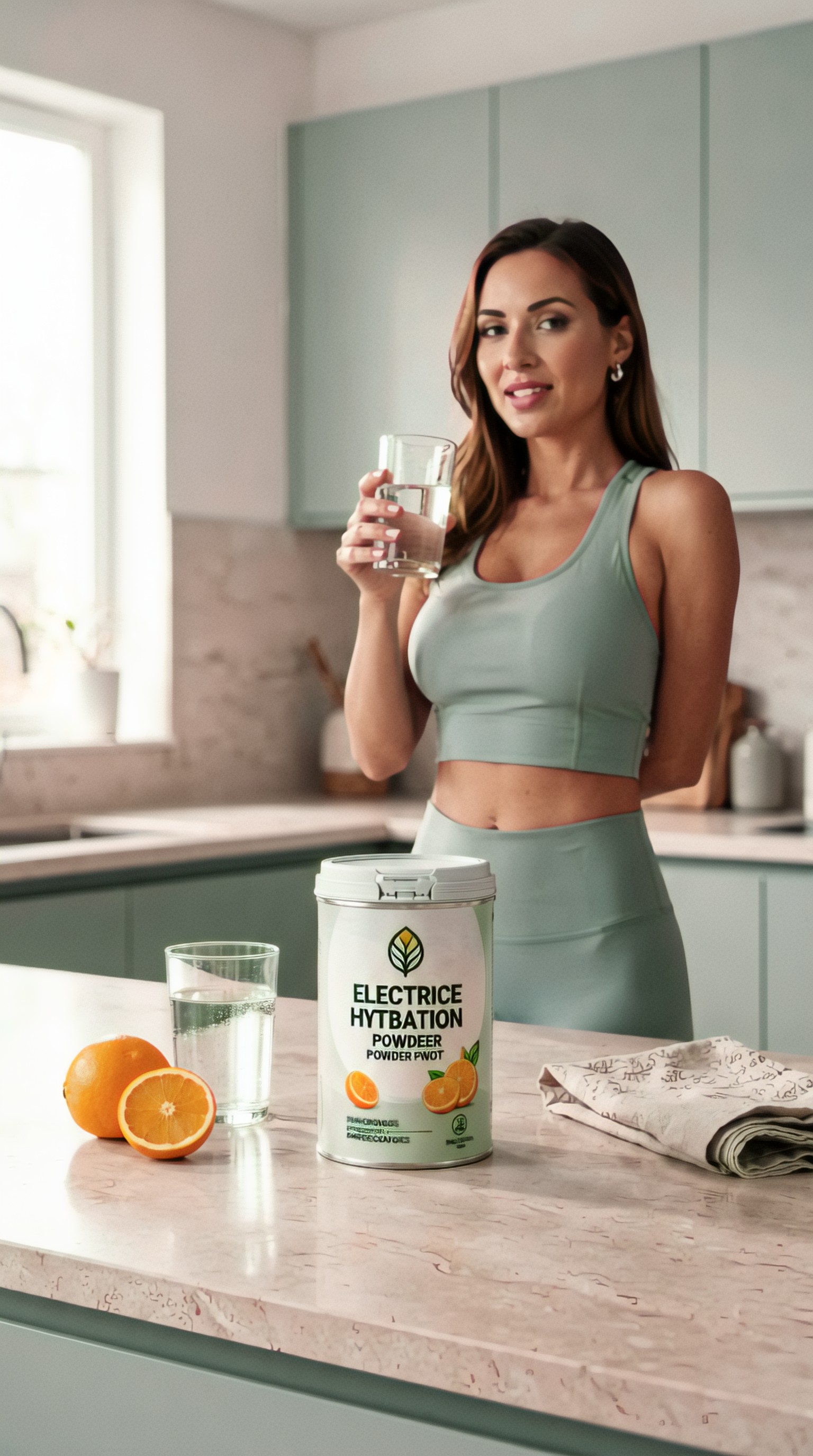
This works because it preserves the campaign objective while making decisions about product hierarchy, environment, mood, and composition.
A second variation from the same brief might push more motion and energy.
Topic: Wellness Hydration Morning Routine Ad
Genre: Lifestyle Portrait
Camera: Sony A7 IV
Lens: 35mm f/1.8
Lighting: Golden hour window light
Location: Urban apartment breakfast nook with soft morning shadows
Style: Modern Wellness Campaign
Final Prompt: Active woman in her early 30s mixing electrolyte hydration powder into a clear glass at a sunlit urban apartment breakfast nook, premium canister on the table facing camera, candid mid-motion pose, fresh awake expression, airy golden morning light, clean tabletop styling with cut citrus, reusable bottle, and neutral ceramics, composition designed for Instagram feed ad with subject on one side and copy space on the other, warm beige, sage, and pale yellow palette, realistic fabric texture, subtle glow on skin, Sony A7 IV look, 35mm f/1.8 environmental framing, polished modern wellness advertising visual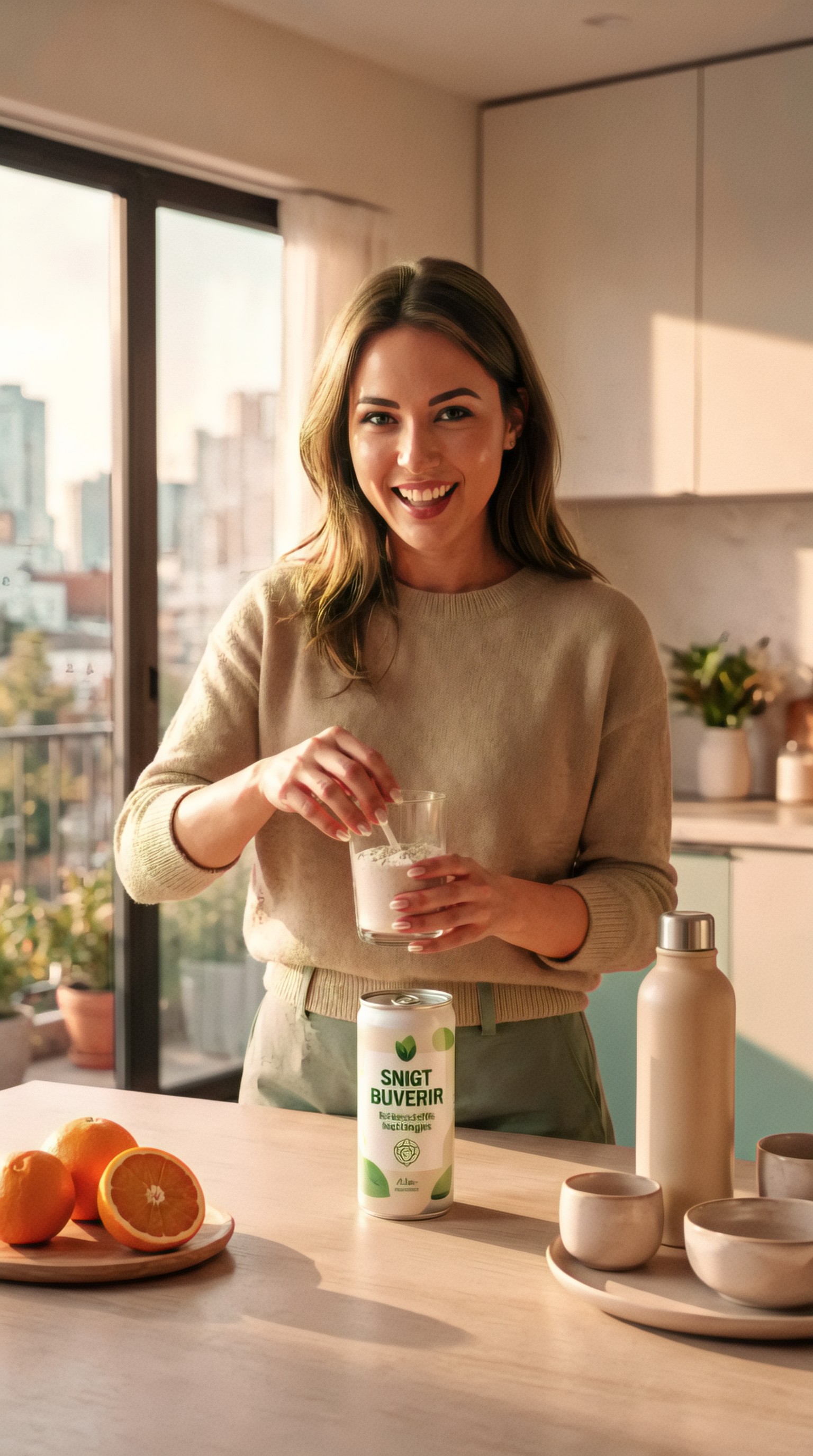
What the best prompt generator for AI ads should ask you
If you are evaluating tools, look closely at the input form or prompt-building flow. The best systems ask practical questions that reflect how ad creative is actually made.
Useful fields include:
- What is the product or service?
- Who is the audience?
- What is the offer or campaign objective?
- Where will the image appear?
- Is the image product-first, lifestyle-first, or concept-first?
- What should the viewer feel?
- Are there visual references or brand constraints?
- Do you need room for headline or CTA?
- What aspect ratio do you need?
- What must not appear?
This is what separates a generic text enhancer from a genuine turn brief into image prompt AI workflow.
Use case 2: Generate luxury beauty campaign prompts from a launch brief
Beauty campaigns need precision. Skin finish, packaging surface, lighting direction, and color palette can make the difference between a usable image and a vague “beauty-ish” result.
Suppose the brief says:
- Product: glass-bottle facial serum
- Positioning: premium clinical skincare
- Audience: women 30–50
- Channel: website hero and paid social
- Tone: luxurious, credible, calm
A generator should convert “premium clinical skincare” into both luxury and efficacy cues.
Topic: Premium Facial Serum Hero Campaign
Genre: Beauty Campaign
Camera: Nikon Z7 II
Lens: 105mm f/2.8 macro
Lighting: Studio butterfly light with soft edge fill
Location: Minimal cream-toned beauty studio with reflective acrylic surfaces
Style: High-End Beauty Advertising
Final Prompt: Luxury facial serum in a clear glass bottle with silver dropper placed on reflective acrylic blocks in a minimal cream-toned beauty studio, elegant female model with luminous skin and pulled-back hair leaning into frame, calm confident expression, precise hand pose near face, premium clinical skincare aesthetic, studio butterfly light with soft edge fill creating controlled highlights on glass and skin, clean composition with hero product focus and negative space for headline, palette of ivory, champagne, and soft taupe, ultra-detailed packaging reflections, refined skin texture, Nikon Z7 II sharpness, 105mm f/2.8 macro beauty precision, sophisticated website hero image for premium skincare launch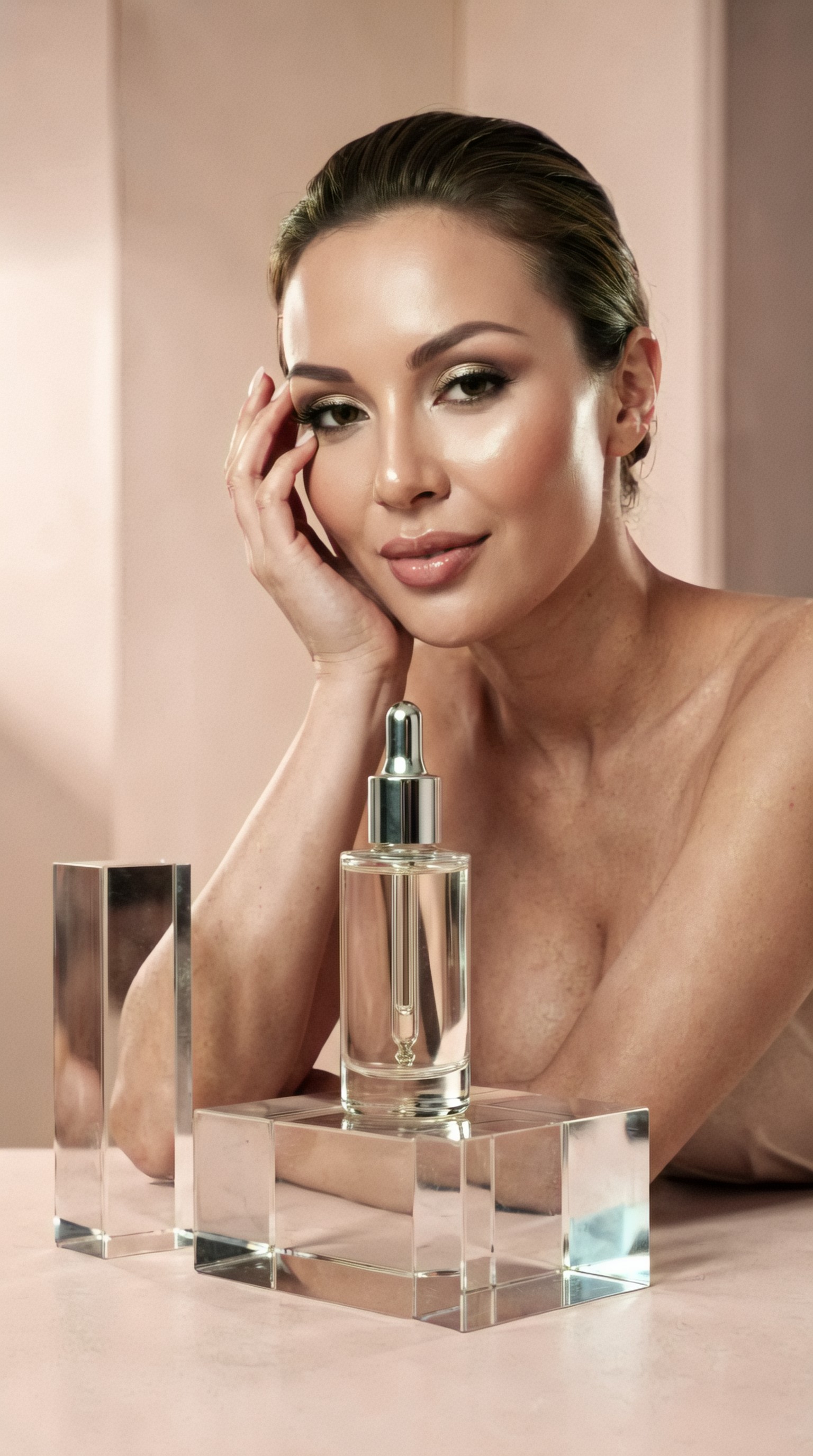
For paid social, you may want a more human-centered variation.
Topic: Clinical Skincare Social Ad
Genre: Beauty Editorial
Camera: Fujifilm GFX 100S
Lens: 80mm f/1.7
Lighting: Softbox key light with subtle silver reflector bounce
Location: Editorial skincare studio with frosted glass backdrop
Style: Korean Magazine Cover
Final Prompt: Sophisticated woman aged around 40 holding a premium facial serum close to her cheek against a frosted glass backdrop, smooth pulled-back hairstyle, natural luminous makeup, poised front-facing posture, direct calm gaze, product label clearly visible, editorial skincare composition inspired by Korean magazine covers, softbox key light with silver bounce for radiant yet credible skin rendering, soft ivory and cool beige palette, refined highlights on the bottle, minimal background distractions, Fujifilm GFX 100S medium-format detail, 80mm f/1.7 shallow depth, polished beauty social ad with luxury and clinical trust cues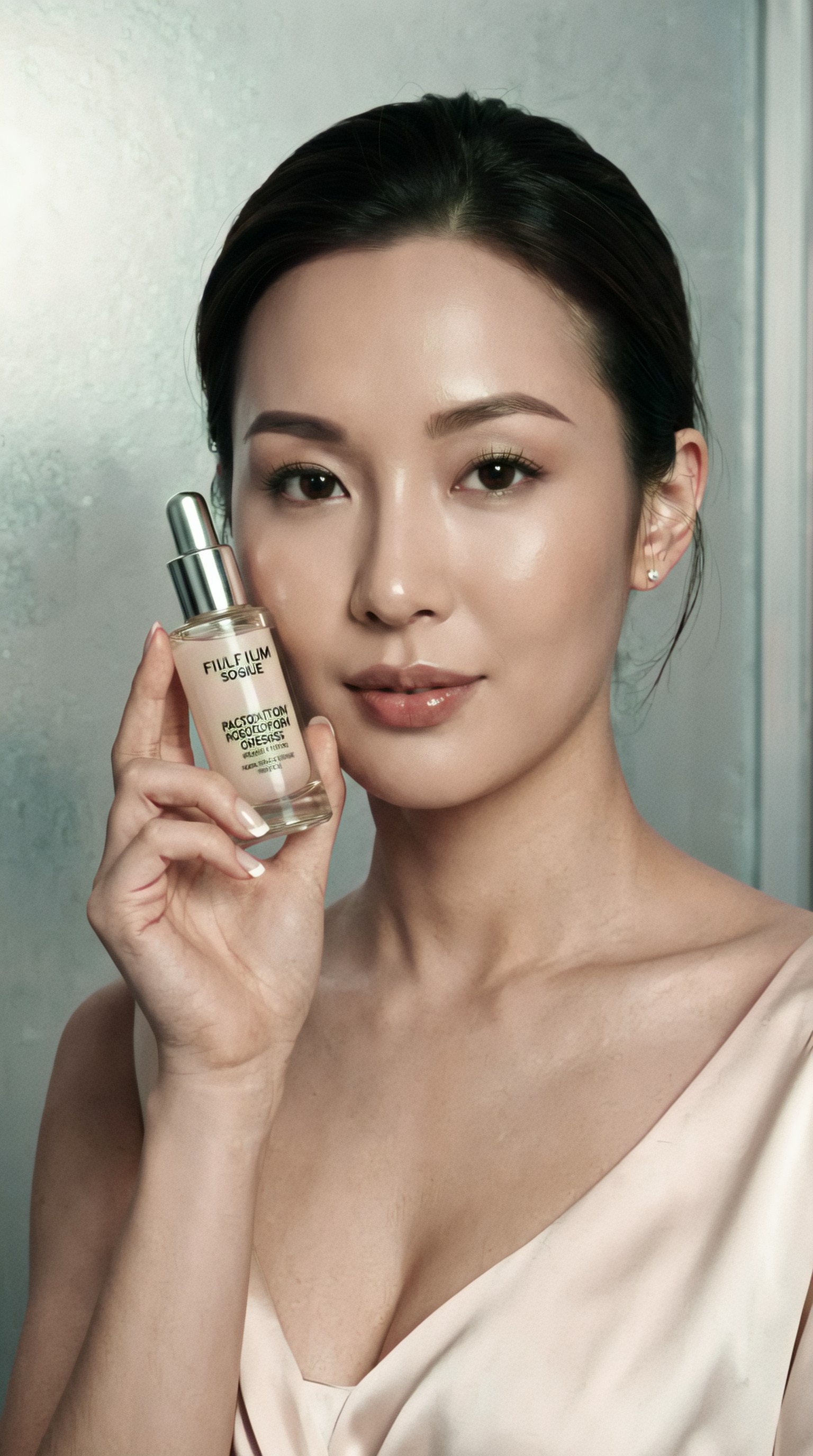
Prompt generators are most useful when they think in campaign systems
Single-image prompting is easy. Campaign prompting is harder. The best prompt generator for AI ads should let you create families of related visuals from one brief.
For example, one product launch may need:
- hero product shot
- model-led lifestyle image
- vertical story version
- seasonal variation
- retargeting creative with tighter crop
- alternate audience-specific creative
Good prompt systems create controlled variation. They keep the core brand feeling while changing scene, framing, and message angle.
Use case 3: From DTC apparel brief to multiple audience angles
Say a clothing brand wants ads for a new commuter jacket.
Brief:
- Product: lightweight waterproof commuter jacket
- Audience A: urban professionals
- Audience B: cyclists and transit commuters
- Tone: practical, stylish, premium
- Channels: Meta ads and homepage banners
A useful generator can spin this into targeted visual directions without losing brand cohesion.
Topic: Urban Professional Commuter Jacket Ad
Genre: Fashion Editorial
Camera: Sony A7R V
Lens: 85mm f/1.4
Lighting: Overcast diffusion with subtle wet-street reflections
Location: Modern city crosswalk with glass office towers after light rain
Style: Luxury Fashion Campaign
Final Prompt: Stylish urban professional wearing a lightweight waterproof commuter jacket while crossing a modern city street after rain, tailored trousers, leather work bag, composed confident stride, focused expression, jacket texture and water resistance clearly visible, reflective wet pavement and glass office towers in the background, overcast diffusion creating premium soft contrast, editorial composition with room for branding, cool gray, navy, and muted silver palette, realistic fabric detail and stitching, Sony A7R V precision, 85mm f/1.4 compressed luxury fashion framing, premium performance apparel campaign visual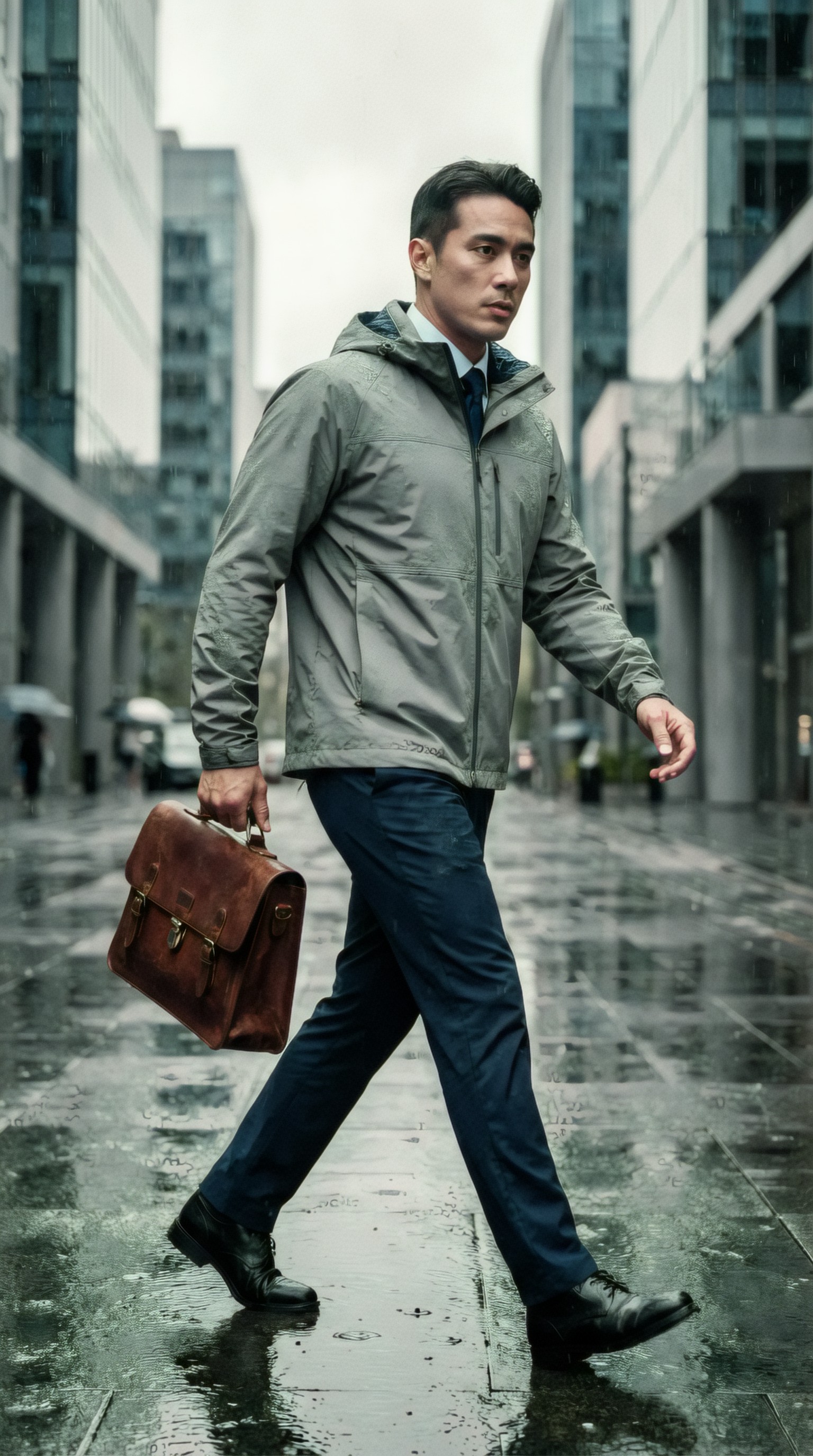
Topic: Transit Commuter Waterproof Jacket Campaign
Genre: Street Style
Camera: Leica SL2-S
Lens: 35mm f/2
Lighting: Neon rim light mixed with rainy evening ambient light
Location: Covered train platform in a dense urban center
Style: Cinematic Realism
Final Prompt: Young commuter wearing a lightweight waterproof jacket on a rainy evening train platform, messenger bag over shoulder, subtle movement as they step toward arriving transit, alert determined expression, raindrops on jacket surface catching light, practical premium styling with sneakers and tapered pants, cinematic realism with neon rim light from station signage and cool ambient platform light, layered background with blurred train motion, teal, charcoal, and amber accents, composition optimized for paid social with strong silhouette and product clarity, Leica SL2-S look, 35mm f/2 environmental storytelling, high-detail urban campaign image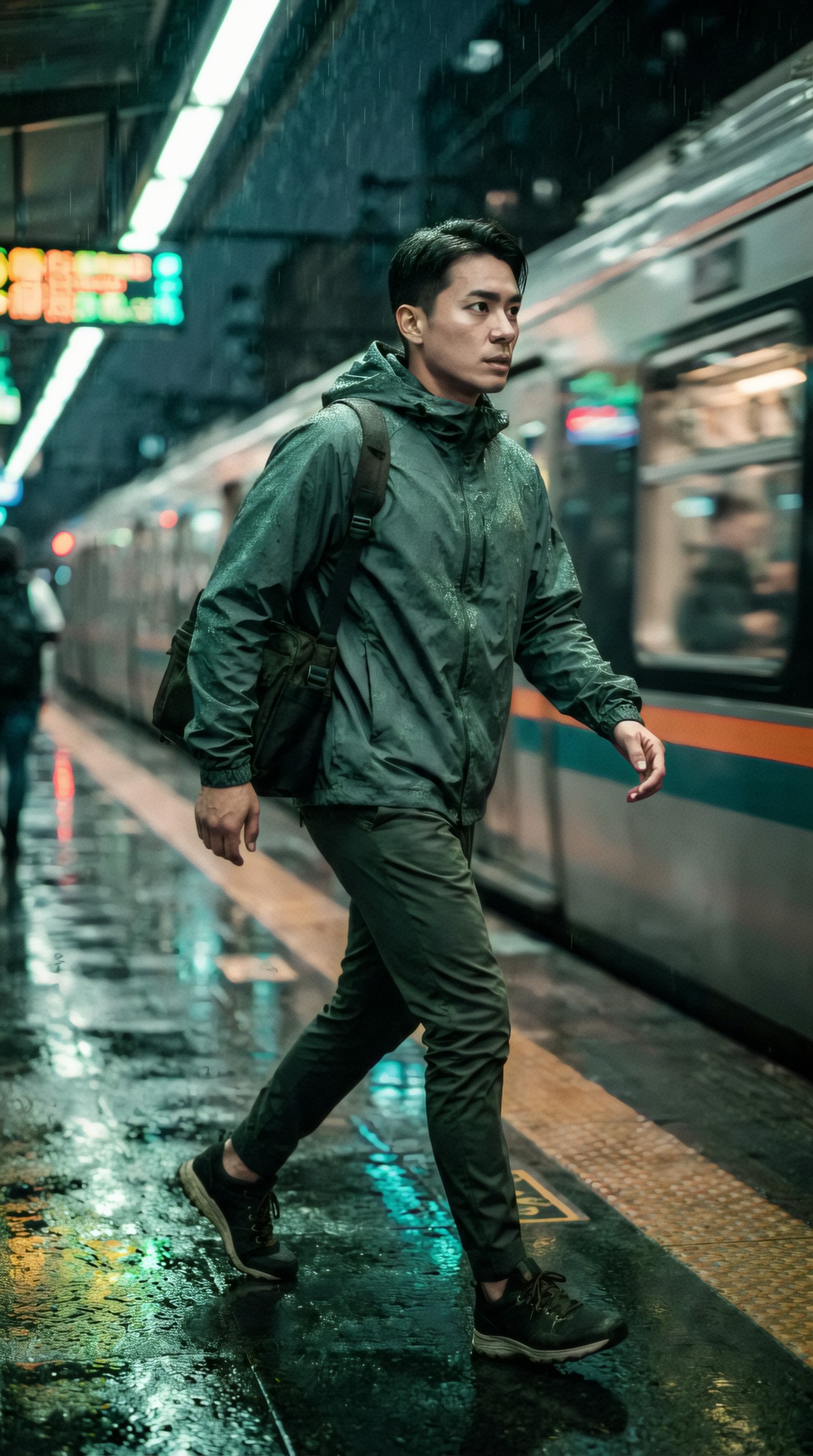
These two prompts come from the same product brief but serve different audience mindsets.
How to turn a campaign brief into a better image prompt
Whether you use a dedicated generator or build your own system prompt, the process is usually the same.
Step 1: Extract the campaign variables
Pull out the essentials:
- product
- audience
- promise
- channel
- visual priority
- emotional tone
- brand cues
Step 2: Translate each variable into visual language
Examples:
- premium → controlled lighting, minimal clutter, refined materials
- affordable family value → warmer environments, approachable expressions, lived-in context
- fast delivery → motion, active handling, time-of-day urgency
- eco positioning → natural textures, daylight, low-plastic visual cues
Step 3: Choose the image type
Decide which of these you need:
- product close-up
- lifestyle scene
- portrait ad
- editorial concept image
- environment-heavy banner
- UGC-inspired social creative
Step 4: Add production detail
This is where most prompts improve dramatically:
- camera body or capture style
- lens and focal length
- lighting setup
- location mood
- wardrobe and props
- composition and cropping
- palette and texture
Step 5: Bake in ad usability
A good ad prompt includes practical direction:
- copy space
- clear product visibility
- simple background if needed
- visual hierarchy
- aspect ratio intent
Use case 4: Food delivery ads that need speed and appetite appeal
Food brands often need a balance of realism and polish. Too cinematic, and the image stops feeling clickable. Too plain, and it lacks appetite appeal.
Brief:
- Service: healthy meal delivery app
- Audience: busy office workers
- Objective: first-order conversion
- Channel: mobile paid social
- Tone: fresh, convenient, trustworthy
Topic: Healthy Meal Delivery Mobile Ad
Genre: Lifestyle Portrait
Camera: Canon EOS R6 Mark II
Lens: 35mm f/2.0
Lighting: Window side light with soft negative fill
Location: Modern office desk by a large city window during lunch break
Style: Clean Commercial Look
Final Prompt: Busy office worker opening a healthy meal delivery container at a modern desk beside a large city window, smartphone with delivery app interface placed nearby, fresh grain bowl with vivid vegetables and protein in sharp focus, subject smiling with relieved satisfied expression, smart-casual wardrobe, natural seated pose, clean commercial framing for mobile paid social, realistic office context without clutter, bright food colors against neutral desk materials, window side light with soft negative fill for contrast and freshness, Canon EOS R6 Mark II realism, 35mm f/2.0 lifestyle framing, appetizing trustworthy convenience-focused ad image with space for CTA
A second prompt can emphasize delivery speed rather than mealtime.
Topic: Fast Healthy Delivery Campaign
Genre: Product Editorial
Camera: Panasonic Lumix S5II
Lens: 50mm f/1.8
Lighting: Sunset backlight with controlled front fill
Location: Apartment doorway in a modern residential building
Style: Modern App Advertising
Final Prompt: Fresh healthy meal delivery bag being handed to a young professional at a modern apartment doorway, branded packaging visible, subject in relaxed workwear receiving the order with pleased surprised expression, subtle motion suggesting recent arrival, warm sunset backlight outlining figures with controlled front fill preserving packaging detail, clean residential background with muted concrete and wood textures, vibrant greens and warm orange food accents, composition tailored for conversion ad with clear focal hierarchy, Panasonic Lumix S5II look, 50mm f/1.8 natural depth, polished app advertising image focused on convenience and freshness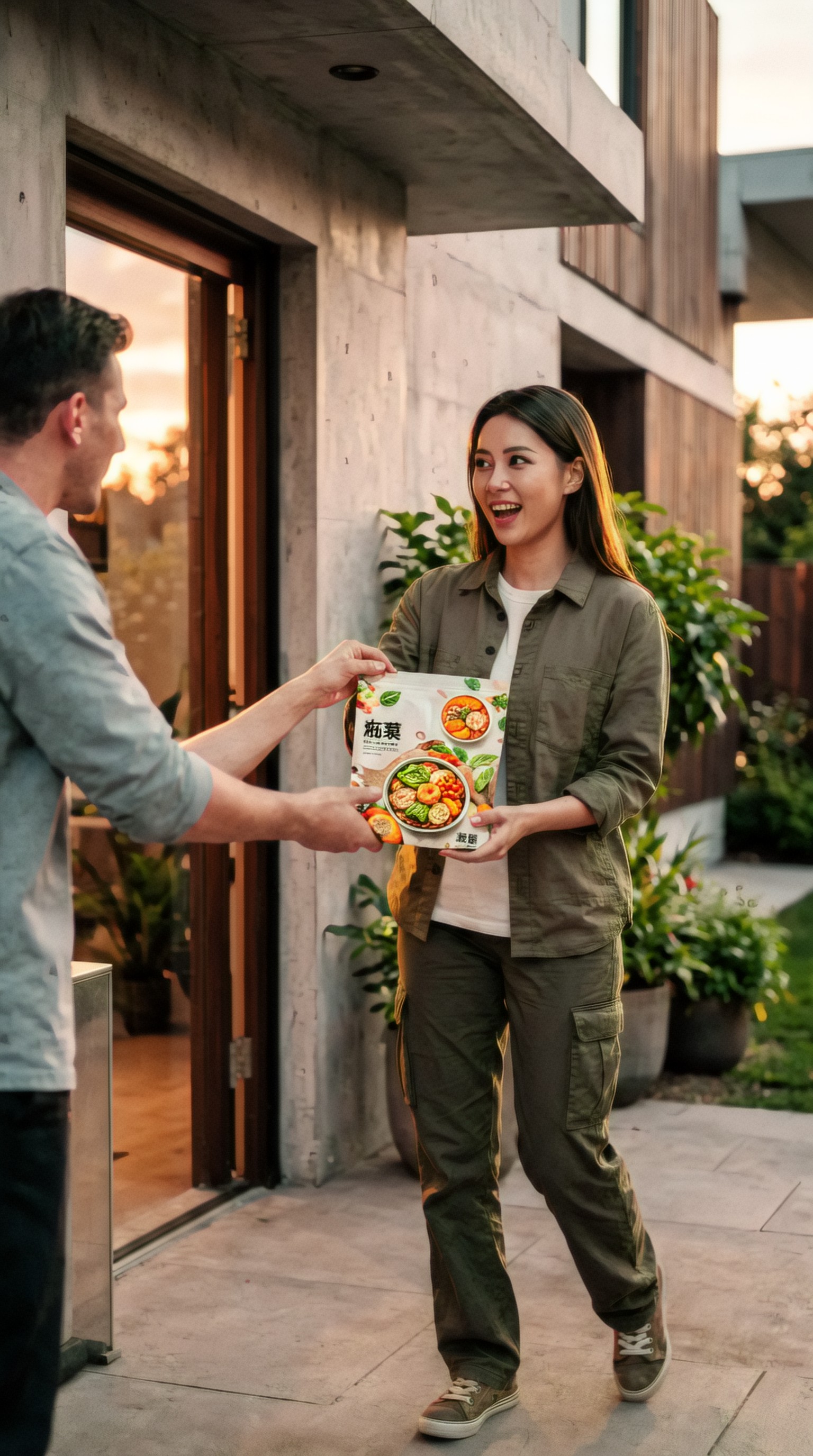
Features worth paying for in an ad campaign prompt generator
If your search intent is commercial investigation, this is where tools start to separate.
Strong brief-to-prompt mapping
The tool should not just “enhance” text. It should infer missing visual details from campaign inputs in a sensible way.
Preset ad formats
Helpful presets include:
- product launch
- paid social lifestyle ad
- e-commerce hero
- beauty close-up
- fashion editorial ad
- seasonal campaign
- app promotion
Brand voice or style memory
Useful for agencies and in-house teams running repeated campaigns.
Variation controls
You should be able to generate:
- safer version
- more premium version
- more direct-response version
- younger audience version
- studio version vs lifestyle version
Negative prompt guidance
For ad work, this matters. You may want to avoid:
- distorted hands
- cluttered packaging surroundings
- unreadable labels
- over-stylized backgrounds
- extra products not in SKU
Export-ready structure
The best outputs are easy to copy into Midjourney, Flux-based workflows, SDXL interfaces, or internal creative docs.
Use case 5: Travel and hospitality ads need mood with conversion clarity
Travel prompts often drift into generic postcard imagery. Ad prompts need stronger positioning.
Brief:
- Product: boutique beach resort
- Audience: couples 30–45
- Goal: summer bookings
- Channel: Meta ads and landing page header
- Tone: intimate, elevated, relaxing
Topic: Boutique Beach Resort Booking Campaign
Genre: Cinematic Travel
Camera: Sony FX3 cinematic capture style
Lens: 40mm f/2.5
Lighting: Sunset backlight with beach reflection
Location: Private beachfront cabana at a Mediterranean-style resort
Style: Elegant Resort Editorial
Final Prompt: Stylish couple in refined resort wear walking barefoot toward a private beachfront cabana at sunset, soft linen garments moving in the sea breeze, relaxed affectionate body language, warm intimate smiles, glowing ocean reflection lighting their silhouettes, boutique resort architecture and calm shoreline in the background, elegant resort editorial framing with generous sky and copy space for booking message, palette of sand, coral, cream, and deep turquoise, tactile linen and wood textures, cinematic warmth, Sony FX3 capture style, 40mm f/2.5 immersive composition, premium hospitality campaign image designed for summer conversion ads
For a homepage hero, the generator might remove some motion and make the scene more spacious.
Topic: Luxury Resort Landing Page Hero
Genre: Luxury Campaign
Camera: Hasselblad X2D 100C
Lens: 55mm f/2.5
Lighting: Golden hour
Location: Infinity pool terrace overlooking a calm coastal bay
Style: High-End Travel Advertising
Final Prompt: Serene luxury resort terrace with infinity pool overlooking a calm coastal bay at golden hour, elegantly dressed couple seated at the pool edge with relaxed posture, subtle connection rather than overt pose, upscale cocktail table styling, airy composition with broad negative space for website headline, warm amber sunlight across stone surfaces, soft ocean haze in the distance, palette of cream, sea blue, pale terracotta, and gold, rich material detail in water, stone, and fabric, Hasselblad X2D 100C medium-format clarity, 55mm f/2.5 balanced perspective, polished high-end travel advertising hero image
Common mistakes prompt generators make for advertising
Not every generator marketed to marketers is actually useful. Watch for these recurring problems.
Overwriting the prompt with style words
If the output is mostly adjectives like “stunning, vibrant, amazing, highly detailed,” it is not doing enough strategic work.
Ignoring product visibility
Many prompts create mood but bury the product. Ads usually need a clearer focal hierarchy.
No sense of channel
An image for a billboard mockup is different from one for a mobile feed ad. The generator should reflect that.
Generic demographics
“Woman using product” is too broad. Better prompts imply audience through wardrobe, setting, posture, and routine.
Repetitive visual setups
If every output defaults to the same studio portrait, the generator is limiting campaign range.
Use case 6: SaaS and app promotion can still benefit from image prompting
AI ad visuals are not only for physical products. App and SaaS campaigns often need concept visuals that communicate use, ease, and context.
Brief:
- Product: team scheduling app
- Audience: small business owners
- Goal: free trial signups
- Channel: LinkedIn and Meta
- Tone: efficient, calm, professional
Topic: Small Business Scheduling App Ad
Genre: Clean Business Editorial
Camera: Nikon Zf
Lens: 50mm f/1.8
Lighting: Soft daylight with practical office lamp accent
Location: Contemporary small business office with scheduling board and laptop workstation
Style: Modern Productivity Campaign
Final Prompt: Small business owner standing beside a clean workstation reviewing a team scheduling app on a laptop and smartphone, composed confident posture, focused but calm expression, smart casual wardrobe, subtle hints of retail or service business operations in the background, clean business editorial composition with clear space for promotional copy, soft daylight from side windows with warm office lamp accent, palette of slate blue, white, and muted wood tones, realistic screen glow without overpowering the scene, Nikon Zf rendering, 50mm f/1.8 natural perspective, professional modern productivity advertising image designed for free-trial conversion campaigns
This kind of prompt helps create ad creative for software that would otherwise rely on generic stock-photo aesthetics.
How to evaluate prompt quality before generating images
You can usually judge a prompt generator before spending much on rendering.
Ask these questions:
- Does the prompt clearly name the subject and campaign angle?
- Is the product or service integrated naturally into the scene?
- Are lighting and location specific?
- Can you imagine the composition before generation?
- Is the audience visible through styling and context?
- Does it account for ad usability, not just aesthetics?
- Could a teammate edit it quickly?
If the answer is no, the prompt likely needs another pass.
Use case 7: Product-first ads for home goods and interiors
Home goods campaigns often need a cleaner composition with controlled styling and clear material rendering.
Brief:
- Product: premium ergonomic desk chair
- Audience: remote professionals
- Goal: conversion for a new model launch
- Channel: website and display ads
- Tone: modern, comfortable, design-forward
Topic: Premium Ergonomic Desk Chair Launch
Genre: Product Editorial
Camera: Phase One XF IQ4 cinematic still capture style
Lens: 80mm f/2.8
Lighting: Large softbox key light with subtle daylight edge light
Location: Minimal architectural home office with oak desk and textured plaster wall
Style: Design-Led Commercial Advertising
Final Prompt: Premium ergonomic desk chair positioned as the hero object in a refined home office with oak desk, textured plaster wall, and curated desk accessories, chair angled three-quarters toward camera to highlight contours, mesh texture, and armrest design, no person in frame, clean design-led commercial styling with spacious negative area for headline placement, palette of warm oak, charcoal, stone, and soft cream, large softbox key light shaping the chair form with subtle daylight edge light from side window, crisp material detail and premium finish realism, Phase One XF IQ4 high-end capture look, 80mm f/2.8 product perspective, polished conversion-focused website hero image
Use case 8: Seasonal retail ads need controlled variation, not full reinvention
One of the strongest reasons to use a prompt generator is seasonal adaptation. You want to keep a winning concept but refresh it for timing.
Brief:
- Product: leather crossbody bag
- Base campaign: urban premium everyday style
- Seasonal variant: autumn collection
- Channel: paid social and email hero
- Tone: polished, warm, wearable
Topic: Autumn Leather Crossbody Bag Campaign
Genre: Street Style
Camera: Canon EOS R3
Lens: 70mm f/2.0
Lighting: Late afternoon golden hour with soft side fill
Location: Tree-lined city avenue with brownstone facades and fallen autumn leaves
Style: Premium Everyday Fashion Advertising
Final Prompt: Fashion-forward woman wearing a tailored camel coat, knit top, and premium leather crossbody bag while walking along a tree-lined city avenue in autumn, relaxed confident stride, subtle half-smile, bag positioned clearly across the torso as hero accessory, brownstone facades and fallen leaves softly blurred in the background, late afternoon golden hour light with gentle side fill enhancing leather texture, warm palette of camel, chestnut, rust, and cream, premium everyday fashion advertising composition with room for seasonal message, Canon EOS R3 clarity, 70mm f/2.0 flattering compression, polished retail campaign image with tactile material richness and elegant city mood
This is where the best prompt generator for AI ads saves time: it preserves the campaign identity while changing season, palette, wardrobe, and atmosphere.
A practical workflow for teams
If you handle campaigns regularly, use a repeatable workflow instead of prompting from scratch every time.
Brief intake
Create a lightweight template with:
- product
- audience
- channel
- objective
- must-show elements
- brand style references
- prohibited elements
Prompt generation
Use your chosen generator to produce 3 to 5 distinct visual routes:
- product-first
- lifestyle-first
- premium editorial
- direct-response social
- seasonal or audience variant
Prompt review
Check for:
- visual hierarchy
- product visibility
- realism level
- channel fit
- editability
Image generation
Render a small batch first. Do not overproduce before checking whether the prompt logic holds.
Prompt refinement
Update prompts based on results:
- simplify crowded scenes
- improve hand positioning
- increase packaging prominence
- adjust camera distance
- add clearer copy space
Campaign scaling
Once one route works, create controlled variants rather than entirely new concepts.
So, what is the best prompt generator for AI ads?
The best option is the one that behaves less like a random prompt improver and more like a creative strategist with production awareness. It should help you move from a short campaign brief to a prompt that includes:
- a clear visual concept
- audience-aware styling
- campaign-appropriate composition
- channel-specific framing
- realistic lighting and environment
- product or service hierarchy
- easy room for iteration
In other words, the best prompt generator for AI ads is not just a writing tool. It is a conversion layer between marketing intent and image production.
If you are comparing tools, prioritize structured inputs, editable outputs, campaign variation controls, and prompts that make practical image decisions. That is what turns a vague brief into something your image model can use—and something your creative team can actually ship.
Final takeaway
A solid ad campaign prompt generator should reduce ambiguity, not add decoration. When you feed it a simple brief, it should return prompts that are production-ready, visually specific, and aligned with campaign goals.
If a tool helps you consistently turn brief into image prompt AI outputs for product launches, paid social, fashion ads, beauty campaigns, app promotions, and hospitality creative, it is doing real work. If it only makes prompts longer, keep looking.
For ad teams, the winning standard is simple: better prompts should lead to faster testing, clearer creative direction, and fewer unusable generations.
<!-- zview-hands-on-backfill -->
Practical Test Notes
What this article should verify
- Whether a prompt generator can turn a short campaign brief into a usable first-pass ad prompt without losing core strategy inputs like audience, offer, channel, and brand tone.
- Whether the generated prompt adds practical image direction, such as framing, lighting, camera feel, styling, and negative space for copy, rather than only piling on descriptive adjectives.
- Whether the same brief structure can support multiple ad formats or product categories while keeping product focus and visual consistency.
- Whether outputs based on these prompts appear specific enough for creative iteration, not just attractive but generic lifestyle imagery.
Result checks
For this test setup, the main result checks should focus on what to inspect in the existing or future generated images:
- Product clarity: packaging readable enough for ad use, hero product clearly foregrounded, label orientation sensible, no melted edges or warped containers.
- Face stability: natural eyes, mouth, and skin texture; believable age cues; no uneven facial symmetry in beauty or wellness portraits.
- Hand risk: fingers, grip, and product handling should look plausible, especially in serum and drink-mixing scenes.
- Lighting control: light direction should match the prompt, with clean highlights on bottles, glass, and skin rather than muddy or flat rendering.
- Background consistency: props, surfaces, and room styling should support the campaign without distracting from the offer.
- Style consistency: wellness scenes should stay clean and commercial; skincare scenes should hold premium clinical cues without drifting into editorial fantasy.
Failure risks
The main failure risks are predictable. A generator may translate strategy into vague luxury language but miss the actual ad objective. Product prompts can also drift into lifestyle-heavy scenes where the item becomes secondary. Beauty outputs are especially exposed to over-retouched skin, unstable hands, and reflective packaging artifacts. Another weak point is channel mismatch: a prompt may sound polished but still ignore crop safety, copy space, or aspect-ratio needs. If the input brief is too thin, the generator may fill gaps with generic wellness props, generic models, or inconsistent brand styling.
Practical recommendation
Use this setup if you need a structured starting point for paid social, landing page heroes, or internal concept rounds. Avoid relying on it as the final creative brief when brand compliance, exact packaging accuracy, or multi-asset consistency is critical. The detail that matters most is not the camera jargon; it is whether the prompt generator preserves product priority, audience cues, and placement-specific composition in a form your team can iterate quickly.