Saving a ComfyUI workflow as your default is a bet that it will behave on prompts you have not written yet, so the check that matters is not "does it make one good image" but "where does it fail, and is that failure visible?" A practical pre-save test is a small fixed set of probe prompts, each chosen to expose one specific kind of failure, rendered with the same seeds and the same output size every time you change the graph.
This article is a checklist with reasons attached. The example images come from eight probe prompts rendered with Krea2 Turbo on 2026-07-11. They are single outputs, not a recorded comparison of two workflow graphs. No workflow JSON, sampler settings or seed comparisons were saved with them, so this article makes no claim about which graph is better. What the images can do is show what each probe looks like when it catches something, and what a pass looks like.
Freeze the test before you touch the graph
A comparison only means something if one thing changes at a time. The general guidance (untested here) is:
- Keep the probe prompts in a text file and reuse them unchanged. If you rewrite a prompt between runs you cannot tell whether the workflow or the prompt changed the result.
- Use a fixed seed while comparing graphs (the seed widget's "control after generate" set to fixed), and run several seeds only after the graph passes on one.
- Use one output size for every run. All eight images below are 1088 x 1928, a portrait ratio, so anything judged here is judged at that size.
- Change one node setting per run. If you change the sampler and the second pass together, a regression has two suspects.
Eight probes, and the failure each one is there to catch
1. Readable text on an object
Any prompt that contains a label, sign or logo area is a text probe, even if you never asked for words. The skincare-bottle prompt asked for a "precise label area" and no text at all, yet the label came out covered in lettering.
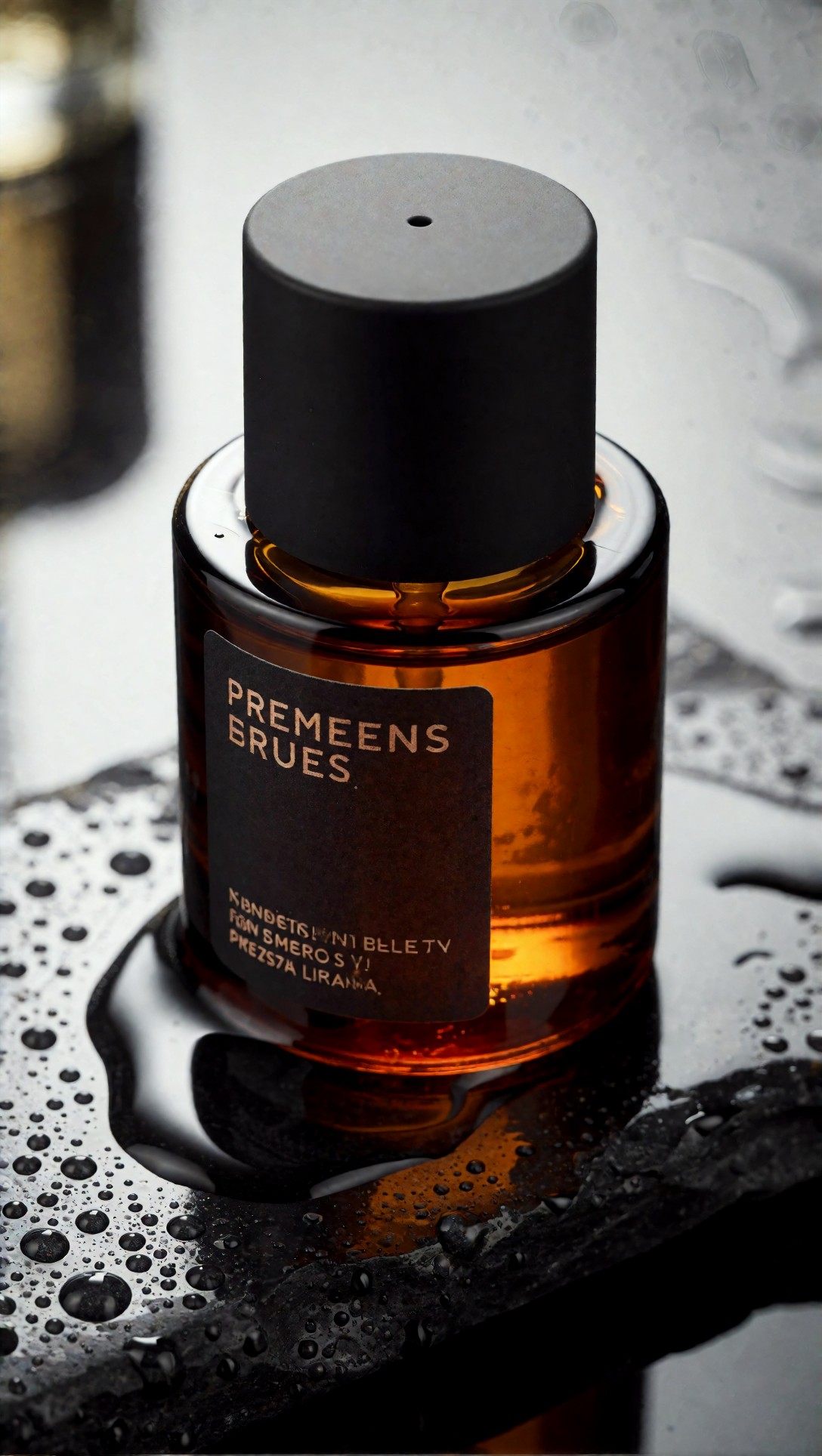
The lettering is garbled: the top line reads roughly "PREMEENS BRUES" and the lines below are not words. The water beads on the stone, on the other hand, stay separate round drops with clear edges, so this probe failed on text and passed on droplets. Why it belongs on the list: if your product or poster work ever shows a label, a workflow that invents fake text needs a rule (leave labels blank, add text in an editor afterwards) before it becomes the default. Whether a different graph would fix garbled text is not something these images test.
2. Hands doing something
A front-facing portrait with hands hidden proves nothing about hands. The barista prompt put both hands on named objects and asked for "believable fingers".
lifestyle image of a barista in a charcoal apron preparing pour-over coffee, both hands visible, one hand holding a matte black kettle, the other steadying a ceramic dripper, rolled sleeves, textured linen shirt, focused downward expression, warm wood counter with beans and folded towel, gentle window side light from the left, soft interior fill preserving hand detail, calm earthy palette, realistic steam, ceramic glaze texture, clean documentary commercial composition, Panasonic Lumix S1R look, 35mm f/1.8 natural perspective, authentic motion and believable fingers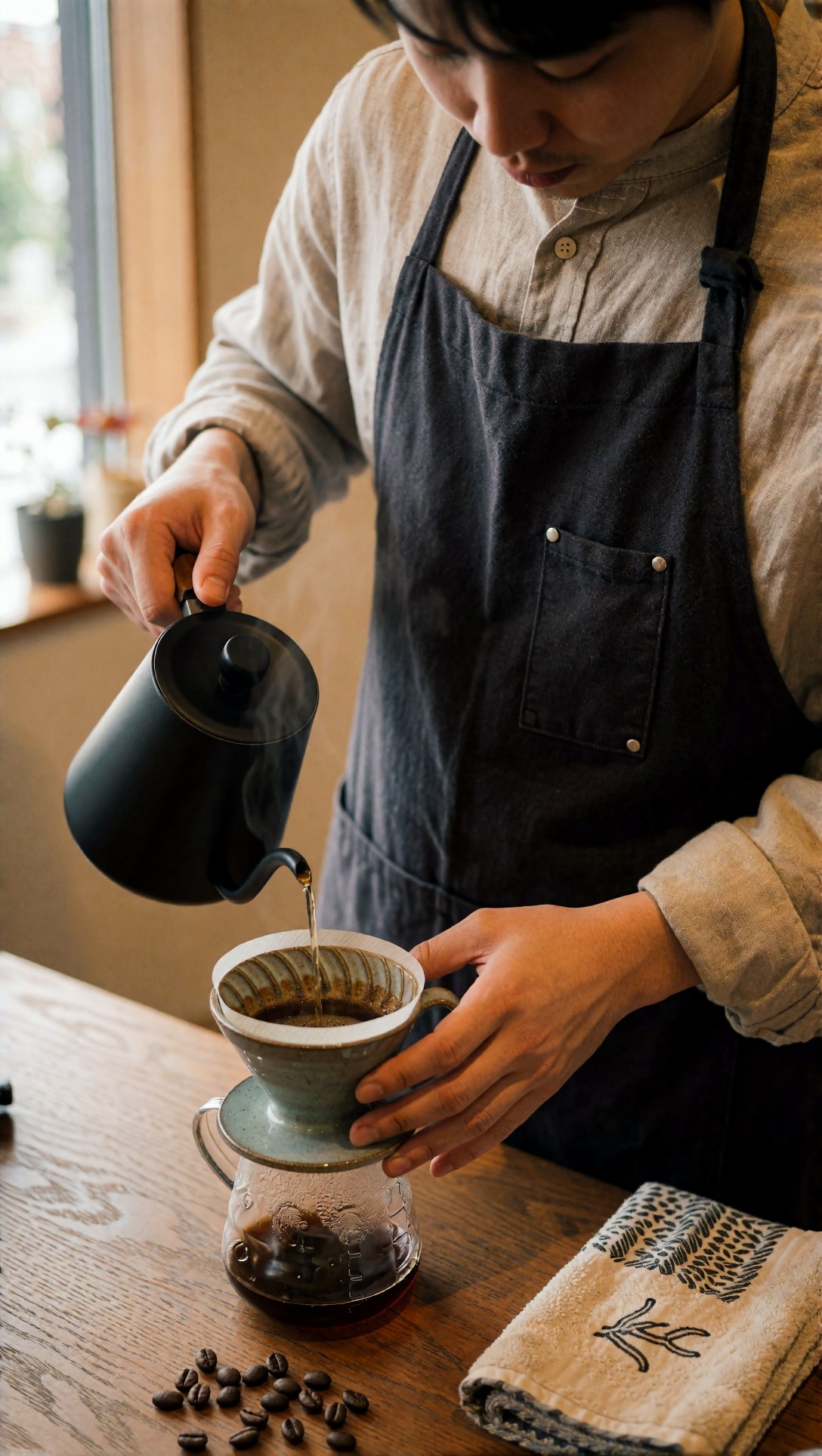
In this output both hands are visible and read as plausible: the left hand grips a wooden kettle handle, the right wraps the side of the ceramic dripper, the gooseneck spout lines up with the water stream, and the steam stays off the fingers. One result is not a guarantee, but it shows the probe is fair: the pose has a clear grip logic you can judge at a glance. A side effect worth noting is framing. The face is cropped at the forehead although the prompt asked for a "focused downward expression", so a framing check belongs here too.
3. Does the image follow the details you actually wrote?
The hotel-lounge prompt is a good example of a workflow that looks fine until you compare the picture to the sentence.
evening lifestyle scene in a boutique hotel lounge, subject seated on a cognac leather sofa wearing a navy double-breasted blazer, cream turtleneck, tailored trousers, polished loafers, one hand resting on a marble coffee table with a glass of sparkling water, relaxed confident expression, warm tungsten lamps in frame balanced against cool twilight window spill, layered interior depth with bookshelves and textured curtains, premium hospitality editorial style, realistic leather and marble surfaces, controlled skin tones under mixed light, Canon EOS R3 look, 28mm f/1.8 environmental composition, natural perspective, cinematic but believable color separation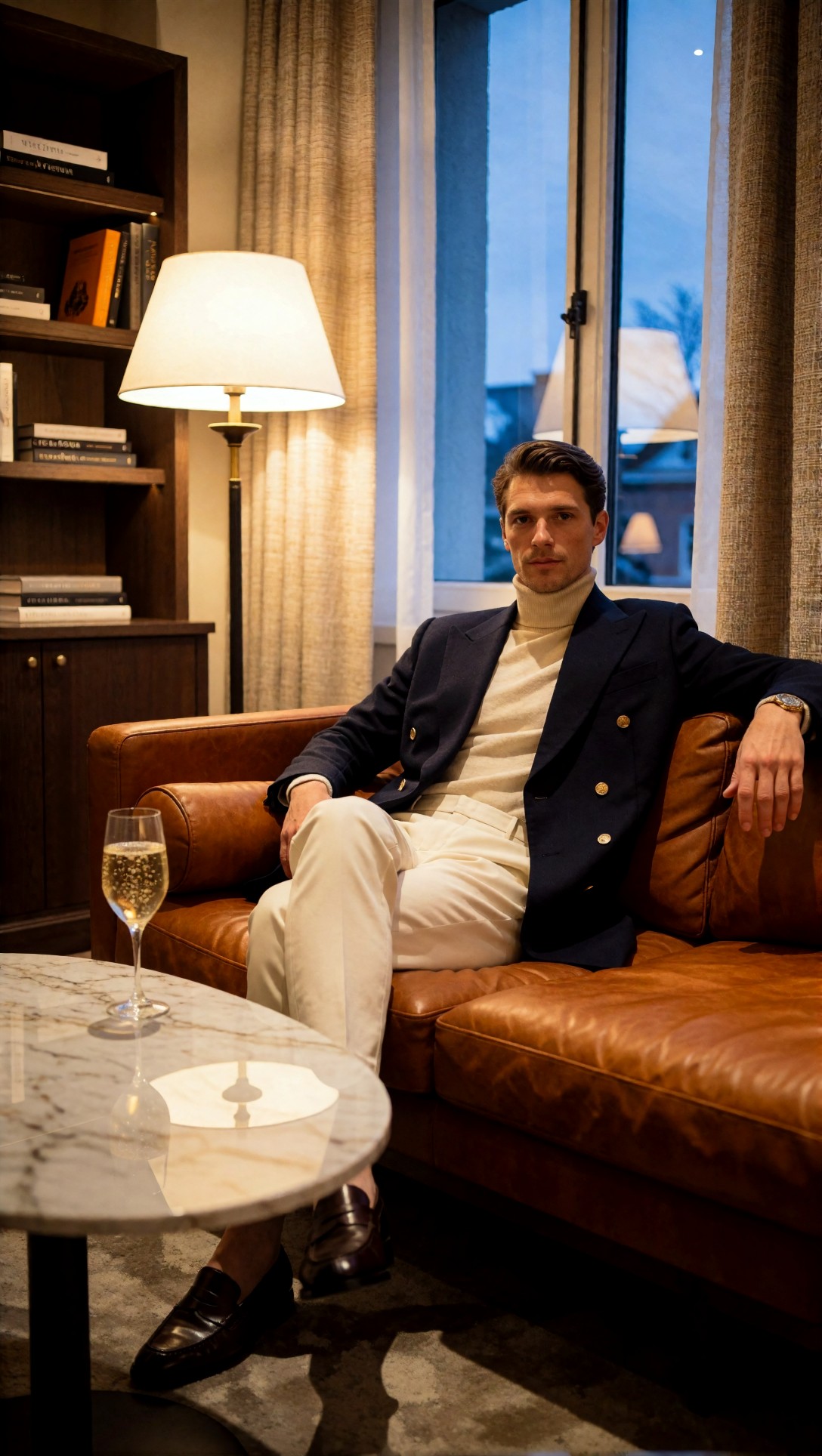
The mixed lighting works: a warm lamp on one side, a blue window on the other, and skin that does not turn orange. Most listed items are present (blazer with gold buttons, turtleneck, loafers, bookshelves, glass with bubbles, marble table). But the instruction "one hand resting on a marble coffee table" was not followed: one hand rests on the sofa back and the other on the knee. The glass stands on the table, not under a hand. This is the kind of small drift you only catch by reading the prompt against the image, item by item, which is why the check is "tick every noun and every action", not "does it look good".
4. Dense prompts with many accessories
The Paris street prompt lists eleven clothing and accessory items.
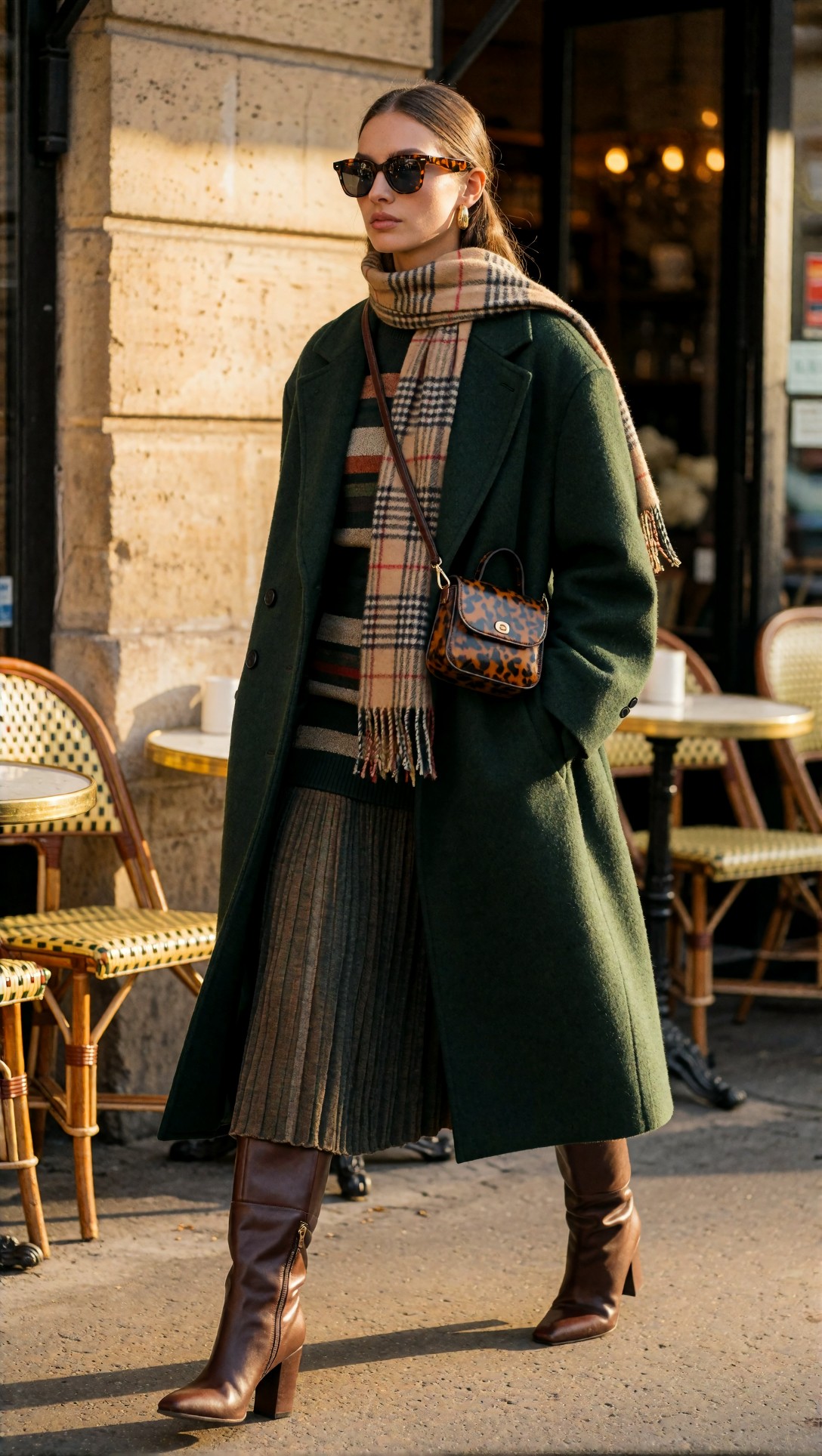
Every garment is there: green wool coat, striped knit, pleated skirt, plaid scarf, crossbody bag, tall brown boots, gold hoop earring. The skirt pleats stay orderly and the bag strap runs logically over the scarf. One instruction slipped: the prompt said sunglasses "pushed onto the head", but they sit on the face. So a dense-prompt probe can pass on items and still fail on placement. The bag's leopard-print pattern was never requested, which is fine here, but it shows the model fills unspecified details by itself.
5. Neon and mixed lighting with a hand-held prop
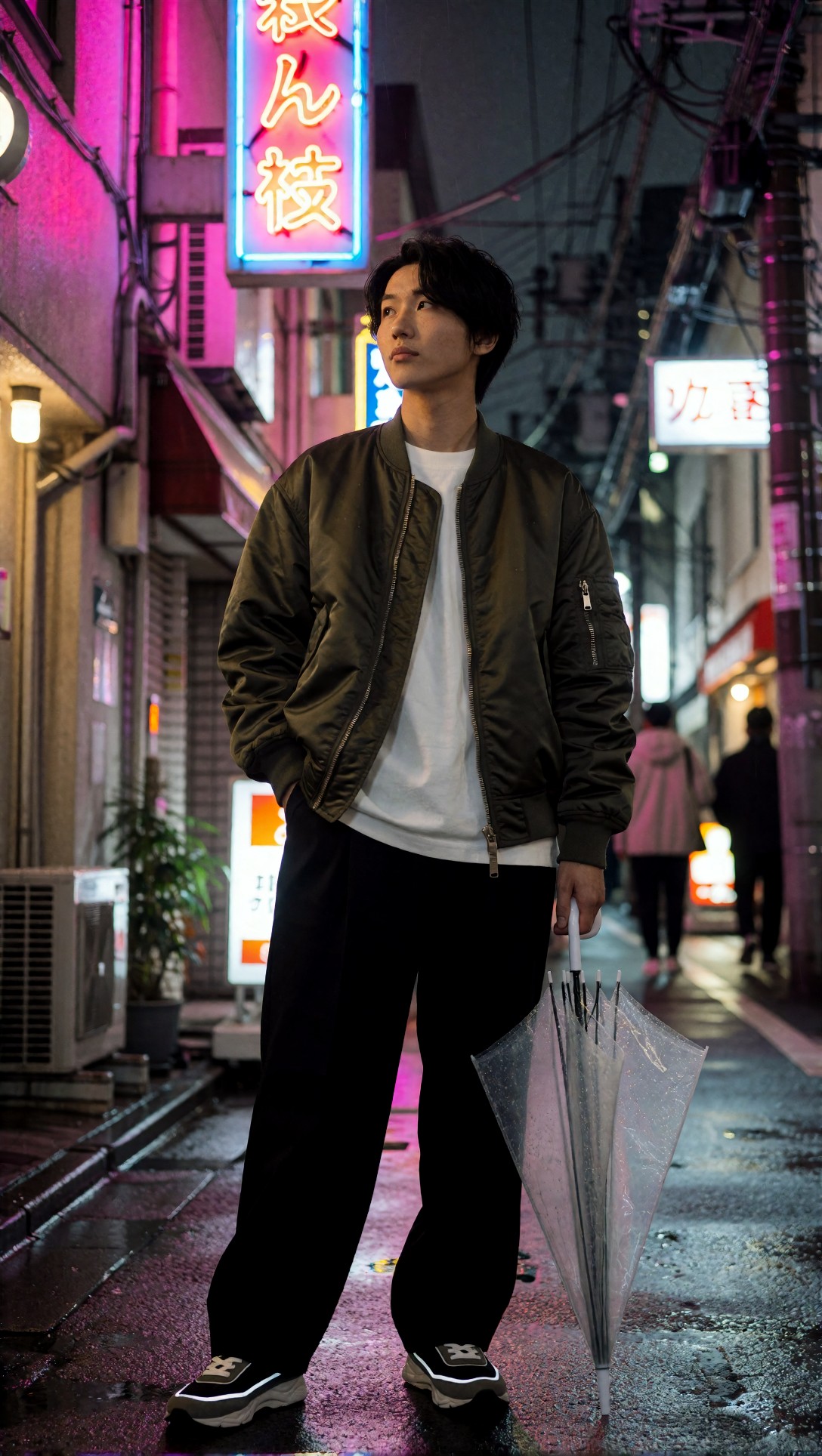
The prompt asks for one hand in a pocket and the other holding a transparent umbrella. Both happen: the left hand is in the pocket, the other hand holds the umbrella handle, and the umbrella is closed and translucent. Pink and blue neon, wet pavement and blurred passers-by give a layered background without swallowing the subject. The signs carry Japanese-looking characters that are not a legible sentence, so treat signage like the label in probe 1: a place where garbling can hide in the background.
6. Material separation: satin, wool, velvet
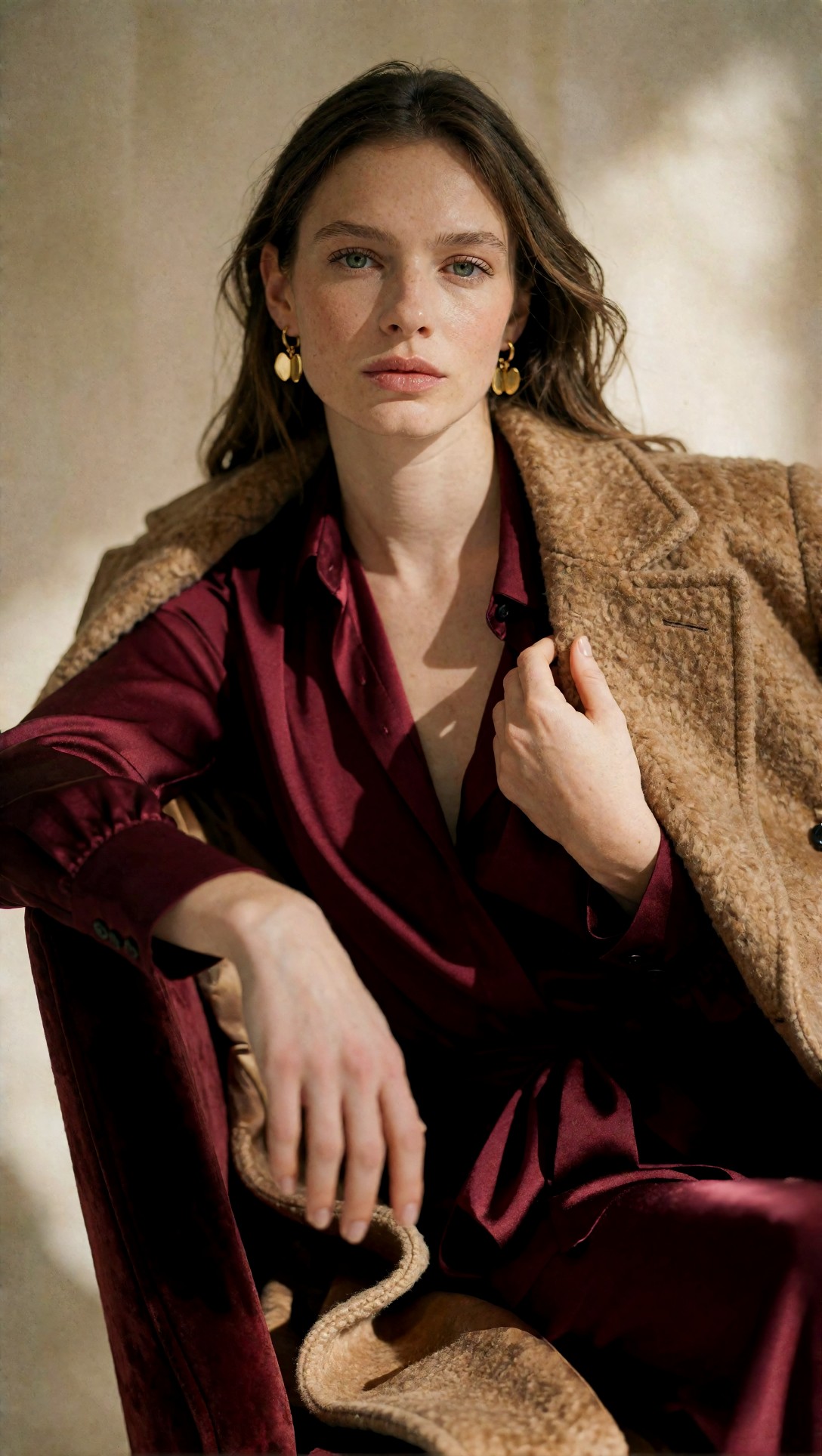
The prompt asked for "visible satin sheen distinct from wool texture". The blouse does read as glossy satin, and the burgundy chair reads as velvet. The coat, however, looks like a fluffy, curly-textured fabric (closer to boucle or teddy than to smooth wool). That is not necessarily wrong, since "textured camel wool" allows it, but it is exactly the moment to decide whether the default should be trusted for a "smooth wool" request. A material probe tells you which words the model reads literally.
7. Composition and garment structure in motion
The remaining two probes (a trench-coat rooftop walk and a handbag portrait) are worth keeping in a probe set for garment construction: coat belts, buttons, stitching, hardware. In the rooftop output the trench belt, cuffs and lapels stay coherent while the coat moves, and in the handbag output the stitching and gold lock hold together. Both are passes in the images checked, and both hide hands (in pockets, or partly behind the bag), so they do not replace probe 2.
8. The second pass
Hires fix and upscale stages are a standard place for a default graph to go wrong, but none of the eight images here were compared before and after a second pass, so this article has no evidence either way. The general advice (untested) is to compare the same seed with the second pass on and off at full size, looking at skin texture, stitching and small text, and to lower the second pass denoise if faces or fabrics are being redrawn. Test it on a clean crop rather than a thumbnail, where oversharpened texture looks like detail. The [upscaler](/upscaler/en) is an alternative if you would rather keep the graph simple and upscale separately.
What eight single images cannot tell you
Two limits matter. First, each probe ran once, so none of these outcomes says how often a workflow would pass. A default needs the same probes across several seeds before you believe it; a workflow that passes the hands probe on one seed and fails on the next two is not a pass. Second, a saved default should be judged on the failures you can predict. If a graph's failures are garbled labels and small prompt drift, you can work around those. If failures change unpredictably when you nudge CFG or steps, it will be hard to use as a daily baseline.
Record the settings before you save
The last check is administrative but saves real time. Before you overwrite your default, note the model name, sampler, steps, CFG and the probe-set results somewhere next to the graph. As general guidance (untested here), ComfyUI embeds the workflow in PNG outputs by default, so keeping PNGs of the probe runs lets you reload the exact graph later; the JPEG files used on this page do not carry it. If you want probe prompts to start from, the [Prompt Lab](/promptlab/en) can draft them, and the [image generator](/create/en) is where these examples were made.
FAQ
How many probe prompts are enough? There is no verified number. The eight here cover text, hands, prompt-following, accessories, lighting, materials, garment structure and upscaling. Add a probe when you notice a failure that none of them would have caught.
Should I keep a separate fast graph? That is a workflow preference, not something these images test. If quick seed searching matters to you, keep a lighter graph for ideas and apply the checklist only to the one you save as default.
Basis for this article
- Model: Krea2 Turbo (from the generation records), images generated 2026-07-11, all 1088 x 1928.
- Checked: I opened eight images and read their recorded prompts; six are shown. Their prompts are quoted exactly.
- Not recorded: any ComfyUI graph, sampler, steps, CFG, denoise or seed settings. Everything about those settings is general guidance, marked untested.