If you want to know which ComfyUI nodes improve output, start from the defect you see, not from the node list. A node earns its place only if you can point to a flaw it removes. The six images below are single-pass outputs from Krea2 Turbo, and they show which flaws are common. Several of them cannot be fixed by any node that touches pixels or latents. The node advice in this article is general ComfyUI knowledge. I did not run any node comparison for this article. The generation records contain a model name and a prompt for each image, and nothing about a graph, sampler, CFG, steps or seed.
Defect 1: the prompt said more than you wrote
The most useful thing in this image set has nothing to do with sampling. Each stored prompt is the written brief followed by the same block of fashion-editorial phrases. For example, the hotel-lobby record ends like this:
..., editorial architectural composition, street-style full-body shot plan, three-quarter outfit editorial framing, shoes and bag visible, layered garments and silhouette clearly readable, trend led fashion mood, outfit-first fashion editorial, complete styling system, visible fabric texture, accessories, shoes, bag, scene context, natural pose or walking action, 35mm editorial photography, realistic street, runway, retail, or lookbook settingThe same tail is on the watch, handbag, chef, beauty and trench-coat records. It is visible in the pictures.
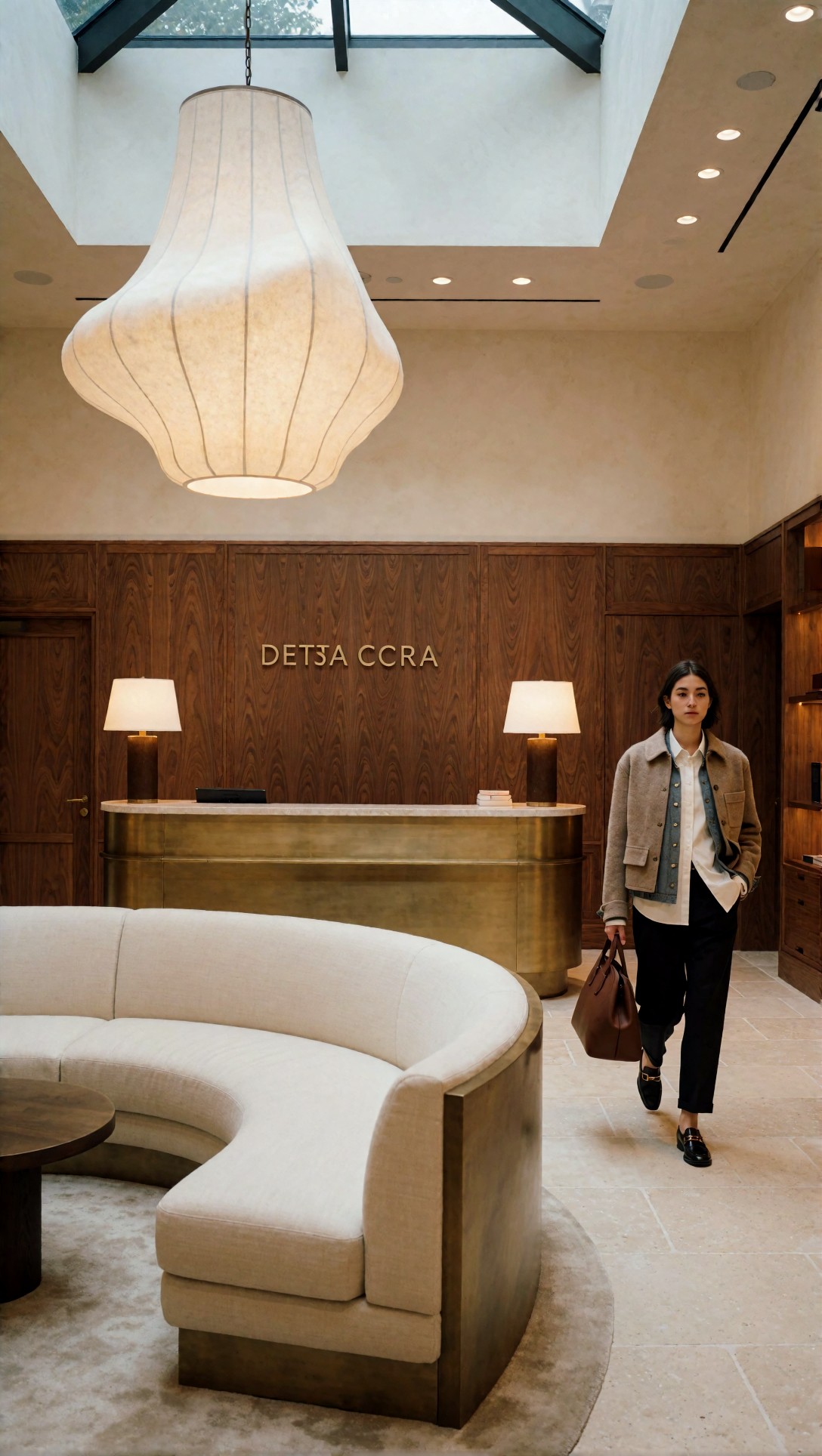
The lobby prompt asked for a hotel lobby with a sofa, pendant light, walnut panels and stone floor. The picture has all of those, but it also has a woman in a jacket, loafers and a leather bag walking through the frame. That matches "shoes and bag visible" and "natural pose or walking action" from the appended block, not the lobby brief. The watch image (below) has a small figure in a white skirt carrying a shopping bag at the bottom edge, and the handbag image has shoes and a mannequin.
In ComfyUI the usual places where prompt text gets combined are text-encode nodes and conditioning nodes such as ConditioningConcat or ConditioningCombine, or a string-join custom node. I cannot tell from these records where the tail was added, and it may have come from outside ComfyUI. As general practice: put a preview or show-text node on the final string and read it before you judge a sampler.
Defect 2: text on surfaces
In the lobby image the brass wall sign reads "DETJA CCRA", and the prompt asked for no sign at all. In the two images below, lettering is also invented or garbled.
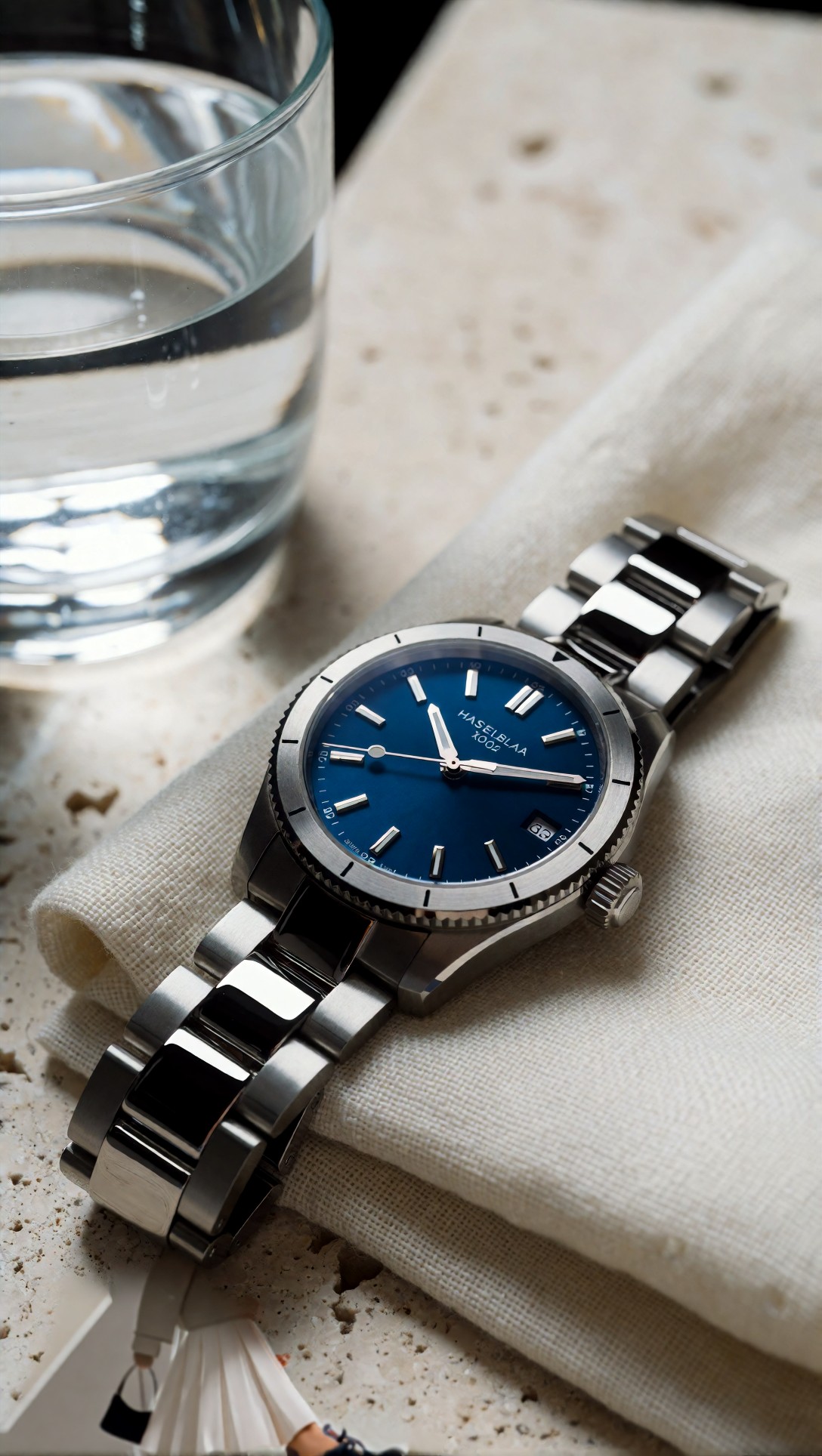
The watch dial reads roughly "HASELBLAA X002". The prompt ended its brief with "Hasselblad X2D 100C look", so a camera name appears to have turned into printed text. The case, bezel, bracelet links and linen weave are coherent, but the letters are wrong.
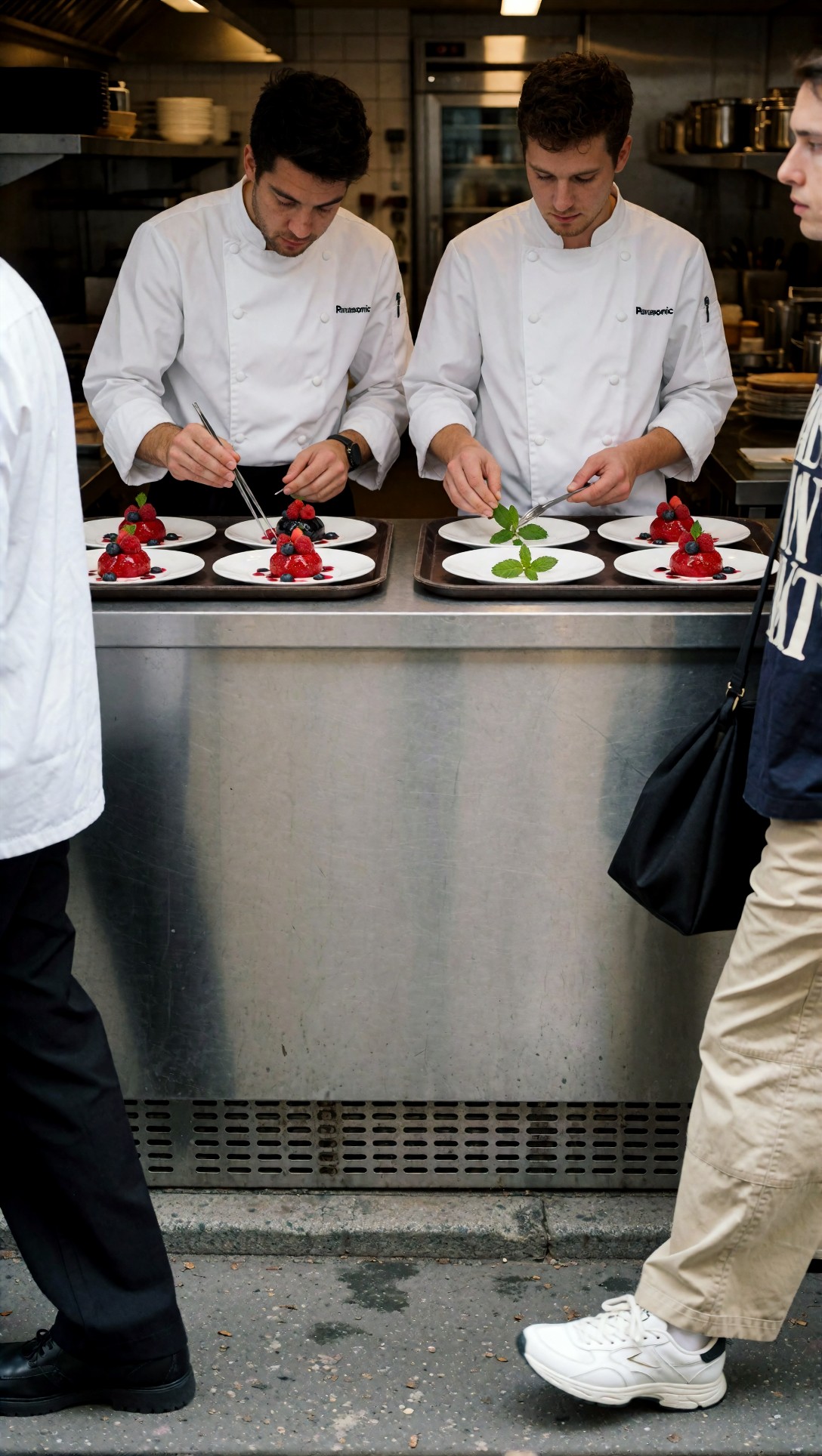
Both chef jackets carry a logo that resembles "Panasonic", which matches the prompt's "Panasonic Lumix S1R II look". The two chefs are separate, each with their own hands and tools, which is what the prompt wanted. But two bystanders walk across the foreground, one in a navy shirt with broken print, and the steel counter fills the lower half. The prompt asked for an open kitchen, not a street-facing one.
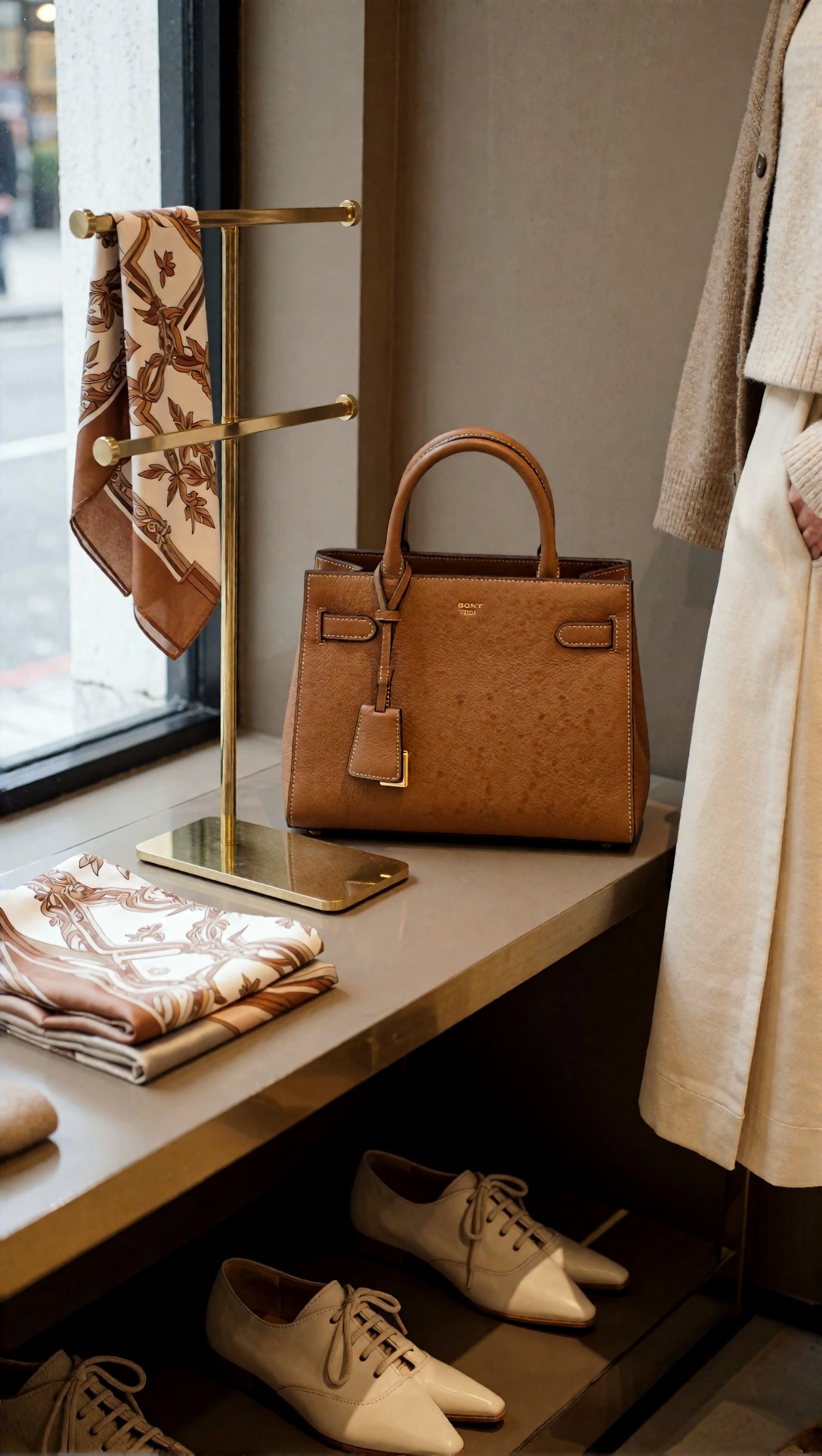
The handbag carries a small gold logo that looks like "SONY", after "Sony A1 look" in the prompt. Stitching, strap buckles and the brass stand are clean.
What can a node do about it? Nothing in the sampler or scheduler is a text fixer. The practical options are general, and I have not tested them here. The first is to remove camera and brand names from prompts that contain labels, dials or clothing. The second is to regenerate only the bad region. A common ComfyUI approach is to mask the area, encode the image with an inpainting-style VAE Encode, and resample with a higher denoise on the mask, often wrapped in a crop-and-stitch custom node. Even then, small invented lettering often comes back, so a blank label is often the safer target.
Defect 3: pose and garment structure
Not every image above is flawed. The trench-coat image is the cleanest structural example.
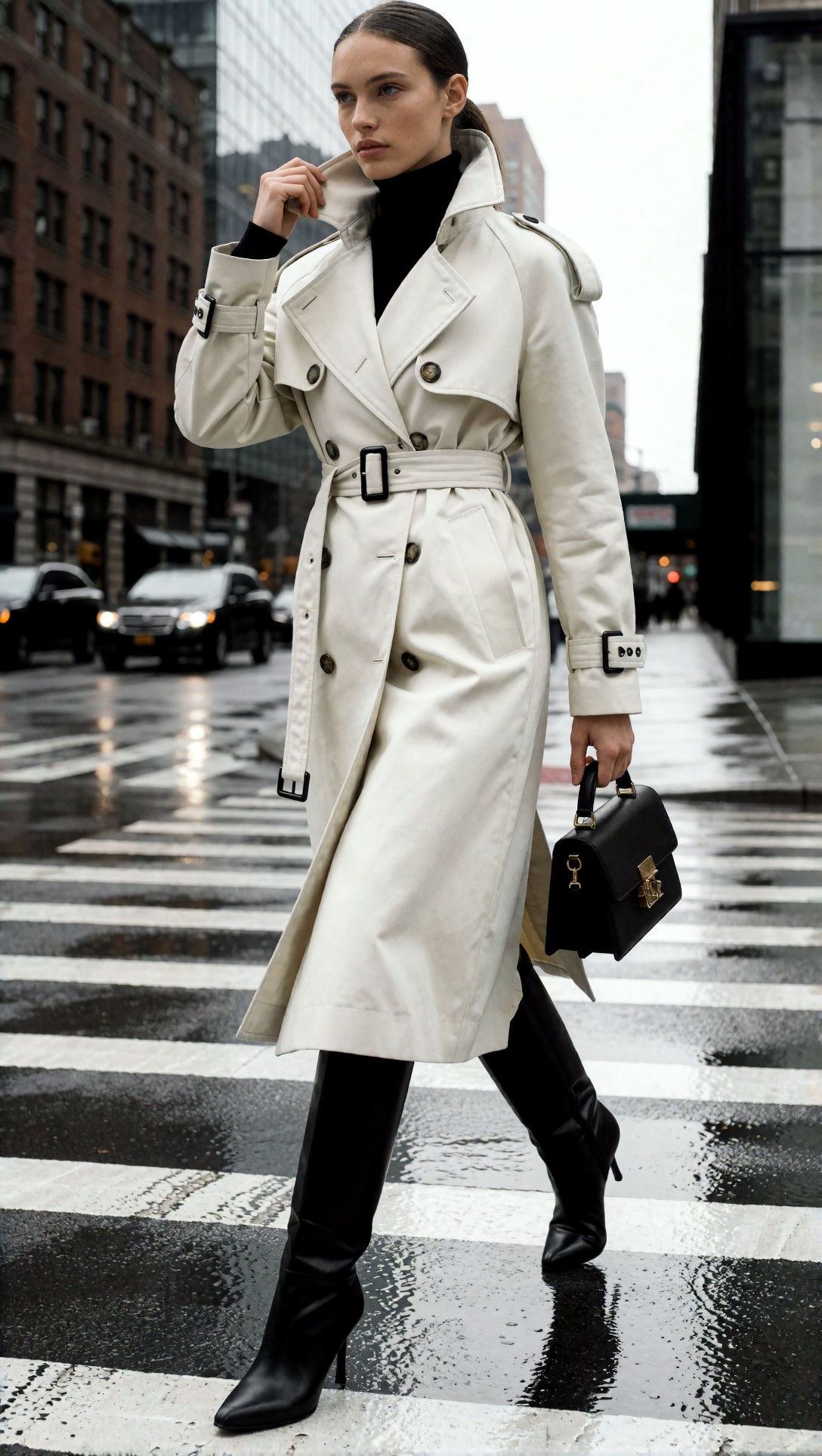
The belt buckle, storm flap, sleeve straps, buttons and hem all read correctly. The hand at the collar and the hand on the bag handle are readable, the boots match in shape, and the wet crosswalk reflects plausibly. The prompt asked for "visible full silhouette, balanced limb proportions", and on this seed that held in a plain prompt-only generation with no guidance node that I know of.
This is a caution for the usual advice that ControlNet is needed for full-body poses. It is a general-knowledge recommendation: pose, depth or edge guidance nodes (the ControlNet apply and preprocessor nodes) help when you need a specific pose, layout or perspective that the prompt cannot fix. One clean image does not show that they are unnecessary, and does not show they are needed either. The records here do not include a guided run.
Defect 4: flat texture
Nodes that add detail are the reason many graphs grow. The beauty portrait is a fair target for the question.
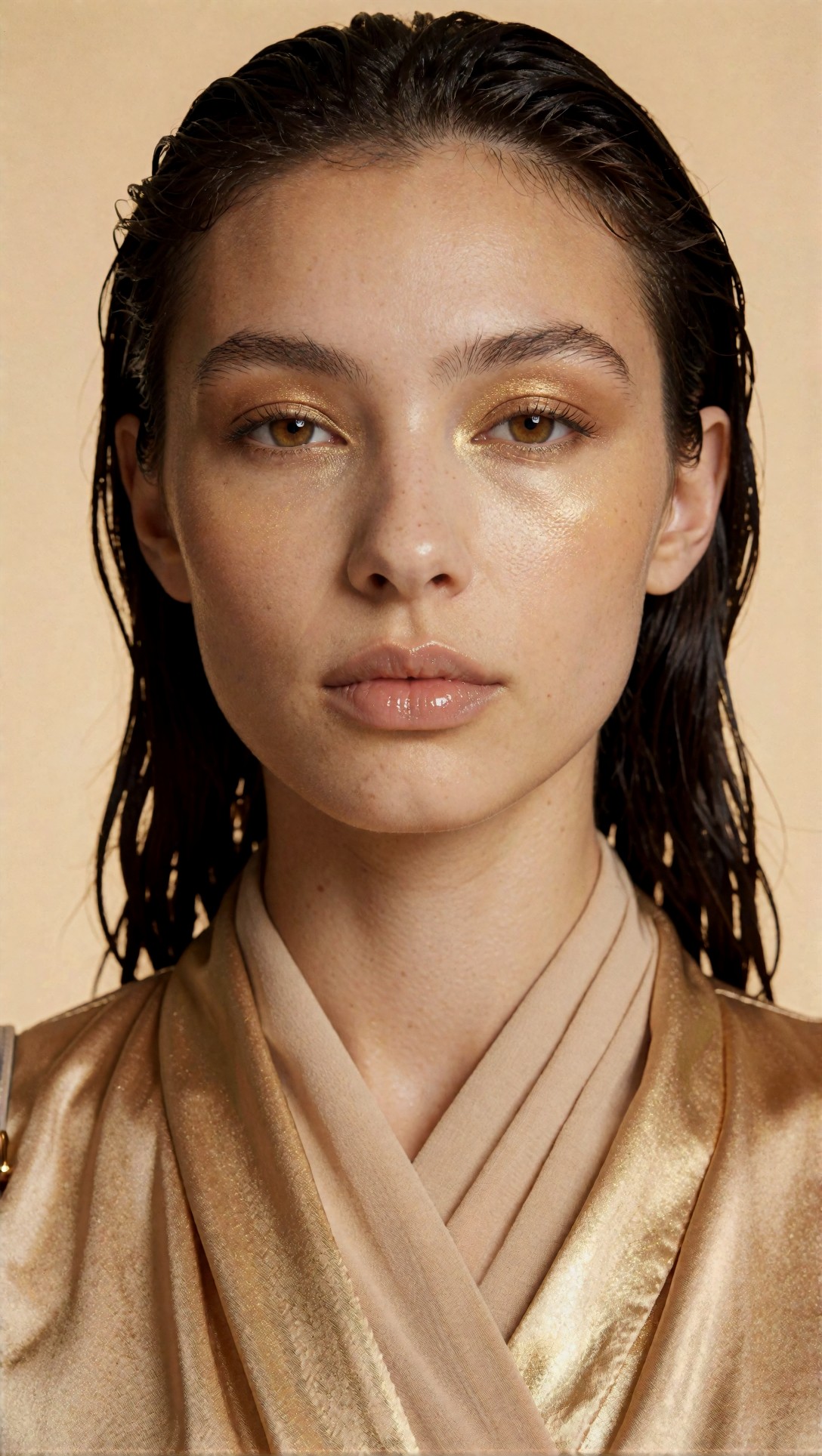
Skin shows freckles, pore-scale texture on the cheeks and nose, individual eyelashes and wet hair strands, all in the single pass. There is also a leftover strap with a gold piece at the lower left edge that the prompt did not ask for, which again points to the appended "accessories, bag" tail. The picture already has texture, so a detail-adding second pass would have little to fix here.
If your own output looks smooth and waxy, the general guidance is this:
- Do composition in the first pass and add texture in a second sampler stage, either by upscaling the latent (Upscale Latent or Upscale Latent By) or by upscaling the decoded image and re-encoding it.
- Keep denoise in the second pass low. High denoise repaints the image instead of refining it, and the face can change.
- Use face-detail custom nodes (for example the Impact Pack FaceDetailer) sparingly. That guidance is widely repeated and I did not test it.
Upscaling belongs at the end. It increases pixel count, so it cannot correct lettering, stray objects or the wrong number of bystanders. For the last step outside ComfyUI, the [Upscaler](/upscaler/en) is an option.
A defect-to-node cheat sheet (general knowledge, untested here)
| What you see | Try first | Node or setting involved | |---|---|---| | Elements you never asked for | Read the final prompt string | Text-encode and conditioning-combine nodes, a preview-text node | | Invented or garbled text | Remove brand/camera words, or inpaint the region | Mask plus inpaint encode, crop-and-stitch | | Wrong pose, layout or perspective | Structural guidance | ControlNet apply and its preprocessor | | Smooth, waxy surfaces | Second pass with low denoise | Latent upscale, second KSampler | | Soft edges at delivery size | Final upscale | Upscale model loader and upscale-image nodes | | Style overpowers the subject | Lower the LoRA strength | Load LoRA (strength model/clip) | | Messy graph, no visible change | Delete the node | Reroute and utility nodes change organization only |
Sampler and scheduler choice and CFG also change images, but their best values depend on the checkpoint. Distilled or turbo-style models typically specify their own settings, so check the model card.
Where to draft and test
Because the first defect in this set came from the prompt, drafting a clean prompt before adding graph complexity is cheap. The [Prompt Lab](/promptlab/en) can help write prompts, and the [image generator](/create/en) lets you check how a brief renders without building a graph.
FAQ
Do more nodes make better images? Not by themselves. Nodes that correct a defect you can see are useful. Others add failure points and, in a large graph, it gets harder to find which one caused a problem.
Can an upscaler fix garbled text? No. It makes existing pixels larger and cleaner, so lettering that is wrong stays wrong.
> What this article is based on. Model: Krea2 Turbo (per the generation records), six of eight images shown, all generated on 2026-07-11. I opened all eight images. The records hold the model name and prompts only, with no ComfyUI graph, sampler, CFG or steps, and it is not recorded whether ComfyUI was used. Everything about nodes is general guidance, not a tested result.