How to Generate Consistent AI Model Photos for E-Commerce Across Angles and Outfits 한국어 요약
이 페이지는 ZView Space의 영어 원문을 한국어 검색 사용자도 이해할 수 있도록 정리한 SEO 요약입니다. 핵심은 단순한 얼굴 중심 이미지가 아니라 패션 에디토리얼, 룩북, 아웃핏, 프롬프트 테스트, 이미지 생성 워크플로우를 실제로 어떻게 구성할지입니다.
핵심 요약
- 원문 주제: How to Generate Consistent AI Model Photos for E-Commerce Across Angles and Outfits
- 목적: AI 이미지 생성에서 outfit, silhouette, fabric, pose, location, camera framing을 더 명확하게 설계합니다.
- 활용 범위: Z-Image Turbo, Krea2 Turbo, Qwen Image, Anima, SeedVR2 같은 이미지 생성 및 업스케일 워크플로우에 적용할 수 있습니다.
- SEO 관점: 제목, 설명, 이미지 alt, 프롬프트 예시가 실제 검색 의도와 맞아야 색인 가능성이 높아집니다.
한국어 사용자를 위한 체크포인트
1. 프롬프트가 얼굴 묘사에만 머물지 않고 전체 스타일과 의상 구성을 설명하는지 확인합니다. 2. 패션 이미지라면 상의, 하의, 아우터, 신발, 액세서리, 소재감, 촬영 장소를 분리해서 씁니다. 3. 생성 결과는 바로 게시하지 말고 디테일, 손, 의상 형태, 배경 일관성, 이미지 품질을 비교합니다. 4. 글 본문에는 실제 테스트 기준과 실패를 줄이는 방법이 들어가야 검색엔진에서 얇은 콘텐츠로 보일 가능성이 줄어듭니다.
원문 미리보기
Creating consistent AI model photos for ecommerce is less about finding one perfect prompt and more about building a repeatable system. If you want the same model to appear believable across front, side, and back angles, while also wearing different outfits wi
---
Creating consistent AI model photos for ecommerce is less about finding one perfect prompt and more about building a repeatable system. If you want the same model to appear believable across front, side, and back angles, while also wearing different outfits without changing identity, body proportions, or brand presentation, you need a controlled workflow.
This guide explains how to create consistent AI model photos ecommerce teams can actually use for product pages, lookbooks, ads, and catalog updates. It covers reference planning, prompt structure, angle control, outfit swaps, QA, and production tactics that reduce drift.
Why consistency is difficult in AI fashion imagery
Most image models are very good at producing attractive fashion photos, but they are less reliable at preserving the same person across many generations. Common failure points include:
- facial features subtly changing between images
- body shape shifting across outfits
- hair length or texture drifting
- skin tone inconsistency under different lighting
- pose and camera angle interfering with garment visibility
- accessories appearing or disappearing randomly
- fabric details changing from one shot to the next
For ecommerce, these inconsistencies matter. Shoppers expect visual continuity when they compare colors, cuts, sizes, and styling options. If the model looks like a different person in each image, the catalog feels unreliable.
What “consistent” means in an ecommerce workflow
For consistent ai catalog images, consistency usually includes five layers:
1. Identity consistency
The face, age range, body type, skin tone, and hair should stay stable.
2. Styling consistency
Makeup, grooming, posing style, and expression range should feel aligned with the brand.
3. Camera consistency
Focal length, distance, framing, perspective, and depth of field should remain controlled.
4. Lighting consistency
A catalog set should not jump unpredictably from harsh editorial lighting to flat ambient lighting unless intentional.
5. Garment accuracy
The outfit should change when needed, but the model should not. Product color, silhouette, texture, and fit must remain recognizable.
Best use cases for consistent AI model photos in ecommerce
Before building your workflow, define where these images will be used. The production setup changes depending on the output.
Concrete use cases include:
- apparel PDPs with front, 3/4, side, and back views
- same model different outfits AI lookbooks for seasonal collections
- marketplace listings that require clean white or neutral backgrounds
- social ad variations using a consistent face across multiple products
- email campaign banners where one brand model appears in multiple wardrobe changes
- virtual try-on support assets with standardized body positioning
- size and fit guides showing the same garment type across consistent poses
- localized catalog variants using the same model identity but different styling direction
The core workflow for ai fashion model consistency
The most reliable process is not “prompt and hope.” It is a pipeline.
Step 1: Create a model identity sheet
Start by defining the person in language precise enough to anchor the generation.
Your identity sheet should include:
- approximate age
- gender presentation
- height and body proportions
- face shape
- skin tone
- eye shape and color
- hair color, parting, texture, and length
- signature expression range
- makeup level
- brand fit: luxury, minimalist, casual, athletic, etc.
Keep this identity sheet unchanged across the entire catalog batch.
Topic: Base ecommerce fashion model identity sheet portrait
Genre: Beauty Campaign
Camera: Canon EOS R5
Lens: 85mm f/1.8
Lighting: Studio butterfly light
Location: Neutral seamless studio in soft warm gray
Style: Clean commercial look
Final Prompt: A professional ecommerce fashion model portrait designed as a master identity reference, woman in her late 20s with oval face, almond brown eyes, medium tan skin, straight dark chestnut hair parted in the center and falling just below the shoulders, balanced symmetrical facial features, natural refined makeup, calm confident expression, no visible jewelry, fitted beige tank top, upright posture, shoulders squared, direct eye contact, shot in a neutral warm gray seamless studio, studio butterfly lighting with soft fill, Canon EOS R5 realism, 85mm f/1.8 compression, sharp skin texture without over-retouching, clean commercial beauty composition, premium catalog realism, consistent facial proportions and natural color accuracy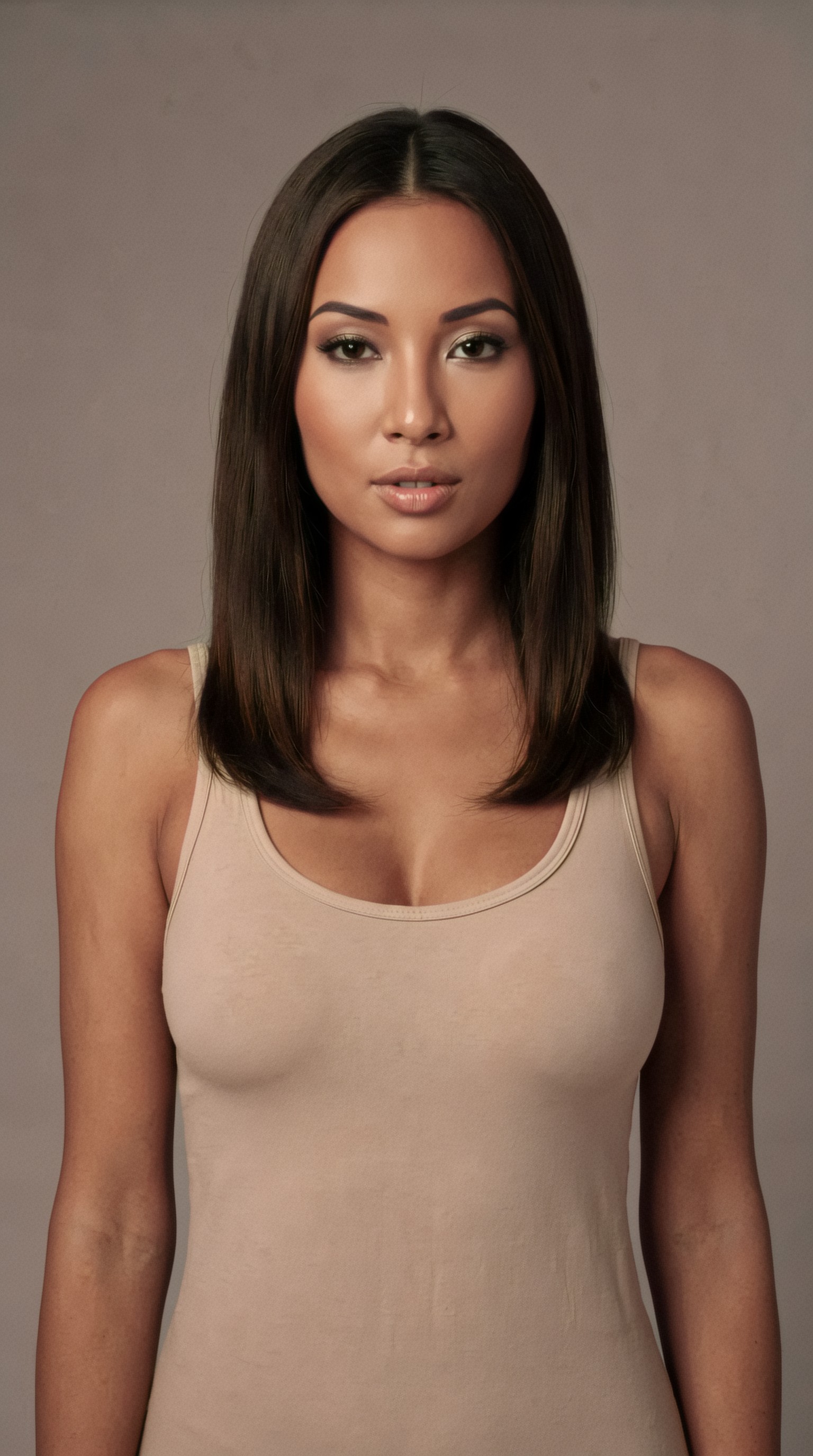
Step 2: Lock a base camera and framing system
A major reason consistent ai model photos ecommerce projects fail is lens drift. If one shot feels like 35mm environmental editorial and the next feels like 135mm studio compression, the model and garment proportions will appear inconsistent even if the face is similar.
For most fashion ecommerce sets, choose a narrow range such as:
- 85mm for portraits and upper-body crops
- 50mm for full-body PDP images
- 70mm to 100mm for clean commercial compression
Also define your framing rules:
- front full-length
- 3/4 left
- side profile
- back view
- waist-up crop
- detail crop
Step 3: Use one lighting family for each batch
If your spring dress catalog uses soft overcast-style diffusion, do not suddenly switch half the set to dramatic sunset rim light unless you are making separate campaign assets.
For catalog consistency, lighting families that work well include:
- large softbox key with fill
- overcast diffusion style daylight
- clean window light with neutral bounce
- controlled white seamless studio lighting
Topic: Full-body ecommerce catalog front view with stable camera and lighting
Genre: Product Editorial
Camera: Nikon Z8
Lens: 50mm f/4
Lighting: Large softbox key light with white fill
Location: White seamless studio with minimal shadow
Style: Clean commercial look
Final Prompt: Full-body front-facing ecommerce apparel image of the same female fashion model with medium tan skin, oval face, almond brown eyes, straight dark chestnut shoulder-length hair center-parted, neutral confident expression, standing naturally with arms relaxed, wearing a tailored ivory blouse tucked into high-waisted sand trousers, photographed on a white seamless studio background with minimal soft grounding shadow, large softbox key and white fill for even fabric visibility, Nikon Z8 commercial realism, 50mm f/4 perspective for accurate garment proportions, crisp texture in cotton and tailoring seams, symmetrical composition, clean catalog styling, premium but neutral color grading, consistent identity and body proportions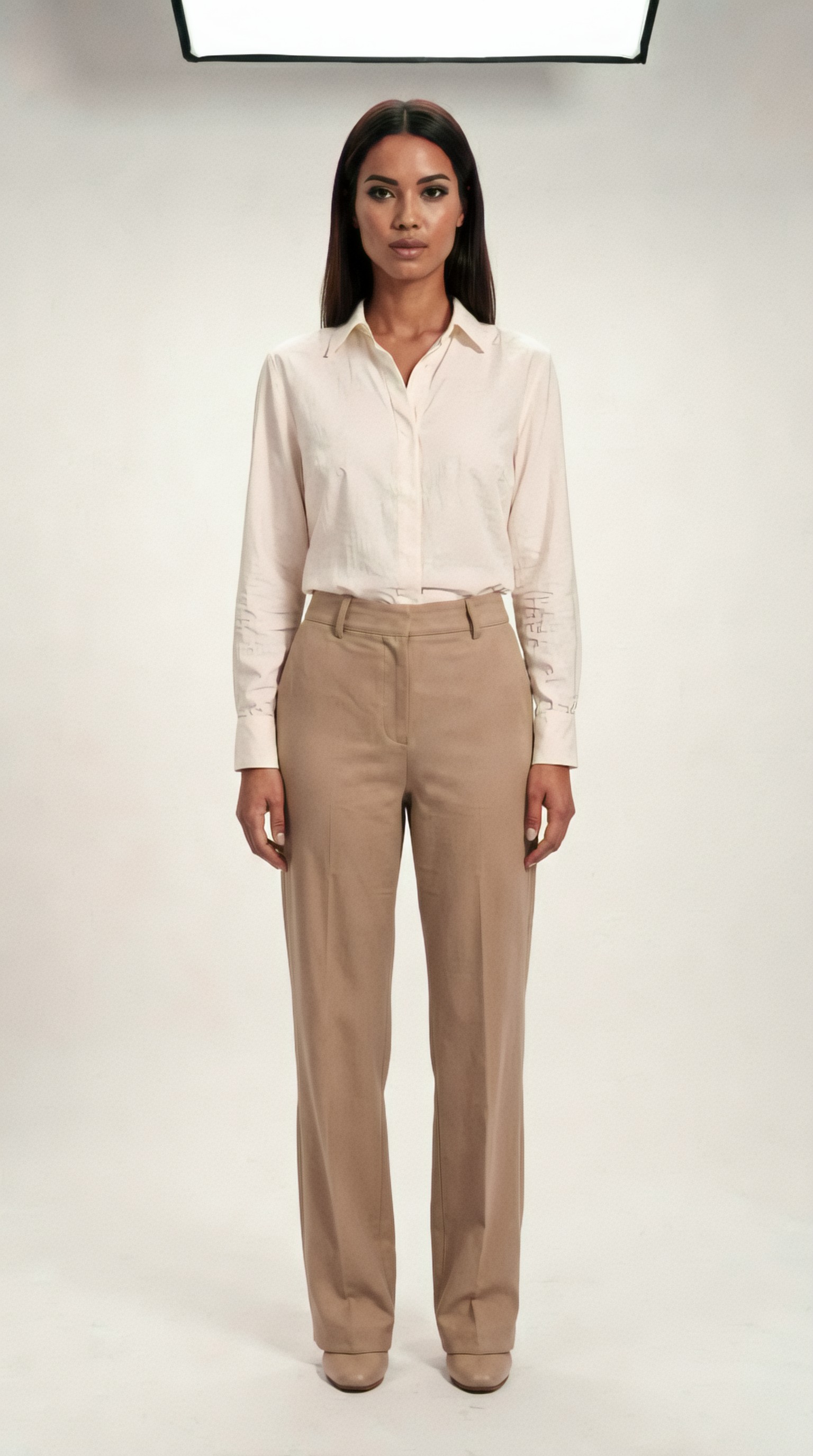
How to keep the same model across angles
The phrase same model different outfits ai often starts with angle control, because once you can maintain identity across views, outfit changes become easier to manage.
Use angle-specific prompts without rewriting the person
Keep the identity language constant. Change only the viewpoint, pose, and framing.
For example, preserve:
- age range
- face description
- hair description
- body type
- skin tone
- expression style
Then only swap angle instructions such as:
- front-facing full length
- 3/4 left turn
- true side profile
- back-facing with head slightly turned
Reduce unnecessary expressive variation
For ecommerce, avoid introducing major emotional changes between angles. A broad laugh in one image and a severe runway look in the next can make the person feel different.
Keep hair behavior controlled
Hair is one of the fastest ways identity drifts. If you need consistency, specify:
- center part or side part
- tucked behind ears or not
- straight, soft wave, or curly
- exact length region such as shoulder-length
Topic: Same ecommerce model in three-quarter angle for apparel listing
Genre: Fashion Editorial
Camera: Sony A7 IV
Lens: 70mm f/3.5
Lighting: Overcast diffusion
Location: Soft gray studio cyclorama
Style: Minimalist catalog editorial
Final Prompt: Three-quarter left angle full-body fashion ecommerce image of the same model, woman in her late 20s with medium tan skin, oval face, almond brown eyes, straight dark chestnut shoulder-length hair with a center part, natural makeup, composed neutral expression, wearing a fitted black knit top and cream wide-leg trousers, body turned slightly left with chin gently toward camera, one foot forward in a natural retail pose, soft gray cyclorama studio, overcast diffusion style lighting for smooth even skin and fabric detail, Sony A7 IV realism, 70mm f/3.5 natural compression, clean minimalist catalog editorial direction, accurate garment drape, premium neutral tones, identity preserved from reference image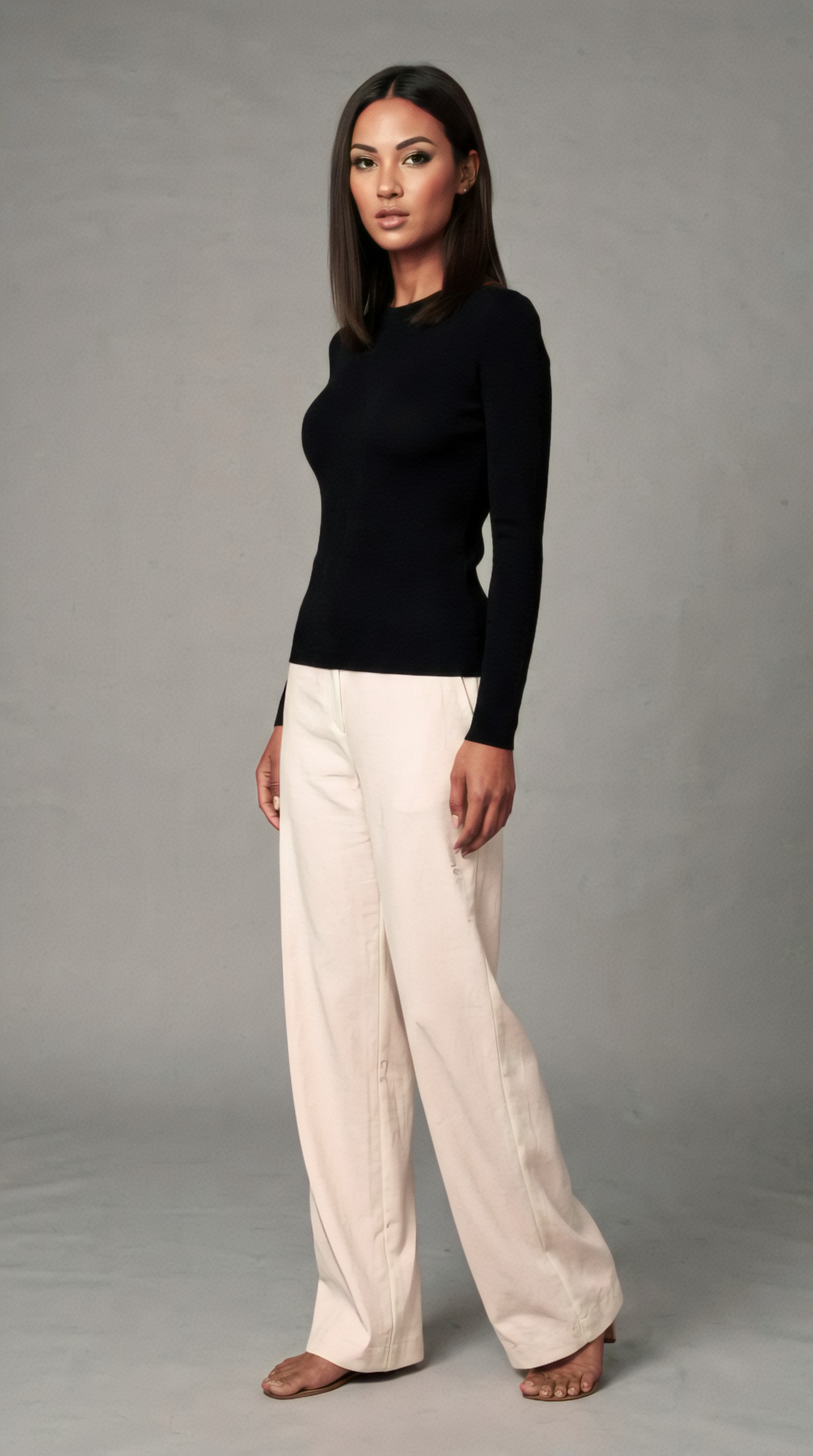
Topic: Same ecommerce model in side profile for garment silhouette view
Genre: Product Editorial
Camera: Fujifilm GFX100 II
Lens: 80mm f/5.6
Lighting: Softbox side fill with neutral bounce
Location: Matte beige seamless studio
Style: Clean commercial look
Final Prompt: True side-profile full-body ecommerce fashion image of the same female model, late 20s, medium tan skin, oval face, almond brown eyes, straight dark chestnut hair neatly tucked behind the ears and resting at shoulder length, calm neutral expression, wearing a slate blue midi dress with defined waist and clean hemline, standing upright with arms relaxed and body perfectly side-on to show garment silhouette, matte beige seamless studio, softbox side fill with neutral bounce for shape without harsh contrast, Fujifilm GFX100 II detail rendering, 80mm f/5.6 accurate catalog perspective, realistic fabric folds, consistent proportions, understated premium styling, clean commercial ecommerce presentation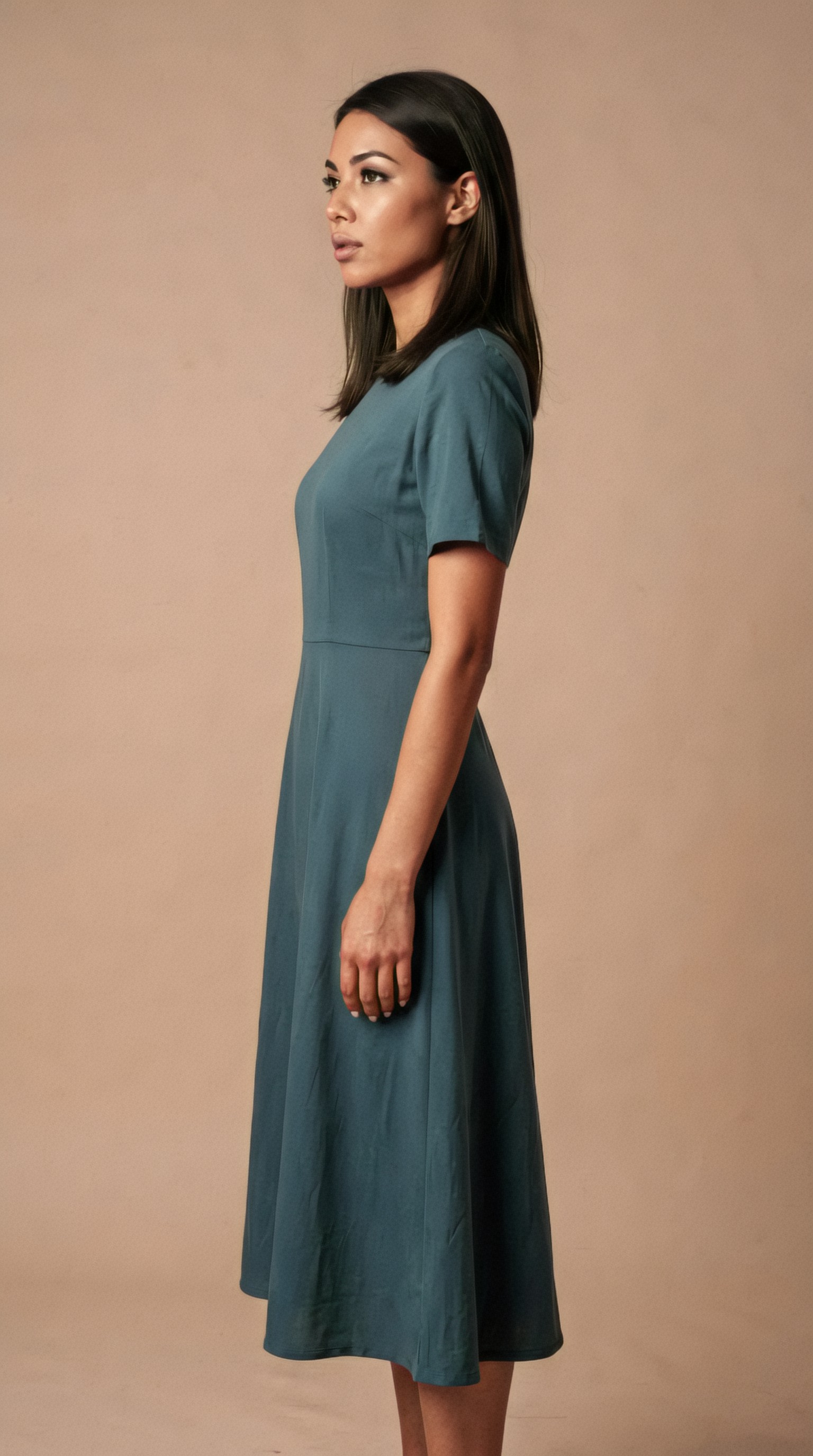
Topic: Same ecommerce model back view for catalog completeness
Genre: Product Editorial
Camera: Canon EOS R3
Lens: 65mm f/5
Lighting: Even studio wrap light
Location: Neutral off-white studio backdrop
Style: Clean commercial look
Final Prompt: Full-body back-view ecommerce apparel image of the same fashion model, late 20s, medium tan skin, straight dark chestnut shoulder-length hair with center part falling neatly down the back, slender balanced proportions, wearing a structured camel blazer and matching trousers, standing with back to camera and head turned slightly over the left shoulder just enough to preserve identity, off-white studio backdrop, even wrap studio lighting to reveal seam lines and garment fit, Canon EOS R3 realism, 65mm f/5 accurate proportion control, minimal shadow, crisp tailoring details, premium catalog composition, restrained neutral palette, consistent model identity across front and side views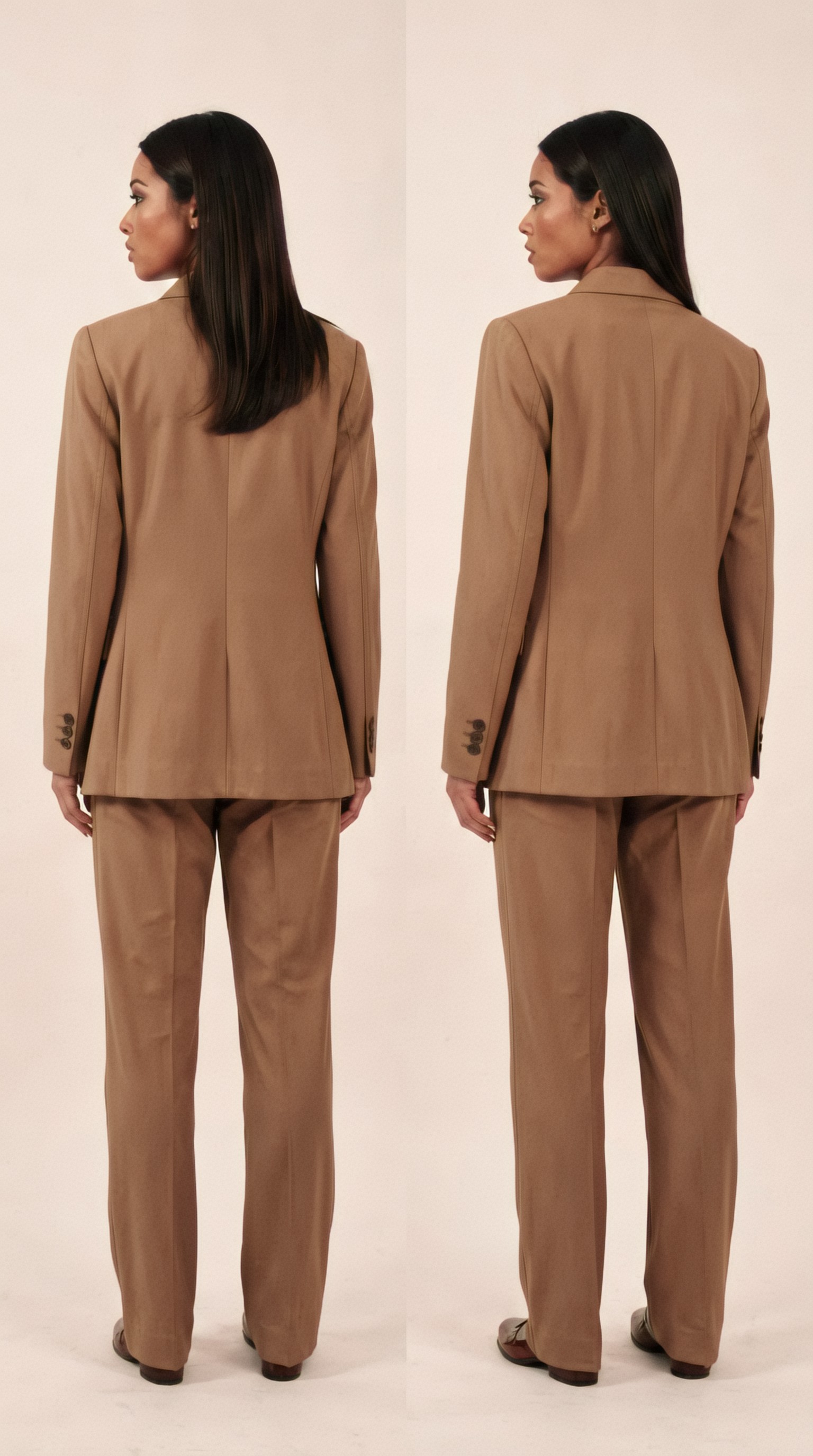
How to change outfits without changing the person
Once identity and camera are stable, outfit variation becomes a wardrobe problem rather than a character problem.
Separate fixed attributes from variable attributes
In every prompt, think in two layers.
Fixed attributes:
- face
- body type
- skin tone
- hair
- age range
- expression style
- lighting family
- camera logic
Variable attributes:
- garment
- colorway
- styling accessories
- pose nuance
- crop type
- background variation within brand rules
This is the key to ai fashion model consistency.
Write garments like a merchandiser
Instead of “wearing a stylish dress,” describe:
- neckline
- sleeve length
- fit
- waist treatment
- hem length
- fabric type
- print or solid color
- closure or drape behavior
That improves garment fidelity and lowers identity drift because the model description does not have to do all the work.
Topic: Same fashion model wearing a casual knit set for ecommerce catalog
Genre: Lifestyle Portrait
Camera: Leica SL2-S
Lens: 75mm f/2
Lighting: Window light with white bounce
Location: Minimal apartment studio corner with neutral plaster wall
Style: Soft premium lifestyle commerce
Final Prompt: The same female ecommerce model, late 20s with medium tan skin, oval face, almond brown eyes, straight dark chestnut shoulder-length hair center-parted, natural makeup and calm expression, wearing a monochrome oatmeal ribbed knit lounge set consisting of a relaxed crewneck sweater and tapered knit pants, subtle fabric texture clearly visible, standing in a minimal apartment-style studio corner with neutral plaster wall and pale oak floor, soft window light with white bounce, Leica SL2-S realism, 75mm f/2 gentle depth separation, relaxed pose with one hand lightly touching the sweater hem, warm neutral palette, premium lifestyle commerce aesthetic, consistent identity and proportions, accurate garment drape and tactile knit detail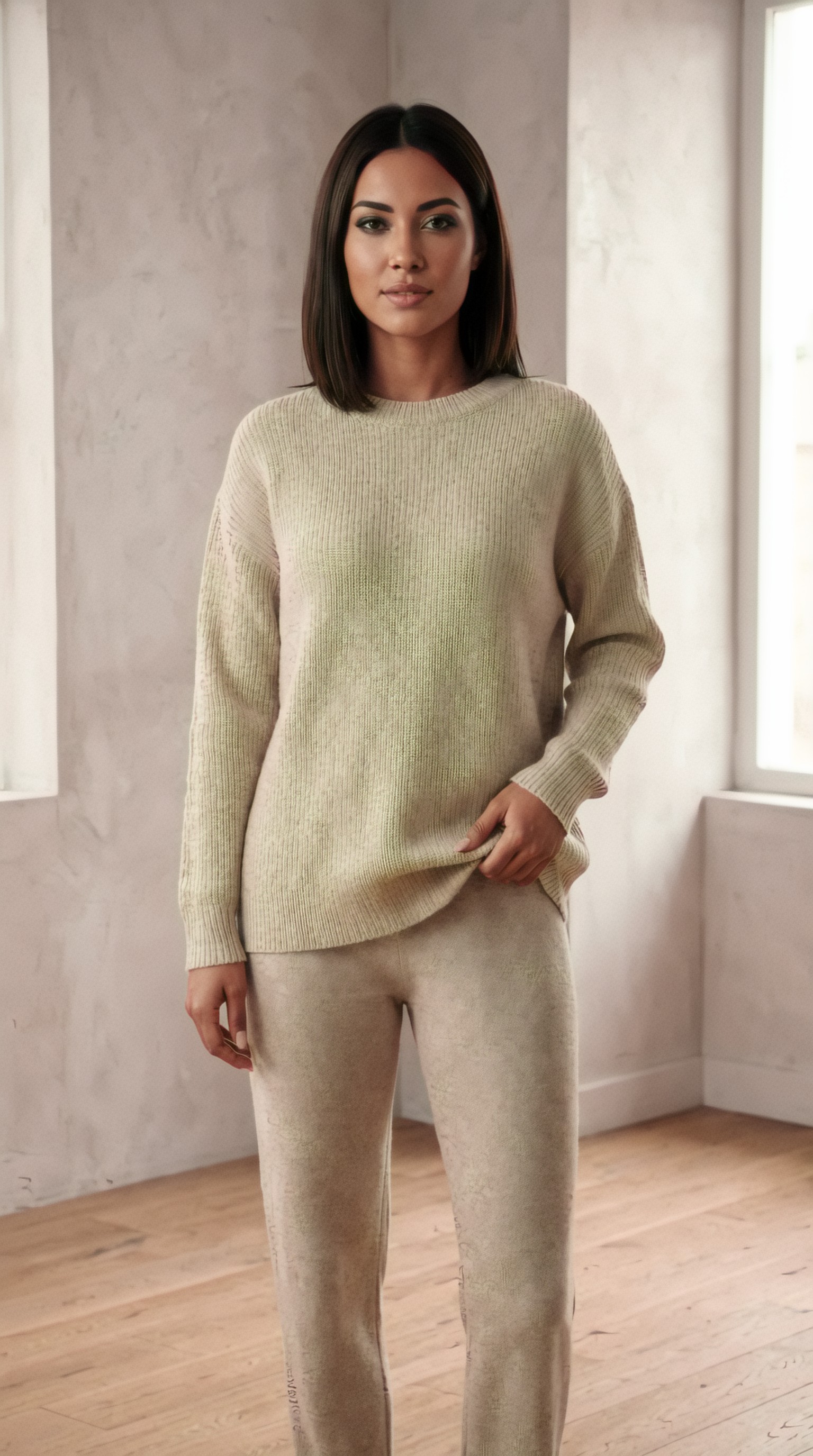
Topic: Same fashion model wearing a formal blazer outfit for ecommerce catalog
Genre: Luxury Campaign
Camera: Hasselblad X2D 100C
Lens: 90mm f/3.2
Lighting: Soft studio key with subtle rim light
Location: Stone-textured editorial studio set
Style: Luxury fashion campaign
Final Prompt: The same female model from the catalog reference, late 20s, medium tan skin, oval face, almond brown eyes, straight dark chestnut shoulder-length hair in a center part, polished natural makeup, poised expression, wearing a sharply tailored charcoal double-breasted blazer with matching straight-leg trousers and ivory silk camisole, standing in front of a refined stone-textured editorial studio wall, soft studio key with subtle rim light for garment structure, Hasselblad X2D 100C high-detail realism, 90mm f/3.2 elegant compression, luxury fashion campaign art direction, controlled posture with shoulders open and weight on one leg, neutral cool-gray palette, crisp tailoring, consistent face and body proportions across the catalog series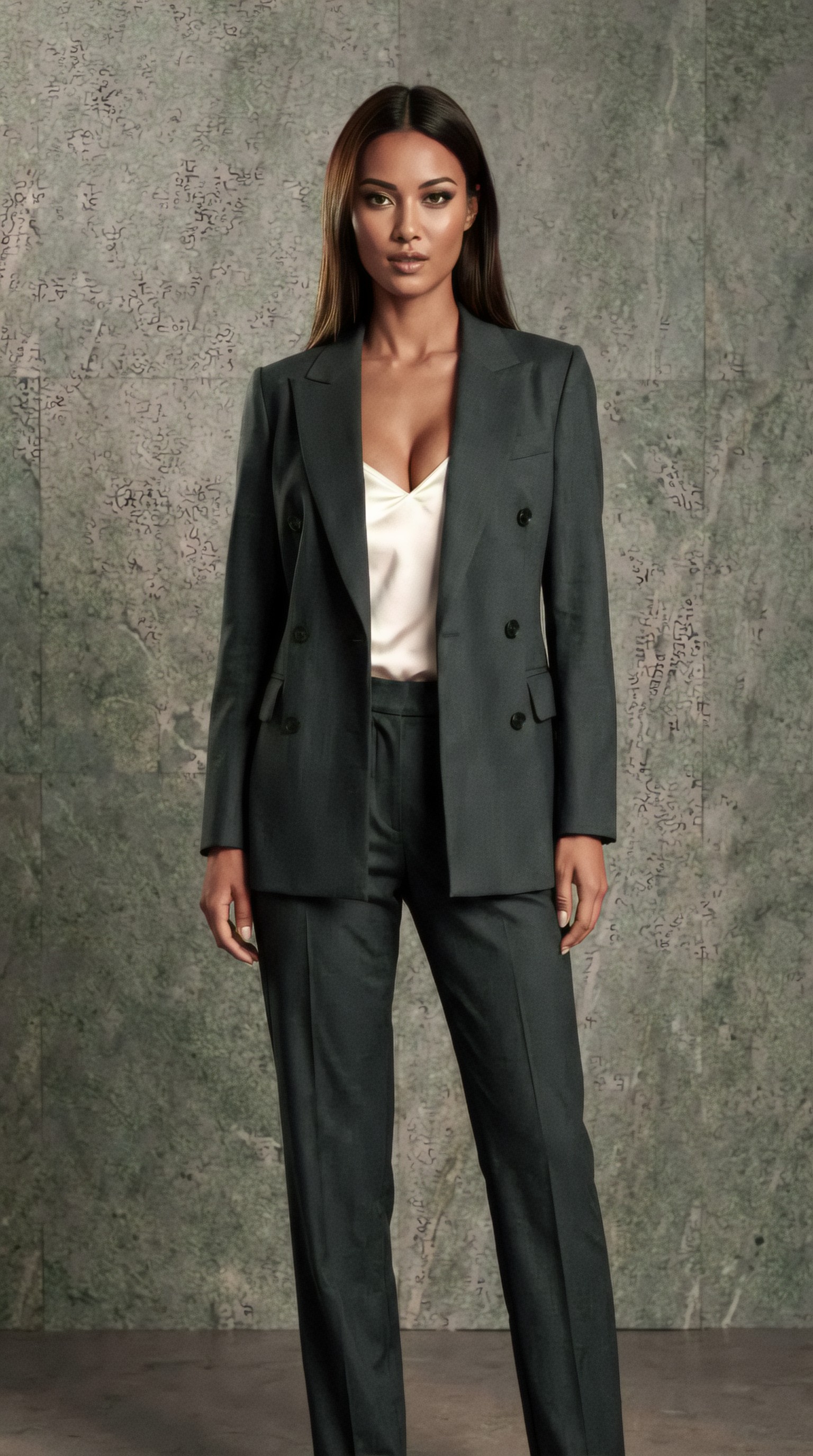
Build a reusable prompt template for production
If your team is generating dozens or hundreds of assets, avoid writing every prompt from scratch. Use a prompt template with stable sections.
A practical production template looks like this:
1. model identity 2. pose and angle 3. garment description 4. lighting setup 5. background and set 6. camera and lens 7. visual style 8. quality and realism controls
This helps when using an ecommerce model image generator or a general image model with manual prompting.
A good consistency prompt formula
Use this order:
Model identity → shot type → pose/angle → garment details → lighting → background → camera/lens → style direction → realism cues
That sequence tends to keep the subject anchored before introducing variation.
Topic: Reusable front-view dress catalog image with stable identity template
Genre: Product Editorial
Camera: Panasonic Lumix S5II
Lens: 85mm f/4
Lighting: Clean studio softbox setup
Location: Light taupe seamless background
Style: Clean commercial look
Final Prompt: The same catalog fashion model, woman in her late 20s with medium tan skin, oval face, almond brown eyes, straight dark chestnut shoulder-length hair center-parted, natural makeup and composed neutral expression, full-body front-facing shot, standing upright with relaxed arms and balanced posture, wearing a forest green wrap midi dress with V-neckline, self-tie waist, long sleeves, fluid matte fabric and soft hem movement, photographed against a light taupe seamless background, clean studio softbox setup with even fill for accurate product visibility, Panasonic Lumix S5II realism, 85mm f/4 commercial perspective, clean commercial look, true-to-life skin and fabric texture, consistent proportions, premium ecommerce catalog finish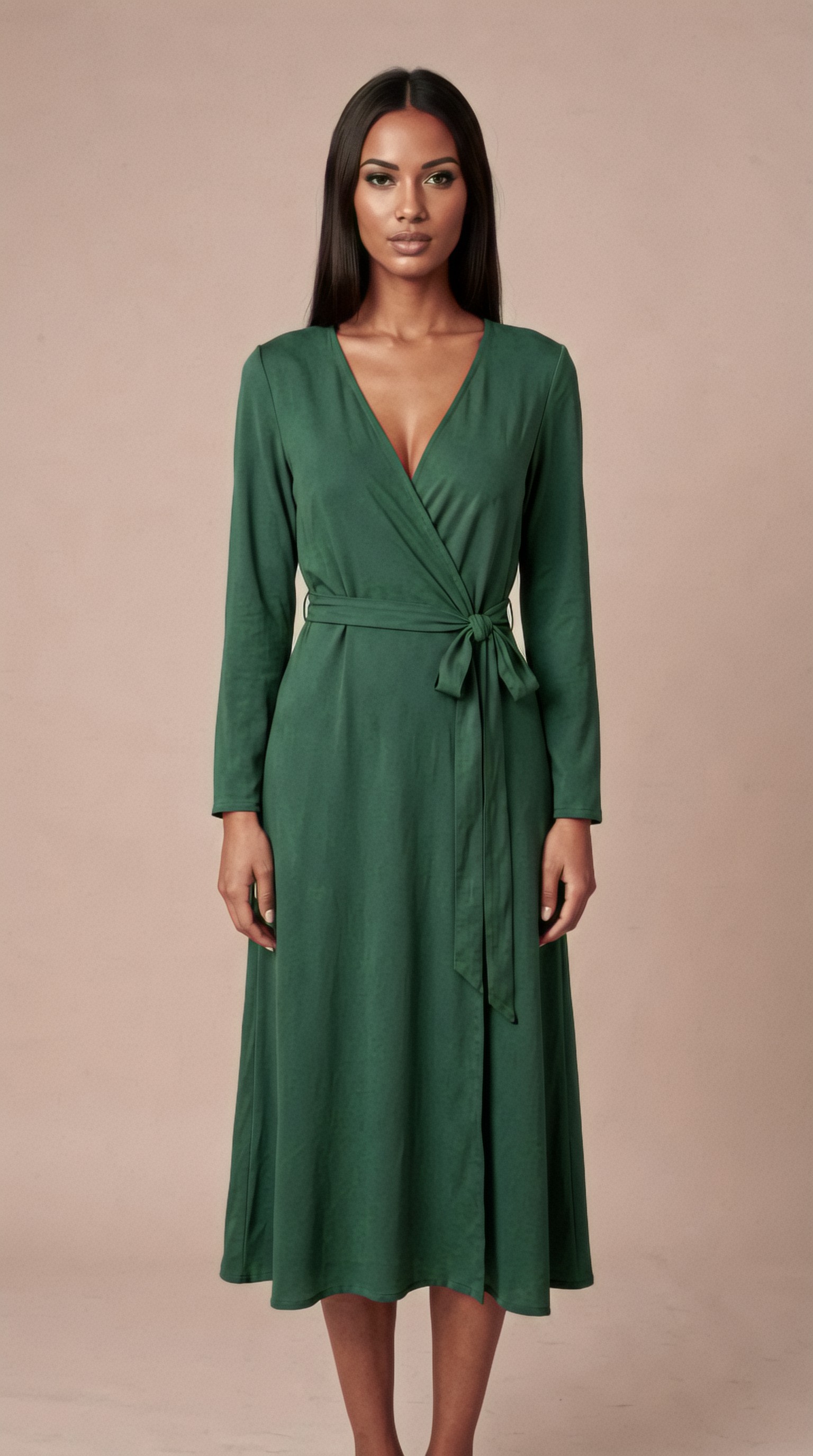
Use references when your tool supports them
Many current tools support image references, character references, face references, or identity-preserving adapters. If available, use them.
Recommended reference hierarchy:
- primary identity reference: a clean head-and-shoulders base portrait
- secondary full-body reference: standard neutral standing pose
- garment references: product photos or flats
- style reference: one image that defines lighting and set mood
When references are used well, text prompts become less responsible for holding the entire identity together.
What makes a strong identity reference
Use an image with:
- clear face visibility
- neutral expression
- natural skin texture
- simple hairstyle
- no extreme angle
- minimal occlusion
- no dramatic color cast
Keep backgrounds simple during catalog generation
If your main goal is product consistency, use simple sets first. Complex environments create more variables and more opportunities for the model to drift.
Good catalog backgrounds:
- white seamless
- light gray seamless
- warm beige wall
- soft editorial plaster texture
Once your core product angles are stable, you can generate campaign variations using the same identity.
Topic: Same fashion model in denim look on neutral set for catalog continuity
Genre: Street Style
Camera: Sony A1
Lens: 55mm f/4.5
Lighting: Neutral daylight simulation
Location: Pale concrete studio wall with clean floor line
Style: Modern retail editorial
Final Prompt: The same female ecommerce model with medium tan skin, oval face, almond brown eyes, straight dark chestnut shoulder-length hair center-parted, subtle natural makeup and steady composed expression, wearing a light-wash denim jacket over a white fitted tank and dark indigo straight-leg jeans, full-body stance angled slightly toward camera with one hand in pocket, photographed against a pale concrete studio wall with a clean floor line, neutral daylight simulation for honest denim color and texture, Sony A1 realism, 55mm f/4.5 accurate full-body perspective, modern retail editorial styling, restrained blue-gray palette, clear seam and wash detail, consistent identity and silhouette across the set
Control poses like a retailer, not a fashion magazine
Highly expressive editorial poses look great, but they often hide garment information. For ecommerce, prioritize poses that reveal fit.
Reliable catalog poses include:
- neutral front stance
- slight 3/4 turn
- side profile with relaxed arms
- back view with slight head turn
- seated pose only for selected lifestyle categories
- hand placement that does not block key garment features
Pose consistency tips
- keep shoulders level unless the garment benefits from asymmetry
- avoid extreme head tilts
- avoid crossing arms over the torso
- avoid dramatic stride unless showing movement is necessary
- define hand behavior clearly
Topic: Same ecommerce model seated in a controlled lifestyle knitwear shot
Genre: Lifestyle Portrait
Camera: Nikon D850
Lens: 58mm f/2.8
Lighting: Soft north-window light
Location: Minimal cream-toned studio with wooden stool
Style: Refined lifestyle commerce
Final Prompt: The same female catalog model, late 20s, medium tan skin, oval face, almond brown eyes, straight dark chestnut shoulder-length hair with center part, soft natural makeup and relaxed neutral expression, seated on a simple wooden stool in a minimal cream-toned studio, wearing a blush pink fine-knit turtleneck and ecru tailored trousers, posture upright with one ankle slightly forward and hands resting lightly to keep the garment visible, soft north-window light for gentle realistic shaping, Nikon D850 realism, 58mm f/2.8 natural depth and proportion, refined lifestyle commerce style, clean warm palette, visible knit texture and trouser crease detail, consistent identity preserved from standing catalog images
Negative prompting and constraint language
If your platform supports negative prompts or exclusions, use them carefully. They can help reduce errors such as:
- extra fingers or distorted hands
- duplicate accessories
- inconsistent hair length
- exaggerated makeup
- warped fabric folds
- extra people in frame
- distracting props
Useful constraint language can include:
- no additional jewelry
- no hat
- no sunglasses
- no dramatic expression
- no extra garments layered over the product
- no busy background
- no extreme wide-angle distortion
Do not overload negatives. Too many exclusions can make the output brittle.
Create shot lists before generating
A production team should define all required outputs before running generations.
Example shot list for one SKU:
- front full-body
- 3/4 angle
- side profile
- back view
- waist-up detail
- fabric close-up without identity priority
- optional lifestyle crop
Then repeat that exact structure for each garment category. This is how consistent ai model photos ecommerce workflows scale.
Quality control checklist for consistent ai model photos ecommerce
Even with a strong setup, review each image against a fixed checklist.
Identity QA
- does the face match the reference?
- are the eyes, nose, jawline, and skin tone stable?
- is the hair length and parting correct?
Garment QA
- is the color accurate?
- is the silhouette correct?
- are seams, hems, collars, or prints distorted?
- is the fit believable?
Camera QA
- does the focal length feel consistent with the batch?
- is body proportion realistic?
- is the framing aligned with the shot list?
Brand QA
- does the image match your visual standards?
- is the expression appropriate?
- is retouching level natural?
Marketplace QA
- does the background meet platform requirements?
- is there enough negative space if needed?
- is the product visible without obstruction?
When to use white background vs styled background
Choose background style based on channel.
White or neutral background
Best for:
- Amazon-style listings
- Shopify PDPs
- comparison grids
- colorway selectors
- large batch catalog production
Styled background
Best for:
- homepage banners
- campaign launches
- social content
- seasonal edits
- branded lookbooks
A practical system is to create your core catalog set on neutral backgrounds first, then repurpose the same identity into styled scenes.
Topic: Same model in elevated campaign-style outfit still suitable for retail continuity
Genre: Fashion Editorial
Camera: RED Komodo cinematic still capture
Lens: 50mm f/2.5
Lighting: Sunset backlight with soft front fill
Location: Rooftop terrace with muted city skyline
Style: Cinematic realism
Final Prompt: The same female ecommerce model with medium tan skin, oval face, almond brown eyes, straight dark chestnut shoulder-length hair center-parted and lightly moved by breeze, natural luminous makeup, wearing a cream trench coat over a black column dress and low-profile leather boots, standing on a minimalist rooftop terrace with a muted city skyline in the distance, body angled three-quarter to camera and expression calm and assured, sunset backlight with soft front fill creating gentle edge separation while preserving facial identity, RED Komodo cinematic still realism, 50mm f/2.5 natural perspective, cinematic realism with restrained retail polish, elegant neutral palette, premium fabric detail, atmosphere subtle and believable, consistent identity maintained from catalog studio images
Batch strategy for large catalogs
If you need hundreds of outputs, organize by controlled batches rather than mixing every variable at once.
Recommended sequence:
1. generate and approve the base identity 2. generate standard front-angle images for all products 3. generate 3/4 and side views for approved garments 4. generate back views 5. generate lifestyle variants 6. run final QA and retouch selectively
This reduces compounding errors. If the identity breaks early, fix that before producing every angle.
Common mistakes that break ai fashion model consistency
Changing too many variables at once
If you alter model, background, pose, lighting, and wardrobe all together, you cannot tell what caused the drift.
Using vague person descriptions
“Beautiful female model” is not enough for consistency.
Over-stylizing every shot
Heavy editorial direction can conflict with garment clarity.
Ignoring lens consistency
Perspective changes can make the same model look like a different body type.
Letting hair and makeup float
These should be fixed unless intentionally updated.
Skipping QA between batches
Small identity drift becomes obvious only after 20 or 50 images.
A practical example workflow for a small apparel brand
Imagine a brand launching 12 women’s outfits.
A workable process:
1. Create one approved master identity portrait. 2. Define one camera family: 50mm full body, 85mm crop. 3. Use one lighting family: soft studio key with fill. 4. Set one neutral background family: white and light taupe. 5. Generate front-view images for all 12 outfits. 6. Review identity and garment accuracy. 7. Generate 3/4 and back views only after approval. 8. Create 2 to 3 styled campaign images with the same model identity.
This gives you both PDP assets and marketing images without building a new visual character every time.
Final recommendations
To generate consistent AI model photos for ecommerce, focus on controlled repeatability:
- define the model precisely
- lock lens and framing logic
- keep lighting in one family
- separate fixed identity traits from variable outfit traits
- generate by batch, not randomly
- use references when available
- QA identity and garment accuracy at every stage
The most useful mindset is to treat AI image generation like a production studio, not a slot machine. Once your workflow is stable, creating consistent ai model photos ecommerce, same model different outfits ai variations, and consistent ai catalog images becomes much more manageable.
If your goal is practical retail output, consistency beats novelty almost every time.