You cannot generate images on ZView Space without signing in. Generation asks you to sign in with Google first, and once you have, the free account receives 20 credits per day. A Krea2 Turbo or ZImage render costs 2 credits, so a day of free credits covers roughly ten images. Those numbers come from the site's current settings and can change, so check the [Pricing](/pricing/en) page before you plan around them.
This article used to be a ranking of third-party "no login" generators. We cannot verify which outside tools require an account today, which are free, or how good they are, and that kind of claim goes stale within weeks, so it has been removed. What remains is what we can stand behind: how our own free tier works, and what six Krea2 Turbo images from our records actually show about getting the most out of a small daily budget.
What the free tier gives you
- Sign-in: Google sign-in is required before an image is generated. The site's own message reads "Sign in with Google to generate images."
- Daily credits: a free account gets 20 credits per day. The Pricing page lists the same figure, along with a limit of 10 saved prompts and standard (non-priority) queueing.
- Cost per image: 2 credits for Krea2 Turbo and for ZImage, and 10 for a WAN video. The upscaler costs 2 or 4 credits depending on the variant.
- Queue: when Krea2 Turbo is busy, the page shows your position in line. Its own copy says a render usually takes about 35 seconds, so a long queue means a long wait.
- Paid plan: an Unlimited plan at $9.99 per month is listed on the Pricing page. It adds priority generation and unlimited Relax mode, and it is the only path to commercial usage rights. Free accounts are listed as personal use.
If signing in is a hard no for you, this site is not the answer, and we have no verified alternative to recommend. If a Google sign-in is acceptable, the free tier is enough to run a small, deliberate test every day at no cost. You can start at [/create/en](/create/en).
Ten images a day changes how you prompt
With about ten renders available, rerolling until something looks good is an expensive habit. It helps to decide in advance what each render is meant to test. The six images below come from one Krea2 Turbo session on 2026-07-13, generated a minute or so apart. They are a useful example because each one has something you can actually check.
A full prompt, including what got added to it
This is the complete stored prompt for the first image, exactly as it was sent:
A solo female traveler standing on a quiet coastal train platform in northern Portugal, wearing a beige trench coat over a navy knit top, relaxed posture with one hand holding a paper ticket and the other resting on a small olive suitcase, soft thoughtful expression, wind moving loose hair, overcast daylight with gentle diffusion, wet platform texture, pale blue train in the background slightly out of focus, realistic skin texture, natural proportions, subtle travel editorial composition, Canon EOS R5 look, 50mm f/1.8 depth of field, muted coastal color palette, crisp fabric detail, photorealistic clean commercial image, street-style full-body shot plan, three-quarter outfit editorial framing, shoes and bag visible, layered garments and silhouette clearly readable, trend led fashion mood, outfit-first fashion editorial, complete styling system, visible fabric texture, accessories, shoes, bag, scene context, natural pose or walking action, 35mm editorial photography, realistic street, runway, retail, or lookbook settingThe last sentence fragment ("street-style full-body shot plan ... lookbook setting") is a block of fashion-editorial wording that is identical across the prompts of this set. The first half is the scene. The second half, in practice, pushed every result toward a full-body, shoes-and-bag fashion frame. Keep that in mind when you read the images: some of what you see is the scene prompt, and some is that appended block.
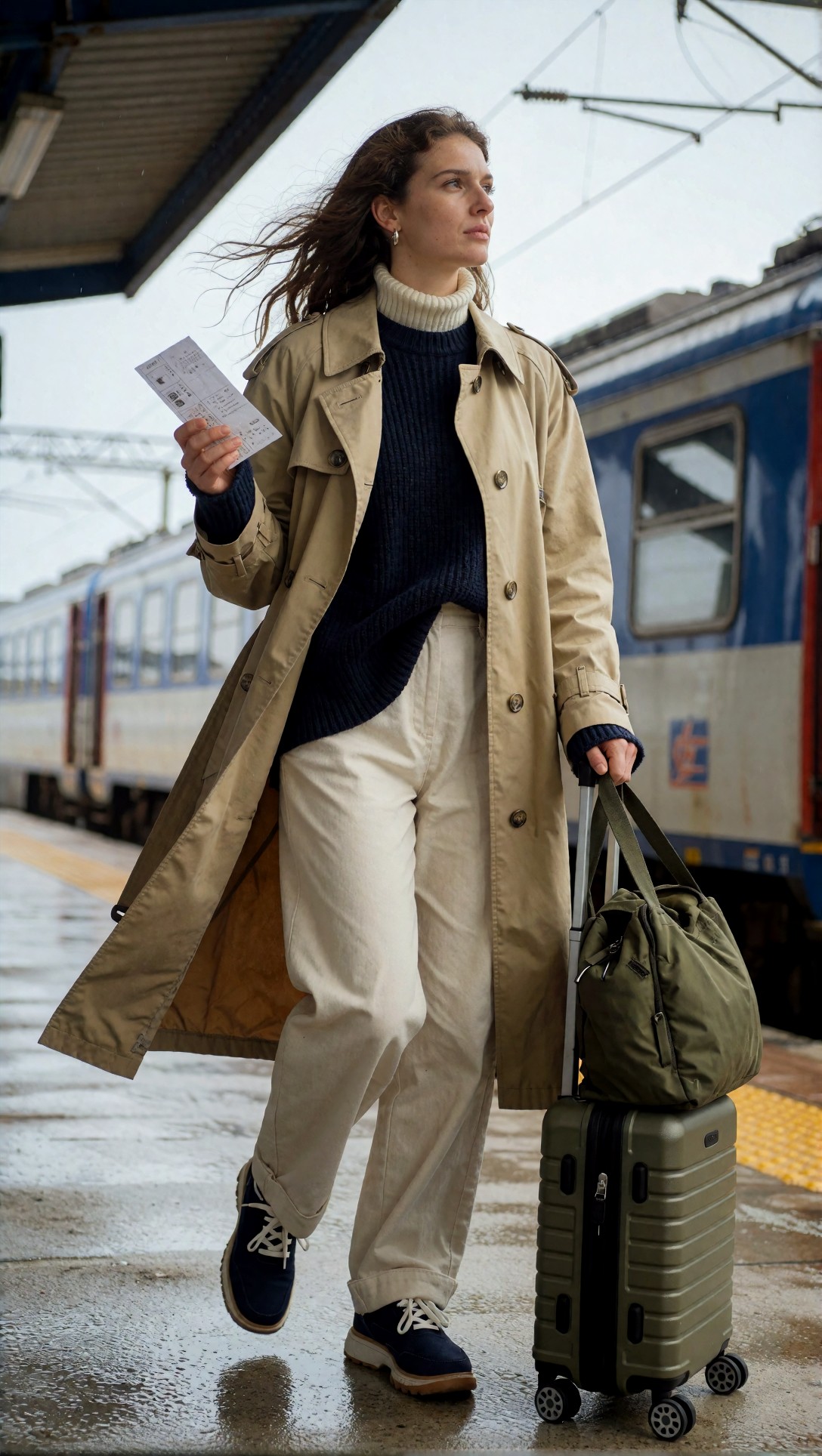
What is visible: the trench coat has buttons, a belt loop and an orange lining where the wind opens it, the platform is wet and reflective, and the train has a believable window and door structure. The suitcase is a hard-shell case with a telescoping handle, and a duffel bag sits on top of it, which the prompt did not ask for. The ticket in her raised hand is covered in small marks that do not form readable text. Both shoes are visible, as the appended "shoes and bag visible" wording asked.
The image file is 1088 x 1928 pixels, a tall vertical frame.
What these six renders show
Text appears even when you do not ask for it
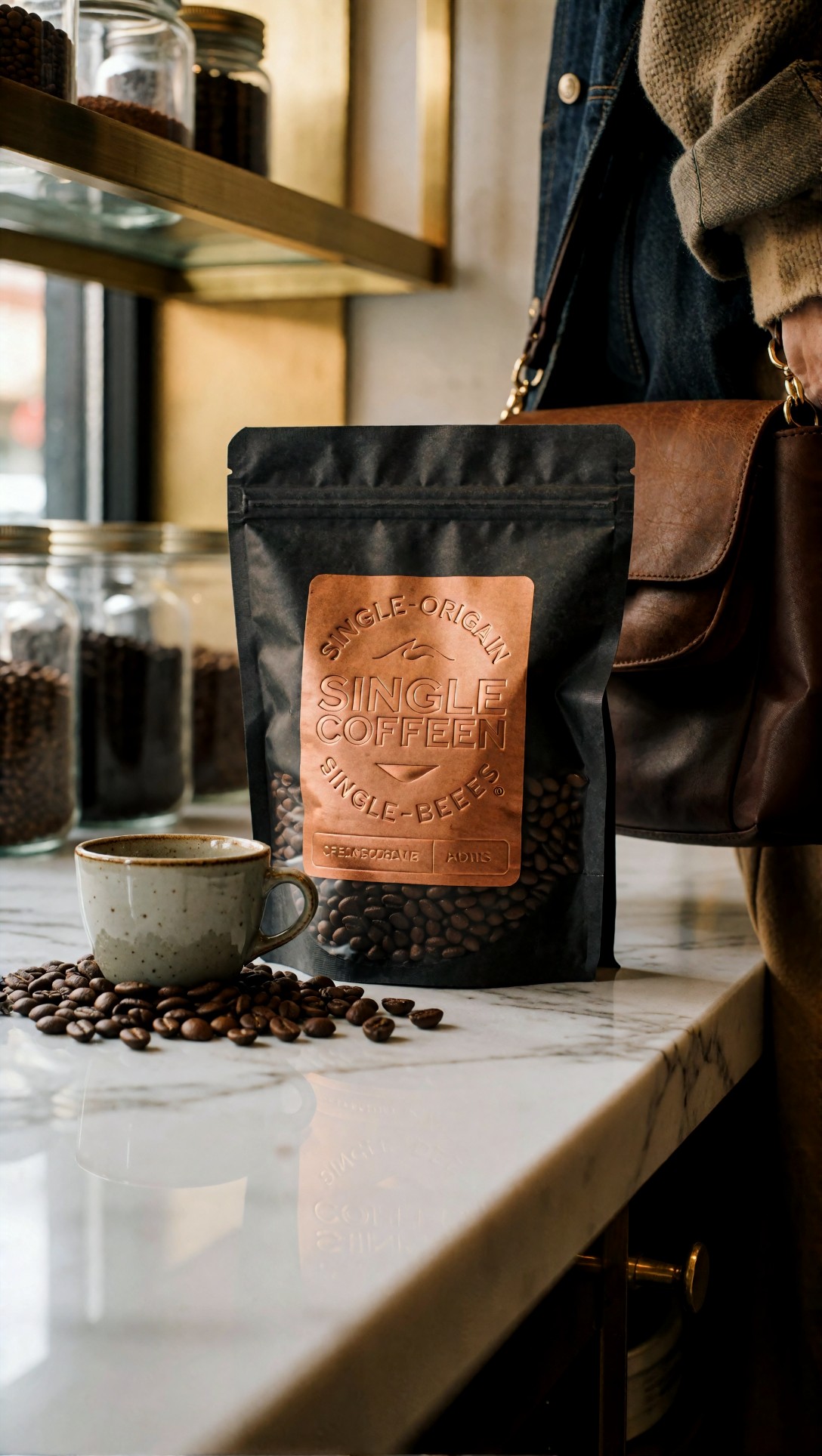
The prompt asked for an "embossed copper label" and did not specify any words. The model filled the label with lettering anyway, and the letters are wrong: "SINGLE COFFEEN", "SINGLE-ORIGAIN", "SINGLE-BEEES", and a line of garbled small print below. The reflection on the marble repeats the mistake. The pouch shape, the glass jars and the brass shelves are clean. The object at the right edge, a brown leather shoulder bag and a person's denim sleeve, was not requested in the coffee prompt and is most likely a side effect of the appended "shoes and bag visible" wording. This is our reading of the cause, not something the generation record proves.
For a product shot, this is a real cost: two credits spent, and the label text still needs to be replaced in an editor.
Hands held up in the test that mattered
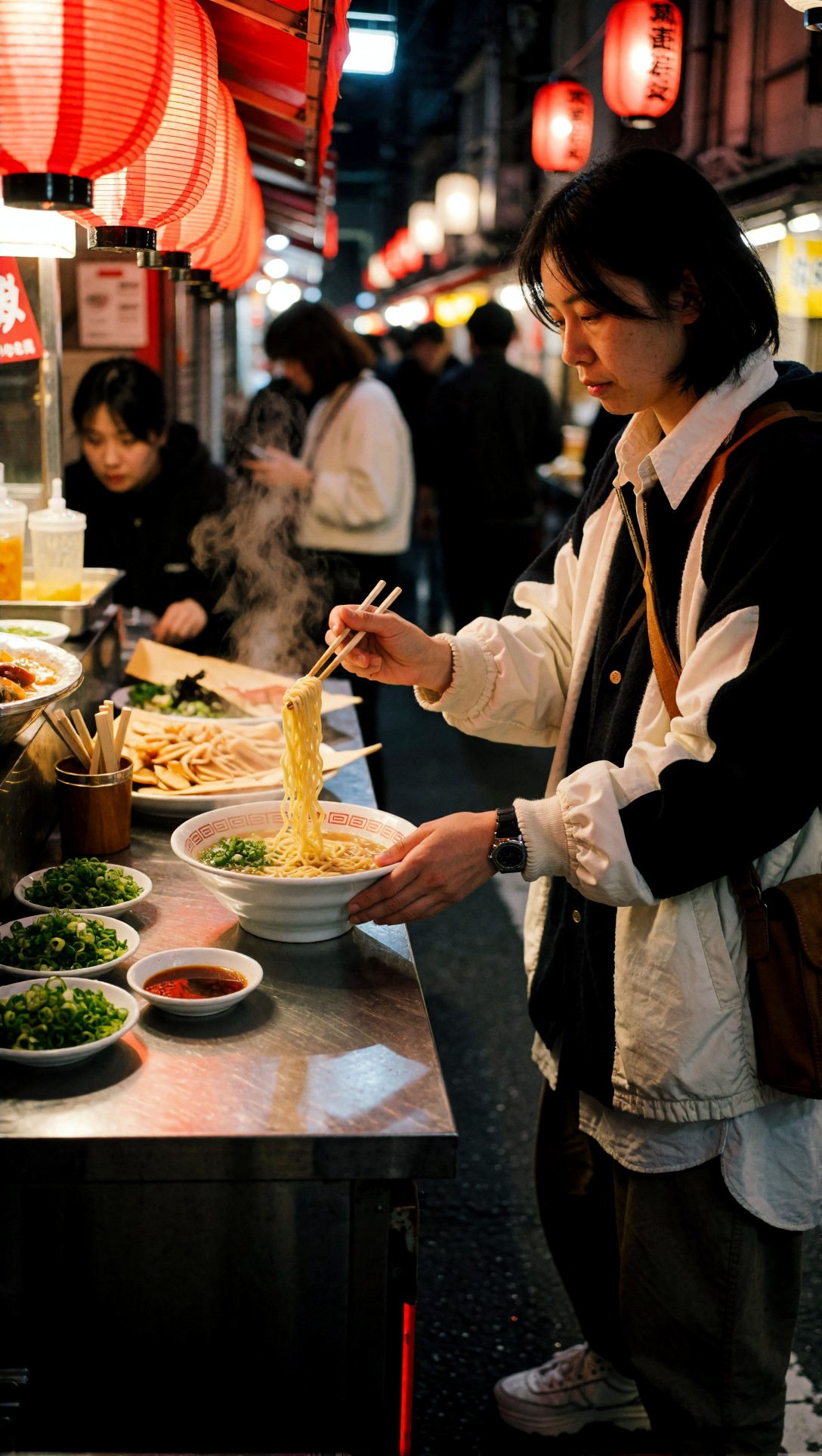
The prompt asked for a vendor plating ramen with both hands visible. The result shows a person at the counter rather than clearly behind it, which reads more like a customer, although the prompt said vendor. On the anatomy question the image does well: one hand holds two chopsticks lifting noodles, the other steadies the bowl from below, and both hands have normal finger counts in a plausible grip. The noodles hang as noodles. Background figures and the red signage on the left are soft and unreadable.
Composition instructions can lose to the appended framing
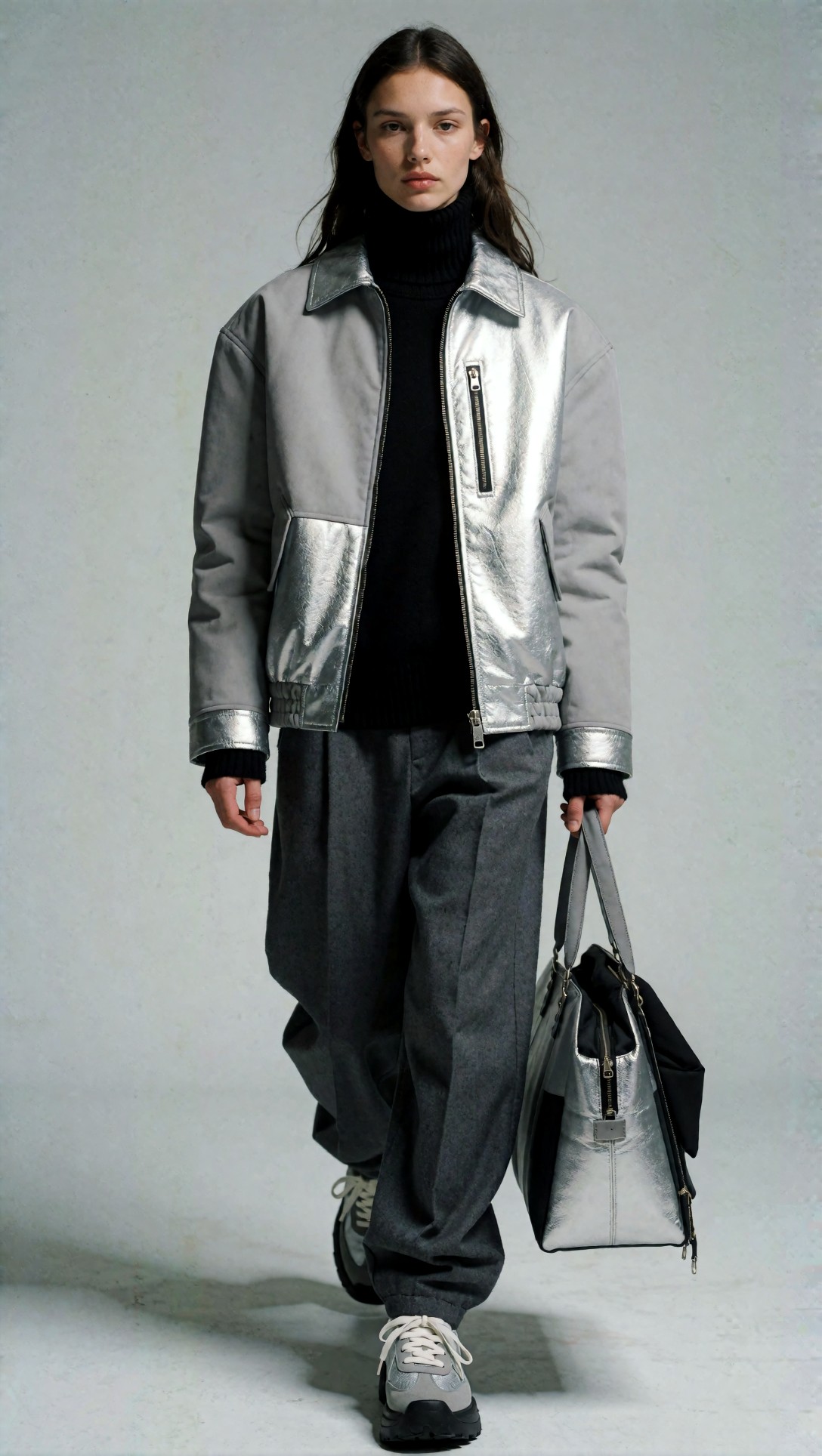
The prompt called for a centered, front-facing portrait with negative space for a magazine masthead. The image is a full-body walking shot with a tote bag in one hand, so the "cover" composition was not followed: there is a flat grey wall, but no reserved headroom layout. The clothing is the strongest part, with a two-tone jacket, metallic panels and a working zip pocket, and the hands are readable. If layout space matters to you, say so early and keep the appended block out of the prompt.
Layered scenes can hold together
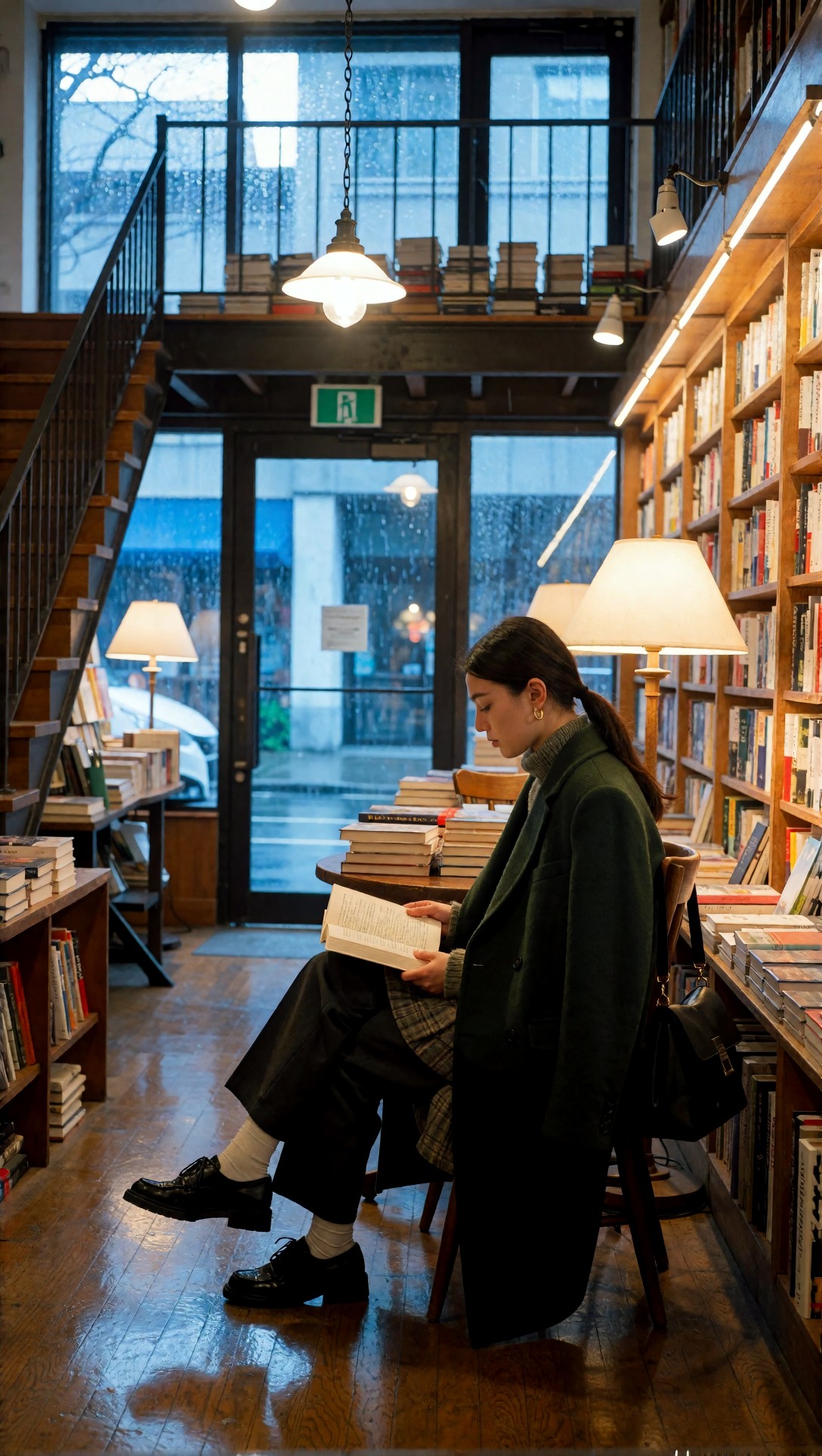
The bookstore prompt has the most parts: rain, tungsten lamps, a staircase, a mezzanine, a polished floor. All of them are present. The staircase with its railing rises on the left, the upper level with stacked books is visible above the table, and the floor carries lamp reflections. The shelves on the right are packed with distinct book spines instead of one smeared texture. Her crossed legs and both shoes are readable. The staircase runs off the left edge of the frame, so we cannot say where it ends.
Signs and logos you did not ask for
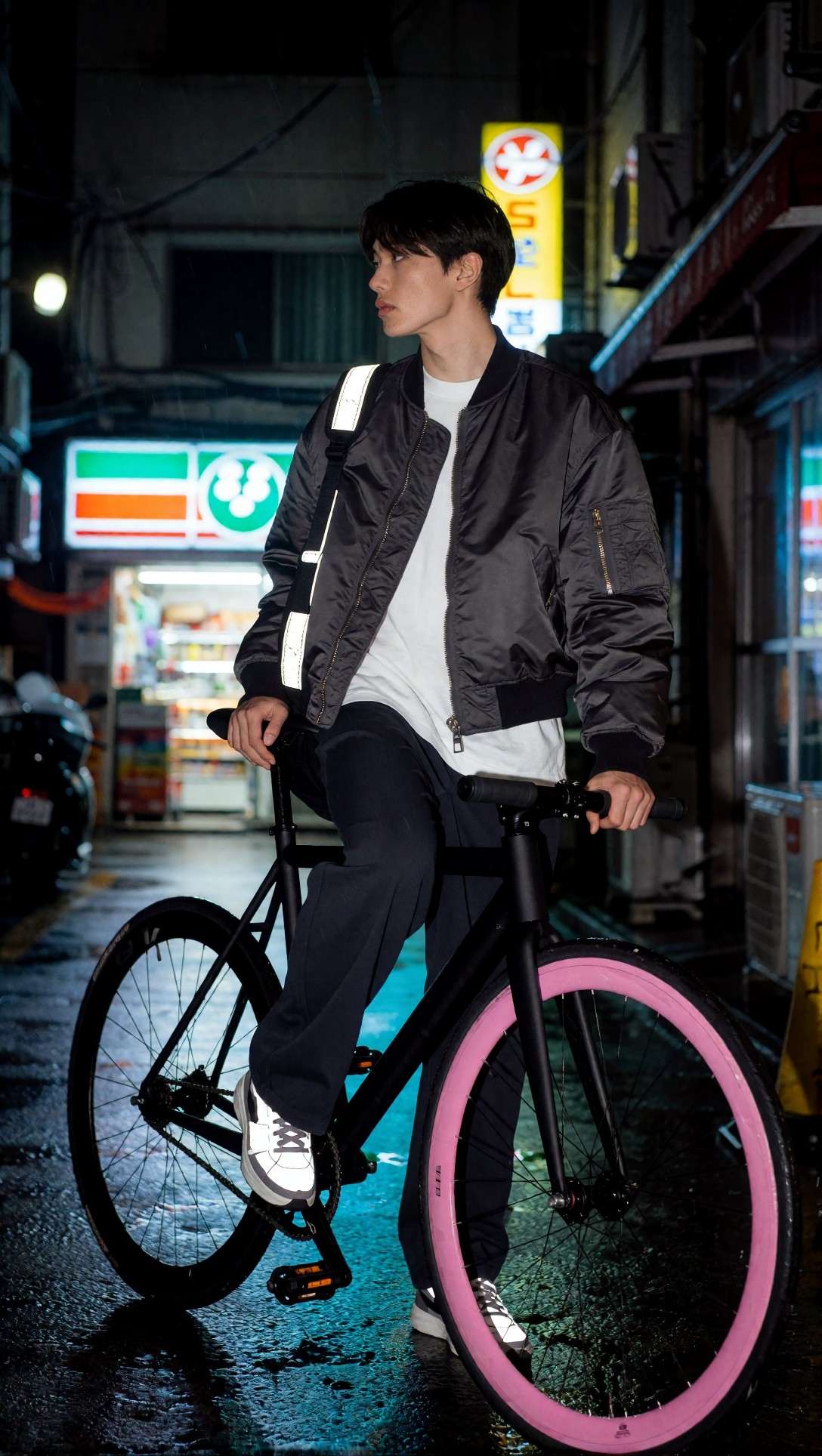
The prompt asked for pink and cyan neon and a convenience-store glow. The image delivers a pink front rim, cool cyan reflections on the wet pavement, and a lit store sign with stripes and a round emblem. The sign is invented: the prompt named no brand, but the sign has the look of a real convenience-store logo, which is something to watch for if you publish the image. The man is leaning on the bike rather than standing beside it, the bicycle frame and both wheels are structurally sound, and his hands are fine.
Getting the most from 20 credits a day
These points follow from the six images above. They are observations from one small set, not a controlled test.
1. Write the scene once, and check the tail of the prompt. In this set, a fashion-framing block at the end of every prompt changed the framing of a coffee shot and a magazine-cover shot. If the tool or template you use appends text, read the final prompt before you render. 2. Do not plan on text. Two of six images contain lettering the prompt did not specify, and the coffee label's lettering is wrong. Plan to add real text in an editor. 3. Decide what a render is testing. The ramen and bookstore images were the most informative because each had a single checkable question: hands, or scene structure. 4. Fix composition before detail. An [upscale](/upscaler/en) can sharpen an image but cannot move a missing layout. Upscaling costs credits too (2 or 4), so it is worth doing only on a frame you already like. 5. Draft wording outside the render budget. [Prompt Lab](/promptlab/en) is meant for drafting and saving prompts, which saves you from spending credits on prompts that were not ready.
For more on why images come out generic, see [15 prompt mistakes behind generic results](/articles/ai-image-generator-prompt-mistakes-15-reasons-your-results-still-look-generic/en).
FAQ
Is there a free way to try it without paying? Yes, with a Google sign-in. The free account's daily credits are the free route. Nothing in our records says you can render without signing in, so we do not claim that.
Can I use the images commercially? The Pricing page lists commercial usage rights with the paid Unlimited plan and personal use for free accounts. Read the current terms before you publish.
Which outside tools need no login? We do not know, and we removed the list that used to be here, because those rules change often and we cannot verify them.
> What this article is based on. Model: Krea2 Turbo. Six images generated on 2026-07-13, each opened and inspected. Two more images from the same session were viewed but not used. Credit figures, the sign-in requirement and the queue note come from the site's source code and Pricing page at the time of writing (credits and daily amounts are configurable and may change). The generation records contain prompts and model name only, with no seed, steps or settings.