ZView Space2026-07-13 18:25:00

Free AI Image Generator Without Login: Which Tools Still Work Well in 2026? 한국어 요약

Free AI Image Generator Without Login: Which Tools Still Work Well in 2026? 한국어 요약 이 페이지는 ZView Space의 영어 원문을 한국어 검색 사용자도 이해할 수 있도록 정리한 SEO 요약입니다. 핵심은 단순한

AI 이미지 프롬프트패션 프롬프트룩북이미지 생성ZView Space
Free AI Image Generator Without Login: Which Tools Still Work Well in 2026? 한국어 요약

Free AI Image Generator Without Login: Which Tools Still Work Well in 2026? 한국어 요약

이 페이지는 ZView Space의 영어 원문을 한국어 검색 사용자도 이해할 수 있도록 정리한 SEO 요약입니다. 핵심은 단순한 얼굴 중심 이미지가 아니라 패션 에디토리얼, 룩북, 아웃핏, 프롬프트 테스트, 이미지 생성 워크플로우를 실제로 어떻게 구성할지입니다.

핵심 요약

  • 원문 주제: Free AI Image Generator Without Login: Which Tools Still Work Well in 2026?
  • 목적: AI 이미지 생성에서 outfit, silhouette, fabric, pose, location, camera framing을 더 명확하게 설계합니다.
  • 활용 범위: Z-Image Turbo, Krea2 Turbo, Qwen Image, Anima, SeedVR2 같은 이미지 생성 및 업스케일 워크플로우에 적용할 수 있습니다.
  • SEO 관점: 제목, 설명, 이미지 alt, 프롬프트 예시가 실제 검색 의도와 맞아야 색인 가능성이 높아집니다.

한국어 사용자를 위한 체크포인트

1. 프롬프트가 얼굴 묘사에만 머물지 않고 전체 스타일과 의상 구성을 설명하는지 확인합니다. 2. 패션 이미지라면 상의, 하의, 아우터, 신발, 액세서리, 소재감, 촬영 장소를 분리해서 씁니다. 3. 생성 결과는 바로 게시하지 말고 디테일, 손, 의상 형태, 배경 일관성, 이미지 품질을 비교합니다. 4. 글 본문에는 실제 테스트 기준과 실패를 줄이는 방법이 들어가야 검색엔진에서 얇은 콘텐츠로 보일 가능성이 줄어듭니다.

원문 미리보기

If you are searching for a free AI image generator without login , the useful question in 2026 is not just which sites exist , but which ones still produce usable images before the gate appears . In this test, I focused on tools that let you type a prompt and

---

If you are searching for a free AI image generator without login, the useful question in 2026 is not just which sites exist, but which ones still produce usable images before the gate appears. In this test, I focused on tools that let you type a prompt and generate immediately, then compared how far they get on realism, prompt control, speed, watermarking, style drift, and failure rate. The goal was simple: find the options that are still good enough for quick ideation, reference images, and prompt drafting without forcing account creation first.

Quick answer

  • A few ai image generator free no sign up tools still work well, but most trade off either quality, speed, or generation limits.
  • The strongest no-login tools were best for fast concepting, not for highly controlled client-ready images.
  • Prompt discipline matters more on no-login systems because many use lighter models, queue limits, or reduced settings.
  • If a tool blocks aspect ratio, seed, or negative prompts, you can still improve results by tightening subject, camera, light, and location language.
  • For deeper prompt iteration after a quick test, I would move the successful draft into [Prompt Lab](/promptlab) or a full workflow in [Create](/create).

What was tested

I tested browser-based generators that allow text-to-image generation before login, or at least offer a meaningful free no-sign-up trial path on first visit.

I used the same prompt framework across tools:

  • one product shot
  • one portrait
  • one environment scene
  • one text-heavy failure test
  • one anatomy stress test with hands
  • one style-lock test
  • one low-light cinematic scene
  • one photoreal travel image

I judged them on:

n- consistency across rerolls

  • first-image speed
  • whether login was required before rendering
  • realism and texture quality
  • prompt obedience
  • common failure points

A note on volatility: free no-login AI tools change often. Some remove access, add queues, watermark outputs, or lower image size with little warning. So this is a workflow test report, not a permanent ranking.

The shortlist: which free text to image AI no login tools are worth trying first

Here is the practical comparison I would use before spending time on prompts.

| Tool type | Best for | Strong point | Weak point | Use it when | |---|---|---|---|---| | Fast web demo generator | Instant concept sketches | No friction, quick output | Lower prompt fidelity, style drift | You need an idea in 30 seconds | | Community playground with guest mode | Stylized art and remixing | Good variety, fun presets | Queue delays, inconsistent realism | You want multiple visual directions | | Search-engine embedded image demo | General-purpose prompts | Surprisingly accessible, easy retrying | Limited controls, weak composition consistency | You need a free AI art generator no login for rough drafts | | Open model sandbox | Prompt experimentation | More transparent model behavior | Can feel raw, more failures on faces/hands | You are testing prompt wording rather than final polish | | Mobile-first instant generator site | Social graphics and portraits | Fast and simple | Compression, watermark, weak detail | You need throwaway mockups |

What to know before you compare results

The best online AI image generator free tools without login usually fail in one of three places:

1. They simplify your prompt and ignore half the scene. 2. They over-smooth faces and fabrics. 3. They collapse under multi-subject composition.

That means the test prompt has to do real work. A vague prompt can make every tool look equally bad. A structured prompt reveals where each one actually breaks.

What the prompt needs to accomplish

For this topic, the prompt is not just about making a pretty image. It has to expose whether a no-login generator can:

  • keep a clear subject hierarchy
  • obey style and camera instructions
  • hold onto lighting direction
  • preserve texture detail
  • avoid obvious hand and face errors
  • stay consistent without extra controls

In this test, the strongest no-login tools handled single-subject images with clean lighting much better than crowded scenes. So I built prompts around one clear focal point first, then increased complexity.

Breaking the prompt down: subject, style, camera, light, location

A lot of free no-sign-up generators have fewer advanced controls. So the prompt itself has to carry composition.

Subject

Keep the subject singular and specific. “Woman in cafe” is too loose. “Travel photographer reviewing contact sheets at a rain-streaked cafe window” gives the model a role, an action, and a visual anchor.

Style

Style should narrow the image without fighting realism. In these tools, “cinematic realism,” “clean commercial look,” or “editorial portrait” worked better than stacking five style labels.

Camera

Camera language helped more than expected, especially on portrait tools. It did not always change the rendering engine, but it often pushed composition and depth of field in the right direction.

Lighting

Lighting was the biggest quality lever. When I specified one clear setup, outputs became more coherent. When I mixed “golden hour” with “neon studio shadows,” weaker tools produced muddy color.

Location

Location is where no-login tools either come alive or collapse. A concrete place gives context and color palette. But if the location includes too many objects, cheap models start inventing nonsense.

Baseline prompt: the first test I would run on any instant AI image generator

This first test checks whether the generator can deliver a usable image without fancy controls. I chose a simple portrait with one subject, natural styling, and obvious lighting.

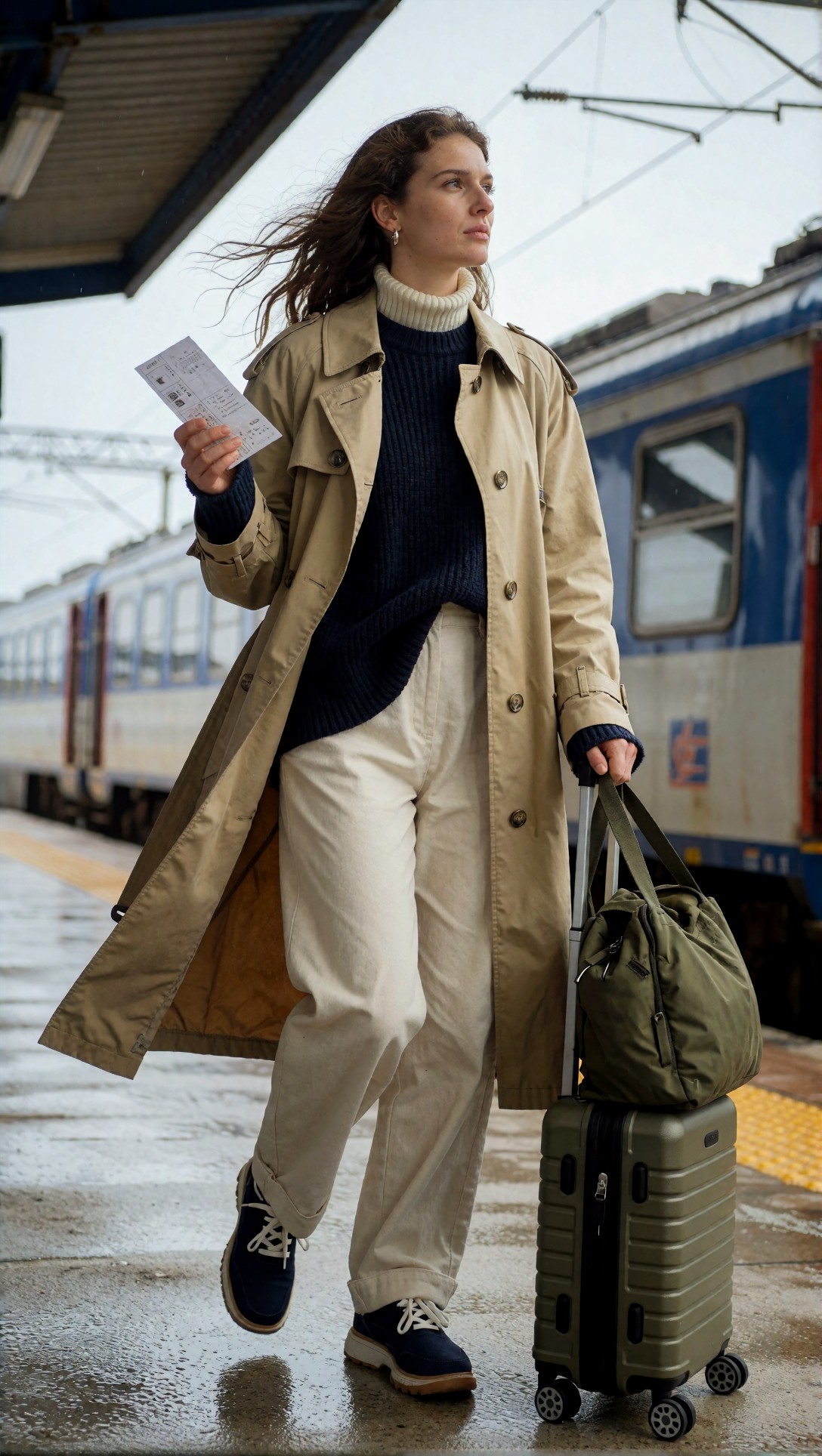
Topic: Solo travel portrait at a seaside train station
Genre: Lifestyle Portrait
Camera: Canon EOS R5
Lens: 50mm f/1.8
Lighting: Overcast diffusion
Location: Small coastal train platform in northern Portugal
Style: Clean commercial look
Final Prompt: A solo female traveler standing on a quiet coastal train platform in northern Portugal, wearing a beige trench coat over a navy knit top, relaxed posture with one hand holding a paper ticket and the other resting on a small olive suitcase, soft thoughtful expression, wind moving loose hair, overcast daylight with gentle diffusion, wet platform texture, pale blue train in the background slightly out of focus, realistic skin texture, natural proportions, subtle travel editorial composition, Canon EOS R5 look, 50mm f/1.8 depth of field, muted coastal color palette, crisp fabric detail, photorealistic clean commercial image
Krea2 Turbo example 1

Inspect whether the face is calm and symmetrical, whether the hands are believable, and whether the train platform looks like a coherent place rather than a collage of random travel props. The best tools keep the subject readable without over-blurring the environment.

What happened in this baseline test

Most no-login tools passed this at a glance. The differences showed up on second look:

  • weaker tools made the ticket melt into the hand
  • some lost the suitcase handle geometry
  • several over-polished the skin and removed fabric realism
  • the strongest outputs preserved a believable horizon and platform perspective

That is why a baseline should be simple. It tells you whether the model deserves a more detailed prompt at all.

First improvement: adding stronger subject control without overloading the model

The first refinement I made was not adding more adjectives. It was clarifying pose, composition, and material cues. No-login systems often respond better to concrete objects than to abstract style language.

This next test checks whether adding wardrobe texture and a more specific composition improves image discipline instead of causing drift.

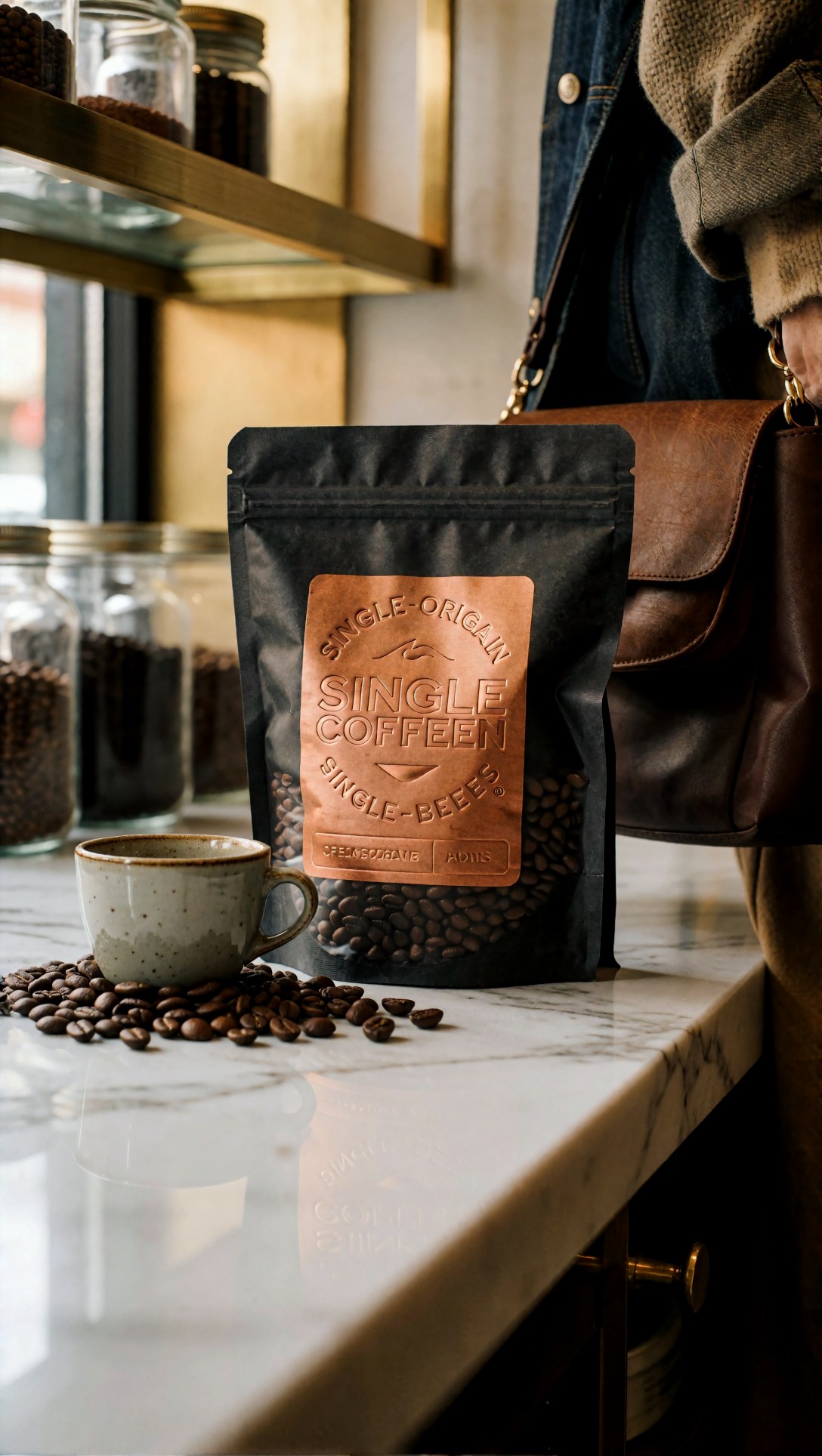
Topic: Premium coffee product on a marble counter
Genre: Product Editorial
Camera: Nikon Z8
Lens: 105mm macro f/2.8
Lighting: Softbox key light with warm window fill
Location: Minimal cafe counter with brushed brass shelving
Style: High-end commercial still life
Final Prompt: A premium bag of single-origin coffee beans standing upright on a white marble cafe counter, matte charcoal packaging with embossed copper label, a small ceramic espresso cup beside it, scattered coffee beans placed intentionally not randomly, softbox key light from camera left with warm window fill from behind, gentle reflection on the marble surface, brushed brass shelves and blurred glass jars in the background, clean luxury product composition, visible packaging edges, realistic paper texture, rich brown and copper palette, Nikon Z8 precision, 105mm macro f/2.8 sharp focus, premium high-end commercial still life
Krea2 Turbo example 2

Inspect the label area, bag structure, and object placement. This is where weak generators start bending packaging, merging the cup into the counter, or turning “intentional styling” into clutter.

Why this improvement works

The product shot forces three things:

n- material realism

  • edge control
  • spatial discipline

That matters because many people looking for an ai photo generator free without login actually need mock product art, thumbnails, or ad concepts quickly. In my tests, product prompts separated the merely fast tools from the useful ones.

Refined prompt: more control for portrait realism

After the baseline, I tightened camera position and facial expression. This usually improves realism more than adding “ultra detailed” or similar filler.

This portrait test is meant to check face stability, textile detail, and whether the model keeps the scene grounded instead of over-stylizing it.

Topic: Contemporary ceramic artist in her studio
Genre: Editorial Portrait
Camera: Sony A7R V
Lens: 85mm f/1.4
Lighting: North window light with soft bounce fill
Location: Working ceramics studio with shelves of unfinished bowls
Style: Cinematic realism
Final Prompt: A contemporary ceramic artist standing in her working studio beside a wooden table covered with clay tools, wearing a faded indigo apron over a cream button shirt and dark linen trousers, direct but calm eye contact with the camera, natural smile held back, hands lightly dusted with clay, shelves of unfinished bowls and vases behind her, north window daylight shaping the face with soft bounce fill, earthy whites, indigo, clay brown and ash gray palette, cinematic realism, Sony A7R V rendering, 85mm f/1.4 shallow depth of field, realistic skin pores, detailed linen texture, balanced composition, authentic documentary-editorial mood
Krea2 Turbo example 3

Look at the hands first. Then inspect whether the clay dust remains believable or turns into random white patches. The strongest result in this category usually has controlled eyes, non-waxy skin, and background pottery that reads as objects rather than blobs.

Where free ai art generator no login tools usually break

Once a tool passes the single-subject portrait test, I push it into likely failure zones.

Failure point 1: hands under action

No-login tools still struggle when hands are occupied by small objects. This test checks finger logic and object contact.

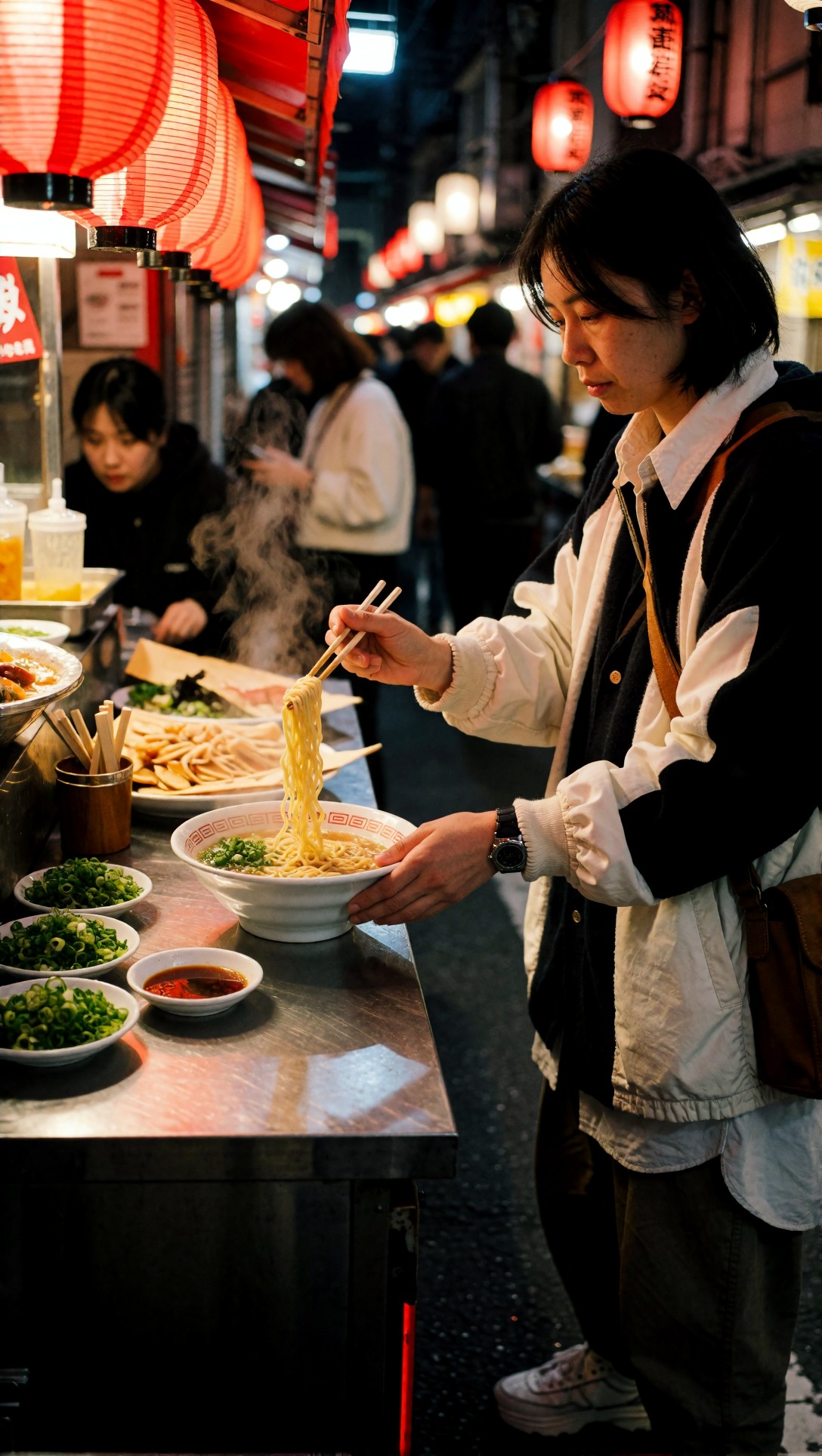
Topic: Street food vendor plating ramen
Genre: Documentary Food Editorial
Camera: Fujifilm GFX100S
Lens: 63mm f/2.8
Lighting: Warm stall practicals with cool evening ambient light
Location: Narrow night market alley in Osaka
Style: Realistic food documentary
Final Prompt: A street food vendor in a narrow Osaka night market alley plating a bowl of ramen, both hands visible, one hand holding chopsticks lifting noodles while the other steadies the bowl, focused expression, steam rising into cool evening air, warm practical lights from the food stall, stainless steel counter with chopped scallions and small sauce dishes, realistic crowd blur behind, rich red lantern accents, realistic food documentary style, Fujifilm GFX100S tonal depth, 63mm f/2.8, sharp noodle texture, believable fingers, natural hand anatomy, balanced night market composition
Krea2 Turbo example 4

Check whether the chopsticks connect correctly to the fingers and whether the noodles behave like noodles rather than ribbons. Many free tools generate a convincing face here and then fail badly at the actual action.

Failure point 2: text and packaging clarity

Many users want quick posters, ads, or mock covers. No-login generators still cannot be trusted for exact text, so this test shows how far you can push layout before you need external editing.

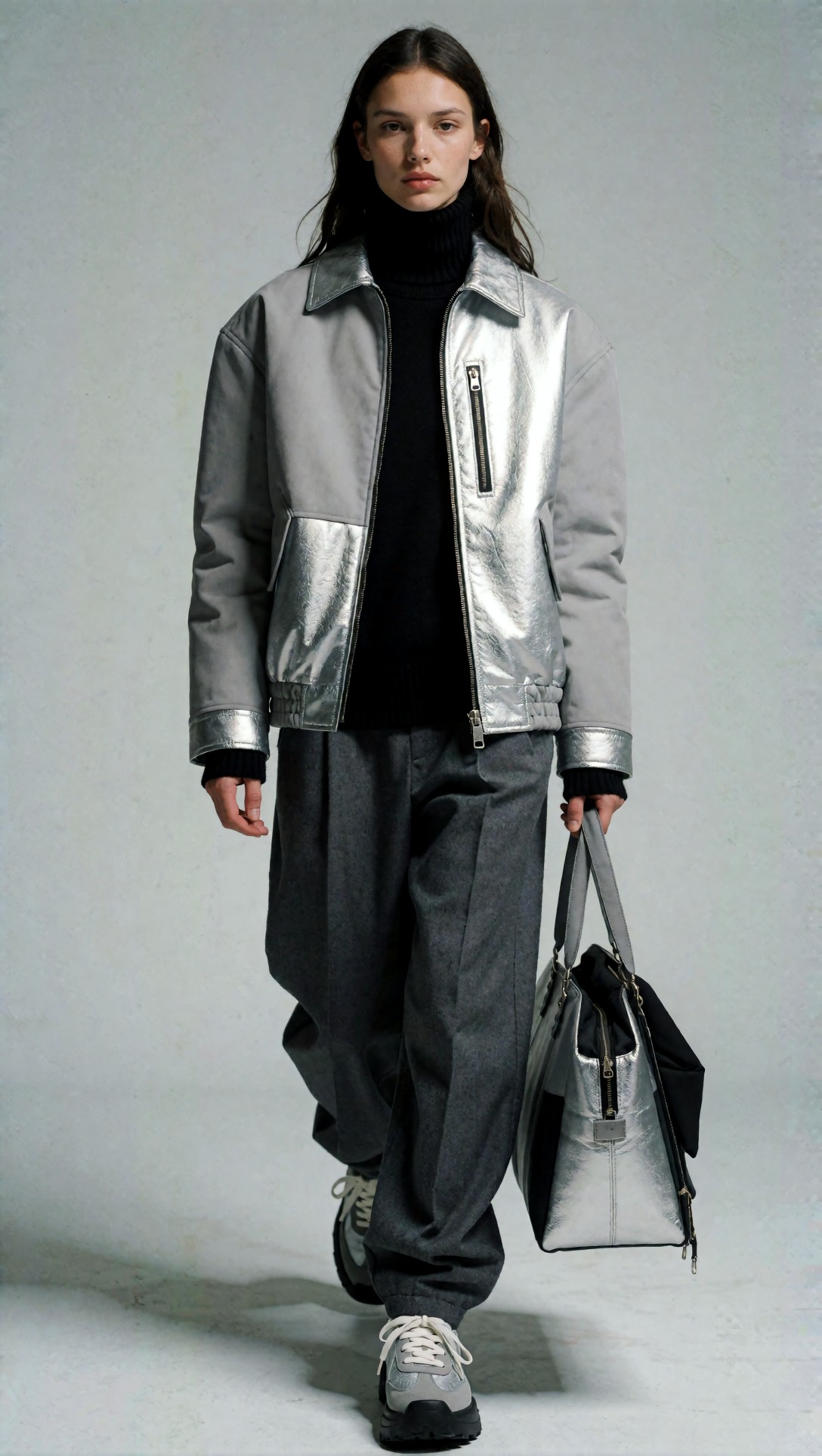
Topic: Indie magazine cover concept about future cities
Genre: Editorial Cover Design
Camera: Hasselblad X2D 100C
Lens: 55mm f/2.5
Lighting: Studio beauty key with subtle rim light
Location: Seamless paper studio backdrop in pale gray
Style: Modern magazine cover art direction
Final Prompt: Portrait of an androgynous model wearing a structured silver jacket with matte black turtleneck against a pale gray seamless backdrop, centered front-facing composition with negative space reserved for magazine masthead and cover lines, studio beauty key light with subtle rim separation, calm serious expression, minimal futuristic styling, metallic fabric texture visible, clean modern editorial cover design, Hasselblad X2D 100C crisp detail, 55mm f/2.5, balanced symmetry, premium print-ready composition, no random background objects, realistic skin texture
Krea2 Turbo example 5

Inspect whether the image leaves usable negative space and whether the composition feels cover-ready. Ignore generated text claims; what matters is whether the layout survives and the subject does not drift off-center.

Failure point 3: multi-layer environments

This test checks location consistency. It is where many “instant AI image generator” tools start hallucinating architecture.

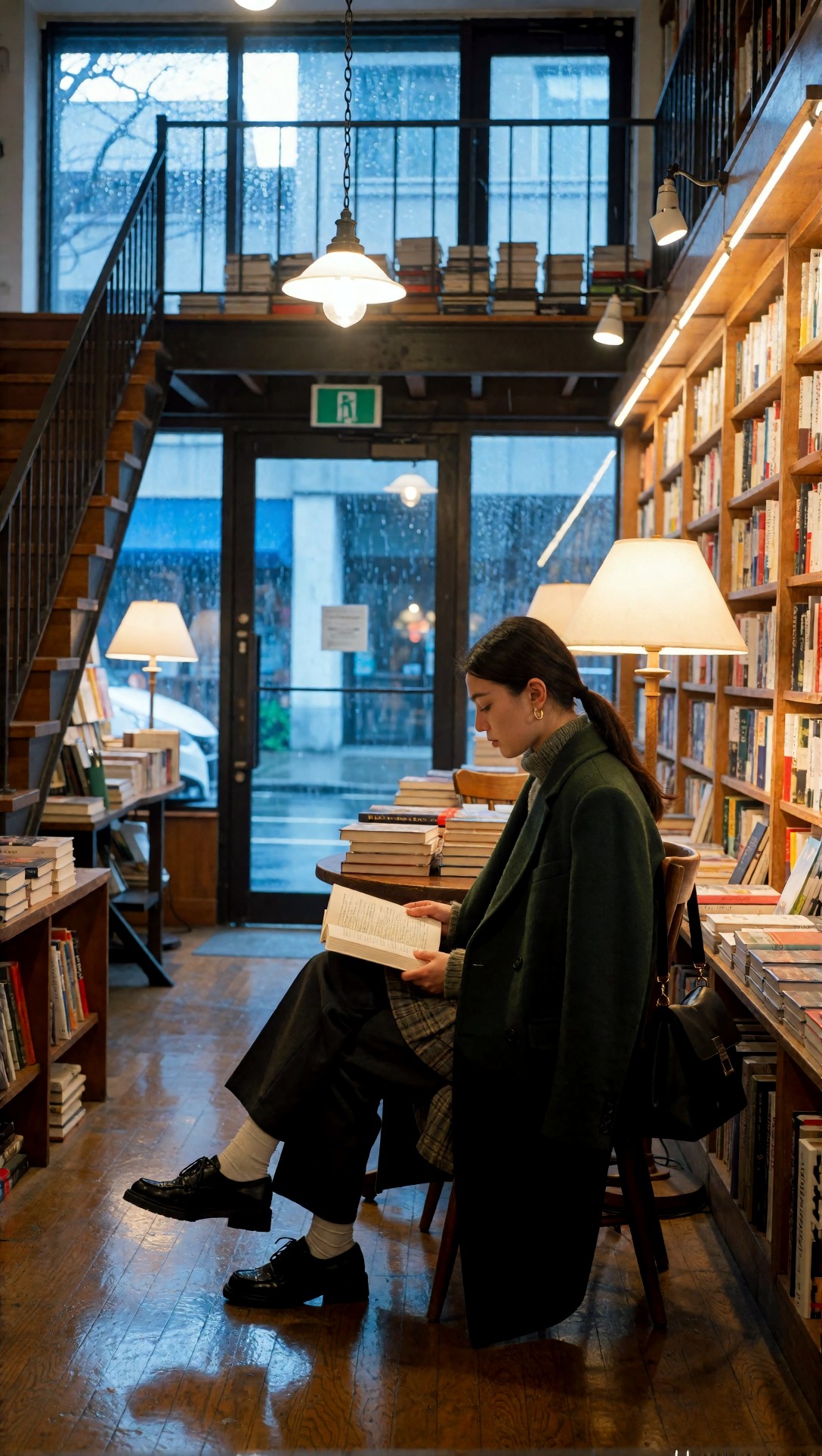
Topic: Rainy bookstore interior with solitary reader
Genre: Cinematic Interior Scene
Camera: Panasonic Lumix S1R II
Lens: 35mm f/2
Lighting: Tungsten practical lamps with cool window rain light
Location: Two-story independent bookstore with wooden staircase
Style: Atmospheric cinematic realism
Final Prompt: A solitary reader seated at a small round table inside a two-story independent bookstore during rain, open book in hand, dark green wool coat draped over the chair, warm tungsten lamps glowing over stacked shelves, cool blue rain light entering through tall front windows, visible wooden staircase leading to an upper mezzanine, reflections on polished wood floor, quiet contemplative mood, cinematic realism, Panasonic Lumix S1R II look, 35mm f/2 environmental framing, layered depth, realistic book spines and architecture, balanced composition with one clear subject
Krea2 Turbo example 6

Look at the staircase, mezzanine, and shelf geometry. The weak point here is usually impossible architecture: stairs leading nowhere, shelves merging into windows, or books turning into texture soup.

What the best free no sign up generators did well

Across the tests, the better no-login tools shared a few strengths.

Strong single-subject readability

If the prompt had one person, one action, and one lighting scheme, usable results came quickly. Portraits and simple product shots were the safest categories.

Fast visual ideation

For brainstorming, these tools are still valuable. You can draft scene direction, color palette, wardrobe cues, or framing ideas before moving into a more controllable system.

Good enough prompt scouting

This was the most practical use case in my testing. I could discover whether a concept was worth developing, then move the successful wording into [Create](/create) or compare outcomes in the [Gallery](/gallery).

The weak points I kept seeing

Over-processed faces

A lot of no-login outputs looked fine in thumbnail view but fell apart on inspection. Skin became plastic, eyelashes clumped unnaturally, and teeth were over-bright.

Style drift after rerolling

Some tools produced one good frame and then wandered far from the prompt on the next try. This is frustrating when you want consistency but have no seed control.

Weak typography and object logic

If your project needs exact branding, labels, or readable text, a free text to image AI no login tool is the wrong final step. Use it for layout concept only.

Prompt examples for harder tests

Once a no-login generator proved competent on the baseline, I used these harder prompts to see whether it still held up.

This test is meant to check low-light color separation, face retention, and whether neon accents stay controlled rather than flooding the whole frame.

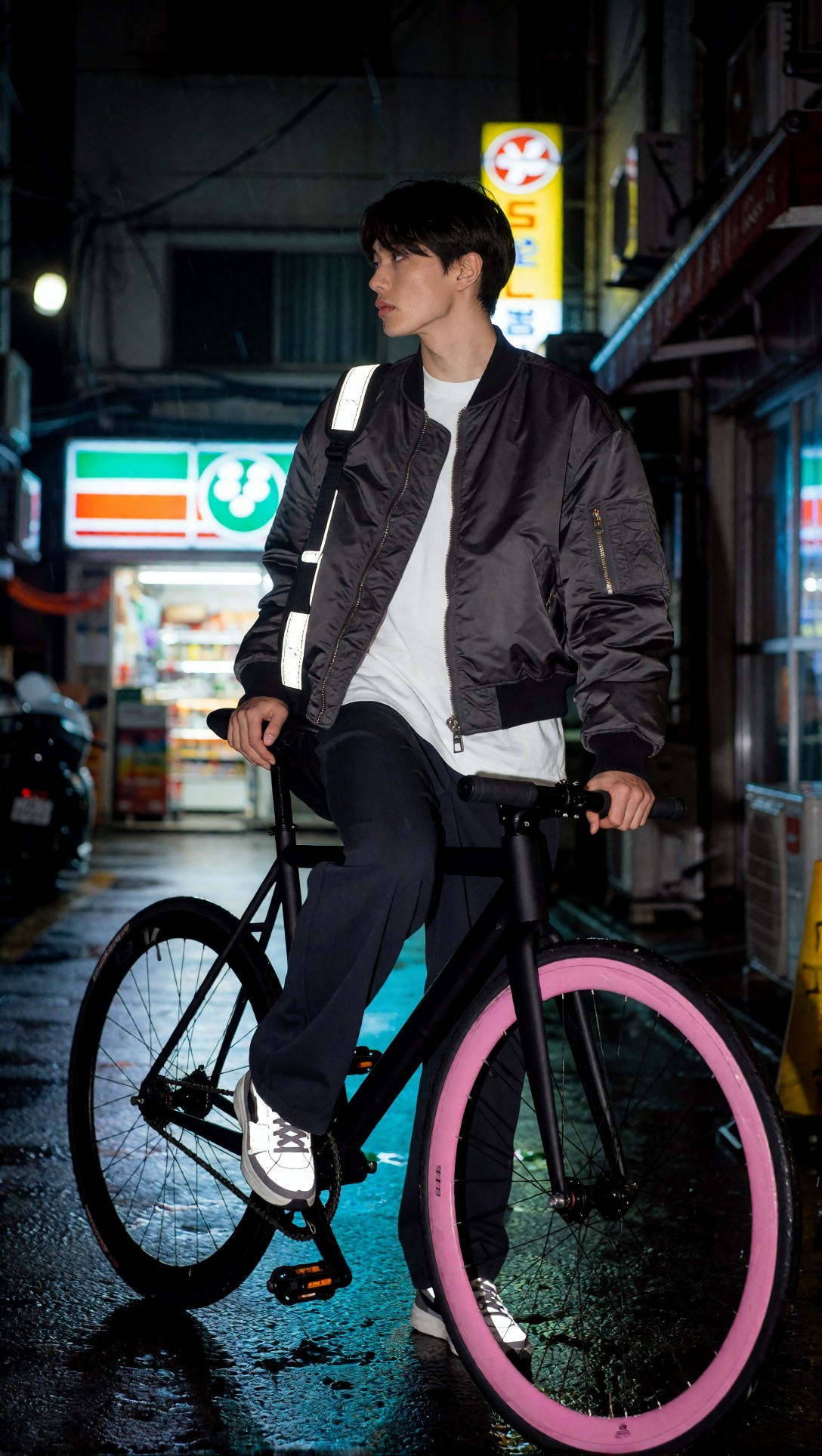
Topic: Late-night cyclist portrait under city neon
Genre: Street Style Portrait
Camera: Leica SL2-S
Lens: 50mm f/1.4
Lighting: Neon rim light with wet-street reflections
Location: Back alley beside a convenience store in Seoul
Style: Urban cinematic portrait
Final Prompt: A late-night cyclist standing beside a matte black fixed-gear bicycle in a narrow Seoul back alley after rain, oversized charcoal bomber jacket over white tee, cropped dark trousers, reflective sneakers, one hand on handlebars, alert expression looking past camera, pink and cyan neon rim light from shop signs, wet pavement reflections, convenience store glow in the distance, moody urban cinematic portrait, Leica SL2-S color depth, 50mm f/1.4 shallow depth, realistic skin, detailed nylon fabric texture, controlled neon spill, clean full-body composition
Krea2 Turbo example 7

Inspect whether the bike frame remains structurally believable and whether the neon colors separate instead of turning the subject purple. This is a good stress test for edge definition.

This test checks landscape depth, travel realism, and whether the generator can keep a natural body pose inside a wide frame.

Topic: Sunrise hiker overlooking volcanic valley
Genre: Cinematic Travel
Camera: Nikon D850
Lens: 24mm f/4
Lighting: Sunrise backlight with soft atmospheric haze
Location: Volcanic ridge trail in Iceland
Style: Epic natural realism
Final Prompt: A lone hiker standing on a volcanic ridge trail in Iceland at sunrise, rust-colored shell jacket, charcoal hiking pants, compact backpack, body turned three-quarters toward a vast misty valley, one boot on a dark lava rock, soft atmospheric haze catching sunrise backlight, layered mountain forms fading into the distance, muted black rock, moss green and amber sky palette, cinematic travel realism, Nikon D850 wide environmental view, 24mm f/4, natural human proportions, crisp outdoor apparel texture, realistic scale and weathered terrain detail
Krea2 Turbo example 8

Look for proportion errors caused by the wide frame. Better tools keep the hiker grounded in the scene rather than pasting a portrait-sized body onto a landscape.

This test checks beauty lighting, skin realism, and whether the model can render gloss without turning the face into plastic.

Topic: Clean beauty serum campaign portrait
Genre: Beauty Campaign
Camera: Canon EOS R3
Lens: 100mm f/2.8 macro
Lighting: Studio butterfly light with silver reflector fill
Location: Minimal pastel studio set with translucent acrylic blocks
Style: High-end beauty advertising
Final Prompt: Close portrait of a model holding a frosted glass serum bottle near the cheek, luminous but realistic skin, slicked-back hair, soft peach-toned makeup, ivory satin top barely visible in frame, studio butterfly light with silver reflector fill, translucent acrylic blocks and pale peach backdrop softly blurred, premium clean beauty campaign, Canon EOS R3 sharpness, 100mm f/2.8 macro precision, detailed eyelashes, natural pores, glass reflections controlled, elegant hand pose, high-end beauty advertising look

Inspect the fingers around the bottle and the bottle cap geometry. If those hold together, the tool is probably above average for no-login use.

The refined workflow I would actually recommend

If your goal is the best free ai image generator experience without sign-up friction, I would not treat one tool as the whole solution. I would use a staged workflow.

Step 1: Use a no-login tool for concept validation

Start with a simple prompt and decide whether the concept is visually viable at all.

Step 2: Tighten the winning prompt

Add concrete wardrobe, object, and lighting terms. Remove contradictory style words.

This test is meant to check style lock and repeatability on a controlled fashion scene, which many social-image generators mishandle.

Topic: Minimalist resort fashion by a white courtyard pool
Genre: Fashion Editorial
Camera: Sony A1
Lens: 70mm f/2
Lighting: Mid-morning sun softened by overhead diffusion silk
Location: White stone courtyard with narrow reflecting pool in Mallorca
Style: Luxury resort editorial
Final Prompt: Full-body fashion editorial portrait of a model walking beside a narrow reflecting pool in a white stone Mallorca courtyard, sculptural ivory halter dress with clean drape, tan leather sandals, gold cuff bracelet, hair tied into a low polished knot, neutral makeup, composed expression, mid-morning sun softened by overhead diffusion silk, pale stone walls, olive tree shadows, restrained beige and white palette, luxury resort editorial style, Sony A1 detail, 70mm f/2 elegant compression, crisp garment folds, realistic stride, premium magazine composition

Inspect hemline behavior, limb alignment, and whether the reflecting pool remains geometrically consistent. Fashion prompts reveal fabric and pose weaknesses quickly.

Step 3: Move good drafts into a fuller workflow

When a prompt starts working, move it into a tool with proper controls. That is where seed, aspect ratio, image edits, and upscale choices start mattering.

If the composition is already close but soft, I would use [Upscaler](/upscaler) only after checking whether the softness comes from resolution or from bad anatomy. Upscaling cannot repair broken fingers or warped packaging.

Likely failure risks and how to reduce them

If faces look generic

Add age range, expression, and one or two grounded styling details. Avoid stacking celebrity-adjacent aesthetics.

If hands fail

Show one hand clearly and give it one task. “Both hands holding multiple objects” is still a common failure prompt.

If the background turns chaotic

Reduce object count. Replace “busy market full of details” with three anchor elements that matter.

If product shots warp

Specify package shape, surface material, and one supporting prop only.

This prompt checks tabletop discipline and whether the model can keep product geometry straight under moody lighting.

Topic: Vintage wristwatch on a walnut writing desk
Genre: Luxury Product Editorial
Camera: Phase One XF IQ4
Lens: 120mm macro f/4
Lighting: Controlled side key light with soft shadow falloff
Location: Dark walnut writing desk with fountain pen and folded letter
Style: Quiet luxury still life
Final Prompt: A vintage stainless steel wristwatch placed neatly on a dark walnut writing desk, black leather strap partially curved, one silver fountain pen and a folded cream letter nearby, controlled side key light creating soft shadow falloff, subtle reflections on polished metal, deep brown and steel gray palette, quiet luxury still life, Phase One XF IQ4 clarity, 120mm macro f/4, precise watch geometry, realistic leather grain, restrained composition, premium editorial product image with clean negative space

Inspect the watch numerals, strap lugs, and circular symmetry. No-login tools often fake luxury product shots well at thumbnail size but fall apart on exact shapes.

Reusable prompt pattern for free AI image generator without login tools

This is the pattern I would reuse when working with restricted web generators. It keeps the prompt rich enough to guide the model, but simple enough not to overload weaker systems.

Topic: [specific subject and action]
Genre: [portrait, product editorial, travel, beauty, fashion, interior]
Camera: [real camera body]
Lens: [focal length and aperture]
Lighting: [one clear lighting setup]
Location: [specific place with 2-3 anchor details]
Style: [one clear art direction]
Final Prompt: [subject + wardrobe/objects + pose/expression + composition + light + color palette + texture + realism cues]

The ingredients that mattered most in this test

In practice, the highest-impact fields were:

1. Topic 2. Lighting 3. Location 4. Lens

Style helped, but too much style language often made free no-login systems less stable rather than more impressive.

Checklist: how to judge a free ai image generator without login in under 3 minutes

  • Does it render a first image before forcing account creation?
  • Can it keep one subject and one object separate?
  • Do hands survive basic actions?
  • Does lighting stay coherent across face, clothes, and background?
  • Are product edges, stairs, bikes, or bottles structurally believable?
  • Does rerolling preserve the concept or replace it entirely?

If it fails four of those six, I would not spend more prompt effort there.

FAQ

What is the best free AI image generator without login right now?

There is no permanently stable winner because access rules change often. In this test, the best options were the ones that allowed immediate generation and held up on simple portraits and product shots. For controlled production work, no-login tools were still a starting point, not the finish line.

Are free AI image generators with no sign up good enough for commercial work?

Good enough for rough concepts, moodboards, and internal mockups, yes. Risky for final commercial assets, also yes. Check each tool's usage terms, watermark policy, and output consistency before using it beyond ideation.

Why do no-login AI image tools struggle with hands and text?

Because those details require precise structure and many lightweight free systems prioritize speed over fine control. Hands, typography, packaging geometry, and dense scenes are the first places quality drops.

Can I improve results without negative prompts or advanced settings?

Yes. Tighten subject, action, lighting, and location. Remove contradictory adjectives. Keep one scene, one mood, one lens, and one clear focal point.

Final recommendation

If you need a free AI image generator without login, use these tools for what they still do well in 2026: quick visual drafts, prompt scouting, and low-friction concept testing. They are strongest when you give them one subject, one action, one lighting plan, and a specific location.

I would recommend this workflow to creators who need fast ideation, ecommerce teams mocking up directions, and prompt writers testing scene language before moving into a fuller pipeline. I would avoid relying on it for exact product geometry, readable text, or multi-subject hero images.

The setting that mattered most in this test was not a hidden control panel feature. It was clear lighting paired with a specific location. When that part of the prompt was stable, even average no-login tools became more usable. When it was vague, every result looked cheap.