How to Create Seoul Runway Model Photos With AI Image Prompts 한국어 요약
이 페이지는 ZView Space의 영어 원문을 한국어 검색 사용자도 이해할 수 있도록 정리한 SEO 요약입니다. 핵심은 단순한 얼굴 중심 이미지가 아니라 패션 에디토리얼, 룩북, 아웃핏, 프롬프트 테스트, 이미지 생성 워크플로우를 실제로 어떻게 구성할지입니다.
핵심 요약
- 원문 주제: How to Create Seoul Runway Model Photos With AI Image Prompts
- 목적: AI 이미지 생성에서 outfit, silhouette, fabric, pose, location, camera framing을 더 명확하게 설계합니다.
- 활용 범위: Z-Image Turbo, Krea2 Turbo, Qwen Image, Anima, SeedVR2 같은 이미지 생성 및 업스케일 워크플로우에 적용할 수 있습니다.
- SEO 관점: 제목, 설명, 이미지 alt, 프롬프트 예시가 실제 검색 의도와 맞아야 색인 가능성이 높아집니다.
한국어 사용자를 위한 체크포인트
1. 프롬프트가 얼굴 묘사에만 머물지 않고 전체 스타일과 의상 구성을 설명하는지 확인합니다. 2. 패션 이미지라면 상의, 하의, 아우터, 신발, 액세서리, 소재감, 촬영 장소를 분리해서 씁니다. 3. 생성 결과는 바로 게시하지 말고 디테일, 손, 의상 형태, 배경 일관성, 이미지 품질을 비교합니다. 4. 글 본문에는 실제 테스트 기준과 실패를 줄이는 방법이 들어가야 검색엔진에서 얇은 콘텐츠로 보일 가능성이 줄어듭니다.
원문 미리보기
Seoul runway imagery works well in AI image generators because it combines strong visual signals: contemporary tailoring, city architecture, beauty styling, and controlled editorial lighting. The best results come from prompts that define not only the model an
---
Seoul runway imagery works well in AI image generators because it combines strong visual signals: contemporary tailoring, city architecture, beauty styling, and controlled editorial lighting. The best results come from prompts that define not only the model and clothing, but also the camera language, location, texture, and fashion context.
This guide compares practical prompt strategies across common AI image models and provides production-ready prompt examples for creating Seoul-inspired runway model photos.
What makes a Seoul runway image distinct?
A convincing Seoul fashion image usually sits between street style and polished editorial. It may reference Seoul Fashion Week, Dongdaemun Design Plaza, Gangnam luxury retail, Hannam-dong galleries, Hongdae youth culture, or the glass-and-concrete look of modern Korean architecture.
Useful visual ingredients include:
- Structured coats, oversized blazers, leather, satin, technical nylon, or minimalist monochrome outfits
- Clean skin texture and refined hair styling rather than overly airbrushed beauty
- Urban backgrounds with glass, concrete, wet pavement, LED signs, or gallery interiors
- Confident runway posture: long stride, shoulders back, controlled facial expression
- Magazine-grade composition with negative space, fabric detail, and believable lighting
Model comparison: which AI generator fits this style?
Midjourney-style models
Midjourney-like models are strong for fashion mood, fabric drama, and elegant compositions. They often produce convincing editorial lighting without much technical prompting. The tradeoff is that clothing details can become stylized or inconsistent, especially with layered garments.
Best for: campaign-like runway images, Korean magazine covers, cinematic fashion spreads.
FLUX and newer photoreal models
FLUX-style photoreal models are useful for realistic faces, natural skin, and believable street photography. They tend to handle modern urban environments well. They may need stronger direction for luxury styling and pose clarity.
Best for: realistic Seoul street style, backstage fashion week images, documentary runway looks.
SDXL checkpoints and LoRA workflows
SDXL is still useful when you need control: pose references, ControlNet, face consistency, custom fashion LoRAs, or repeatable brand styling. It takes more setup but can be better for a production workflow.
Best for: consistent model series, lookbooks, e-commerce-adjacent fashion imagery, controlled poses.
DALL-E-style models
DALL-E-style generators usually follow written instructions well and are good for clean commercial compositions. They may be less fashion-forward unless the prompt clearly defines wardrobe, location, and editorial intent.
Best for: concept boards, advertising mockups, simple campaign visuals, image ideation.
Prompting strategy for Seoul runway photos
A strong prompt should answer five questions:
1. Who is the model and what is their expression? 2. What is the wardrobe, fabric, and silhouette? 3. Where in Seoul is the image set? 4. What camera and lens language should the model emulate? 5. What is the editorial style: runway, beauty, street style, or campaign?
The following prompts use a consistent Prompt Enhancer structure so they can be adapted across models.
Prompt 1: Seoul Fashion Week exterior runway look
Use this when you want a polished runway image with recognizable Seoul architecture and a modern editorial finish.
Topic: Seoul Fashion Week runway model outside Dongdaemun Design Plaza
Genre: Fashion Editorial
Camera: Sony A7R V
Lens: 85mm f/1.4
Lighting: Overcast diffusion
Location: Dongdaemun Design Plaza plaza in Seoul, silver architecture, clean concrete ground, fashion week crowd blurred in the distance
Style: Korean magazine cover
Final Prompt: Seoul Fashion Week runway model walking outside Dongdaemun Design Plaza, wearing an oversized charcoal wool coat, tailored black trousers, pointed leather boots, and minimal silver jewelry, confident forward stride with shoulders back and calm serious expression, silver architectural curves in the background, soft overcast diffusion, muted gray and black color palette, premium wool texture, Sony A7R V look, 85mm f/1.4 shallow depth of field, Korean magazine cover composition, realistic skin texture, high-end editorial finish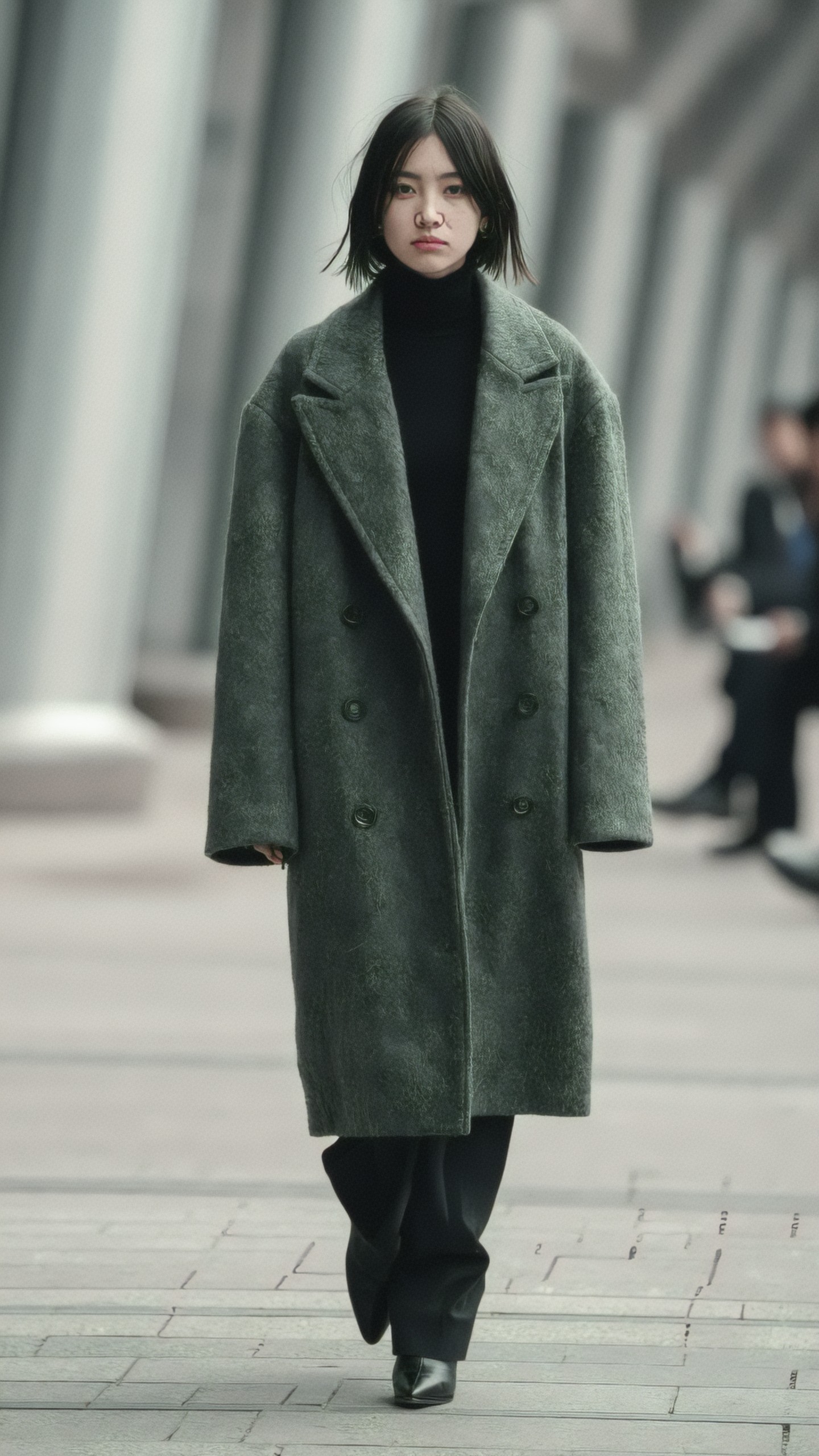
Prompt 2: Gangnam luxury evening campaign
For a more commercial result, specify luxury retail lighting, polished wardrobe, and a cleaner campaign composition.
Topic: Seoul runway model in Gangnam luxury district at night
Genre: Luxury Campaign
Camera: Hasselblad X2D 100C
Lens: 90mm f/2.5
Lighting: Neon rim light
Location: Gangnam luxury shopping street, glass storefronts, reflected city lights, wet pavement after rain
Style: High-end beauty advertising
Final Prompt: Elegant Seoul runway model standing on a rain-glossed Gangnam luxury street at night, wearing a cream satin trench dress with sculptural lapels, black patent heels, sleek low bun, and luminous natural makeup, composed three-quarter pose with one hand adjusting the collar, calm direct gaze, neon rim light outlining the silhouette, soft reflections on wet pavement, glass storefront bokeh, champagne, black, and electric blue color palette, Hasselblad X2D 100C medium-format look, 90mm f/2.5 depth, high-end beauty advertising style, crisp fabric detail, refined commercial polish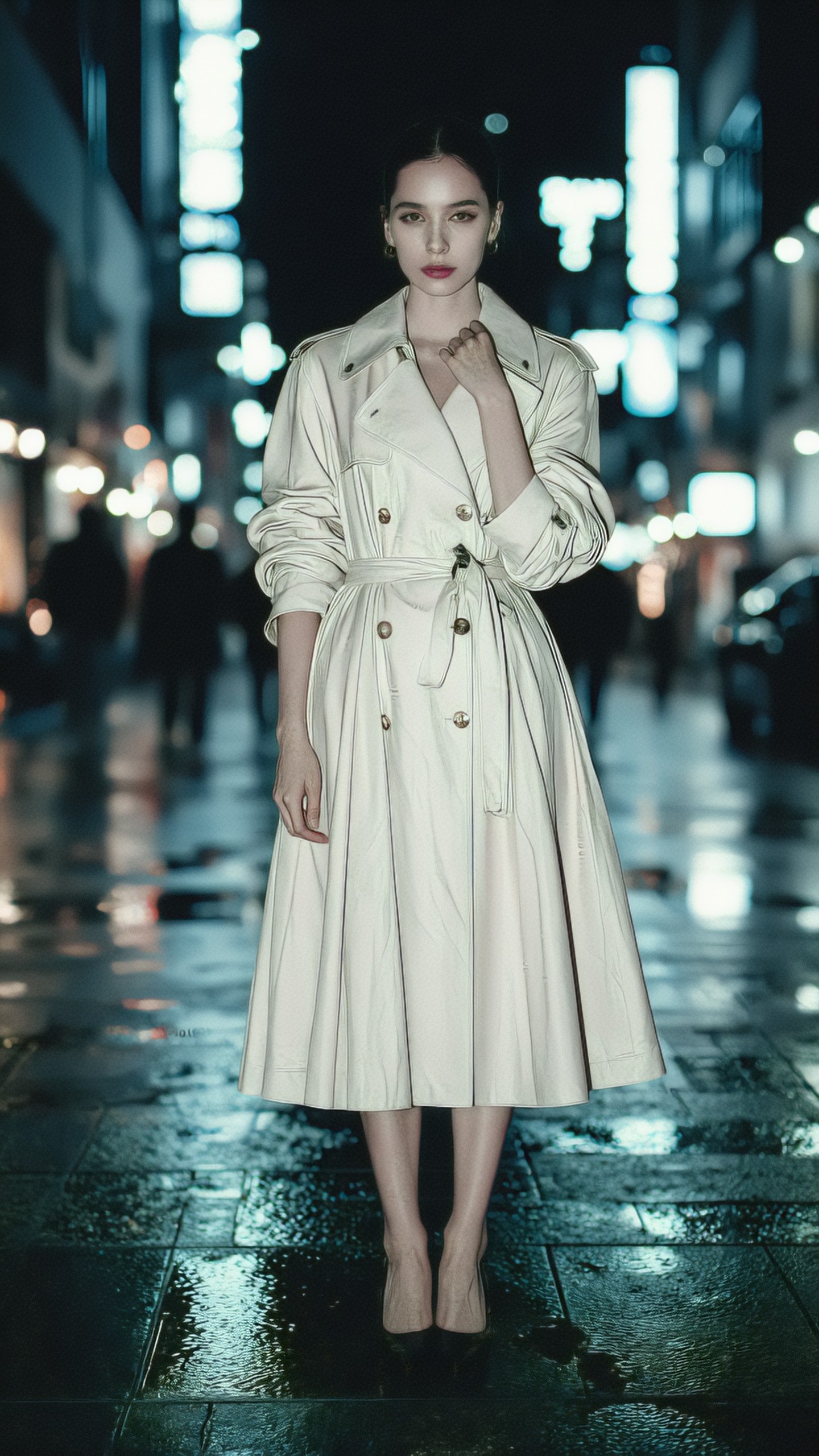
Prompt 3: Hannam-dong gallery fashion portrait
Interior gallery settings are useful when you want less visual clutter and more focus on silhouette, tailoring, and posture.
Topic: Seoul runway model in a Hannam-dong contemporary art gallery
Genre: Lifestyle Portrait
Camera: Canon EOS R5
Lens: 50mm f/1.2
Lighting: Softbox key light
Location: Minimal Hannam-dong gallery interior, white walls, polished concrete floor, abstract monochrome artwork
Style: Clean commercial look
Final Prompt: Seoul runway model posing inside a minimal Hannam-dong contemporary art gallery, wearing a crisp white asymmetrical blazer, wide-leg ivory trousers, sculptural black belt, and understated pearl earrings, relaxed contrapposto pose with a composed thoughtful expression, white gallery walls and monochrome artwork behind her, softbox key light creating clean facial modeling, polished concrete floor reflection, ivory, black, and soft gray palette, Canon EOS R5 look, 50mm f/1.2 shallow focus, clean commercial fashion portrait, natural skin texture, sharp tailoring seams, quiet luxury mood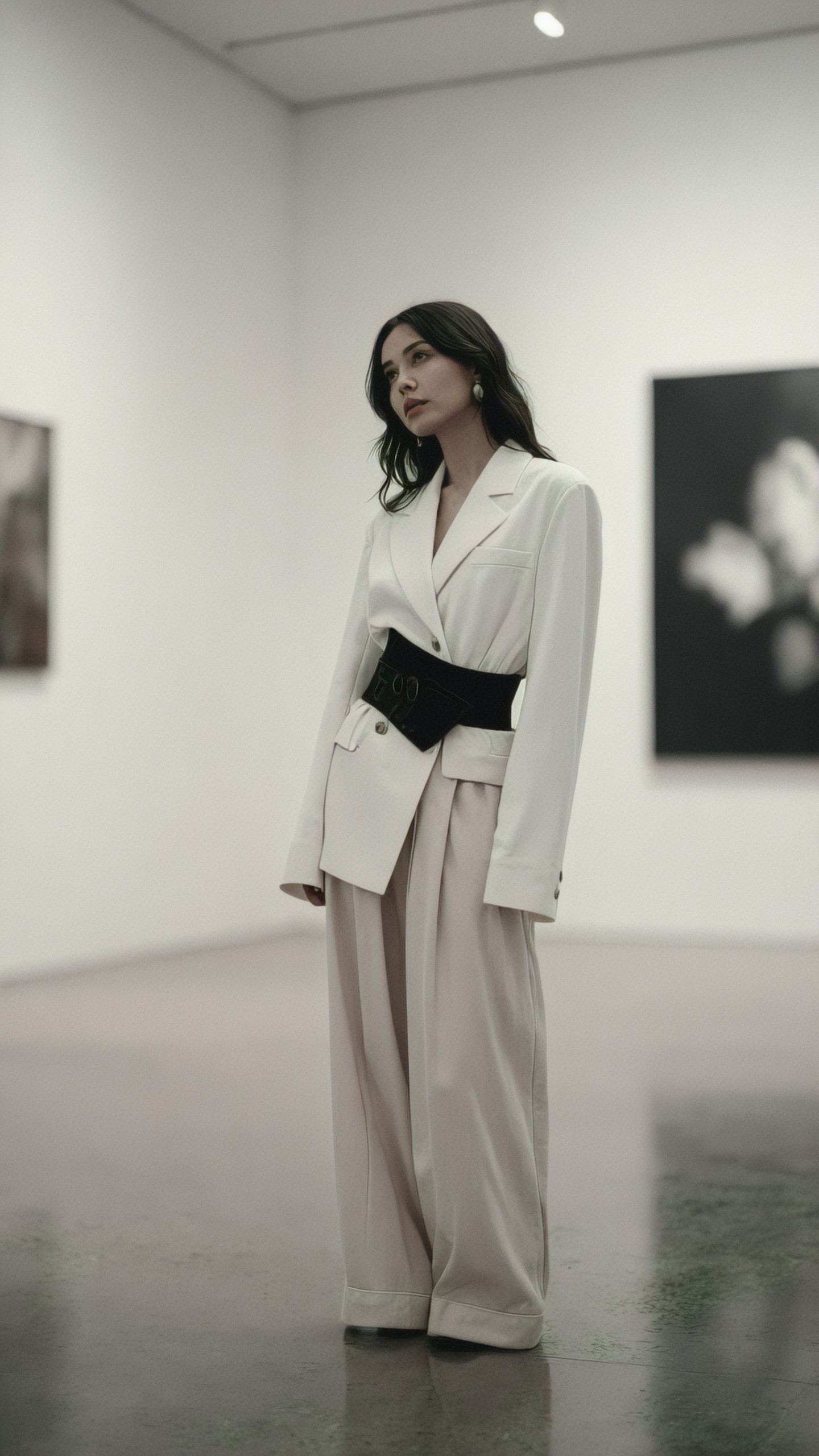
Prompt 4: Hongdae street style runway energy
Hongdae prompts work best when you lean into youth culture, graphic styling, and movement instead of formal luxury.
Topic: Seoul street style runway model in Hongdae
Genre: Street Style
Camera: Fujifilm GFX 100 II
Lens: 45mm f/2.8
Lighting: Sunset backlight
Location: Hongdae side street with murals, small cafes, posters, and pedestrians in soft blur
Style: Cinematic realism
Final Prompt: Seoul street style runway model crossing a Hongdae side street at sunset, wearing a cropped black leather jacket, layered mesh top, wide denim cargo pants, silver chain belt, and chunky sneakers, mid-stride pose with one hand in pocket and a slight self-assured smile, colorful wall posters and cafe signs blurred behind, warm sunset backlight catching hair strands and leather texture, urban youth fashion mood, Fujifilm GFX 100 II look, 45mm f/2.8 environmental portrait framing, cinematic realism, natural motion, detailed fabric wear, balanced street photography composition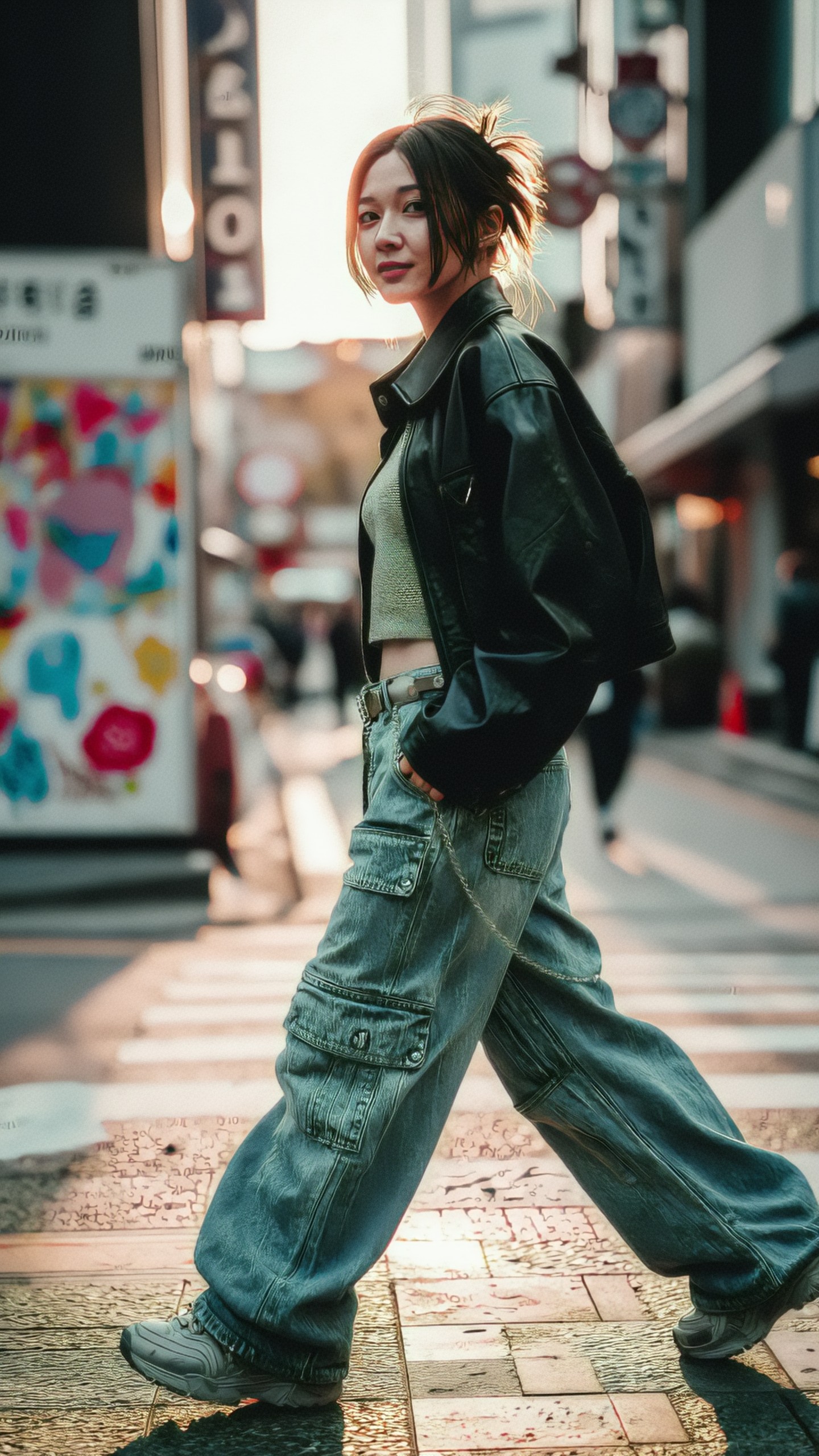
Building a consistent model series
If you want multiple images that look like the same editorial shoot, keep these elements consistent:
- The same camera and lens pairing
- Similar color palette
- Repeated styling language, such as monochrome tailoring or metallic accessories
- Similar facial description, hair length, and makeup direction
- One neighborhood or architectural theme
For SDXL or FLUX workflows, consider using a fixed seed, pose reference, or character reference. For Midjourney-style workflows, use style references and repeat key wardrobe descriptors. For DALL-E-style tools, write a more literal prompt and avoid ambiguous fashion terms.
Prompt 5: Apgujeong beauty-forward runway close-up
This prompt is designed for models that handle facial detail well. It works for beauty campaigns, magazine covers, and makeup concept boards.
Topic: Seoul runway model beauty close-up in Apgujeong
Genre: Beauty Campaign
Camera: Nikon Z8
Lens: 105mm f/2.8 macro
Lighting: Studio butterfly light
Location: Apgujeong beauty studio with soft beige backdrop and subtle reflective panels
Style: High-end beauty advertising
Final Prompt: Close-up beauty campaign portrait of a Seoul runway model in an Apgujeong studio, wearing a black velvet off-shoulder runway top, glass-skin makeup, softly defined brows, muted rose lips, and a single sculptural chrome earring, chin slightly raised with serene confident expression, studio butterfly light creating elegant cheekbone highlights, soft beige background with subtle reflective panels, refined black, rose, and champagne palette, Nikon Z8 look, 105mm f/2.8 macro detail, high-end beauty advertising style, realistic pores, clean hairline, luxurious velvet texture, symmetrical magazine composition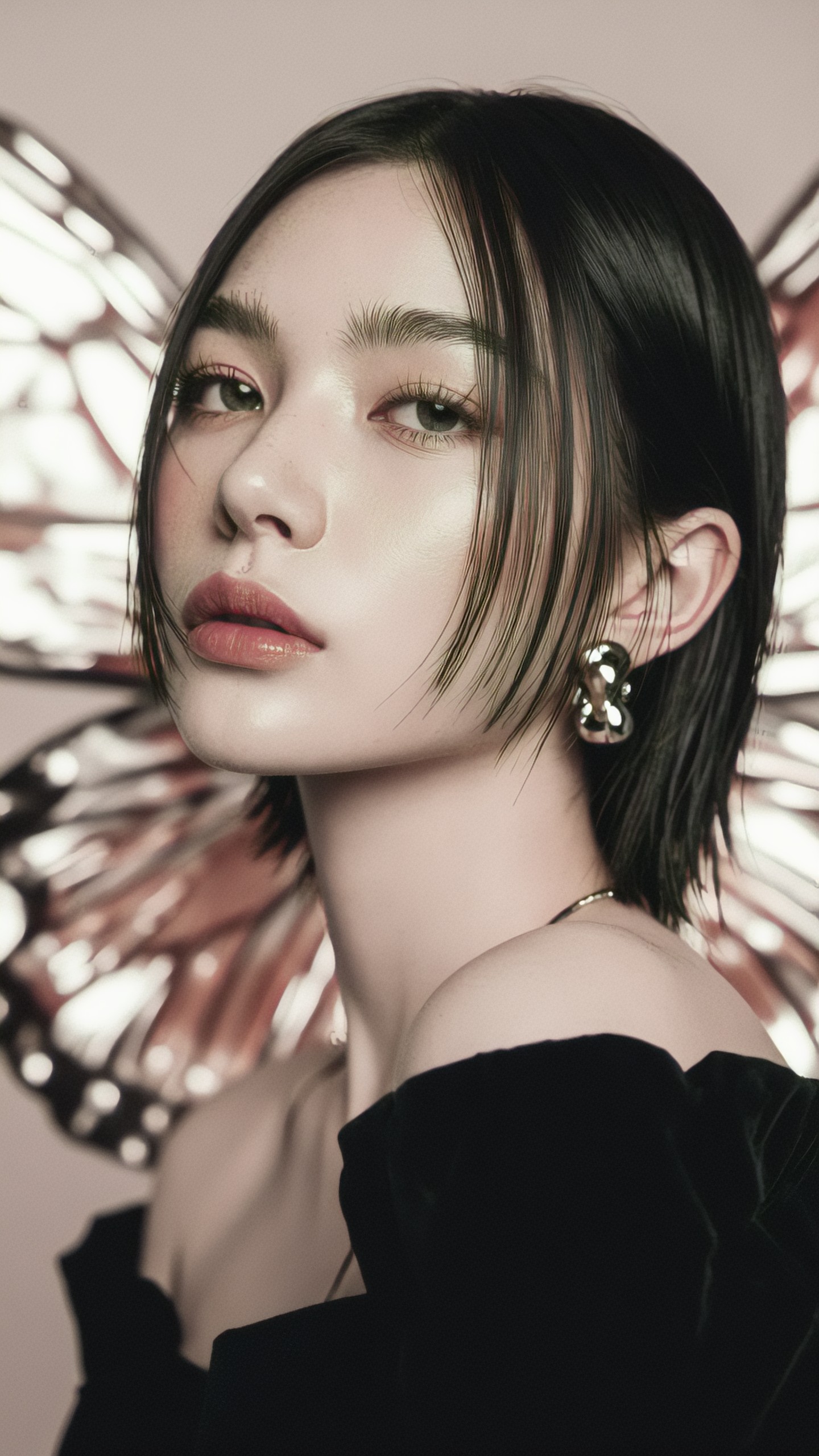
Prompt 6: Yeouido cinematic runway walk
Use a longer lens and cinematic language when you want the model to feel isolated against a large urban background.
Topic: Seoul runway model walking through Yeouido financial district
Genre: Cinematic Travel
Camera: ARRI Alexa Mini LF cinematic capture
Lens: 75mm T2.0 anamorphic
Lighting: Golden hour
Location: Yeouido financial district, tall glass towers, broad sidewalk, late afternoon city atmosphere
Style: Cinematic realism
Final Prompt: Seoul runway model walking through the Yeouido financial district during golden hour, wearing a long navy tailored coat over a silver silk blouse, slim black trousers, and polished ankle boots, elegant runway stride with focused eyes looking past camera, tall glass towers reflecting warm sunlight, broad sidewalk with subtle motion blur from commuters, navy, silver, and amber color palette, ARRI Alexa Mini LF cinematic capture, 75mm T2.0 anamorphic look, soft horizontal flare, cinematic realism, premium fabric movement, controlled editorial posture, realistic urban atmosphere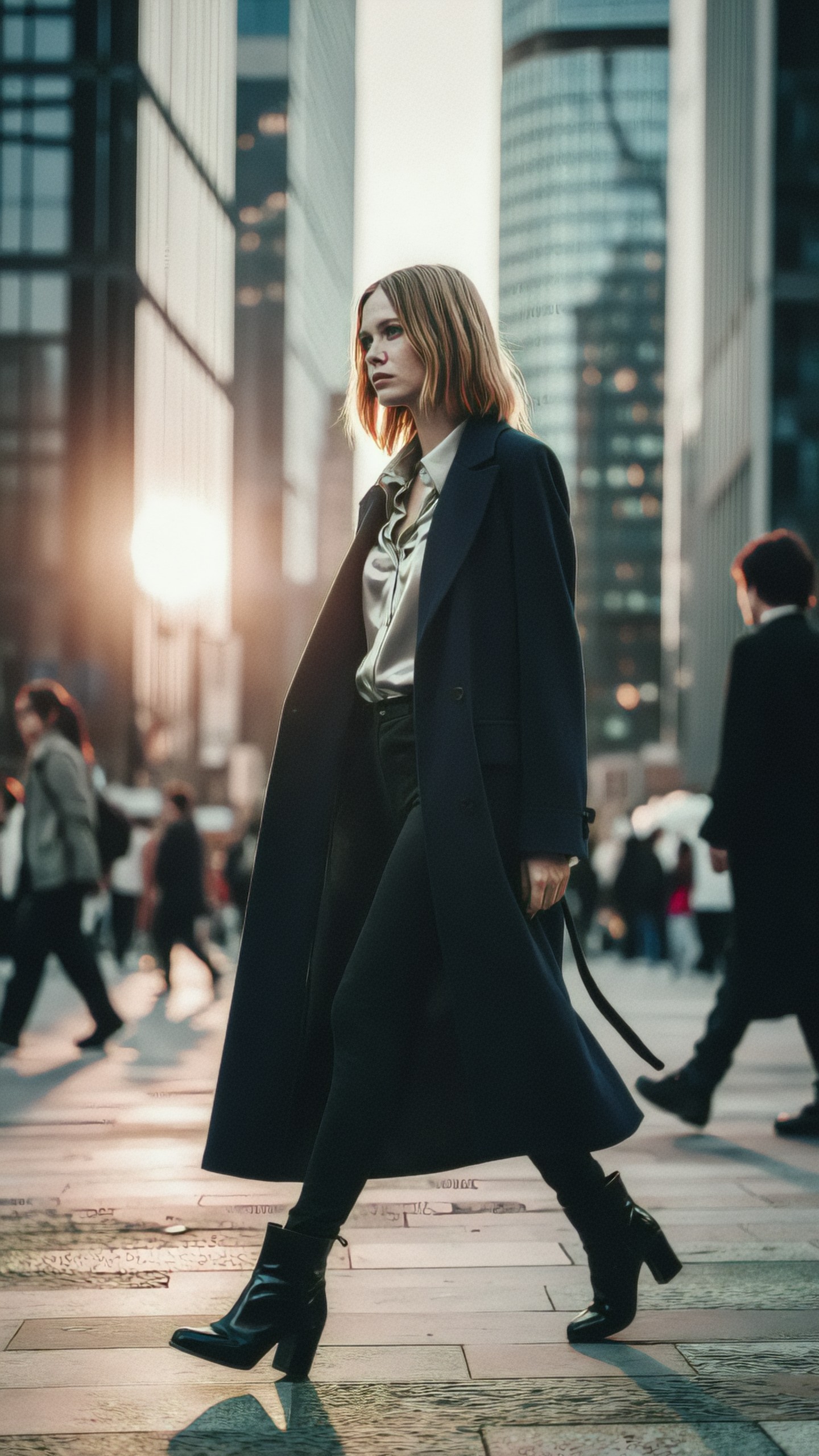
Prompt 7: Cheongdam luxury lookbook image
Cheongdam works well for luxury brand visuals because it suggests private boutiques, polished interiors, and premium materials.
Topic: Seoul runway model in a Cheongdam luxury boutique
Genre: Product Editorial
Camera: Leica SL2-S
Lens: 35mm f/2
Lighting: Softbox key light with warm practical accents
Location: Cheongdam luxury boutique interior, marble floor, walnut display shelves, mirrored fitting room
Style: Luxury fashion campaign
Final Prompt: Seoul runway model inside a Cheongdam luxury boutique, wearing a structured camel cashmere coat, black silk turtleneck, tailored mini skirt, sheer tights, and polished knee-high boots, standing beside a walnut display shelf with one hand holding a small leather handbag, composed neutral expression and elegant posture, marble floor reflections and mirrored fitting room creating depth, softbox key light with warm practical accents, camel, black, walnut, and cream palette, Leica SL2-S look, 35mm f/2 editorial framing, luxury fashion campaign style, detailed cashmere fibers, refined handbag texture, premium retail atmosphere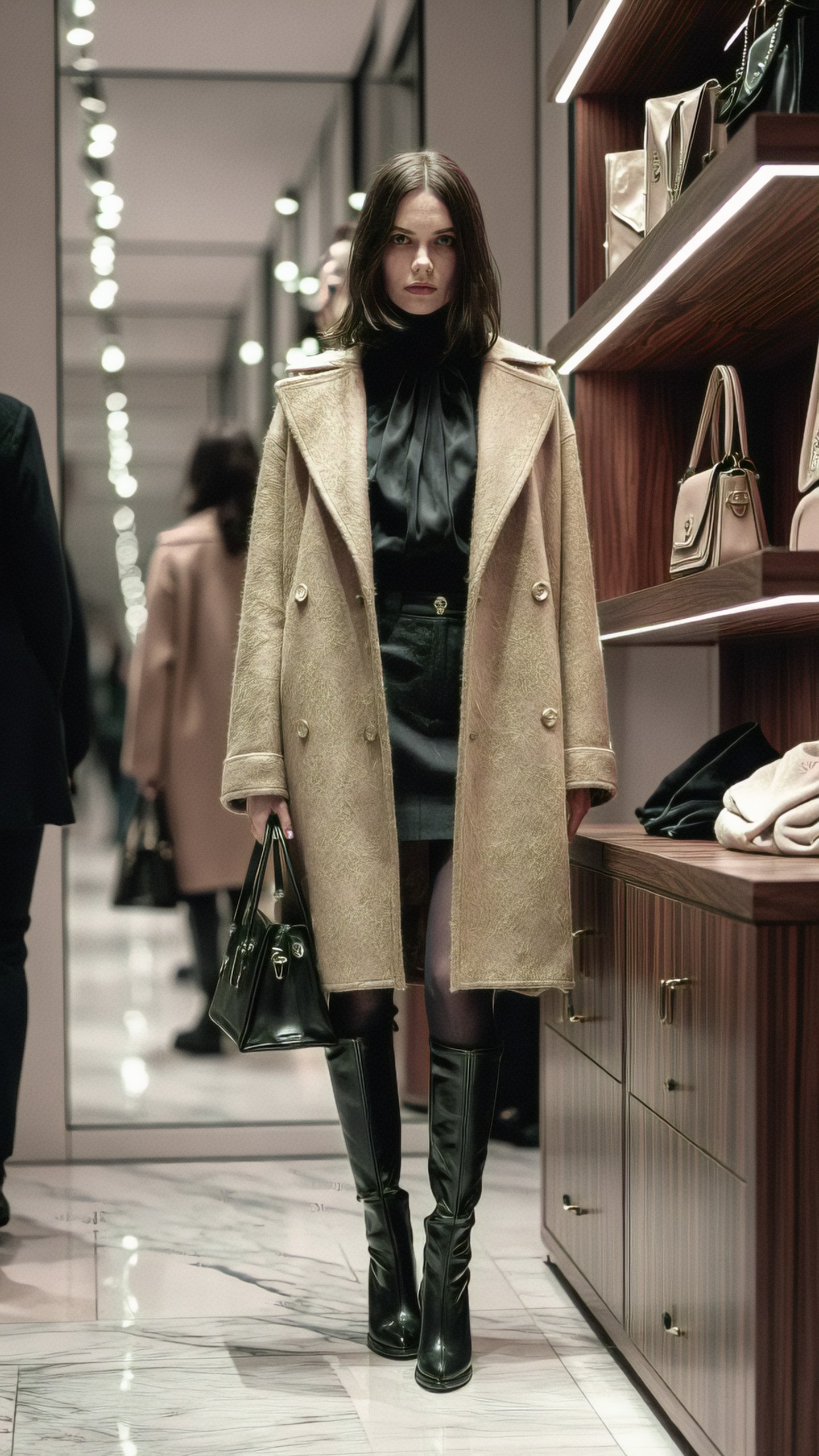
Prompt 8: Han River outdoor runway editorial
Outdoor Seoul images can avoid the dense city look while still feeling local. The Han River gives space, wind, skyline, and a softer fashion mood.
Topic: Seoul runway model near the Han River at dawn
Genre: Fashion Editorial
Camera: Panasonic Lumix S1H
Lens: 70mm f/2.8
Lighting: Dawn blue-hour diffusion
Location: Han River park walkway, Seoul skyline in the distance, calm water, early morning mist
Style: Elegant resort editorial
Final Prompt: Seoul runway model standing on a Han River park walkway at dawn, wearing a flowing slate-blue silk coat dress over wide ivory trousers, minimal sandals, and delicate silver rings, fabric moving gently in the river breeze, graceful side-facing pose with soft contemplative expression, Seoul skyline and calm water softened by early morning mist, dawn blue-hour diffusion, slate blue, ivory, and pale silver color palette, Panasonic Lumix S1H look, 70mm f/2.8 compression, elegant resort editorial style, smooth silk motion, quiet atmosphere, realistic skin tone, spacious high-fashion composition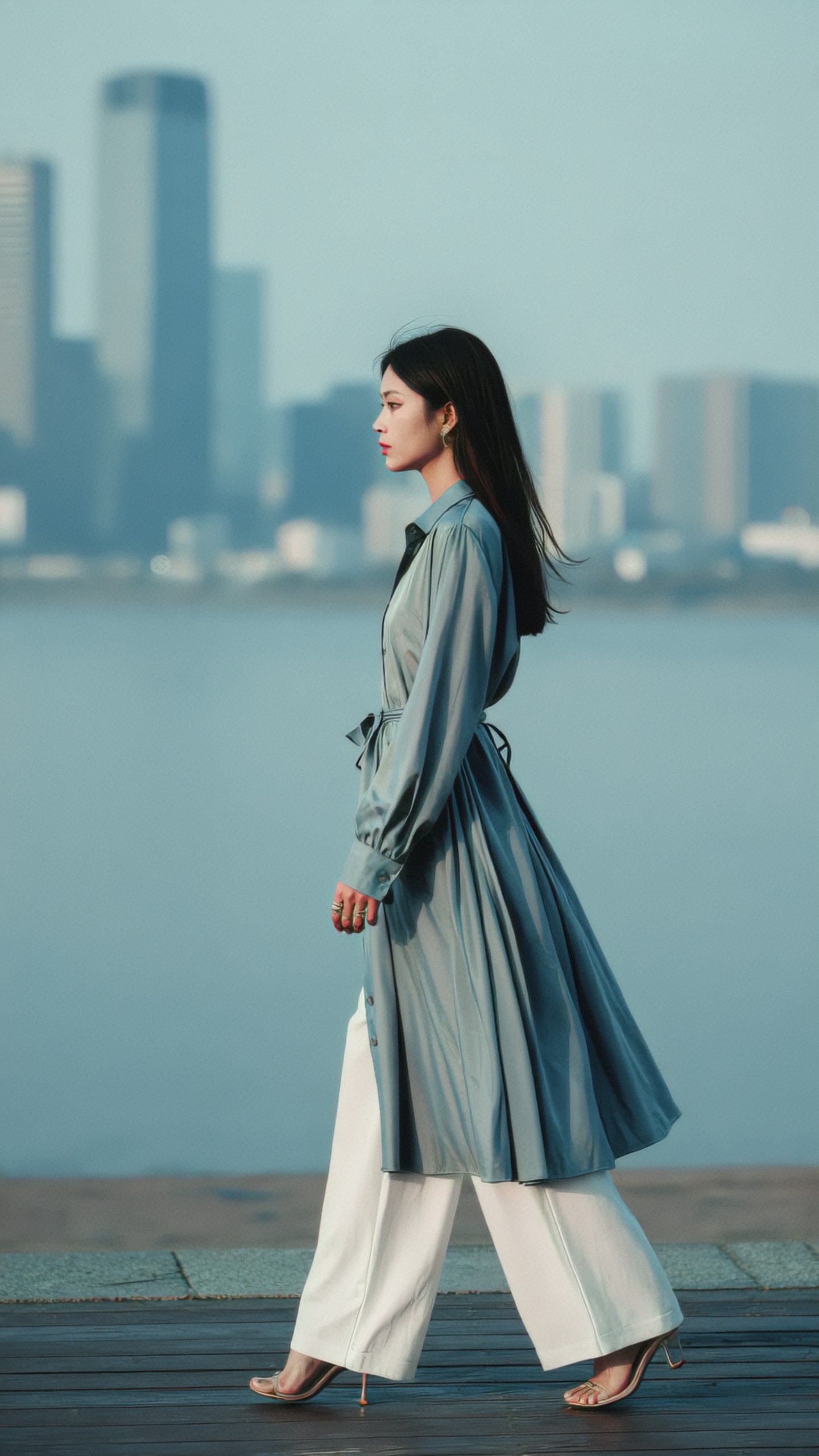
Practical use cases
Seoul runway model prompts can support several visual workflows:
- Fashion mood boards for styling, silhouettes, color palettes, and seasonal direction
- Editorial concept development before a real photo shoot
- Lookbook mockups for small fashion labels testing garment presentation
- Social media campaign drafts with location and lighting variations
- Beauty direction for hair, makeup, and accessory planning
- Model test concepts for portfolio planning
- Background and composition references for photographers or art directors
These images should be treated as concept visuals unless you have rights-cleared model references, garments, and brand elements. Avoid prompting for real private individuals or copying a living designer's exact protected campaign identity.
Editing and refinement tips
After generation, review the image like an editor rather than accepting the first attractive output.
Check for:
- Hands, feet, earrings, buttons, seams, and bag straps
- Korean text artifacts on signs or posters
- Over-smoothed skin or plastic fabric texture
- Inconsistent garment structure between images
- Backgrounds that look like generic Asian city scenes rather than Seoul-specific locations
For better results, revise one variable at a time. If the location is weak, strengthen the Seoul landmark. If the outfit is generic, specify fabric and silhouette. If the face looks artificial, reduce beauty retouching language and ask for natural skin texture.
Final assessment
For Seoul runway model photos, Midjourney-style models are often the fastest route to striking editorial images, while FLUX-style models are stronger for realistic street-level fashion. SDXL remains useful when repeatability and pose control matter. DALL-E-style tools are practical for clear commercial concepts, especially when the prompt is direct and structured.
The most reliable prompts combine Seoul-specific setting, fashion vocabulary, real camera language, and precise lighting. Treat the prompt as an art direction brief, not a keyword list, and the results will be easier to compare, refine, and use in a real creative workflow.