
Open Source Image Models VRAM Requirements List (2026 Edition) 한국어 요약
이 페이지는 ZView Space의 영어 원문을 한국어 검색 사용자도 이해할 수 있도록 정리한 SEO 요약입니다. 핵심은 단순한 얼굴 중심 이미지가 아니라 패션 에디토리얼, 룩북, 아웃핏, 프롬프트 테스트, 이미지 생성 워크플로우를 실제로 어떻게 구성할지입니다.
핵심 요약
- 원문 주제: Open Source Image Models VRAM Requirements List (2026 Edition)
- 목적: AI 이미지 생성에서 outfit, silhouette, fabric, pose, location, camera framing을 더 명확하게 설계합니다.
- 활용 범위: Z-Image Turbo, Krea2 Turbo, Qwen Image, Anima, SeedVR2 같은 이미지 생성 및 업스케일 워크플로우에 적용할 수 있습니다.
- SEO 관점: 제목, 설명, 이미지 alt, 프롬프트 예시가 실제 검색 의도와 맞아야 색인 가능성이 높아집니다.
한국어 사용자를 위한 체크포인트
1. 프롬프트가 얼굴 묘사에만 머물지 않고 전체 스타일과 의상 구성을 설명하는지 확인합니다. 2. 패션 이미지라면 상의, 하의, 아우터, 신발, 액세서리, 소재감, 촬영 장소를 분리해서 씁니다. 3. 생성 결과는 바로 게시하지 말고 디테일, 손, 의상 형태, 배경 일관성, 이미지 품질을 비교합니다. 4. 글 본문에는 실제 테스트 기준과 실패를 줄이는 방법이 들어가야 검색엔진에서 얇은 콘텐츠로 보일 가능성이 줄어듭니다.
원문 미리보기
Open Source Image Models VRAM Requirements List (2026 Edition) The open source image generation ecosystem has evolved dramatically over the past few years. Models released in 2025 and 2026 now deliver image quality that rivals or even surpasses many commercial
---
Open Source Image Models VRAM Requirements List (2026 Edition)
The open-source image generation ecosystem has evolved dramatically over the past few years. Models released in 2025 and 2026 now deliver image quality that rivals or even surpasses many commercial AI services.
However, one factor continues to determine whether a model is actually usable on a local machine: VRAM.
Many creators focus solely on image quality benchmarks while overlooking the memory requirements needed for practical workflows. A model may technically run on a GPU with limited memory, but once LoRAs, ControlNet, upscalers, or higher resolutions are introduced, the experience can quickly become frustrating.
This guide provides realistic VRAM recommendations for the most popular open-source image generation models available in 2026.
---
Why VRAM Matters
VRAM directly affects:
- Maximum image resolution
- Generation speed
- Batch size
- LoRA support
- ControlNet compatibility
- Upscaling workflows
- Video generation pipelines
- Training capabilities
When VRAM is insufficient, users often encounter:
- Out-of-memory errors
- Automatic CPU offloading
- Extremely slow generation times
- Workflow instability
- Reduced image resolutions
For image generation workloads, VRAM capacity is often more important than raw GPU processing power.
---
VRAM Tiers Explained
8GB GPUs
Suitable for:
- Stable Diffusion 1.5
- Lightweight SDXL workflows
- Quantized Flux models
- Basic image generation
Common GPUs:
- RTX 3060 8GB
- RTX 4060
- RTX 5060
---
12GB GPUs
The current sweet spot for budget-conscious creators.
Suitable for:
- SDXL
- Flux FP8
- Most ComfyUI workflows
- Moderate ControlNet usage
Common GPUs:
- RTX 3080 Ti
- RTX 4070
- RTX 5070
---
16GB GPUs
Recommended for enthusiasts and professional creators.
Suitable for:
- Large Flux workflows
- Multiple LoRAs
- High-resolution generation
- Advanced editing models
Common GPUs:
- RTX 4080 Super
- RTX 5070 Ti
- RTX 5080
---
24GB GPUs
Professional-grade AI hardware.
Suitable for:
- Every major image model
- Video generation
- LoRA training
- Heavy upscaling workflows
Common GPUs:
- RTX 4090
- RTX 5090 (32GB)
---
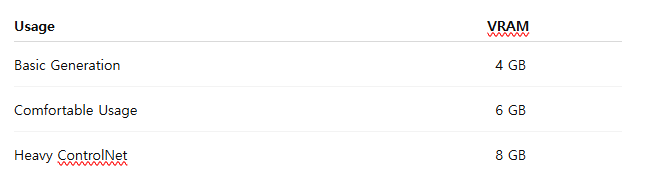
Stable Diffusion 1.5
Overview
Stable Diffusion 1.5 remains one of the most efficient image generation models ever released. Despite its age, it continues to be heavily used because of its speed, extensive ecosystem, and low hardware requirements.
Recommended VRAM
Experience
Even in 2026, SD 1.5 remains an excellent option for older GPUs and budget systems.
---
SDXL
Overview
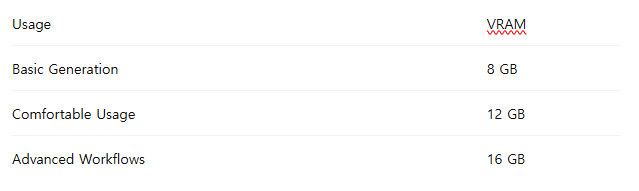
SDXL significantly improved image quality, composition, and realism compared to previous Stable Diffusion releases.
Recommended VRAM
Experience
A 12GB GPU such as the RTX 3080 Ti still provides an excellent SDXL experience in ComfyUI.
---
Flux.1 Dev
Overview
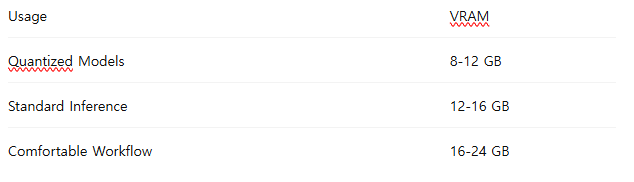
Flux quickly became one of the most influential open-source image models due to its superior prompt understanding and image realism.
Recommended VRAM
Experience
Many creators have replaced SDXL with Flux as their primary image generation model.
On a 12GB GPU, Flux works well using FP8 checkpoints and optimized ComfyUI workflows.
---
Flux Kontext
Overview
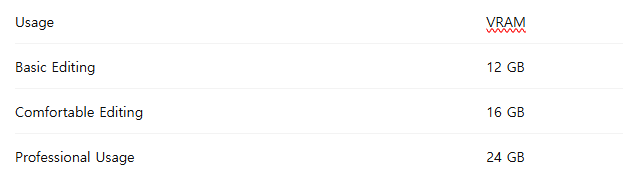
Flux Kontext introduced advanced image editing capabilities including object replacement, style transfer, and context-aware image modification.
Recommended VRAM
Experience
Image-to-image workflows generally consume more memory than text-to-image generation.
---
HiDream-I1
Overview
HiDream-I1 became one of the strongest open-source competitors to Flux during 2026.
Its strengths include:
- Exceptional realism
- Excellent prompt adherence
- Strong human anatomy
- Commercial-grade aesthetics
Recommended VRAM
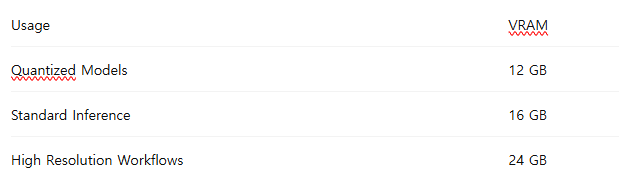
Experience
HiDream produces some of the most visually appealing images currently available in the open-source ecosystem.
---
Seedream 3
Overview
Seedream 3 is widely recognized for producing commercial-quality imagery with excellent typography and product rendering capabilities.
Recommended VRAM
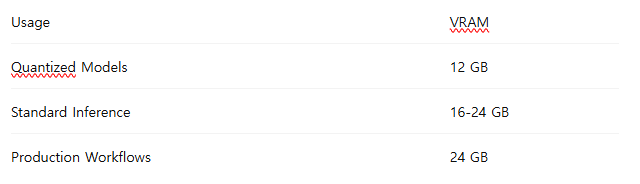
Experience
Seedream 3 performs exceptionally well for advertising, marketing visuals, and social media content creation.
---
Anima
Overview
Anima focuses heavily on character generation and stylized artwork.
It is particularly popular among creators who require:
- Consistent characters
- Anime artwork
- Stylized portraits
- Fashion-focused imagery
Recommended VRAM
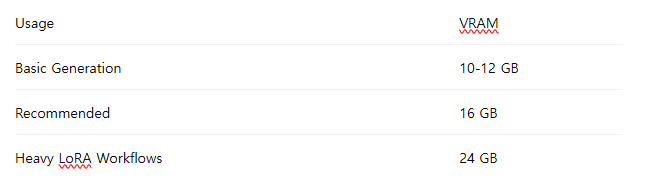
Experience
Anima remains one of the best options for creators prioritizing character consistency.
---
Lumina Image 2
Overview
Lumina Image 2 emphasizes image reasoning and composition quality.
Recommended VRAM
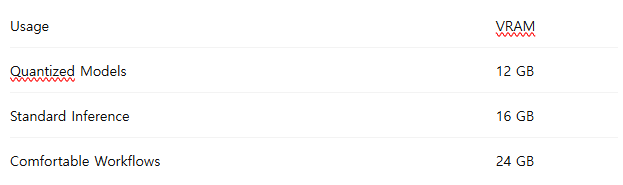
Experience
Lumina often produces more coherent scenes and object relationships than earlier diffusion models.
---
Sana
Overview
Sana was designed around efficiency and accessibility while maintaining modern image quality.
Recommended VRAM
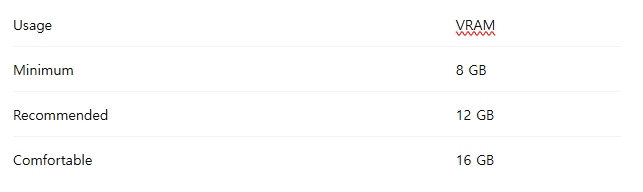
Experience
Sana offers one of the best balances between image quality and hardware requirements.
---
Practical GPU Recommendations
Best Budget Option
12GB GPUs
Examples:
- RTX 3080 Ti
- RTX 4070
- RTX 5070
These cards can comfortably run most modern image generation models using optimized workflows.
---
Best Enthusiast Option
16GB GPUs
Examples:
- RTX 4080 Super
- RTX 5070 Ti
Ideal for users who regularly use Flux, HiDream, and advanced ComfyUI workflows.
---
Best Professional Option
24GB GPUs
Examples:
- RTX 4090
- RTX 5090
These GPUs offer enough VRAM for nearly every image generation workflow currently available.
---
Conclusion
The minimum VRAM requirement advertised by a model rarely reflects real-world usage. While many modern image generation models can technically run on 8GB or 12GB GPUs, practical workflows involving LoRAs, ControlNet, high-resolution generation, and image editing typically require significantly more memory.
For creators entering the AI image generation space in 2026:
- 8GB remains viable for lightweight workflows.
- 12GB offers the best value for most users.
- 16GB provides a comfortable experience for modern models.
- 24GB remains the professional standard.
If you are building a new AI workstation today, choosing a 16GB or 24GB GPU will provide the greatest flexibility and longevity as open-source image generation models continue to evolve.
<!-- zview-hands-on-backfill -->
Practical Test Notes
What this article should verify
- Confirm whether each listed model can complete a test setup at its claimed VRAM tier without immediate out-of-memory errors, heavy CPU offloading, or repeated workflow crashes.
- Compare the difference between "bare minimum" loading and a usable workflow that adds common extras such as LoRAs, ControlNet, higher resolution, or an upscaler.
- Check whether generation remains practical in ComfyUI, not just technically possible, by watching for major slowdowns, tile artifacts, or unstable memory behavior.
- Verify which VRAM tier is realistic for beginners versus power users running multi-step image pipelines.
Result checks
When reviewing existing or future sample outputs, the main result checks should focus on both image quality and workflow stability:
- Face stability: watch for asymmetry, plastic skin, drifting eyes, or identity inconsistency across seeds.
- Hand risk: inspect finger count, merged shapes, awkward poses, and whether errors increase at lower VRAM settings or with aggressive optimizations.
- Lighting control: check if highlights, shadows, and contrast remain coherent when the workflow uses quantization, offloading, or reduced resolution.
- Texture quality: inspect hair, fabric, metal, skin pores, and small text-like details for smearing or oversharpening.
- Background consistency: look for warped architecture, duplicated objects, muddy foliage, or perspective drift.
- Product clarity or style consistency: if the prompt targets objects, branding-like layouts, or a fixed art style, verify edge definition, readable structure, and prompt adherence.
Failure risks
The main failure risks are likely to appear when a model technically fits in VRAM but leaves no headroom for real work. In practice, this can mean sudden memory spikes during high-resolution sampling, ControlNet passes, or VAE decode. Quantized or FP8 variants may reduce memory pressure, but they can also introduce quality tradeoffs in fine textures, color depth, or prompt responsiveness. Lower-VRAM systems are also more exposed to slow CPU offloading, workflow instability, and inconsistent performance once multiple LoRAs, upscalers, or batch jobs are added. Video and training tasks are especially likely to exceed the recommendations in a basic image-only chart.
Practical recommendation
Use this setup as a planning guide, not proof that every model will feel smooth at the listed minimum. Budget users should target the tier above the minimum if they want fewer interruptions in ComfyUI. Users who mainly run SD 1.5 or light SDXL jobs can often stay in the lower tiers; users who expect large Flux workflows, ControlNet-heavy graphs, or training should avoid minimum-spec builds. The detail that matters most is not just whether the model loads, but whether enough VRAM remains for the full workflow you actually intend to use.