ZView Space2026-07-19 21:32:01

SeedVR2 3B vs SeedVR2 7B for Pinterest-Style Outfit Portrait Upscaling

This SeedVR2 3B vs SeedVR2 7B test is a hands on comparison of the existing ZView Space upscaler workflows using the same 1024px Krea2 Turbo v3.1 source im

SeedVR2upscalingfashion portraitsKrea2comparisonSeedVR2 3BSeedVR2 7BKrea2 Turbo flow
SeedVR2 3B vs SeedVR2 7B for Pinterest-Style Outfit Portrait Upscaling

This SeedVR2 3B vs SeedVR2 7B test is a hands-on comparison of the existing ZView Space upscaler workflows using the same 1024px Krea2 Turbo v3.1 source image, then sending that exact file through both SeedVR2 variants at the default 2x upscale setting. The short version: 3B is the practical default for fast portrait checks and batch screening, while 7B is the better final pass when hair separation, fabric weave, skin transitions, and edge fidelity visibly improve enough to justify the extra runtime and VRAM.

If you are deciding what to use inside the current [upscaler](/upscaler) upscaler path for Pinterest-style outfit portraits, the key rule from this test is simple: run the same uploaded input image through both workflows and inspect them side by side. Do not compare different source renders. The quality gap is easiest to spot when the Krea2 seed stays locked.

Quick answer

  • Use the normal 2M-pixel output from the existing Krea2 Turbo v3.1 flow as the source image before upscaling.
  • Keep the source unchanged at 1024px input and compare only the default 2x outputs from SeedVR2 3B and SeedVR2 7B.
  • 3B is faster, lighter, and better for queue-friendly preview checks.
  • 7B is slower, heavier, and more worth it when hair strands, skin transitions, garment edges, and fabric texture clearly improve.
  • Always review outputs horizontally: SeedVR2 3B on the left, SeedVR2 7B on the right.

What was tested

This was not a text-to-image model shootout. The source image in every pair came from the existing Krea2 Turbo upscaler path output, specifically Krea2 Turbo. That Krea2 render is the normal 2M-pixel source image used before upscaling in this comparison.

For each prompt example below, I used one Krea2 seed to generate one Pinterest-style fashion portrait source image. Then I uploaded that exact same image file twice through ZView Space Upscaler:

  • SeedVR2 3B
  • `upscaler path=SeedVR2 3B
  • default 2x upscale

and

  • SeedVR2 7B
  • `upscaler path=SeedVR2 7B
  • default 2x upscale

The source-image condition stayed fixed across the whole test:

  • Pinterest-style fashion portrait
  • detailed fabric texture
  • natural-looking skin
  • soft studio lighting
  • visible individual hair strands
  • clean background
  • same uploaded AI-generated source image for both tests

I checked four things side by side:

1. Fine-detail retention: skin texture, hair strand separation, fabric weave, buttons, seams, jewelry edges. 2. Image stability and risk: halos, ringing, false sharpness, double lines, background breaks, clothing logo deformation. 3. Operational usefulness: speed, VRAM demand, whether I would use it for first-pass screening or final delivery. 4. Retouching burden: how often the output needed extra cleanup before a Pinterest-style gallery post on [gallery](/gallery).

Side-by-side tradeoffs at a glance

| Checkpoint | SeedVR2 3B | SeedVR2 7B | |---|---|---| | Runtime feel | Faster | Slower | | VRAM load | Lower | Higher | | Best role | Preview, screening, batch checks | Final upscale, hero selects | | Skin handling | Usually clean, sometimes slightly smoothed | Better pore and tonal transition retention | | Hair detail | Good enough for approval | Better strand separation on difficult flyaways | | Fabric texture | Solid, but can look a bit compressed | Better weave clarity and seam definition | | Edge behavior | More likely to look a bit sharpened | Cleaner edges when the source is already good | | Artifact risk | Occasional mild halo/ringing | Occasional over-interpretation in textured zones | | Clothing text/logo risk | Needs checking | Still needs checking, especially on small print | | Best use case | Fast default for many portrait jobs | Final gallery export when gains are visible |

Test method that matters most

The main mistake to avoid is changing the source between runs. In this upscaler path, the valid comparison is:

1. Generate one Krea2 source image with one seed. 2. Save that source image. 3. Upload that exact file to SeedVR2 3B. 4. Upload that exact file again to SeedVR2 7B. 5. Review both outputs side by side, horizontally.

If you use 8 prompts, that means 8 Krea2 seeds and 16 upscaled outputs total. That is the only way to tell whether the model variant caused the difference or whether the source image changed underneath you.

SeedVR2 3B: fast preview operator notes

Quick verdict

For production flow, 3B is the default I would start with.

It gets you to a usable 2x portrait upscale faster, with less hardware pressure, and it is good enough to reject weak source images before spending time on 7B.

Where 3B worked well

  • Clean skin without turning faces waxy in most soft-lit fashion shots.
  • Good enough fabric recovery on denim, wool blends, rib knits, and trench cotton.
  • Strong batch practicality when testing multiple outfit directions from [create](/create).
  • Easier queue behavior for preview passes.

What I watched for

  • Slight artificial crispness along lapels, jawline edges, and hair against clean backgrounds.
  • Mild smoothing in cheek gradients where the Krea2 source already had subtle skin texture.
  • Reduced separation in fine hair flyaways compared with 7B.
  • Small text or logos on accessories still needed manual inspection.

Best role for 3B

Use it when you need a quick answer to one question: is this source image worth taking further?

That is where 3B pays off. It is a practical low-VRAM, fast-preview upscaling path, not a luxury finalizer.

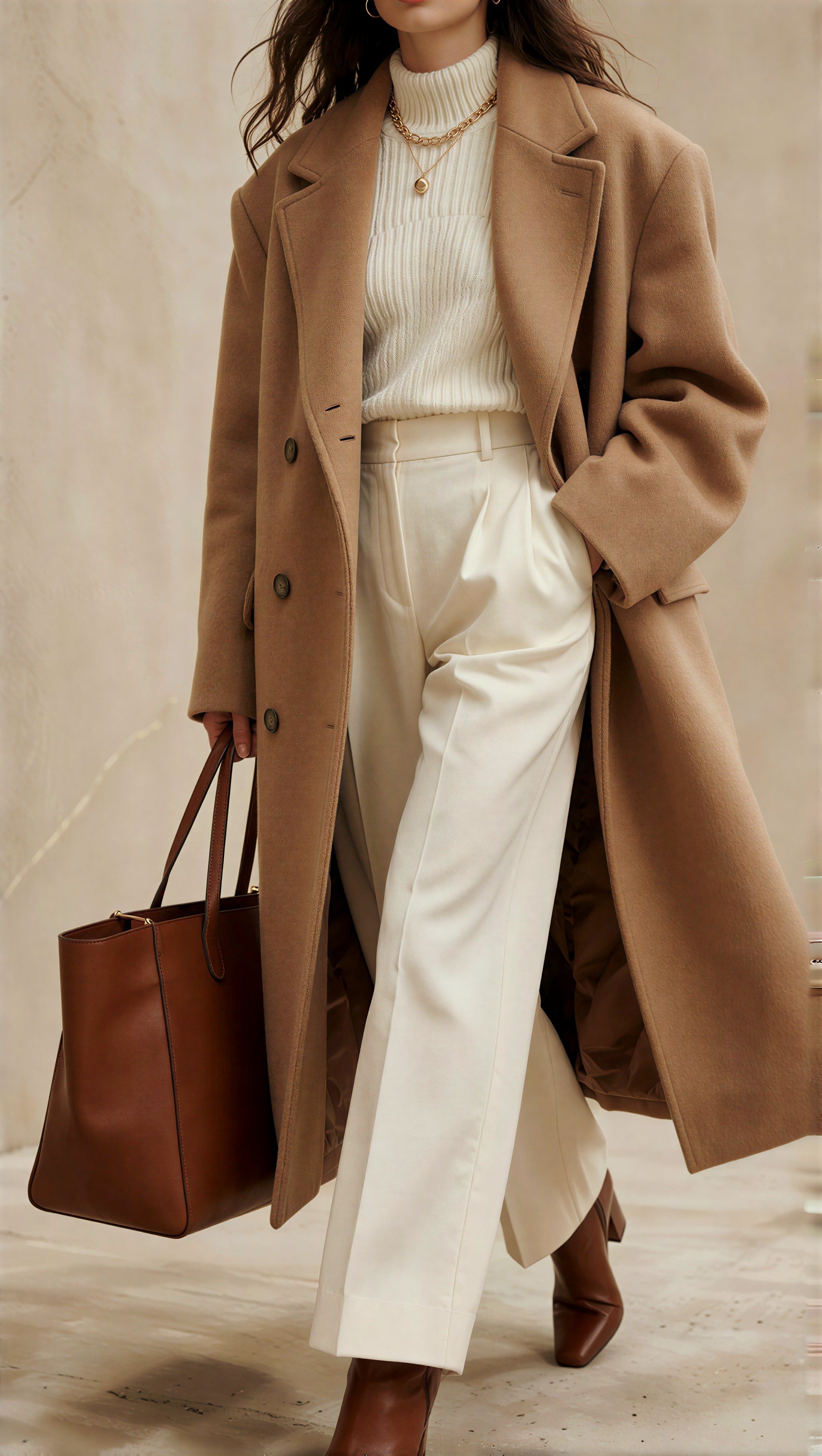
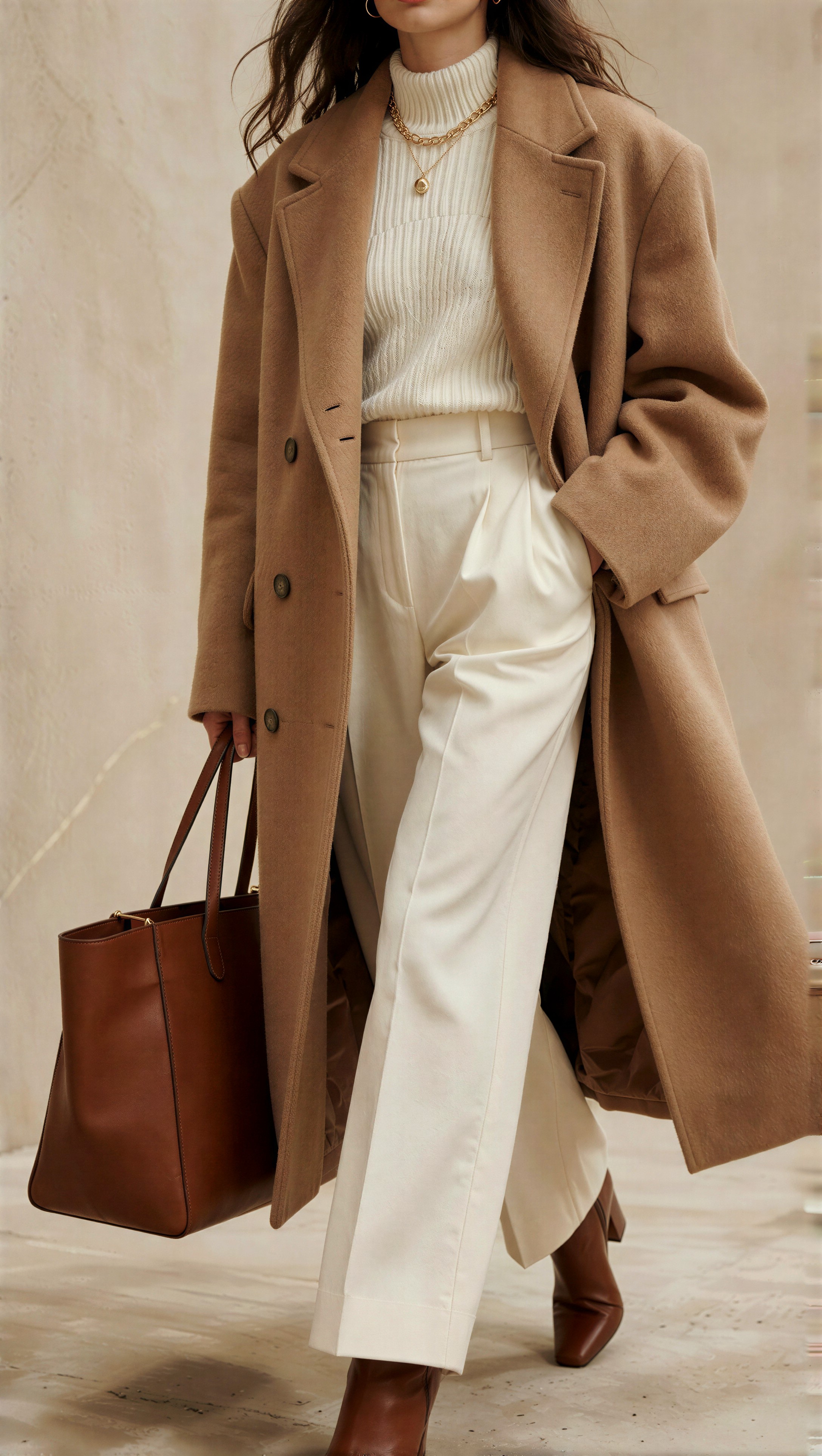
This first prompt was useful because oversized wool textures and layered neutrals quickly reveal whether 3B compresses weave detail.

Topic: Pinterest-style oversized wool layering outfit portrait
Genre: Fashion Editorial
Camera: Canon EOS R5
Lens: RF 50mm f/1.2
Lighting: soft studio key light with large overhead diffusion
Location: clean beige editorial studio set
Style: clean commercial look
Final Prompt: street-style full body Pinterest outfit portrait, oversized camel wool coat layered over a cream rib knit top and tailored wide-leg trousers, leather ankle boots, structured tote bag, delicate gold jewelry, full outfit visibility, relaxed standing pose, soft studio lighting, visible wool weave and ribbed fabric texture, natural hair strands, clean beige background, neutral palette, editorial framing with strong silhouette clarity, realistic garment drape, polished fashion campaign composition

Comparison image 1

The same Krea2 source image is used for both outputs: SeedVR2 3B on the left and SeedVR2 7B on the right.

| Krea2 source | SeedVR2 3B output | SeedVR2 7B output | | --- | --- | --- | | !Krea2 source Test 1 · seed 727943902 | !SeedVR2 3B Test 1 · seed 727943902 | !SeedVR2 7B Test 1 · seed 727943902 |

Krea2 Turbo example 1

Inspect the coat edge, rib knit texture, and the fine transition between hair and background. In this setup, 3B was fast and mostly clean, but 7B usually held more believable wool texture without the same sharpened outline feel.

3B checkpoints before moving on

  • Is the face structurally stable?
  • Are the garment edges clean at 100% view?
  • Does the fabric still look like fabric, not noise?
  • Are background gradients intact?
  • Is the image already good enough for draft delivery?

If yes, keep 3B. If no, send that same source to 7B.

This second prompt stressed glossy surfaces, jewelry edges, and black-on-black outfit separation, which are common preview-stage pain points.

Topic: Pinterest-style monochrome leather layering portrait
Genre: Street Style
Camera: Sony A7R V
Lens: 40mm f/2.5
Lighting: overcast diffusion with soft street bounce
Location: Seoul Seongsu side street with minimal storefront background
Style: Korean magazine cover
Final Prompt: three-quarter outfit editorial portrait on a clean Seoul street, monochrome black leather blazer over a charcoal turtleneck and tailored pleated trousers, polished loafers, slim shoulder bag, silver hoop earrings, visible full styling logic, soft overcast light, subtle reflections on leather, natural hair movement, neutral storefront background, trend-led Pinterest fashion framing, modern Korean editorial look, controlled contrast, realistic stitching and material separation

Comparison image 2

The same Krea2 source image is used for both outputs: SeedVR2 3B on the left and SeedVR2 7B on the right.

| Krea2 source | SeedVR2 3B output | SeedVR2 7B output | | --- | --- | --- | | !Krea2 source Test 2 · seed 653616544 | !SeedVR2 3B Test 2 · seed 653616544 | !SeedVR2 7B Test 2 · seed 653616544 |

Krea2 Turbo example 2

Check whether leather highlights stay smooth or break into harsh lines. On this kind of image, 3B often gave a fast acceptable pass, but the weaker point was edge harshness around blazer seams and stray hair.

SeedVR2 7B: creator upscaler path guide

When the source image is already strong, 7B is the model I would use for the final gallery pass. The gains are not universal, so I would not blindly send every Krea2 source to 7B first. But when the portrait depends on delicate hair, refined skin transitions, or tactile fabric detail, 7B earns its cost more often.

A simple upscaler path recipe

1. Generate the Krea2 Turbo source first. Use the normal Krea2 Turbo v3.1 flow output as your 2M-pixel base image. 2. Run 3B as the screening pass. Decide whether the composition, styling read, and face are already stable enough. 3. Promote only the strongest frames to 7B. This keeps runtime and VRAM focused on images where final fidelity matters. 4. Compare horizontally. Keep 3B on the left and 7B on the right so differences in hair, skin, and fabric can be judged quickly. 5. Choose 7B only when the gain is visible. If the improvement is invisible at delivery size, keep 3B.

What 7B improved in this test

  • Better separation of individual hair strands, especially around the shoulders and side light.
  • More believable skin transitions around nose, cheek, and forehead highlights.
  • Stronger fabric readability in knits, tweed, brushed wool, and structured cotton.
  • Cleaner edge fidelity on collars, chain straps, and small accessories when the source was already coherent.

Where 7B still needs scrutiny

  • Highly repetitive textures can be over-interpreted.
  • Tiny printed logos or typography on garments can still deform.
  • If the source is already slightly unstable, 7B may upscale the instability more clearly rather than fix it.

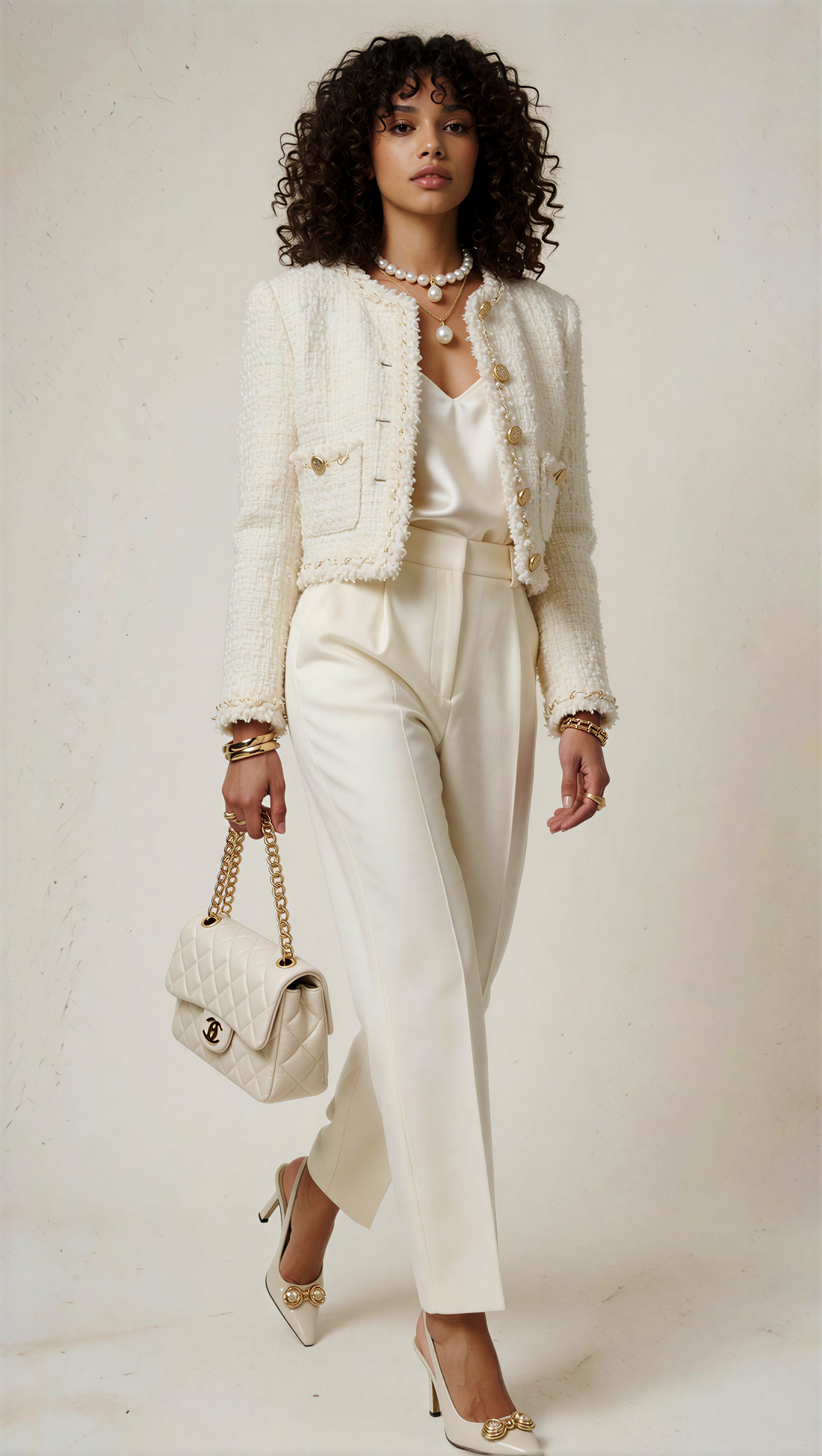
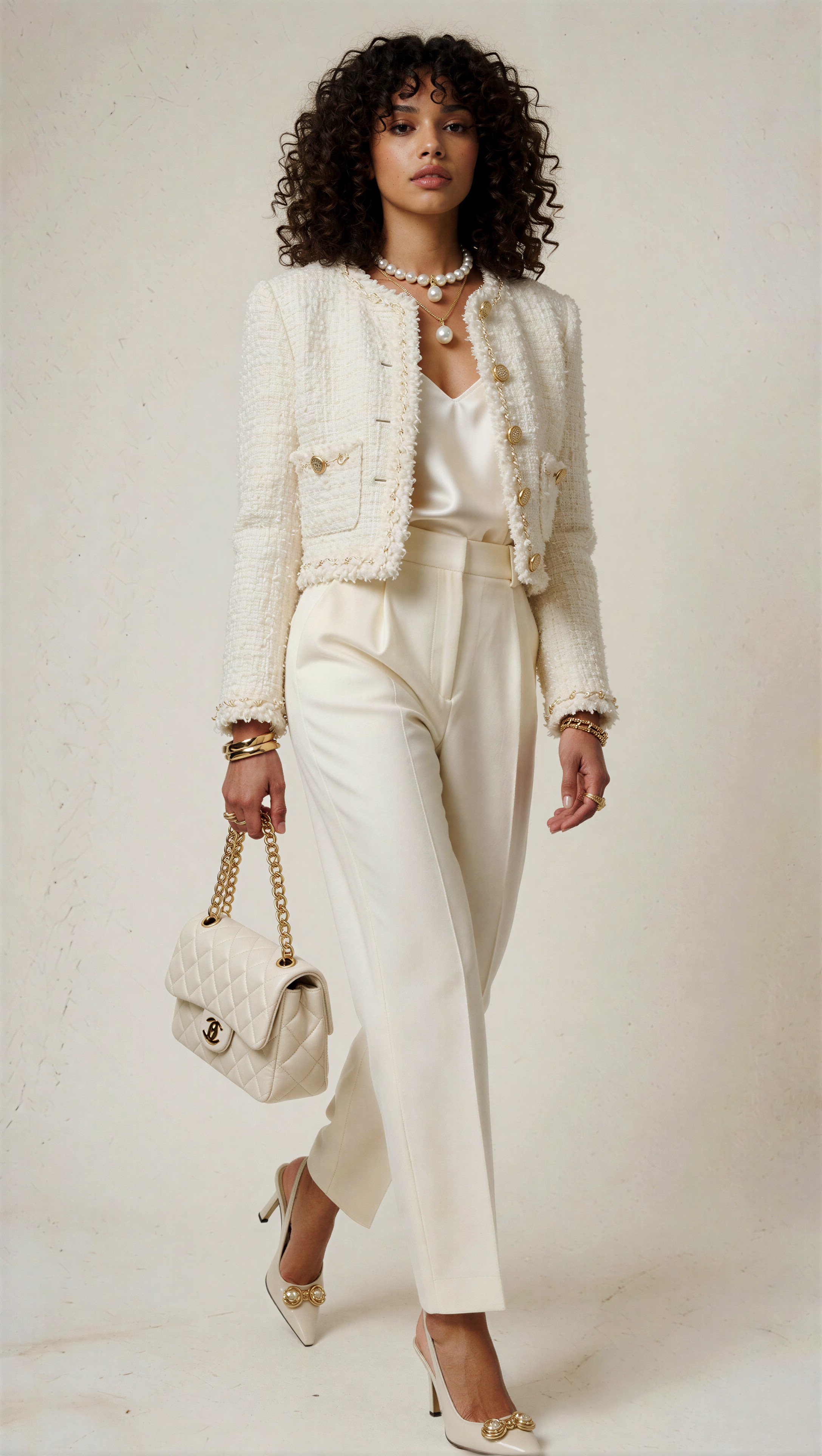
This test prompt was chosen because loose curls, boucle texture, and soft cream lighting make the quality difference easy to see.

Topic: Pinterest-style boucle jacket portrait with soft curls
Genre: Fashion Editorial
Camera: Nikon Z8
Lens: 85mm f/1.8
Lighting: softbox key light with gentle side fill
Location: ivory studio with clean shadow floor
Style: luxury fashion campaign
Final Prompt: head-to-toe lookbook portrait featuring a cropped ivory boucle jacket over a silk camisole, high-waist tailored trousers, slingback heels, quilted mini bag, layered pearl and gold accessories, soft defined curls with visible individual strands, luminous but natural studio skin tones, clean ivory background, refined Pinterest fashion mood, elegant posture, visible garment texture and seam structure, premium editorial composition, quiet luxury palette, high-end campaign styling

Comparison image 3

The same Krea2 source image is used for both outputs: SeedVR2 3B on the left and SeedVR2 7B on the right.

| Krea2 source | SeedVR2 3B output | SeedVR2 7B output | | --- | --- | --- | | !Krea2 source Test 3 · seed 945776437 | !SeedVR2 3B Test 3 · seed 945776437 | !SeedVR2 7B Test 3 · seed 945776437 |

Krea2 Turbo example 3

Inspect the boucle jacket first, then the hair edges against the light background. In this setup, 7B usually showed the clearest upgrade: less mush in the boucle loops, better strand separation, and a more convincing face-to-neck tonal transition.

Final-pass checkpoints for 7B

1. Zoom into the hairline and shoulder overlap. 2. Check fine fabric texture for believable repetition, not invented noise. 3. Review skin under the eyes and around the nose for plastic smoothing. 4. Inspect jewelry chains, bag straps, and buttons for double lines. 5. Verify the background stays clean without halo buildup.

This prompt was useful for testing a harder mix of pinstripes, trench texture, and polished accessories.

Topic: Pinterest-style tailored trench and pinstripe outfit portrait
Genre: Lifestyle Portrait
Camera: Fujifilm GFX100 II
Lens: GF 63mm f/2.8
Lighting: window light with soft interior bounce
Location: minimalist Paris apartment corner
Style: elegant resort editorial
Final Prompt: three-quarter outfit editorial portrait in a minimalist Paris interior, lightweight stone trench coat layered over a blue pinstripe shirt and cream tailored trousers, pointed heels, structured tan handbag, slim belt, stacked bracelets, full outfit visibility, gentle window light, realistic trench cotton texture, crisp but natural pinstripe detail, soft skin transitions, calm luxury atmosphere, Pinterest-ready editorial composition with clean background and refined neutral palette

Comparison image 4

The same Krea2 source image is used for both outputs: SeedVR2 3B on the left and SeedVR2 7B on the right.

| Krea2 source | SeedVR2 3B output | SeedVR2 7B output | | --- | --- | --- | | !Krea2 source Test 4 · seed 145434356 | !SeedVR2 3B Test 4 · seed 145434356 | !SeedVR2 7B Test 4 · seed 145434356 |

Krea2 Turbo example 4

Look closely at the pinstripes and trench seams. 7B often kept these lines cleaner than 3B, but if the source stripes were already imperfect, both models could still produce minor line drift.

Side-by-side image review pattern

If you include result images in the CMS, keep them horizontal like this:

| SeedVR2 3B | SeedVR2 7B | |---|---| | 3B output here | 7B output here |

Do not stack the outputs vertically. In this test, horizontal comparison made it much easier to spot:

  • added sharpness on edge contours
  • small background breaks near hair
  • fabric weave differences
  • tiny accessory deformation
  • smoothing vs real detail retention

Prompt examples that exposed the difference

The biggest differences appeared when the outfit and shot design contained competing fine-detail zones. Hair alone was not enough. The strongest comparison prompts combined hair, skin, layered garments, and one material with directional texture.

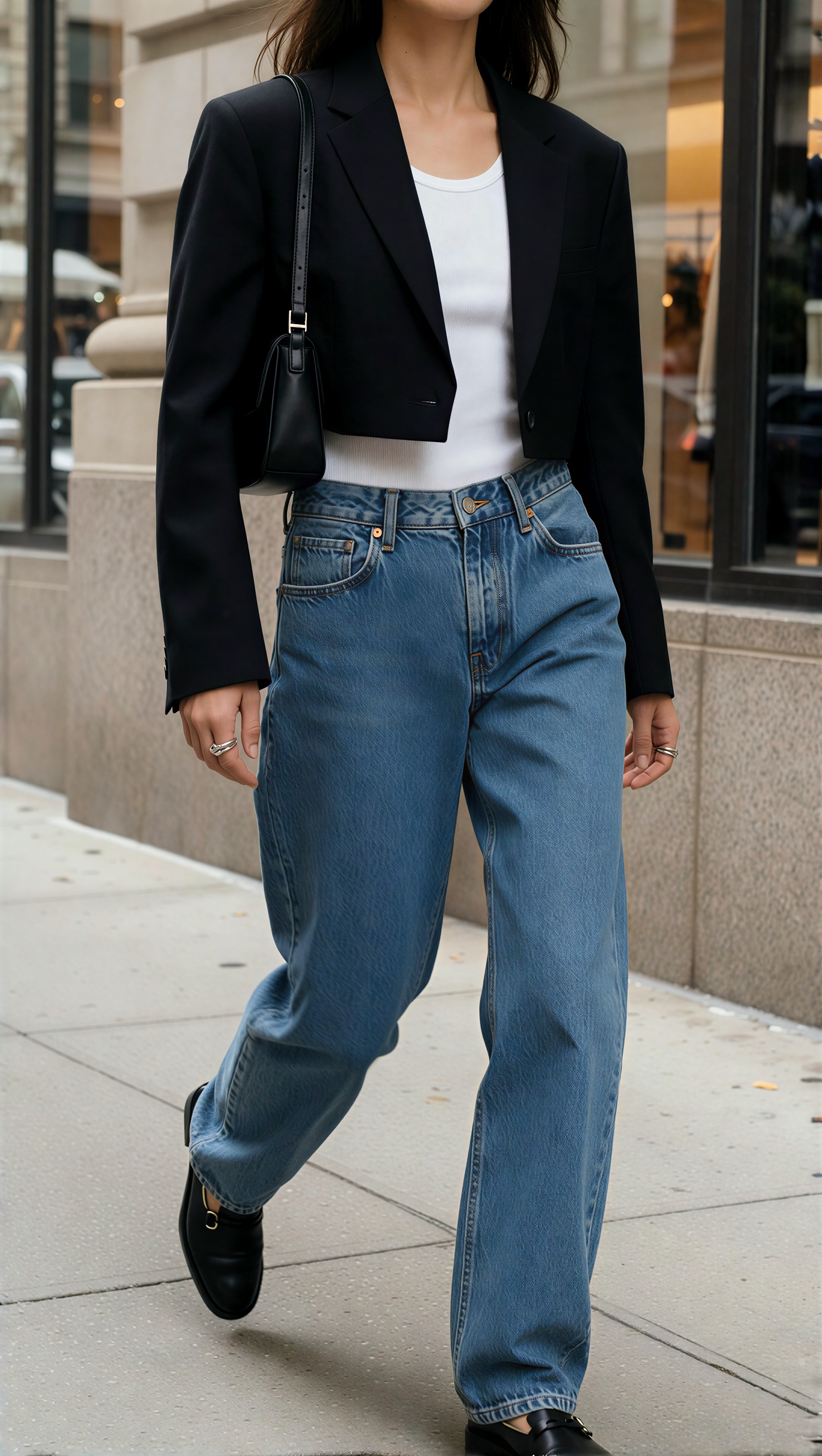
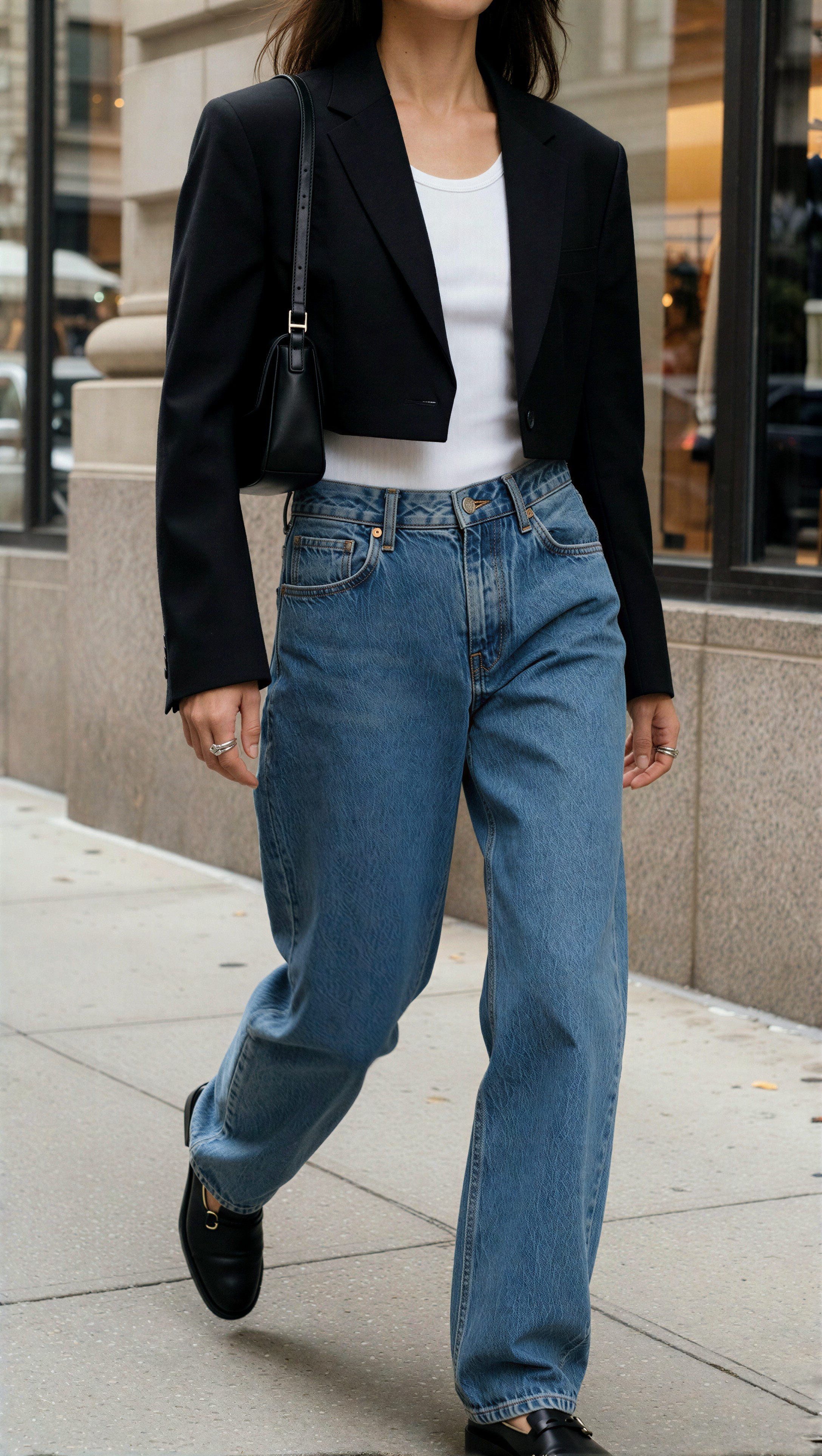
This prompt tested denim grain, layered shirting, and a clean urban background where haloing is obvious.

Topic: Pinterest-style denim overshirt outfit portrait
Genre: Street Style
Camera: Leica SL2-S
Lens: 35mm f/2
Lighting: late afternoon open shade
Location: New York SoHo cast-iron sidewalk
Style: cinematic realism
Final Prompt: street-style full body fashion portrait in SoHo, washed indigo denim overshirt layered over a white tank and beige wide-leg trousers, suede sneakers, crossbody bag, stacked rings, visible head-to-toe styling system, relaxed walking pose, open shade lighting, clean architectural background, detailed denim grain and seam stitching, natural hair strands, trend-led Pinterest outfit framing, neutral urban palette with denim contrast, realistic fabric weight and movement

Comparison image 5

The same Krea2 source image is used for both outputs: SeedVR2 3B on the left and SeedVR2 7B on the right.

| Krea2 source | SeedVR2 3B output | SeedVR2 7B output | | --- | --- | --- | | !Krea2 source Test 5 · seed 285791535 | !SeedVR2 3B Test 5 · seed 285791535 | !SeedVR2 7B Test 5 · seed 285791535 |

Krea2 Turbo example 5

Here I checked denim seams, flyaway hair, and the tank edge against the shirt. 7B tended to keep denim stitch detail more coherent, while 3B was often enough for shortlist review.

This next one pushed knitwear and soft skin under flatter light, which is where fake sharpness is easy to spot.

Topic: Pinterest-style minimalist knit set portrait
Genre: Fashion Editorial
Camera: Panasonic Lumix S1R
Lens: 70mm f/2.8
Lighting: overcast daylight through sheer curtains
Location: Scandinavian minimalist retail studio
Style: clean commercial look
Final Prompt: head-to-toe lookbook portrait in a Scandinavian retail-style studio, oatmeal knit cardigan over a matching sleeveless knit top and fluid wide-leg pants, suede flats, soft leather shoulder bag, minimal gold cuff, complete outfit visibility, soft overcast interior daylight, neutral tonal palette, tactile knit texture, natural relaxed pose, clean merchandising-inspired background, Pinterest-style fashion image focused on fabric feel, silhouette balance, and polished editorial clarity

Comparison image 6

The same Krea2 source image is used for both outputs: SeedVR2 3B on the left and SeedVR2 7B on the right.

| Krea2 source | SeedVR2 3B output | SeedVR2 7B output | | --- | --- | --- | | !Krea2 source Test 6 · seed 424468388 | !SeedVR2 3B Test 6 · seed 424468388 | !SeedVR2 7B Test 6 · seed 424468388 |

Krea2 Turbo example 6

Inspect the knit loops and the shadow transitions around the neck and under the jaw. 3B could make this look slightly more processed, while 7B usually preserved a calmer texture map.

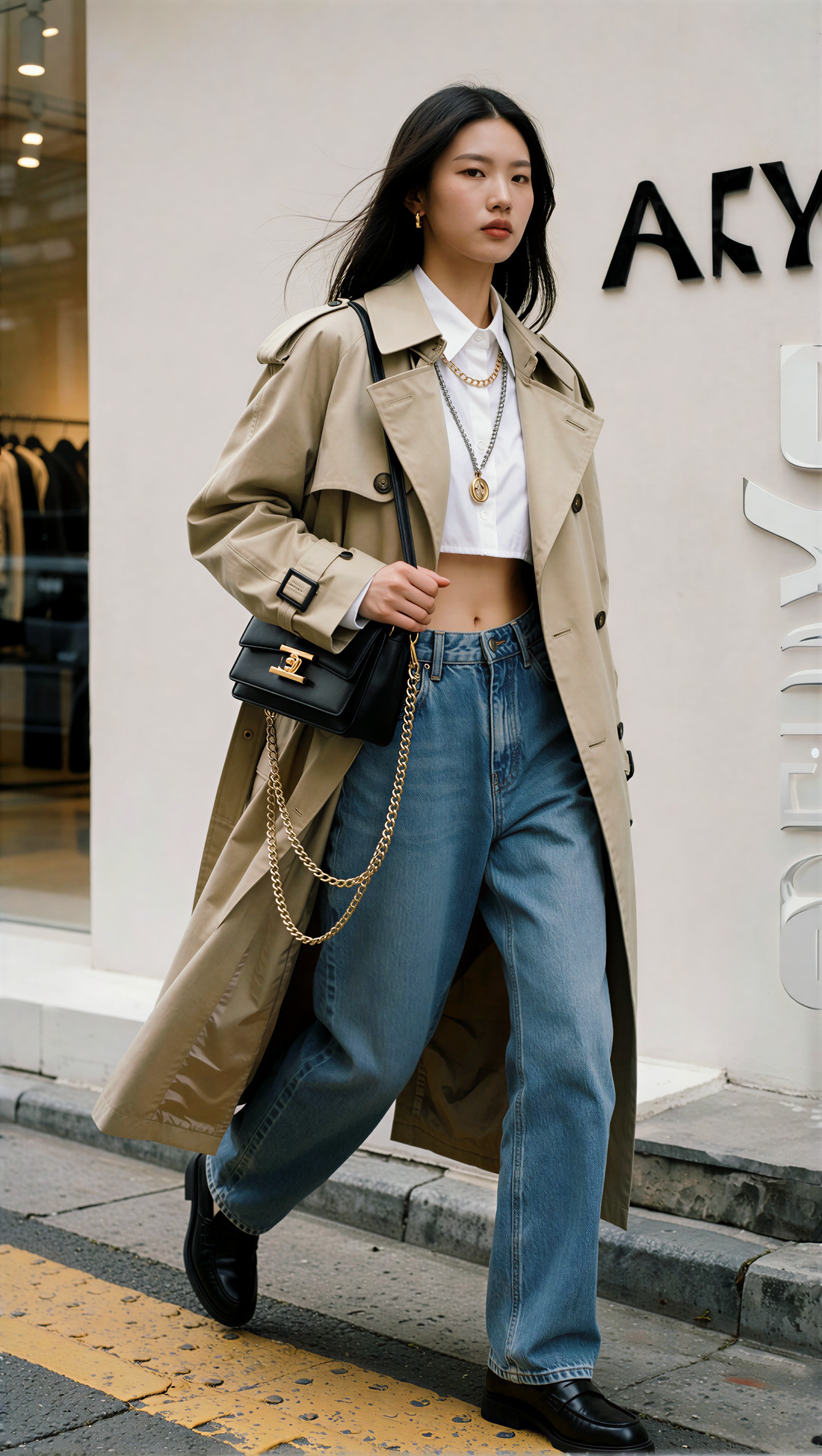
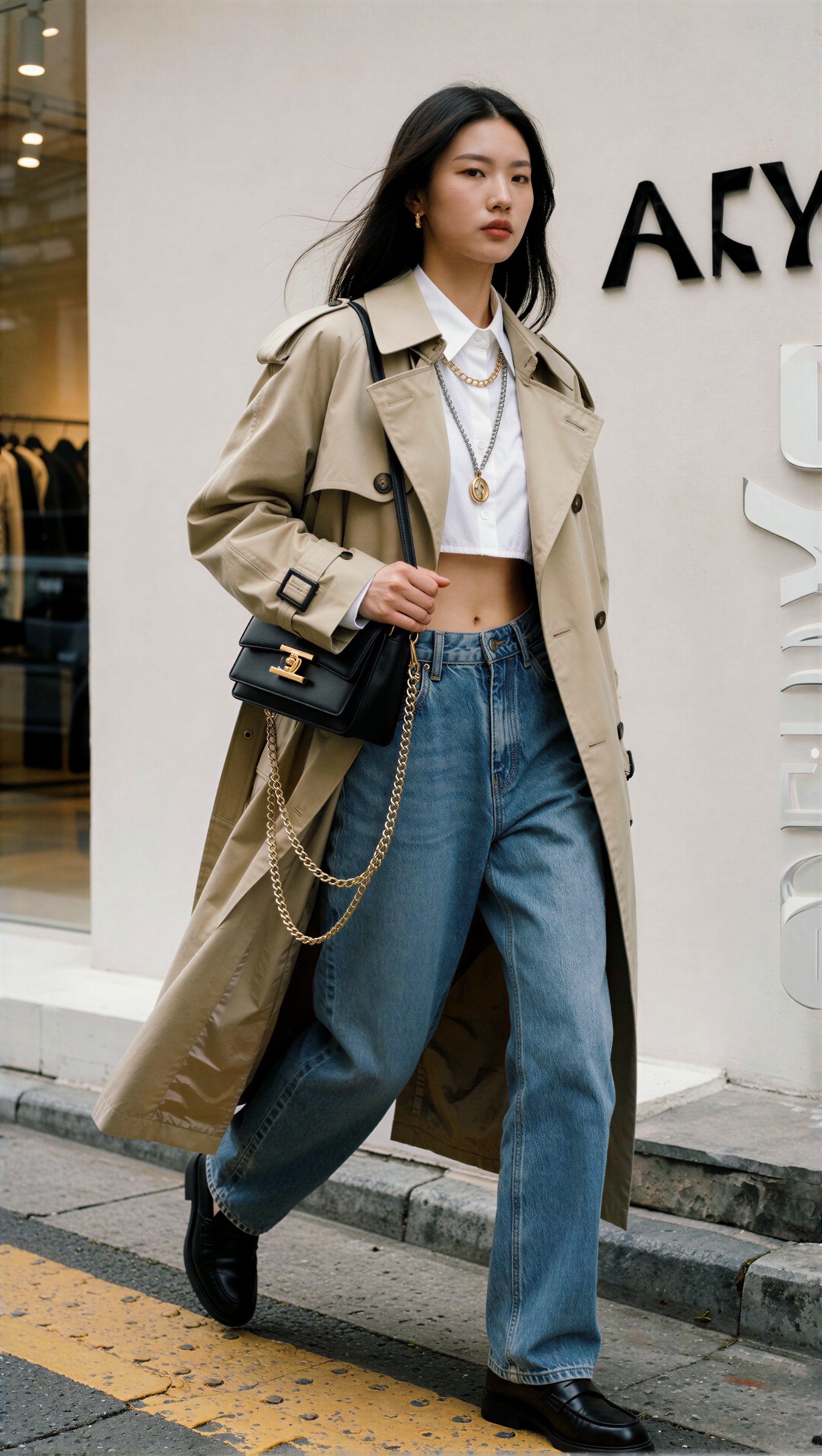
This prompt introduced metallic accessories and a busier but still controlled environment.

Topic: Pinterest-style layered blazer with chain bag portrait
Genre: Luxury Campaign
Camera: Canon EOS R3
Lens: 50mm f/1.4
Lighting: directional soft key with subtle rim light
Location: Milan showroom with muted stone walls
Style: high-end beauty advertising
Final Prompt: three-quarter outfit editorial portrait in a muted Milan showroom, charcoal oversized blazer layered over a satin shell top and straight-leg trousers, pointed pumps, small chain-strap bag, statement earrings, complete outfit styling visible, soft directional key light with subtle rim on hair, realistic satin sheen, crisp blazer structure, visible metallic accessory edges, polished Pinterest campaign composition, balanced cool-neutral palette, luxury retail mood, natural expression and controlled posture

Comparison image 7

The same Krea2 source image is used for both outputs: SeedVR2 3B on the left and SeedVR2 7B on the right.

| Krea2 source | SeedVR2 3B output | SeedVR2 7B output | | --- | --- | --- | | !Krea2 source Test 7 · seed 977060782 | !SeedVR2 3B Test 7 · seed 977060782 | !SeedVR2 7B Test 7 · seed 977060782 |

Krea2 Turbo example 7

The chain strap and blazer lapel are the giveaway areas here. 7B usually handled metallic edge separation better, but both outputs needed a check for double-line artifacts.

This setup was chosen to test warm neutrals, fine pleats, and a softly defocused retail background.

Topic: Pinterest-style pleated skirt layering portrait
Genre: Lifestyle Portrait
Camera: Sony A1
Lens: 24-70mm f/2.8 at 58mm
Lighting: warm storefront window light
Location: London street style outside a minimalist boutique
Style: Korean magazine cover
Final Prompt: street-style full body portrait outside a minimalist London boutique, cropped trench jacket over a fine-gauge knit and mid-length pleated skirt, knee-high boots, top-handle mini bag, scarf accent, visible complete outfit logic, warm storefront window light, soft fashion-forward pose, crisp pleat definition, subtle motion in hemline, natural hair strands, clean boutique background, trend-led Pinterest styling with modern editorial color balance and premium texture detail

Comparison image 8

The same Krea2 source image is used for both outputs: SeedVR2 3B on the left and SeedVR2 7B on the right.

| Krea2 source | SeedVR2 3B output | SeedVR2 7B output | | --- | --- | --- | | !Krea2 source Test 8 · seed 509555837 | !SeedVR2 3B Test 8 · seed 509555837 | !SeedVR2 7B Test 8 · seed 509555837 |

Krea2 Turbo example 8

Watch the pleat spacing and the scarf edges. 3B sometimes simplified the pleats; 7B more often kept the rhythm intact when the Krea2 source was already clean.

This prompt focused on texture-rich tailoring and a high-contrast but uncluttered runway-adjacent setting.

Topic: Pinterest-style backstage tailored suit portrait
Genre: Fashion Editorial
Camera: Nikon D850
Lens: 58mm f/1.4
Lighting: backstage soft overheads with side bounce
Location: Milan runway prep area
Style: luxury fashion campaign
Final Prompt: runway backstage moment showing a complete tailored fashion look, sand-toned double-breasted suit over a silk blouse, slim belt, pointed heels, handheld garment tag, small shoulder bag, full outfit visible, backstage racks softly blurred in background, soft overhead lighting with side bounce, realistic suiting texture, visible hair flyaways, poised pre-show stance, Pinterest editorial mood, sharp silhouette and premium material detail without clutter

Inspect suit lapels, blouse sheen, and the soft clutter in the background. This is where 7B often looked more final-delivery ready, especially on tailoring edges.

Where each model wins

Use SeedVR2 3B when

  • you are previewing many Krea2 outfit portraits
  • you need a practical default for 2x portrait upscaling checks
  • VRAM is limited
  • queue speed matters more than squeezing out the last bit of texture
  • the image is for internal selection, draft sharing, or screening

Use SeedVR2 7B when

  • the same uploaded image already looks compositionally strong
  • hair strands, skin transitions, and fabric weave are central to the shot
  • the portrait is headed for final Pinterest-style gallery delivery
  • you can afford higher runtime and hardware load
  • 3B shows slight smoothing, haloing, or texture compression that 7B may fix

Failure risks I kept checking

No upscaler gets a free pass on fashion imagery. These were the repeat problem zones:

  • hair against pale backgrounds: look for halos and false edge contrast
  • fine knits and boucle: look for invented texture or flattened loops
  • pinstripes and pleats: look for line wobble or rhythm breaks
  • small logos or printed text: look for letter deformation
  • bag chains and jewelry: look for doubled edges and ringing
  • skin under soft lighting: look for waxiness or over-cleaning

If the source image already contains weak hands, unstable straps, or half-legible garment details, neither 3B nor 7B should be expected to rescue them perfectly. In this test, 7B more often clarified good source detail; it did not reliably repair flawed detail.

A practical upscaler path I would actually use

1. Build the outfit portrait in the existing Krea2 Turbo v3.1 flow. 2. Export the normal 2M-pixel source render. 3. Upload that image to the current upscaler service through ZView Space Upscaler. 4. Run `seedvr2_3b` first for a fast check. 5. If the image survives close review, run the exact same source through `seedvr2_7b`. 6. Compare left-right, 3B vs 7B. 7. Keep 7B only when the gain is visible in hair, skin, fabric, or edges.

That is the most efficient route I found for fashion-heavy portrait work on [upscaler](/upscaler) and prompt iteration from [promptlab](/promptlab).

Best choice by use case

Best default

SeedVR2 3B.

It is the practical default for faster and lighter 2x portrait upscaling checks. If you are screening multiple Pinterest-style outfit portraits, 3B gets you answers quickly and keeps hardware demand reasonable.

Best final quality path

SeedVR2 7B.

Use it when the same uploaded image shows clear gains in hair, skin, fabric, and edge fidelity that justify higher runtime or VRAM in the final gallery upscaler path.

Not the best approach

Do not send every frame straight to 7B by habit. The better upscaler path is selective escalation: Krea2 source -> 3B preview -> 7B final for the winners.

FAQ

Is SeedVR2 3B or 7B better for outfit portrait upscaling?

3B is better as the practical default for speed and lighter hardware use. 7B is better for final-quality output when the source image already has strong hair, skin, and fabric detail worth preserving.

Should I use the same input image for both SeedVR2 tests?

Yes. Use the exact same uploaded 1024px source image for both workflows. That is the only reliable way to compare `seedvr2_3b` and `seedvr2_7b`.

What source image was used in this comparison?

The source image came from the existing Krea2 Turbo v3.1 upscaler path output, using Krea2 Turbo, then that same file was upscaled in both SeedVR2 workflows.

What artifacts should I check first?

Start with hairline halos, garment edge ringing, smoothed skin, fabric texture hallucination, and any deformed logos, printed text, chain straps, or narrow accessory lines.

How should I lay out the comparison images?

Horizontally, not vertically. Put SeedVR2 3B on the left and SeedVR2 7B on the right in a two-column markdown table.

Conclusion

For this SeedVR2 3B vs SeedVR2 7B outfit-portrait test, the answer is not “always use the bigger model.” The practical answer is to keep the upscaler path honest: generate one Krea2 Turbo source image, upload that same file to both upscalers, and judge the outputs side by side.

Who should use this upscaler path: operators building Pinterest-style fashion portraits who need a repeatable 2x upscale path from existing Krea2 outputs. Who should avoid a 7B-first habit: anyone doing high-volume preview screening or working under tighter hardware limits. The setting that mattered most in this test was not a hidden tweak; it was holding the source image constant and comparing only the model variant change.

My default would be 3B first, 7B second only for the finalists. That keeps the upscaler path fast, evidence-led, and easier to trust.

Krea2 Turbo source flow

Use the Krea2 Turbo source image generated by Krea2 Turbo. With 8 prompt examples, there are 8 Krea2 seeds; each seed creates one source image, and that exact same source image is sent to both SeedVR2 3B and SeedVR2 7B.

Shared SeedVR2 source-image test condition

Use this same source-image/test condition for both SeedVR2 3B and SeedVR2 7B before comparing the output.

Use the same uploaded AI-generated outfit portrait source image for both tests: a Pinterest-style fashion portrait with detailed fabric texture, natural-looking skin, soft studio lighting, visible individual hair strands, and a clean background. Keep the source image unchanged at 1024px input and compare default 2x upscaled outputs only between model seedvr2_3b and model seedvr2_7b.