SEEDVR2 FP8 Workflow for Fast Batch Upscaling on Consumer GPUs 한국어 요약
이 페이지는 ZView Space의 영어 원문을 한국어 검색 사용자도 이해할 수 있도록 정리한 SEO 요약입니다. 핵심은 단순한 얼굴 중심 이미지가 아니라 패션 에디토리얼, 룩북, 아웃핏, 프롬프트 테스트, 이미지 생성 워크플로우를 실제로 어떻게 구성할지입니다.
핵심 요약
- 원문 주제: SEEDVR2 FP8 Workflow for Fast Batch Upscaling on Consumer GPUs
- 목적: AI 이미지 생성에서 outfit, silhouette, fabric, pose, location, camera framing을 더 명확하게 설계합니다.
- 활용 범위: Z-Image Turbo, Krea2 Turbo, Qwen Image, Anima, SeedVR2 같은 이미지 생성 및 업스케일 워크플로우에 적용할 수 있습니다.
- SEO 관점: 제목, 설명, 이미지 alt, 프롬프트 예시가 실제 검색 의도와 맞아야 색인 가능성이 높아집니다.
한국어 사용자를 위한 체크포인트
1. 프롬프트가 얼굴 묘사에만 머물지 않고 전체 스타일과 의상 구성을 설명하는지 확인합니다. 2. 패션 이미지라면 상의, 하의, 아우터, 신발, 액세서리, 소재감, 촬영 장소를 분리해서 씁니다. 3. 생성 결과는 바로 게시하지 말고 디테일, 손, 의상 형태, 배경 일관성, 이미지 품질을 비교합니다. 4. 글 본문에는 실제 테스트 기준과 실패를 줄이는 방법이 들어가야 검색엔진에서 얇은 콘텐츠로 보일 가능성이 줄어듭니다.
원문 미리보기
Fast batch upscaling is less about chasing giant renders and more about building a repeatable finishing pipeline. SEEDVR2 FP8 is interesting because it makes high volume enhancement feel practical on consumer GPUs: cleaner throughput, lighter memory pressure,
---
Fast batch upscaling is less about chasing giant renders and more about building a repeatable finishing pipeline. SEEDVR2 FP8 is interesting because it makes high-volume enhancement feel practical on consumer GPUs: cleaner throughput, lighter memory pressure, and enough speed to turn rough generations into usable client selects, social crops, lookbook pages, and concept boards without stalling your whole system.
Why SEEDVR2 FP8 fits batch workflows
When you are processing dozens or hundreds of images, raw quality is only half the story. The other half is consistency. A good batch upscaling workflow should:
- preserve texture without turning skin into plastic
- hold linework and fabric detail across mixed image sets
- avoid dramatic shifts in mood or color
- run on hardware that creators actually own
- let you separate hero images from bulk deliverables
FP8 matters here because it lowers the compute burden enough to make iterative enhancement viable on consumer cards. In practice, that means you can run larger batches, test more settings, and still have headroom for generation, masking, or layout work.
For visual creators, this is especially useful when your source images come from different models, aspect ratios, or prompt styles. SEEDVR2 FP8 works best as a finishing layer, not as a magic fix for broken composition.
What to upscale with it
The most reliable results usually come from images that already have a strong base image: good silhouette, readable lighting, and intentional composition. Common use cases include:
- fashion editorials generated at draft resolution
- product hero shots for mock campaigns
- anime key visuals that need cleaner edges
- cinematic travel concepts for pitch decks
- beauty portraits where hair and skin need refinement
- street-style batches for social scheduling
If the original image is noisy, over-sharpened, or compositionally confused, upscale after a light cleanup pass. That might mean denoising, fixing faces, or re-rendering weak candidates before sending them into the batch.
Topic: Fashion Lookbook Batch Selects for Upscaling
Genre: Fashion Editorial
Camera: Canon EOS R5
Lens: 70mm f/2.0
Lighting: Softbox Key Light
Location: Minimal concrete studio with seamless warm gray backdrop
Style: Clean Commercial Look
Final Prompt: Contemporary fashion model in a tailored oatmeal wool blazer, pleated trousers, and sculptural leather boots, standing in a minimal concrete studio with a warm gray seamless backdrop, calm direct gaze, one hand in pocket, relaxed editorial posture, softbox key light creating clean shadow falloff and premium fabric definition, balanced composition with negative space for layout, muted beige and stone palette, precise garment texture, natural skin detail, polished commercial finish, Canon EOS R5 realism, 70mm f/2.0 depth separation, upscale-ready image with crisp seams, refined hair strands, and magazine-grade clarity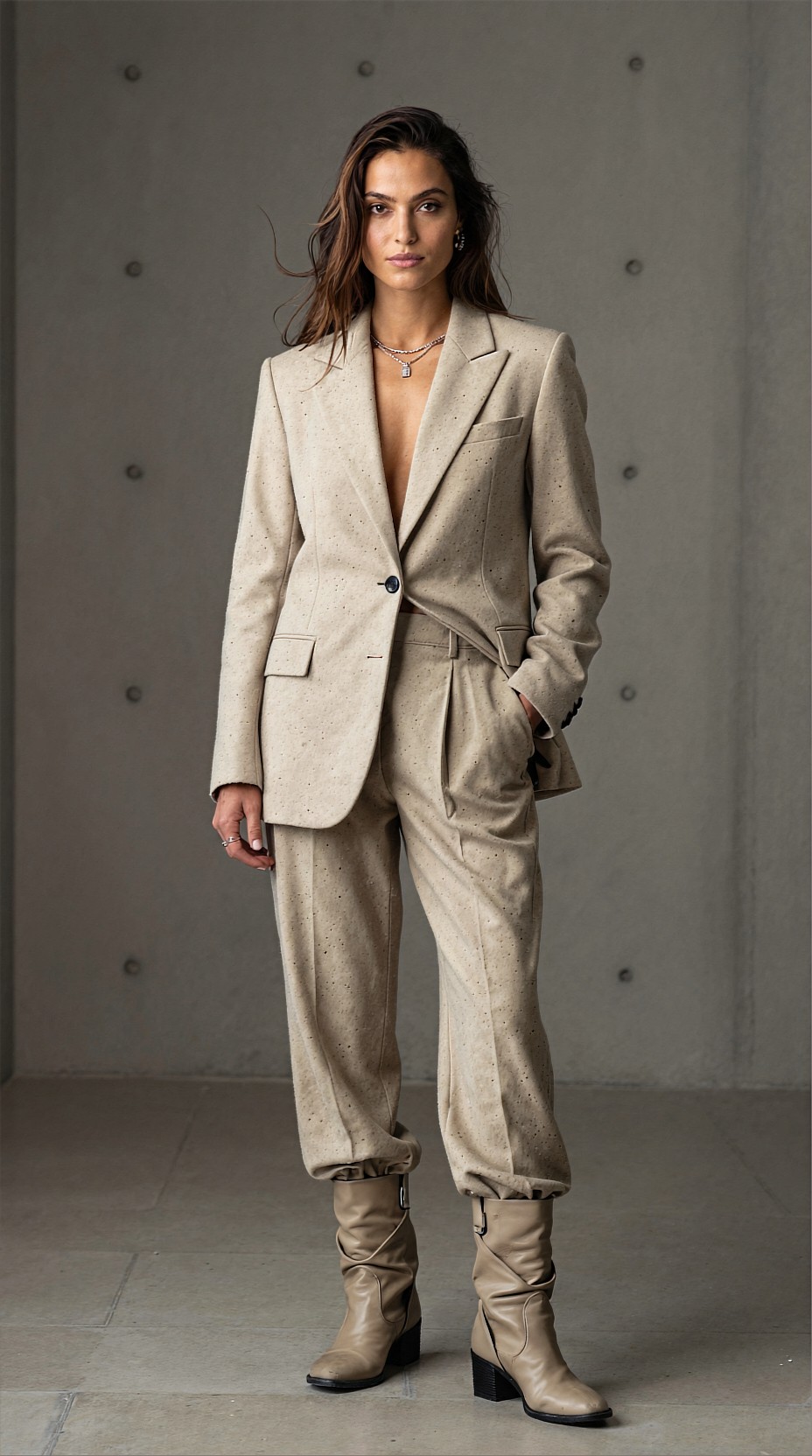
A practical SEEDVR2 FP8 pipeline
Here is a clean workflow for speed and control.
1. Sort images before you upscale
Do not batch everything blindly. Split your images into three bins:
- Hero images: portfolio pieces, covers, ad key art
- Production images: social posts, lookbook pages, thumbnails
- Rejects or rework: images with anatomy issues, muddy contrast, or broken hands
This matters because hero images deserve slower settings and sometimes a second pass, while production images benefit from fast, uniform handling.
2. Normalize the inputs
Before upscaling, try to keep your batch visually stable:
- use similar source resolutions when possible
- correct major exposure mismatches
- lightly denoise images with crunchy gradients
- crop first if final delivery format is known
Batch upscalers tend to reward order. If one image is dark and cinematic and the next is flat and overexposed, the output set may feel uneven even if each file is technically sharper.
Topic: Luxury Skincare Product Sheet for Batch Enhancement
Genre: Product Editorial
Camera: Nikon Z8
Lens: 105mm f/2.8 macro
Lighting: Studio Butterfly Light
Location: Glossy ivory tabletop set with reflected highlights
Style: High-End Beauty Advertising
Final Prompt: Frosted glass skincare serum bottle with brushed gold cap placed on a glossy ivory tabletop, subtle condensation, soft reflected highlights, clean beauty advertising composition, elegant diagonal placement with supporting cream smear texture, studio butterfly light adding controlled specular detail and premium shine, restrained ivory, champagne, and soft peach palette, shallow macro perspective, luxurious minimalist atmosphere, Nikon Z8 precision, 105mm f/2.8 macro realism, pristine label detail, upscale-friendly edges, refined micro-texture, premium commercial retouch feel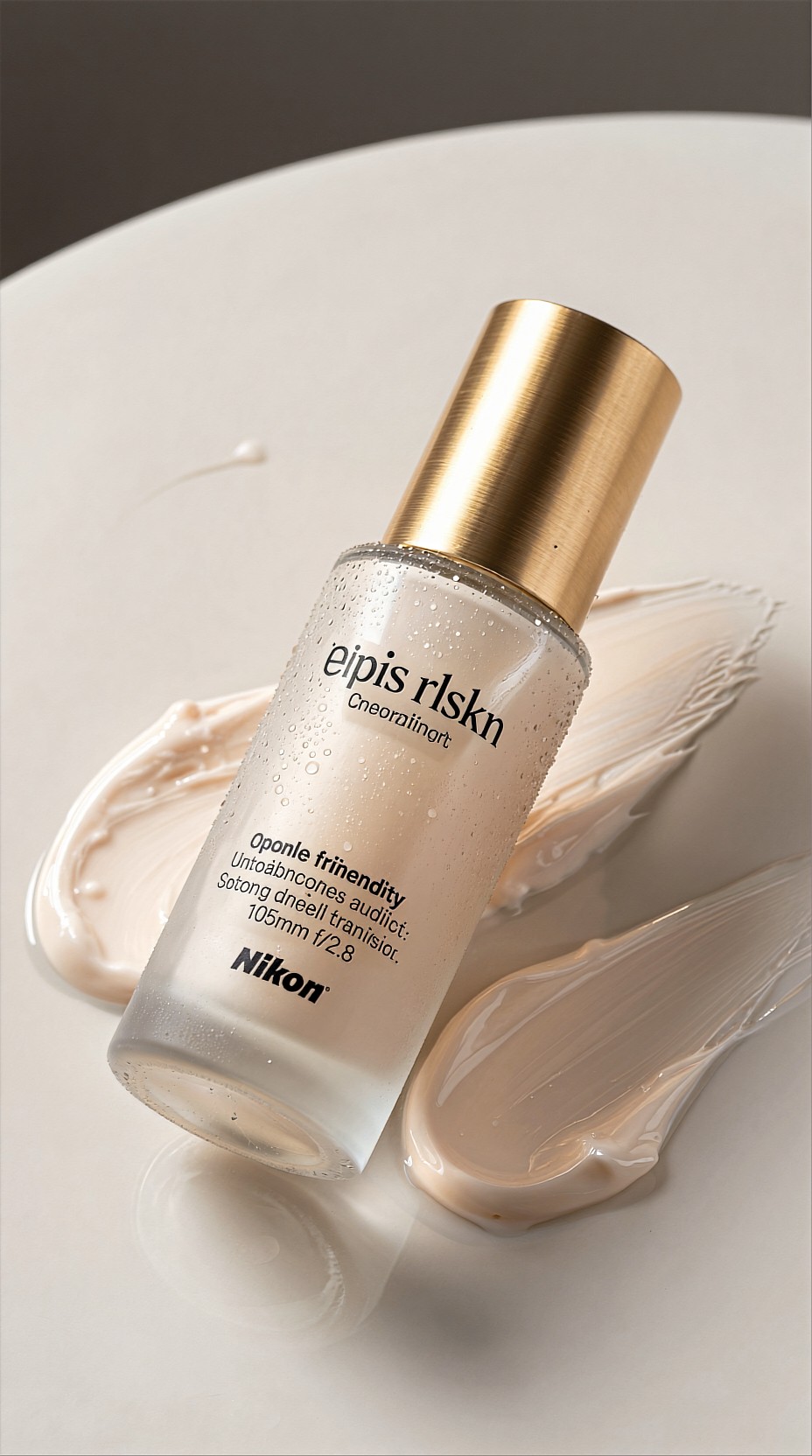
3. Use batch settings by image family
A common mistake is applying one strength setting across everything. Instead, group by subject type:
n- products
- portraits
- anime or illustration
- architecture or interiors
- cinematic scenes with fog, rain, or grain
Portraits often need gentler enhancement to avoid artificial skin texture. Product shots can usually take stronger edge clarity. Anime frames often benefit from line preservation over texture invention.
4. Keep a fixed naming pattern
This sounds boring until you process 300 files. Add structured output names like:
- `editorial_setA_01_up2x_fp8`
- `beauty_closeup_03_up4x_soft`
- `animekv_scene07_up2x_lines`
That makes A/B review much easier when comparing settings.
Consumer GPU strategy: speed without chaos
On a consumer GPU, the workflow goal is not maximum theoretical quality. It is stable throughput.
A practical approach:
- run 2x upscale for first-pass review
- reserve 4x only for approved selects
- keep batch sizes moderate to avoid memory spikes
- avoid stacking multiple heavy enhancement passes unless the image earns it
- monitor thermal throttling during long sessions
If you are combining generation and upscaling on the same machine, process in waves. Generate your draft set first, curate aggressively, then send only the best images through SEEDVR2 FP8. This keeps your workflow responsive and stops the GPU from becoming a queue bottleneck.
Topic: Neon Street Style Social Batch
Genre: Street Style
Camera: Fujifilm GFX100 II
Lens: 63mm f/2.8
Lighting: Neon Rim Light
Location: Rain-slick alley in Shibuya with vending machines and glowing signs
Style: Korean Magazine Cover
Final Prompt: Stylish young woman in oversized charcoal bomber jacket, silver mini skirt, knee-high boots, and translucent umbrella walking through a rain-slick Shibuya alley, neon signs reflecting magenta and cyan across wet pavement, subtle half-smile, confident shoulder-forward pose, vending machines and layered signage in the background, neon rim light tracing hair and jacket edges, glossy editorial composition with bold negative space, saturated electric palette with deep blacks, Fujifilm GFX100 II medium-format clarity, 63mm f/2.8 depth realism, crisp textures in fabric, rain droplets, and reflective surfaces, upscale-ready street style cover image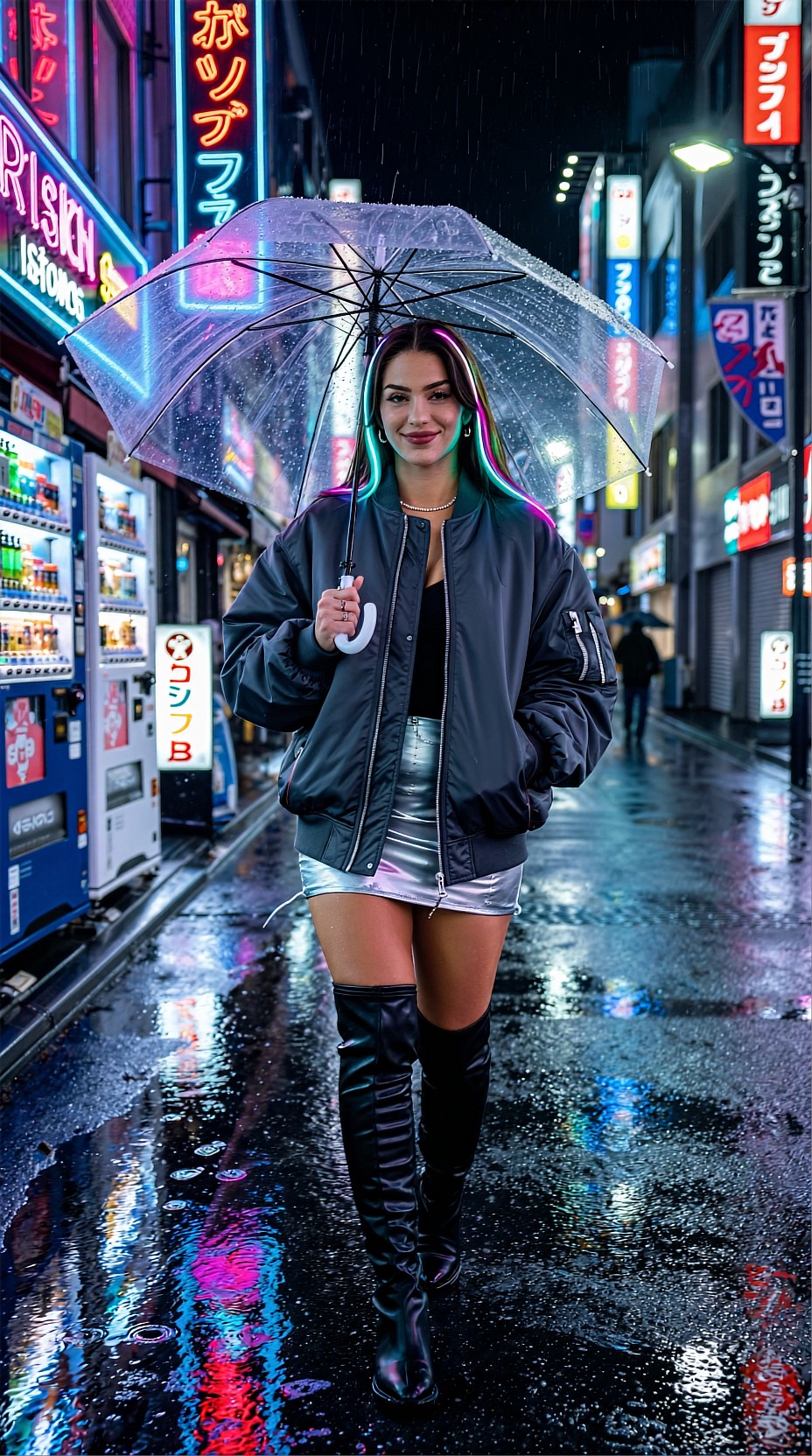
Where SEEDVR2 FP8 helps most visually
Fabric and wardrobe detail
Editorial images often lose garment credibility at low resolution. After a smart upscale, folds, stitching, weave, and reflective trim become more convincing. This is useful for:
- digital fashion campaigns
- e-commerce concept mocks
- runway-inspired moodboards
- capsule collection presentations
Hair, skin, and beauty framing
Beauty portraits benefit when the upscale preserves pores, lashes, and flyaway hair without overprocessing them. The best results usually come from restrained source files with good light direction.
Topic: Beauty Close-Up for Campaign Key Art
Genre: Beauty Campaign
Camera: Sony A1
Lens: 90mm f/2.8 macro
Lighting: Softbox Key Light
Location: Pale rose studio with translucent acrylic panels
Style: High-End Beauty Advertising
Final Prompt: Close-up beauty portrait of a model with luminous skin, soft rose lipstick, brushed brows, and glossy eyelids, wearing a silk wrap top and delicate pearl earring, posed three-quarter toward camera with serene expression, pale rose studio environment softened by translucent acrylic panels, softbox key light creating smooth highlights and controlled shadow under cheekbones, elegant blush, cream, and pearl color palette, Sony A1 precision, 90mm f/2.8 macro detail, crisp lashes and skin texture, refined hairline flyaways, luxury beauty campaign composition with upscale-ready facial detail and polished editorial realism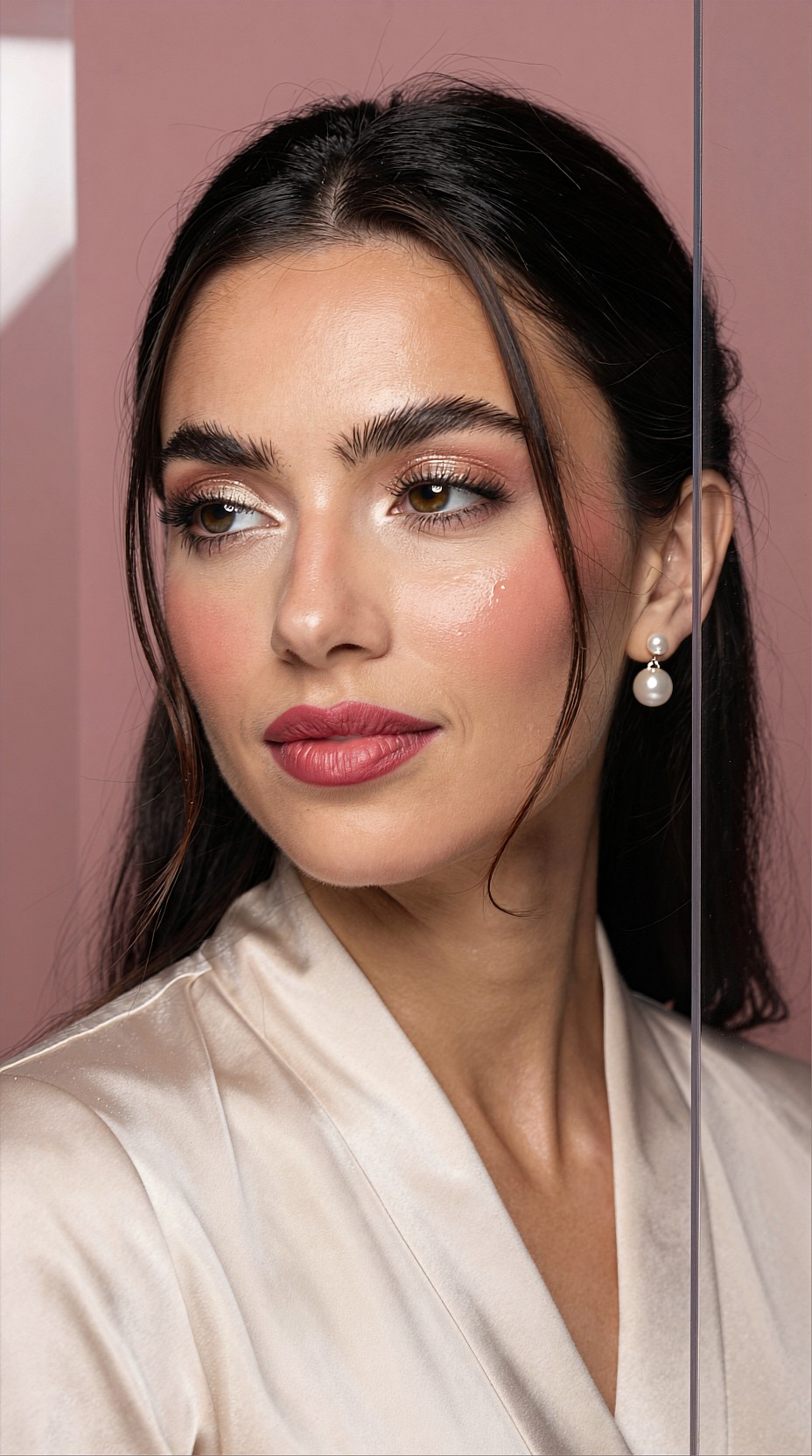
Background readability
In travel, environment, or cinematic concept work, upscale can make signs, windows, tile, foliage, and distant architecture feel more intentional. The trick is not to force excessive sharpness into atmospheric scenes.
Topic: Cinematic Coastal Travel Poster Scene
Genre: Cinematic Travel
Camera: ARRI Alexa 35 cinematic capture
Lens: 40mm anamorphic at T2.0
Lighting: Sunset Backlight
Location: Cliffside road above the Amalfi Coast with vintage scooter
Style: Cinematic Realism
Final Prompt: Traveler in a cream linen shirt and dark trousers leaning against a vintage seafoam scooter on a cliffside Amalfi Coast road, sunset backlight washing the scene in amber glow, relaxed contemplative expression, ocean far below with layered villages and bougainvillea, cinematic anamorphic composition with wide negative sky and subtle lens character, warm terracotta, sea blue, and faded lemon palette, natural fabric motion in coastal wind, ARRI Alexa 35 realism, 40mm anamorphic at T2.0, textured stone walls, atmospheric distance, upscale-ready travel poster frame with elegant depth and controlled highlight bloom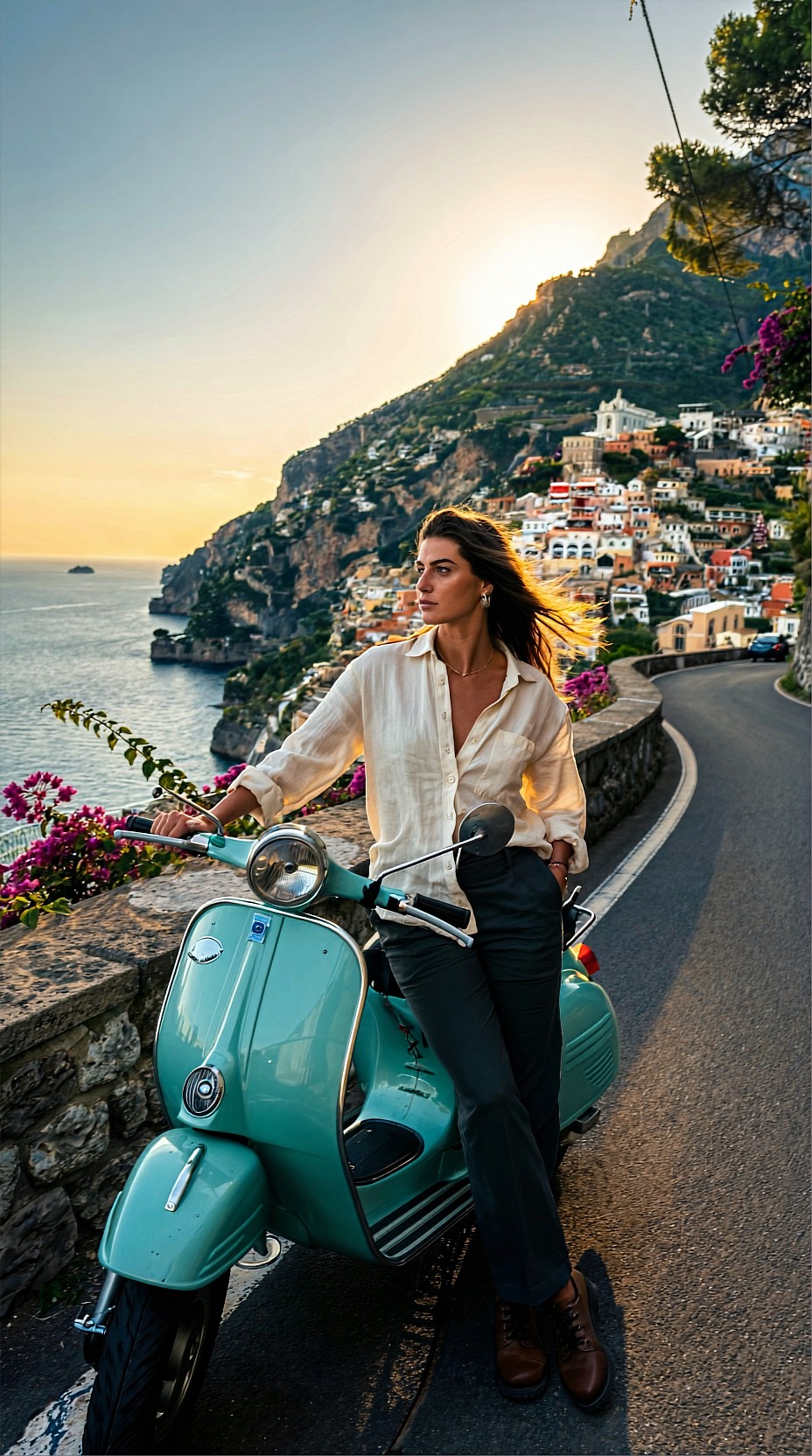
Prompting for upscale-friendly images
SEEDVR2 FP8 is more effective when the original generations are built for clarity. Prompt for strong materials, readable light, and a clean visual hierarchy. Vague prompts often create mushy detail that no upscale stage can truly rescue.
Good source prompts tend to specify:
- one clear subject priority
- intentional lens language
- lighting direction
- material textures
- color palette
- mood and pose
- background depth, not background clutter
For creators building large visual sets, prompt consistency matters as much as model choice. If you want a batch to upscale evenly, keep your visual grammar stable across the set.
Topic: Resort Editorial Source Image for Clean Upscaling
Genre: Luxury Campaign
Camera: Leica SL2-S
Lens: 50mm f/1.4
Lighting: Golden Hour
Location: White stone terrace overlooking the Aegean Sea
Style: Elegant Resort Editorial
Final Prompt: Fashion model in a flowing ivory resort dress with gold cuff bracelets and leather sandals standing on a white stone terrace above the Aegean Sea, soft golden hour light wrapping across skin and fabric, poised side profile with wind lifting the hem, serene luxury mood, minimal architecture and distant blue water creating clean layered depth, palette of ivory, sand, gold, and cobalt, Leica SL2-S natural tonal rendering, 50mm f/1.4 shallow separation, upscale-friendly composition with crisp drapery folds, believable skin texture, and refined editorial atmosphere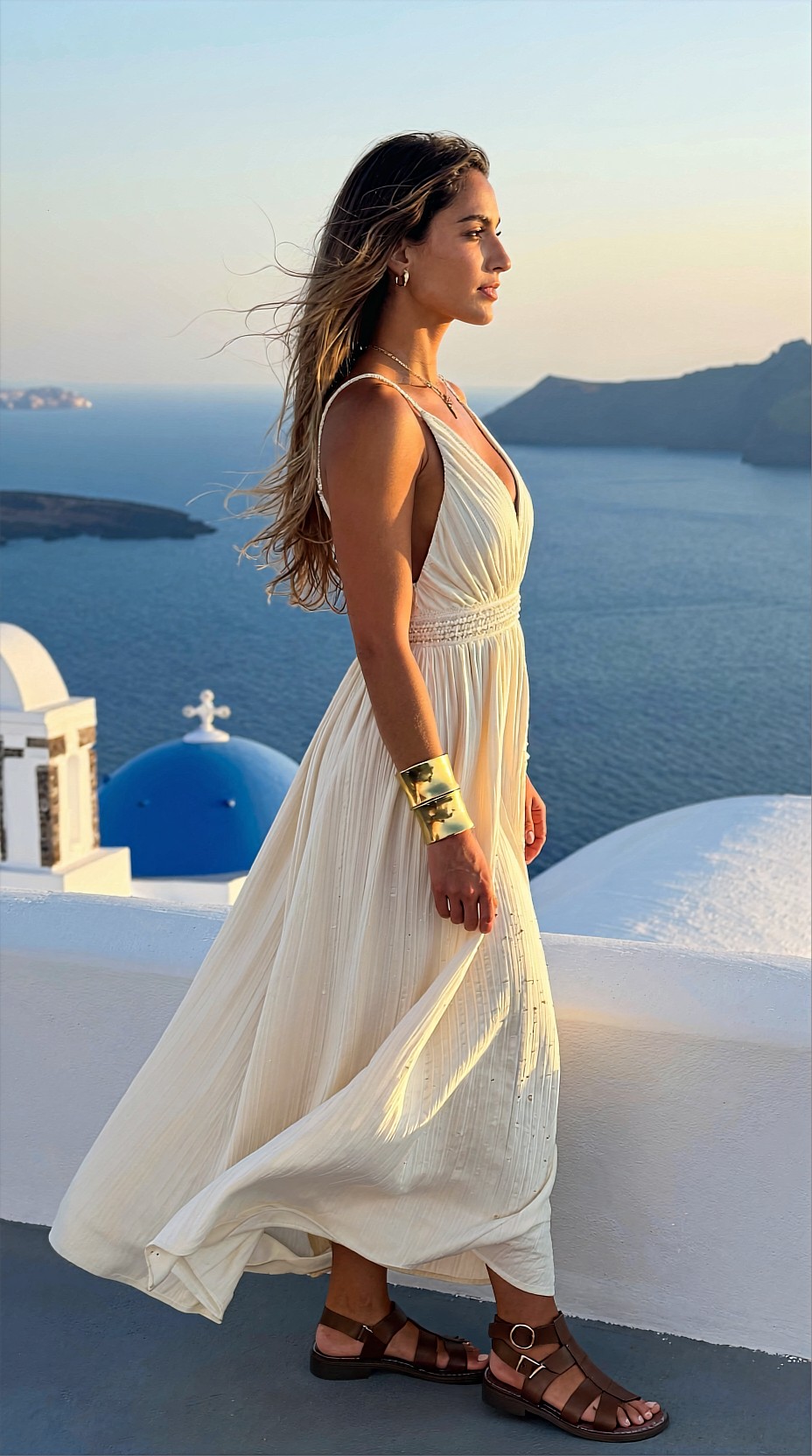
Batch recipes by use case
Social media campaign batches
If you need 20 to 80 images for scheduling, use a lighter pass that improves clarity without making the set look overworked. This is ideal for:
- streetwear drops
- café lifestyle content
- beauty teaser carousels
- travel reels cover frames
Portfolio and pitch deck selects
For presentation images, do a curated second pass. This is where you can justify more time on stronger scaling or manual post-cleanup after the batch run.
Anime and illustrated key visuals
SEEDVR2 FP8 can be especially practical here because consumer GPUs often struggle when creators try to brute-force giant illustration outputs from the start. Generate smaller, compose carefully, then upscale the approved scenes.
Topic: Anime Sci-Fi Key Visual for Poster Output
Genre: Anime Key Visual
Camera: Cinematic anime cels with virtual 35mm framing
Lens: 35mm equivalent f/2.0 look
Lighting: Neon Rim Light
Location: Elevated monorail platform above a futuristic night city
Style: Premium Anime Promotional Art
Final Prompt: Anime heroine with silver bob haircut, navy tech-coat, pleated skirt, and glowing transit card standing on an elevated monorail platform above a futuristic night city, determined gaze toward horizon, wind lifting coat panels, neon rim light in cyan and violet outlining silhouette, dense city below with holographic billboards, train lights, and mist, dramatic poster composition with clear foreground-midground-background separation, rich indigo and electric magenta palette, clean linework, polished cel shading, cinematic 35mm equivalent framing, upscale-ready edges, precise costume detailing, premium anime promotional art finish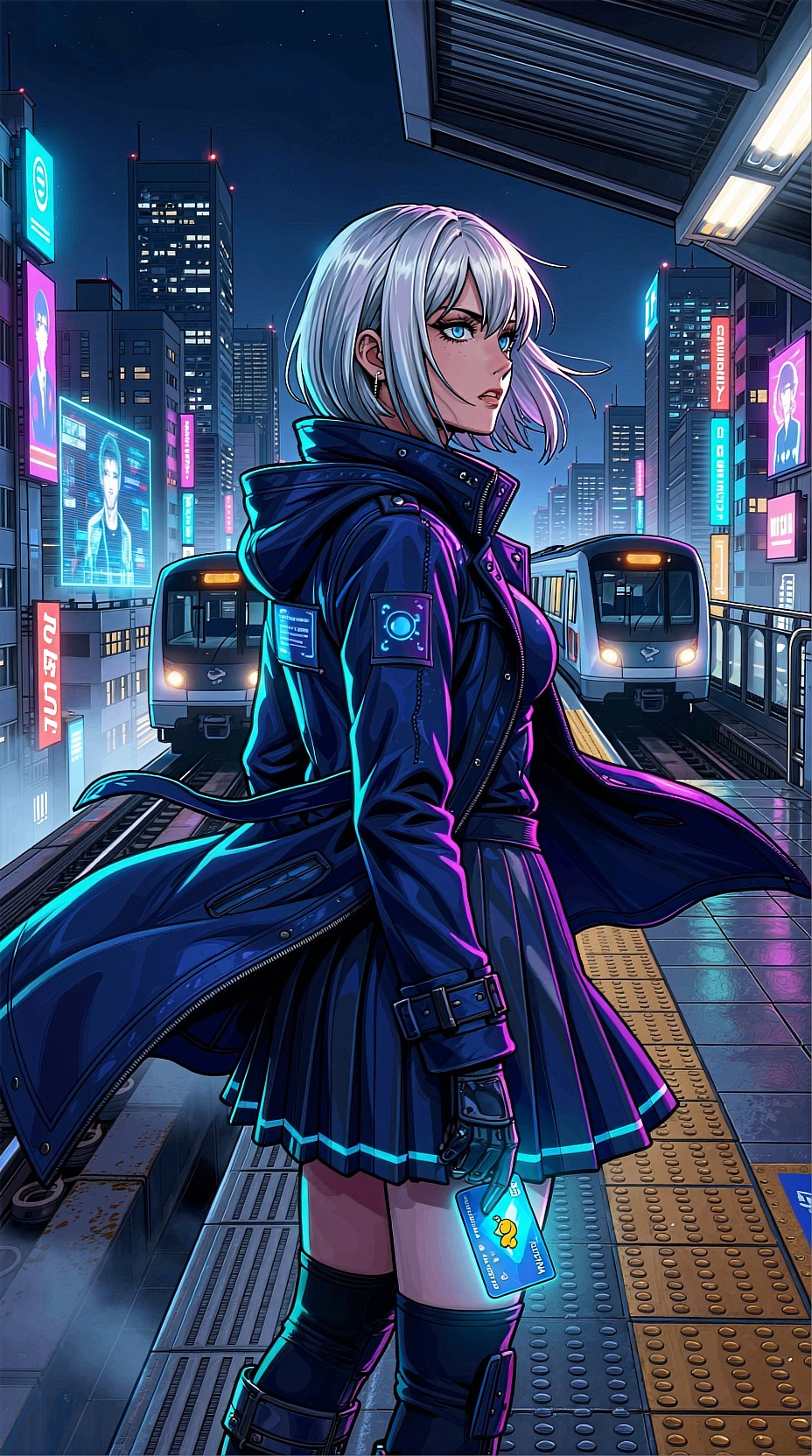
Topic: Artisan Coffee Lifestyle Scene for Content Batch
Genre: Lifestyle Portrait
Camera: Panasonic Lumix S5IIX
Lens: 35mm f/1.8
Lighting: Overcast Diffusion
Location: Corner cafe window seat on a rainy morning in Copenhagen
Style: Clean Commercial Look
Final Prompt: Young creative in a textured knit sweater and loose dark trousers seated by a rain-streaked cafe window in Copenhagen, holding a ceramic cup of coffee and looking outside with a thoughtful relaxed expression, soft overcast diffusion creating gentle skin tones and quiet contrast, wood table with sketchbook and compact camera, muted coffee brown, charcoal, and foggy blue palette, intimate lifestyle composition with layered reflections, Panasonic Lumix S5IIX realism, 35mm f/1.8 environmental portrait depth, upscale-ready textile texture, window droplets, and natural editorial storytelling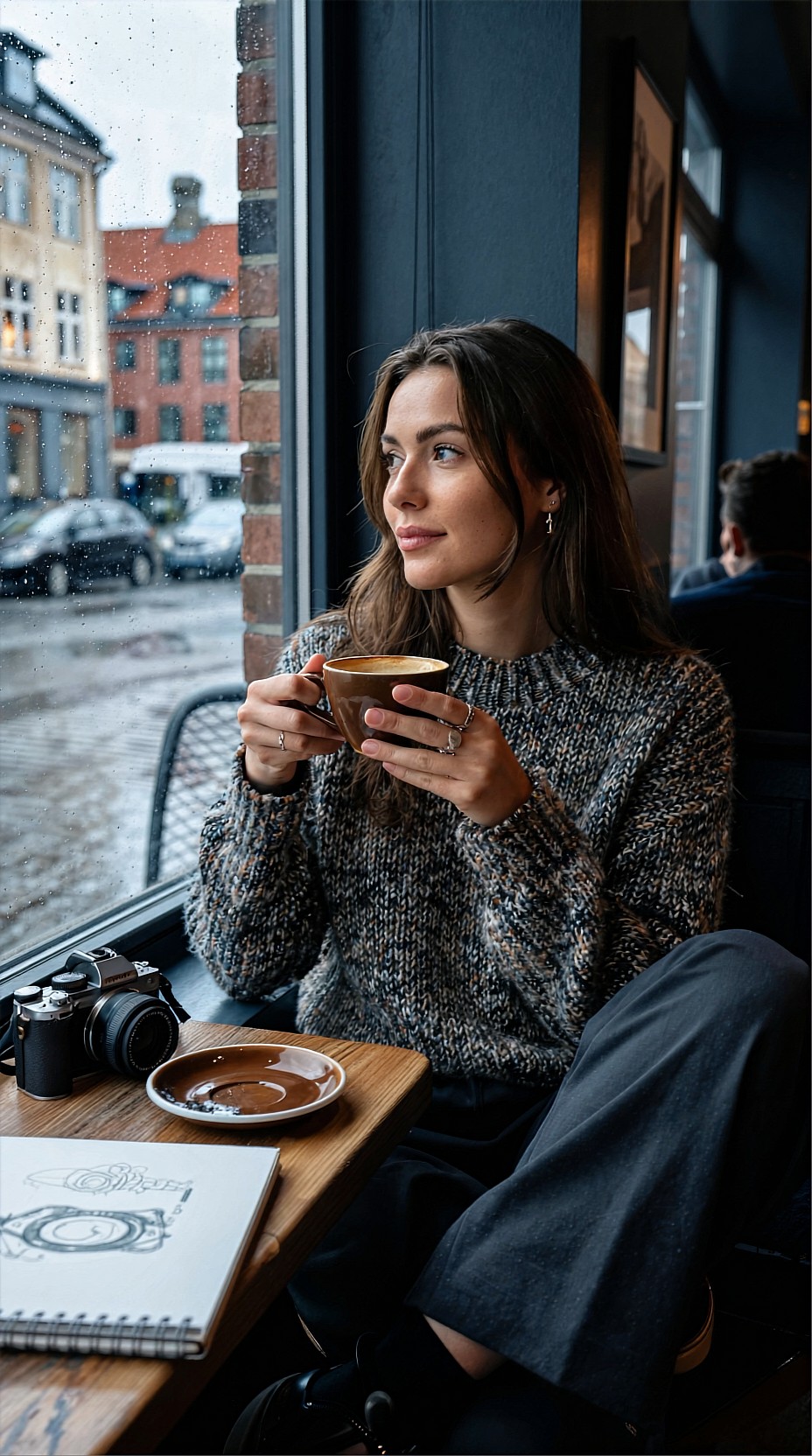
Common mistakes in fast upscaling pipelines
Upscaling bad selects
Do not spend GPU time polishing images that still have structural flaws. Bad anatomy, confused hands, broken perspective, and weak composition should be filtered out early.
Over-sharpening portrait sets
If every eyelash and pore becomes too aggressive, your set stops feeling editorial and starts feeling synthetic. Beauty and fashion usually benefit from restraint.
Ignoring final delivery size
A 4x upscale is pointless if the final image is only used as a mobile thumbnail. Match the upscale target to the actual output.
Mixing too many source aesthetics
A campaign batch should feel related. If half the images are flat studio shots and the other half are extreme neon cinema scenes, even a good upscale pass will not unify them.
Topic: Modern Watch Product Hero for E-Commerce Concept
Genre: Product Editorial
Camera: Hasselblad X2D 100C
Lens: 80mm f/1.9
Lighting: Controlled strip softboxes with subtle edge highlights
Location: Matte black pedestal set with smoked glass backdrop
Style: Luxury Campaign
Final Prompt: Brushed steel wristwatch with deep green dial displayed on a matte black pedestal against a smoked glass backdrop, precision product hero framing, controlled strip softboxes creating elegant edge highlights on the case and bracelet, subtle reflection beneath the watch, luxury campaign mood with dark emerald, graphite, and silver palette, Hasselblad X2D 100C clarity, 80mm f/1.9 premium compression, immaculate material texture, crisp dial markings, upscale-ready reflections, refined commercial composition suitable for e-commerce concept visuals and brand mockups
A simple finishing stack after batch upscale
Once your SEEDVR2 FP8 run is complete, keep post-processing light:
1. review at 100% and at final export size 2. correct color drift across the set 3. reduce any halos or oversharpened edges 4. retouch only the hero images 5. export web and archive versions separately
This keeps the batch efficient while still giving special treatment to the images that carry the project.
Topic: Interior Design Visualization for Presentation Board
Genre: Product Editorial
Camera: RED Komodo 6K still capture style
Lens: 24mm f/4.0
Lighting: Morning window light with soft bounce fill
Location: Scandinavian living room with oak shelving and plaster walls
Style: Cinematic Realism
Final Prompt: Scandinavian living room interior with low boucle lounge chair, travertine coffee table, ceramic vase, and oak shelving against soft plaster walls, morning window light entering from the left with subtle bounce fill, airy editorial composition with clean lines and restrained styling, warm oat, chalk white, and pale wood palette, slight lived-in realism with folded throw and open design book, RED Komodo 6K still capture aesthetic, 24mm f/4.0 spatial depth, upscale-ready detail in fabric weave, wood grain, and shadow transitions, elegant presentation-board image with cinematic realism
Final take
SEEDVR2 FP8 is most useful when treated as a production tool, not a rescue button. On consumer GPUs, that mindset changes everything. Generate smaller, curate hard, group images by subject, upscale with intention, and reserve the heavier passes for the frames that deserve them.
The result is a faster visual pipeline: more finished images, less wasted compute, and better consistency across the kinds of AI-generated editorials, product scenes, beauty campaigns, anime posters, and travel concepts that creators actually deliver.