Which is better for fast prompt iteration, ZImage Turbo or Krea2 Turbo? This site cannot give you a verified winner yet. We have a recorded set of eight ZImage Turbo editorial images with their exact prompts, and no recorded Krea2 Turbo images for the same prompts. So this article does two honest things: it shows what ZImage Turbo actually did with a structured editorial prompt format, including where it added things nobody asked for, and it gives you a short protocol to run the same comparison against Krea2 Turbo yourself in about twenty minutes.
If you only want the practical takeaway: for iteration speed, the model matters less than how you change prompts between runs. Change one element at a time, keep the rest of the prompt word-for-word, and read each result for what was added or broken, not only for what looks good.
What the ZImage Turbo run looks like
The images below were generated on 2026-07-06 with ZImage Turbo from eight editorial prompts. The generation records are spaced roughly 20 seconds apart (13:38:56 to 13:41:15 for all eight). That is a rough cadence of a batch run, not a speed benchmark: it includes whatever overhead the queue had, and we have no matching timing for Krea2 Turbo. Output files are 2880 x 5120 pixels (9:16 portrait).
Every prompt follows the same skeleton: a one-line topic, then wardrobe, pose, location, lighting, palette, and finally a camera-and-lens phrase ("Canon EOS R5 look, 85mm f/1.2 shallow depth of field"). That repetition is what makes quick iteration possible, because each slot can be swapped independently.
A prompt that was followed closely
Minimalist luxury fashion portrait for a fall magazine opener, model wearing structured charcoal wool coat over ivory silk turtleneck, sleek low bun, calm direct gaze, one hand in pocket and one hand lightly touching collar, framed waist-up in a concrete loft studio with brushed steel pedestal and pale gray walls, softbox key light creating gentle sculpted shadows, restrained editorial composition, cool neutral palette with charcoal, ivory, and silver accents, premium fabric texture, realistic skin detail, magazine-grade retouching, Canon EOS R5 look, 85mm f/1.2 shallow depth of field, clean luxury fashion campaign aesthetic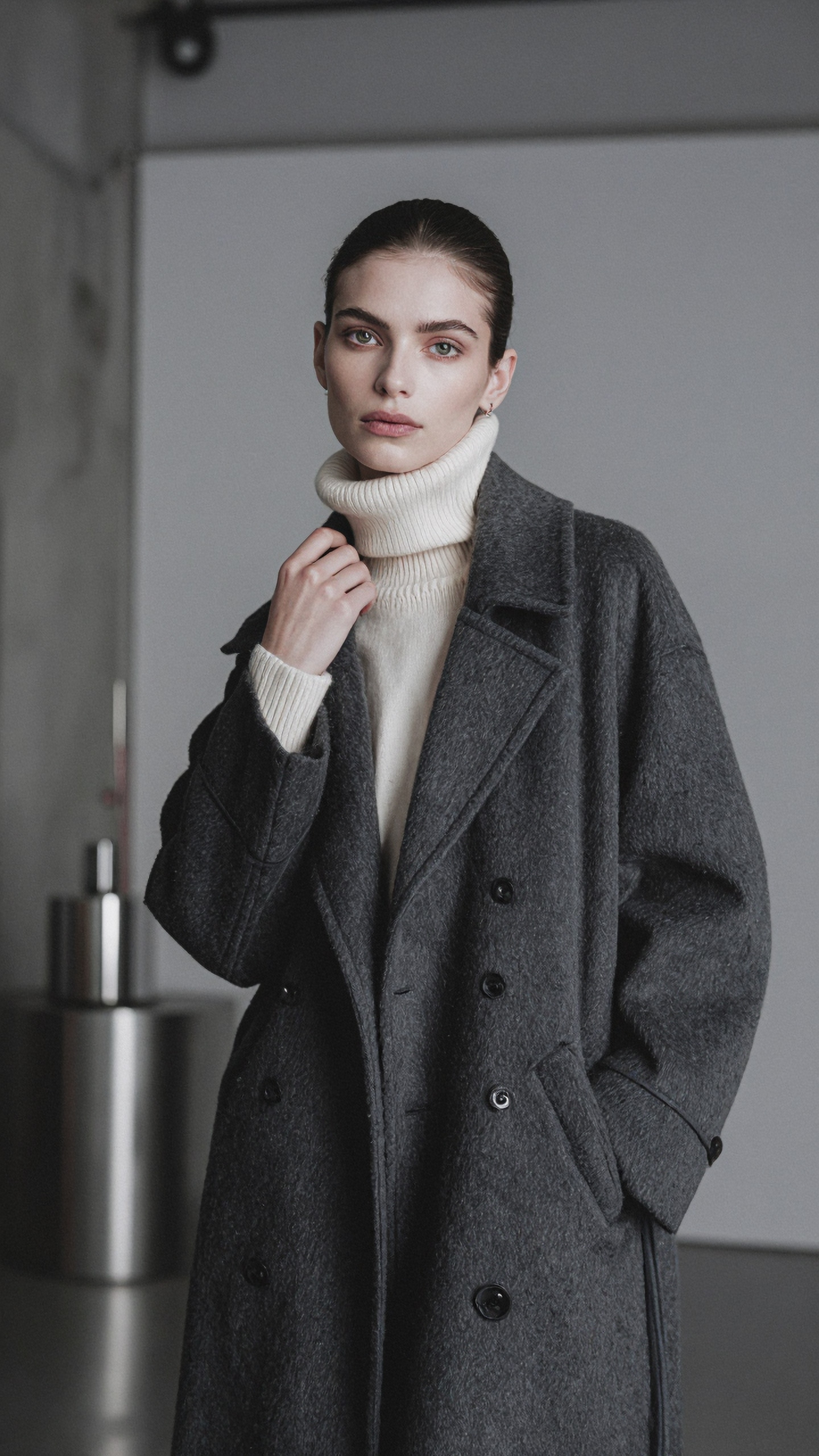
This is the clearest hit in the set. Coat, turtleneck, slicked-back hair, the two hand positions, the gray wall and the steel object in the background are all visible. Two small deviations are worth noting: the crop runs lower than "waist-up" (the coat is visible well below the pockets), and the "steel pedestal" reads as a cylindrical steel canister rather than a pedestal. Both are the kind of drift you catch in a revision loop, not a failure.
A prompt where the model added an element
High-gloss beauty campaign close-up featuring a model with luminous wet skin texture, brushed-up brows, glassy nude lips, and slicked-back hair, photographed against a seamless cream backdrop, elegant chin lift and soft parted lips, macro-level emphasis on skin sheen and cosmetic finish, studio butterfly light with silver reflector fill for symmetrical glow, warm ivory and champagne palette, refined beauty crop, premium cosmetic advertising composition, ultra-clean background, realistic pores with polished finish, Nikon Z8 look, 105mm f/2.8 macro precision, luxurious high-end beauty advertising style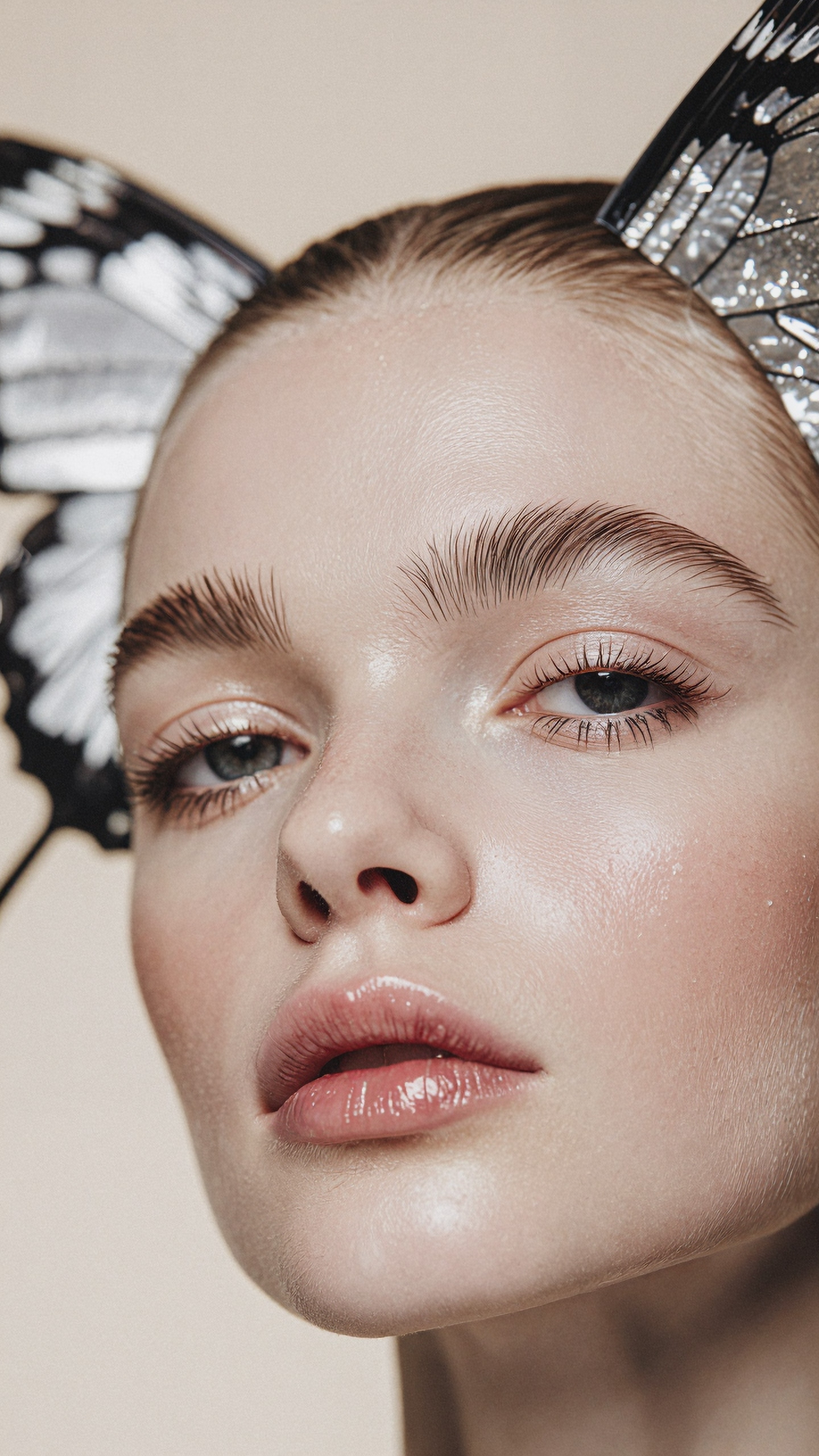
The skin sheen, brushed-up brows, glossy lips and cream background match the prompt. The large butterfly wings on both sides of the head do not: nothing in the prompt mentions them. For a concept round that can be a useful accident, but if you are iterating toward a specific brief, unrequested props are the first thing to look for. The fix is to name what should be absent ("no headpiece, no props") in the next run, not to rewrite the whole prompt.
Motion and clothing structure
Sunset rooftop tailoring story for a contemporary womenswear feature, female model wearing sand-colored double-breasted blazer, fluid cream trousers, pointed heels, and sculptural gold earrings, captured mid-turn with wind moving the blazer hem, poised half-smile and relaxed elegance, downtown rooftop terrace overlooking glass towers and warm haze, sunset backlight wrapping the figure with amber edge glow, balanced editorial composition with skyline depth, palette of sand, gold, warm gray, and peach sky, realistic fabric movement, Leica SL2-S rendering, 50mm f/1.4 cinematic depth, refined cinematic realism for a premium magazine spread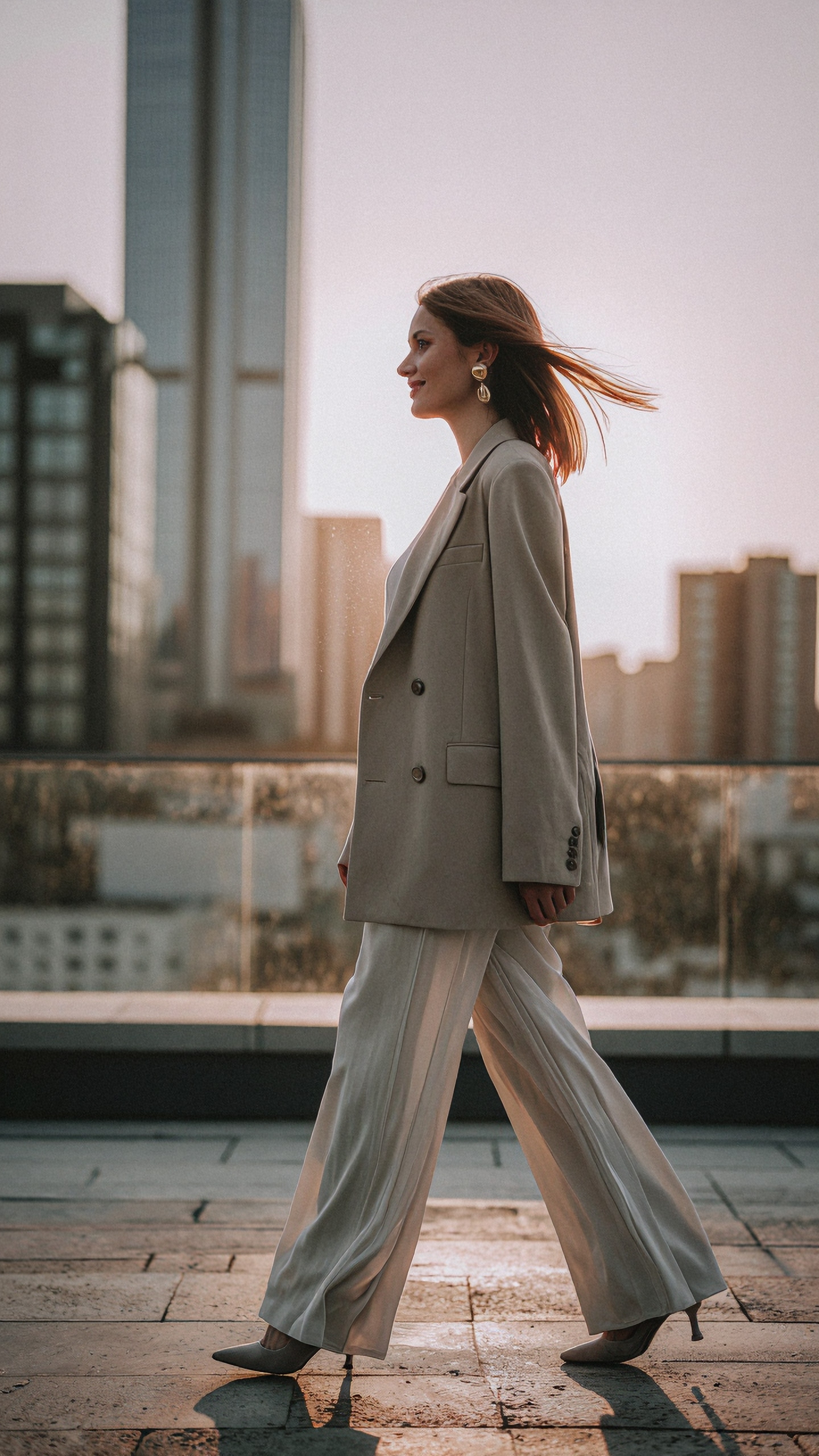
Blazer, trousers, heels, gold earrings, windblown hair, amber backlight and skyline all appear, and the blazer's buttons, lapel and pocket flaps are coherent. The prompt asked for "mid-turn"; the pose is a side-on walk instead. Wardrobe-heavy prompts like this one are a good template for iteration because you can swap only the garment or the location and see whether the rest holds.
Where text and product details go wrong
Two of the eight images show the same problem, and it is the most useful thing in this set for anyone iterating quickly.
Modern street-luxury fashion concept for a youth magazine spread, androgynous model in oversized graphite bomber jacket, pleated black trousers, polished leather sneakers, silver ear cuff, and narrow sunglasses, standing mid-stride on reflective Shibuya pavement after light rain, layered signage and vending machines softly blurred behind, confident detached expression, editorial full-body composition with slight low angle, overcast diffusion for smooth skin and rich fabric tones, cool palette with pops of electric red and cobalt signage, crisp commercial detail, Fujifilm GFX100S look, 63mm f/2.8 medium-format depth, Korean magazine cover styling with urban polish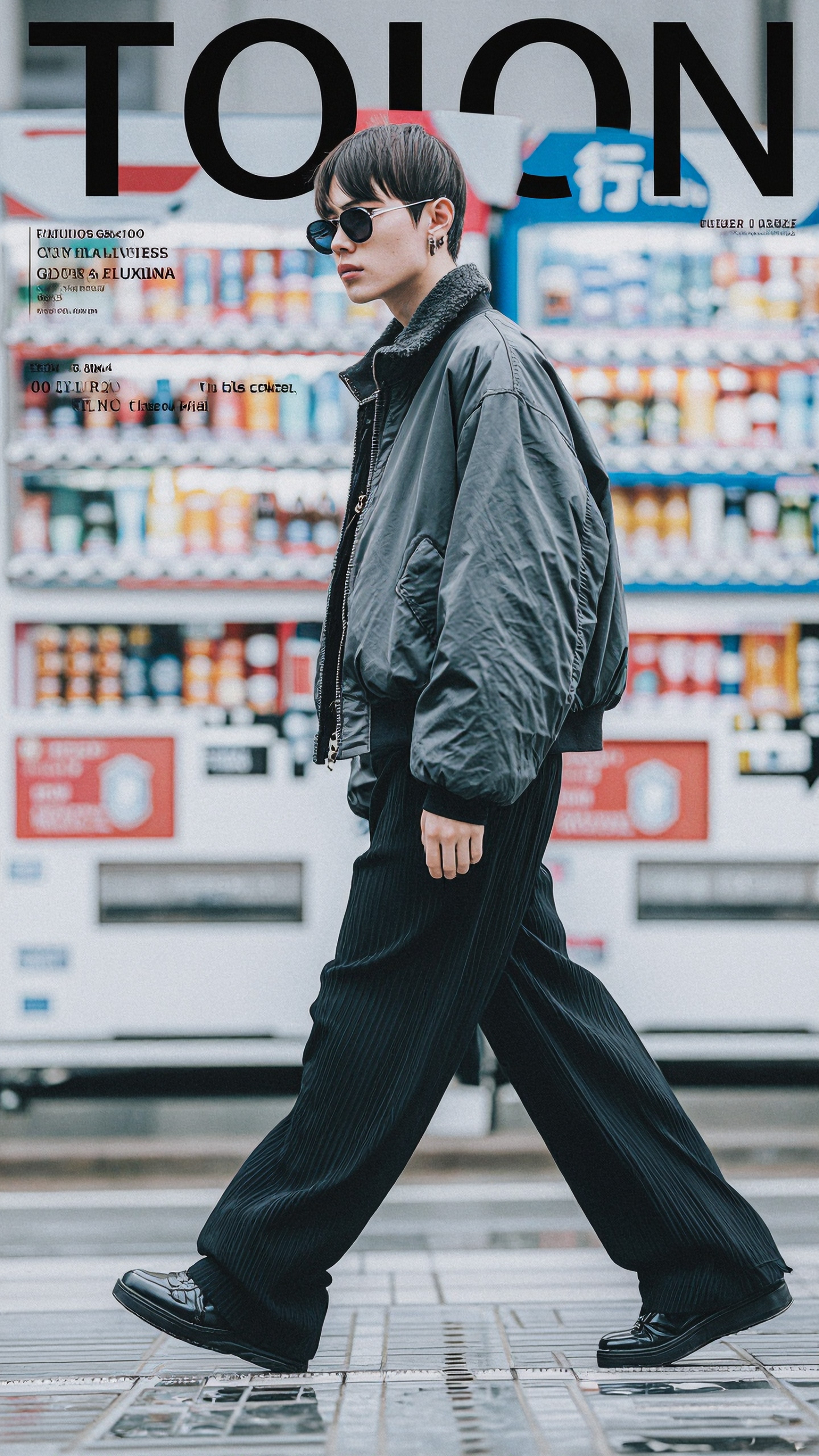
The phrase "Korean magazine cover styling" made the model draw a cover layout: a large masthead that reads "TOION" and several blocks of unreadable, malformed small text. The jacket, trousers, sunglasses and vending machines are fine. Note also that the masthead partly overlaps the head. If you want a clean image you will lay out yourself, avoid the words "cover", "masthead" and "magazine cover" in the prompt.
The same thing happened here:
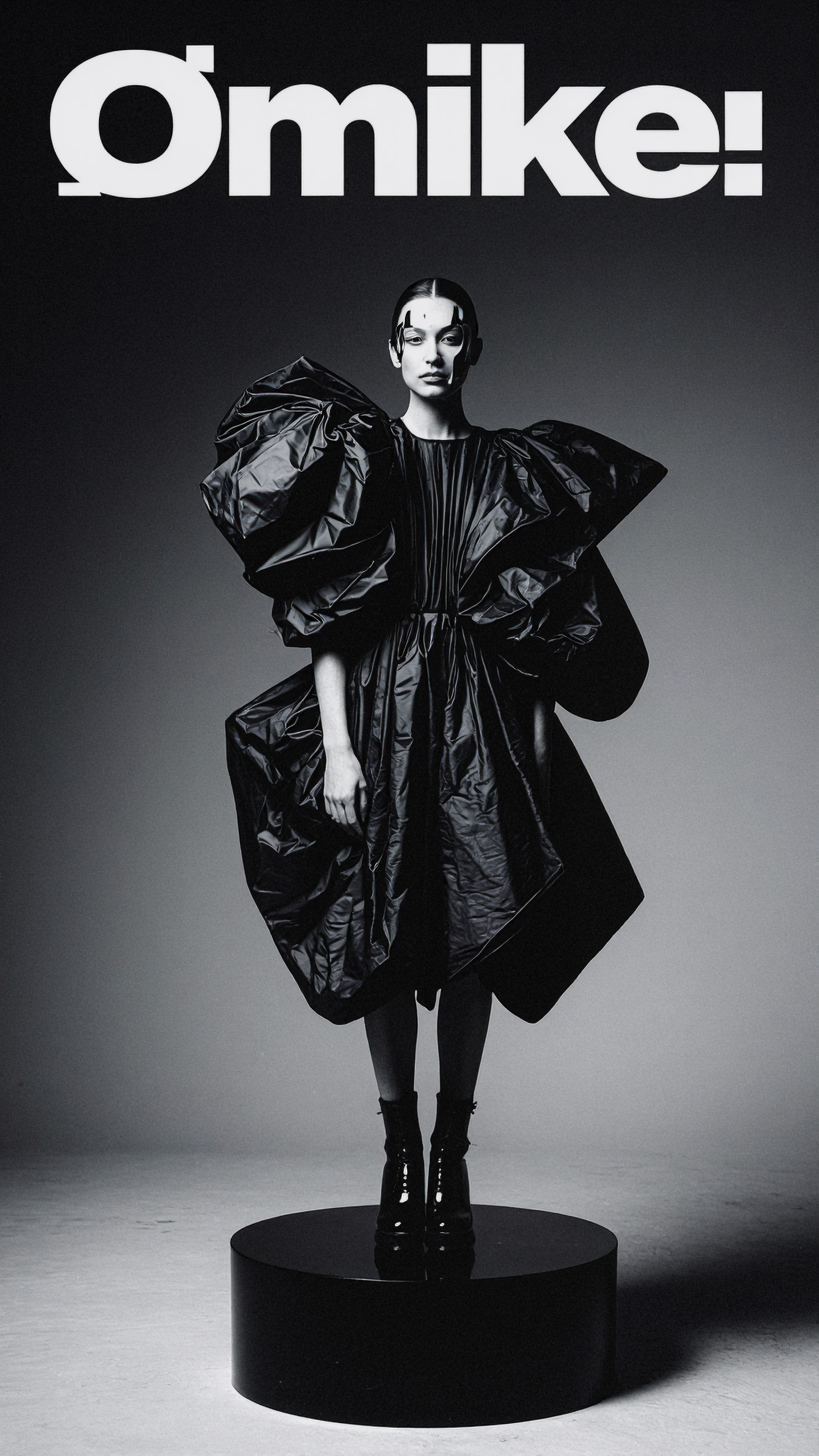
The prompt ended with "designed for a bold collector magazine cover", and the result carries an invented masthead (roughly "Ømike!"). The gown is large, shiny and sculptural, and the round platform and boots match, but the prompt said "origami gown" and what we see reads as crinkled plastic-like volume. The prompt did not ask for black and white either, only "black-on-black tonal separation".
The product shot shows a related failure:
Luxury fragrance bottle concept with sculptural reflections, faceted amber perfume bottle placed on black acrylic tabletop surrounded by smoked glass panels and subtle condensation beads, editorial still-life composition with asymmetric spacing, narrow strip softboxes creating sharp luminous edges and mirrored bounce cards adding controlled highlights, palette of obsidian, amber, bronze, and deep plum, premium reflection management, tactile glass texture, high-end brand campaign atmosphere, Hasselblad X2D 100C look, 80mm f/1.9 crisp detail with elegant falloff, luxury campaign styling suitable for fragrance launch visuals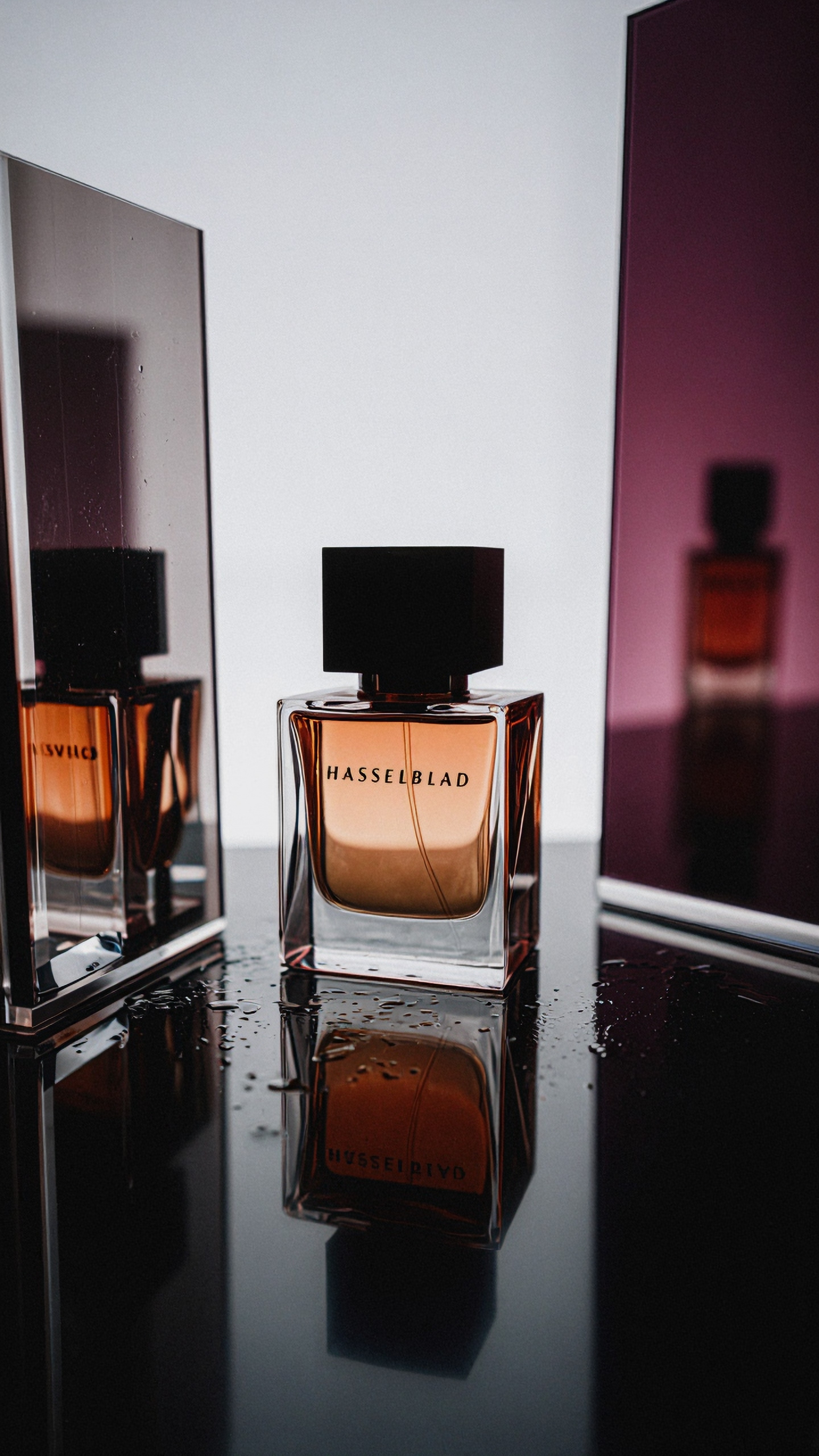
The scene itself is convincing: amber liquid, black cap, mirrored and plum panels, droplets on a dark surface, a reflection below. But the bottle label reads "HASSELBLAD". The camera name in the prompt ("Hasselblad X2D 100C look") was rendered as label text on the product. The bottle is also a squarish glass block rather than clearly faceted. This is a concrete argument for keeping camera phrases out of product prompts, or for testing whether the other model does the same.
How to run the same comparison on Krea2 Turbo
Because we have no recorded Krea2 Turbo output for these prompts, we are not going to describe how it behaves. Here is a protocol that gives you a real answer in a handful of runs. It is general practice, not a result of our testing.
1. Pick three of the prompts above that differ in kind: one wardrobe portrait (the coat prompt), one close-up beauty prompt, one product prompt. Paste each one unchanged into both models. 2. Use the same aspect ratio and, where both tools allow it, the same seed. If a model does not expose a seed, generate the same number of images per prompt on each side so you compare hit rates, not single pictures. 3. Score each image on the same short list. Was every garment or object in the prompt present? Were any objects added that were not requested (the butterfly wings)? Is any text visible that you did not ask for (the mastheads, the bottle label)? Are hands and fabric structure coherent? 4. Then change one slot. Replace only the location or only the lighting, rerun both models, and check whether the rest of the image stayed the same. This is what "prompt responsiveness" actually means, and it is measurable. 5. Count usable images per batch, not seconds per image. A faster model that needs twice as many retries is not faster in practice.
You can do steps 1 to 4 in [Create](/create/en), and [Prompt Lab](/promptlab/en) is useful for keeping the slot-by-slot structure consistent while you edit. If one of the winners needs more resolution for a pitch deck, run it through the [upscaler](/upscaler/en) afterwards.
Habits that speed up iteration with either model
These are general prompt-writing practices, and the eight images above are consistent with them rather than proof of them.
- Keep a fixed skeleton. Topic, wardrobe, pose, location, light, palette, camera. When a result is off, you know which slot to edit.
- State absences. The butterfly wings and the invented mastheads both appeared without being requested. Add "no text, no logo, no props" to prompts where you want a clean plate.
- Keep brand and camera names out of text-sensitive scenes. A camera name written into a prompt can come back as printed text on objects, as the fragrance bottle shows.
- Do not use "cover" language unless you want a layout. Two of the eight images grew a masthead from it.
- Treat a good-looking image as a hypothesis. The rooftop image looks finished, but the pose was "mid-turn" in the prompt and "walking" in the result. Check against the prompt before you show it to a client.
Two images we did not use
The spring beauty portrait (lilac eyeshadow, mint off-shoulder top, sheer curtain) and the Amalfi resort image (linen suit, sandals, sea and cliffside town) are solid results, but they show nothing the six above do not, so they are left out to keep the article short. Both came from the same ZImage Turbo batch.
FAQ
Is ZImage Turbo or Krea2 Turbo better for editorial concepts? We can only say what ZImage Turbo did on these eight prompts. For a verdict you need to run the same prompts on Krea2 Turbo, and the protocol above is built for that.
Why do my images come with text I did not ask for? In this set, words like "magazine cover" produced invented mastheads with partly garbled lettering, and a camera name appeared as label text on a bottle. Removing those words, or stating "no text", is the usual first fix.
Can I reuse these prompts? Yes. They are the exact prompts that produced the images shown. If you change them, treat the new version as untested until you have looked at the output.
> About this article's evidence > Model: ZImage Turbo (eight images, generated 2026-07-06 between 13:38 and 13:41 UTC). Krea2 Turbo: no recorded images, so no claims about it are made from results. Checked: six images were opened and compared with their recorded prompts; two more from the same batch were viewed and left out. Prompts are quoted exactly from the generation records.