
Z-Image Turbo vs Qwen Image 2512 vs ERNIE Turbo: Which AI Image Model Performs Best? 한국어 요약
이 페이지는 ZView Space의 영어 원문을 한국어 검색 사용자도 이해할 수 있도록 정리한 SEO 요약입니다. 핵심은 단순한 얼굴 중심 이미지가 아니라 패션 에디토리얼, 룩북, 아웃핏, 프롬프트 테스트, 이미지 생성 워크플로우를 실제로 어떻게 구성할지입니다.
핵심 요약
- 원문 주제: Z-Image Turbo vs Qwen Image 2512 vs ERNIE Turbo: Which AI Image Model Performs Best?
- 목적: AI 이미지 생성에서 outfit, silhouette, fabric, pose, location, camera framing을 더 명확하게 설계합니다.
- 활용 범위: Z-Image Turbo, Krea2 Turbo, Qwen Image, Anima, SeedVR2 같은 이미지 생성 및 업스케일 워크플로우에 적용할 수 있습니다.
- SEO 관점: 제목, 설명, 이미지 alt, 프롬프트 예시가 실제 검색 의도와 맞아야 색인 가능성이 높아집니다.
한국어 사용자를 위한 체크포인트
1. 프롬프트가 얼굴 묘사에만 머물지 않고 전체 스타일과 의상 구성을 설명하는지 확인합니다. 2. 패션 이미지라면 상의, 하의, 아우터, 신발, 액세서리, 소재감, 촬영 장소를 분리해서 씁니다. 3. 생성 결과는 바로 게시하지 말고 디테일, 손, 의상 형태, 배경 일관성, 이미지 품질을 비교합니다. 4. 글 본문에는 실제 테스트 기준과 실패를 줄이는 방법이 들어가야 검색엔진에서 얇은 콘텐츠로 보일 가능성이 줄어듭니다.
원문 미리보기
Z Image Turbo vs Qwen Image 2512 vs ERNIE Turbo: Which AI Image Model Performs Best? AI image generation models continue to improve at an impressive pace. Among the latest contenders, Z Image Turbo, Qwen Image 2512, and ERNIE Turbo have attracted attention for
---
Z-Image Turbo vs Qwen Image 2512 vs ERNIE Turbo: Which AI Image Model Performs Best?
AI image generation models continue to improve at an impressive pace. Among the latest contenders, Z-Image Turbo, Qwen Image 2512, and ERNIE Turbo have attracted attention for their unique strengths in image quality, prompt understanding, and generation speed.
This article compares the three models using the same prompts and evaluates their performance across several important categories.
---
Table of Contents
1. Introduction 2. Model Overview 3. Prompt Understanding 4. Photorealistic Image Quality 5. Generation Speed 6. Text Rendering Capability 7. Artistic Style and Creativity 8. Strengths and Weaknesses 9. Which Model Should You Choose? 10. Conclusion
---
Introduction
Choosing the right image generation model depends on your specific needs. Some models prioritize speed, while others focus on prompt accuracy, artistic flexibility, or photorealistic output.
To better understand the differences, we compare Z-Image Turbo, Qwen Image 2512, and ERNIE Turbo across multiple real-world use cases.
---
Model Overview
Base IMAGE
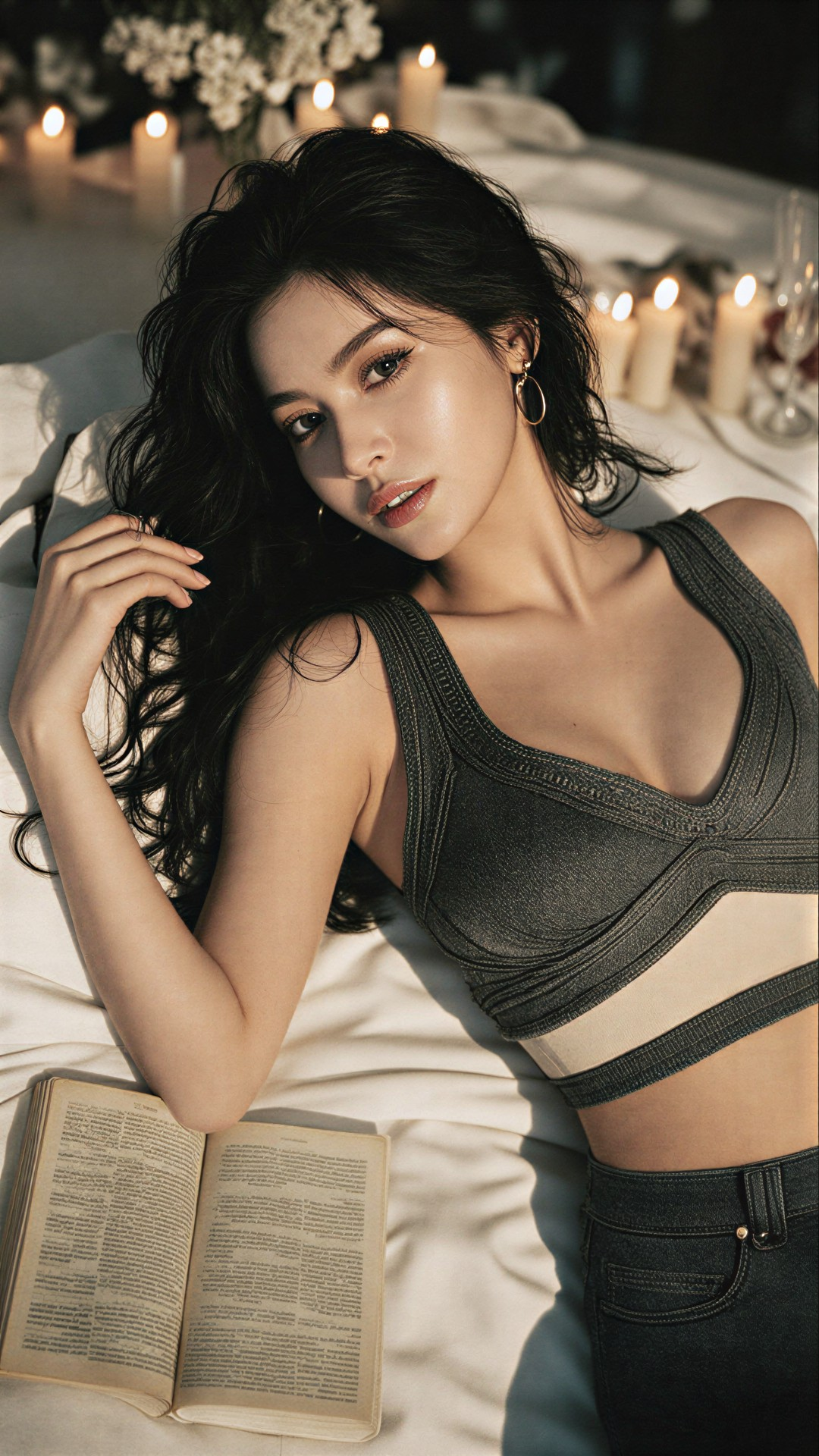
Prompt QWEN3-VL 4B
A young woman with long, dark wavy hair lies on her side atop a white bedspread, gazing directly at the viewer with an intimate, serene expression. Her makeup highlights her defined eyes and full lips, while she wears large gold hoop earrings that catch the ambient light. She’s dressed in a stylish black crop top featuring intricate stitching and sheer panels across the midriff, paired with high-waisted denim jeans. One hand rests gently near her face as she leans slightly toward the camera, creating a relaxed yet poised posture. An open book rests beside her on the bedding, its pages filled with dense text but unreadable from this angle. In the softly blurred background, multiple lit candles line a table draped with fabric, casting warm golden glows against cool-toned walls and contributing to a romantic or contemplative atmosphere. The scene is illuminated by candlelight combined with natural backlighting filtering through unseen windows, producing soft halos around her silhouette and gentle gradients of shadow along her body. Shot from eye level close-up, the frame captures her upper torso and head within tight focus while subtly emphasizing depth via shallow depth-of-field blur behind her. Composition centers her gaze and form, drawing attention to both her expressive features and elegant attire amidst the cozy setting.,,
Z-Image Turbo
![ZIMAGE]()
Z-Image Turbo is designed for fast image generation while maintaining strong photorealistic quality. It is particularly popular among users who need high-quality results with minimal waiting time.
Qwen Image 2512
![QWEN2512]()
Qwen Image 2512 focuses on advanced prompt comprehension and detailed scene construction. It often excels when handling long and complex prompts containing multiple subjects and relationships.
ERNIE Turbo
![ERINE]()
ERNIE Turbo aims to balance speed and visual appeal. It frequently produces aesthetically pleasing images with a cinematic or artistic feel while maintaining relatively fast generation times.
---
Prompt Understanding
Winner: Qwen Image 2512
Prompt understanding is one of the most important factors in image generation.
When using complex prompts containing multiple characters, objects, actions, and environmental details, Qwen Image 2512 generally demonstrates the highest level of accuracy.
Strengths:
- Better object placement
- Improved scene consistency
- Strong handling of long prompts
- Better understanding of relationships between subjects
Z-Image Turbo and ERNIE Turbo can occasionally omit smaller details when prompts become highly complex.
---
Photorealistic Image Quality
Winner: Z-Image Turbo
For realistic portraits and photography-style images, Z-Image Turbo often delivers the strongest results.
Advantages:
- Natural skin textures
- Realistic lighting
- Better facial details
- Consistent photographic appearance
Qwen Image 2512 produces excellent images but may occasionally lean toward a slightly stylized look. ERNIE Turbo tends to prioritize mood and aesthetics over strict realism.
---
Generation Speed
Winner: Z-Image Turbo
Speed can significantly impact workflow efficiency.
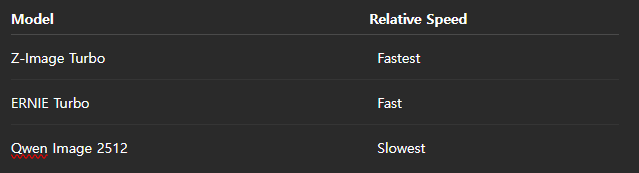
Z-Image Turbo is optimized for rapid generation and can often produce results significantly faster than its competitors.
For creators generating large numbers of images, this advantage can be substantial.
---
Text Rendering Capability
Winner: Z-Image Turbo and Qwen Image 2512
Text rendering remains a challenging area for many image models.
Both Z-Image Turbo and Qwen Image 2512 perform relatively well when generating:
- Posters
- Product packaging
- Logos
- Signage
- Marketing materials
ERNIE Turbo generally produces visually appealing results but may be less consistent when rendering readable text.
---
Artistic Style and Creativity
Winner: Qwen Image 2512
When generating illustrations, fantasy artwork, concept art, and stylized images, Qwen Image 2512 demonstrates impressive flexibility.
Supported styles include:
- Anime
- Oil painting
- Digital illustration
- Concept art
- Fantasy environments
- Cinematic scenes
Its ability to adapt to various artistic directions makes it a strong choice for creative projects.
---
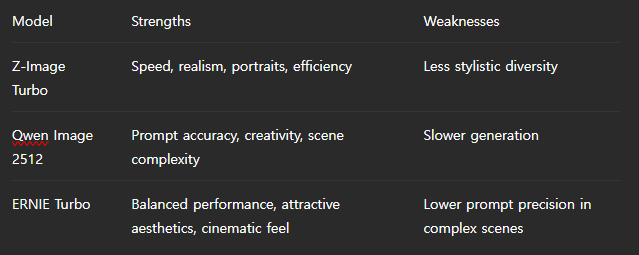
Strengths and Weaknesses
---
Which Model Should You Choose?
Choose Z-Image Turbo if:
- You need fast generation.
- You create realistic portraits.
- Productivity is a priority.
- You generate images in high volume.
Choose Qwen Image 2512 if:
- Prompt accuracy matters most.
- You create concept art or illustrations.
- You use long and detailed prompts.
- Creative flexibility is important.
Choose ERNIE Turbo if:
- You want balanced performance.
- You prefer cinematic and artistic outputs.
- You need decent speed without sacrificing image quality.
---
Conclusion
Each model excels in different areas.
Z-Image Turbo stands out for speed and photorealistic image generation, making it ideal for creators who prioritize efficiency and realistic results.
Qwen Image 2512 offers the strongest prompt comprehension and artistic flexibility, making it the best choice for complex scenes and creative projects.
ERNIE Turbo occupies the middle ground, delivering visually appealing images with a balance of speed and quality.
Ultimately, there is no universal winner. The best model depends on your workflow, creative goals, and the type of images you generate most frequently.
<!-- zview-hands-on-backfill -->
Practical Test Notes
What this article should verify
- Use one fixed test setup across Z-Image Turbo, Qwen Image 2512, and ERNIE Turbo to check whether each model preserves the same subject, pose, framing, and mood from a long descriptive prompt.
- Compare prompt adherence in practical terms: does the model keep key details such as hoop earrings, black crop top, denim jeans, open book, candles, and shallow depth of field?
- Check whether photorealism holds up under mixed lighting, since the prompt combines candle glow, cool walls, and soft backlighting.
- Review text rendering cautiously, especially for the book pages, because dense text is a common weak point even when the prompt says it should remain unreadable.
Result checks
When reviewing the existing or future outputs, focus on result checks that are easy to compare side by side:
- Face stability: eye alignment, skin texture, lip shape, and whether the expression stays serene rather than drifting into an unnatural stare.
- Hand risk: finger count, hand pose near the face, and whether the wrist and forearm connect cleanly.
- Lighting control: believable candlelight warmth, soft edge halos, and consistent shadows on the face, hair, and clothing.
- Texture quality: stitching and sheer panels on the top, denim texture, hair strands, bedding folds, and earring reflections.
- Background consistency: candles should remain plausible in number, placement, and blur level without melting into random artifacts.
- Composition accuracy: eye-level close-up framing, upper torso visibility, and shallow depth of field that separates subject from background without over-blurring key details.
Failure risks
The biggest failure risks here come from the prompt itself: it is long, detail-heavy, and mixes subject styling, pose, props, and cinematic lighting. Some models may drop secondary objects like the book or candles, simplify clothing details, or over-prioritize beauty retouching at the expense of realism. Hand placement near the face raises anatomy risk. Mixed warm and cool lighting can also cause muddy skin tones, blown highlights, or inconsistent shadows. If this comparison includes only one prompt category, conclusions may not transfer well to product shots, typography-heavy scenes, or stylized illustration tasks.
Practical recommendation
For operators, this setup is most useful when the goal is portrait-oriented prompt following with layered lighting and fashion detail. Choose it if you care most about face quality, material texture, and stable scene mood. Avoid using this single setup as proof of general model superiority across all image tasks. The detail that matters most is not raw beauty alone, but whether each model keeps the small prompt constraints intact without introducing anatomy or background errors.